Adding a new annotation scale in AutoCAD using .NET

Thanks to Nikolay Poleshchuk and Roland Feletic for suggesting this topic, and to Wayne Brill, from DevTech Americas, for providing the code.

In this post we're going to look at some functionality that's specific to AutoCAD 2008 - adding a new annotative scale to a drawing. The next post (assuming I can work out how to do it 🙂 will cover how you can attach a scale programmatically to make an entity annotative.

Firstly, I should cover what the annotation scaling feature is all about...

Here's a quick overview from the AutoCAD 2008 online help:

Objects that are commonly used to annotate drawings have a property called Annotative. This property allows you to automate the process of scaling annotations so that they plot or display at the correct size on the paper.

Instead of creating multiple annotations at different sizes and on separate layers, you can turn on the annotative property by object or by style, and set the annotation scale for layout or model viewports. The annotation scale controls the size of the annotative objects relative to the model geometry in the drawing.

The following objects are commonly used to annotate drawings and contain an annotative property:

  • Text
  • Dimensions
  • Hatches
  • Tolerances
  • Multileaders
  • Blocks
  • Attributes

When the Annotative property for these objects is turned on (set to Yes), these objects are called annotative objects.

Here's some code in C# that creates a new annotation scale and adds it to the active drawing in AutoCAD:

using Autodesk.AutoCAD.ApplicationServices;

using Autodesk.AutoCAD.DatabaseServices;

using Autodesk.AutoCAD.EditorInput;

using Autodesk.AutoCAD.Runtime;

namespace AnnotationScaling

{

  public class Commands

  {

    [CommandMethod("AS")]

    static public void addScale()

    {

      Document doc =

        Application.DocumentManager.MdiActiveDocument;

      Database db = doc.Database;

      Editor ed = doc.Editor;

      try

      {

        ObjectContextManager cm =

          db.ObjectContextManager;

        if (cm != null)

        {

          // Now get the Annotation Scaling context collection

          // (named ACDB_ANNOTATIONSCALES_COLLECTION)

          ObjectContextCollection occ =

            cm.GetContextCollection("ACDB_ANNOTATIONSCALES");

          if (occ != null)

          {

            // Create a brand new scale context

            AnnotationScale asc = new AnnotationScale();

            asc.Name = "MyScale 1:28";

            asc.PaperUnits = 1;

            asc.DrawingUnits = 28;

            // Add it to the drawing's context collection

            occ.AddContext(asc);

          }

        }

      }

      catch (System.Exception ex)

      {

        ed.WriteMessage(ex.ToString());

      }

    }

  }

}

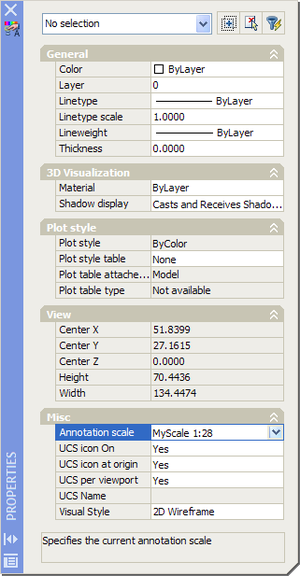
Here's the new annotation scale, selected manually in the Property Palette after running the code:
New_annotation_scale

In the next post we'll look at what it takes to make an object annotative programmatically, by setting its annotative property and annotation scale.

16 responses to “Adding a new annotation scale in AutoCAD using .NET”

  1. Nikolay Poleshchuk Avatar
    Nikolay Poleshchuk

    Kean, thank you. Before using your code I should add that AutoCAD documentation is not perfectly exact. The legacy leader object can be annotative too but scale influence on it is sometimes inpredictable.

  2. Thank you, Kean. Now i'm really curious about making an object annotative.

    1. Filip Algoedt Avatar

      I'm also curious about your new post (setting and annotation scale of a viewport)

  3. Hi all,

    Can we reset the scale list in ACAD 2008 using .NET?

    Thanks

  4. You should be able to enumerate the annotation scales in the ObjectContextCollection, and call RemoveContext() on each one. I haven't tried it, though.

    Kean

  5. how do you get the current drawing's current annotation scale object, i need that number as a factor on my program. thank you.

  6. Check the CANNOSCALE system variable (also accesible via the Database.Cannoscale property).

    Kean

  7. I HAVE TRIED TO LEARN FROM THE VTC.COM BRYANT ,,SCALING AND ANNOTATION .. THE VIDEO IS OVER PRICED AND LACKING SUBSTANCE,I DONT WANT METRIC NOR A BRITISH ACCENT-
    100 $$EACH ..

    THE LYNDA.COM REFERANCES AND NOTATION WAS NOT VERY GOOD HOW EVER THE PRICE WAS SIGNIFIGANTLY LOWER50$$EACH ..

    I THOUGHT OF RAPLH GRABOSKI BUT I WAS NOT VERY PLEASED WITH HIS THOMAS DELMAR AUTO CAD BOOKS ..NONE OF THE FIGURES HAVE NUMBERS , WHAT IS HE REFERING TO??

    ITS ALL PRICE .. EDUCTION IS TOO EXPENSIVE AND THE RETURNS ARE LOW..

    AUTO CAD HELP FILES ARE SELDOM HELP AT ALL..

  8. Hi,

    Is there a way to do this (adding annotation scales) but via the COM API (ActiveX/VBA)?

    Thanks !

  9. Hi Ben,

    I don't know, sorry. I tend only to use COM when I can't do what I want from .NET. You might try posting to the appropriate discussion forum, to see if anyone there can help.

    Regards,

    Kean

  10. Hi Kean,
    Would you by any chance know how to access the annottaion plot size in AutoCAD MEP 2013 using .net?

    Thanks in advance

  11. Kean Walmsley Avatar

    Hi Mike,

    Sorry - not my area of expertise. I suggest asking ADN or posting to the appropriate discussion forum.

    Regards,

    Kean

  12. Scott Forbes Avatar

    Kean-

    After searching for a couple of days, I thought I would ask here. When you first open a new drawing and attempt to insert an annotative object, AutoCAD knows whether or not the user has set and annotative scale for the drawing and (by default) pops up a dialog to prompt the user to set annotative scale. I noticed that the default CANNOSCALE is 1, which is a valid option, and was wondering how AutoCAD determines if the user has already set the scaling and whether this is exposed to .NET?

  13. Kean Walmsley Avatar
    Kean Walmsley

    Scott,

    Does Database.Cannoscale give you what you want?

    Otherwise perhaps you can query the ObjectContextCollection, as shown above.

    This isn't an area I spend much time with, admittedly, so I could easily be missing the point.

    Regards,

    Kean

  14. Hi Kean

    Thanks for ur post.
    I need help in getting standard scale from Model space & i want to set text height for newly created Text or MText based on scale.
    Please help me in this regard

    Thanks in Advance

  15. Hi Pran,

    As I'm pretty sure I mentioned in my reply to your other comment, I really don't have time to provide support. Please post your question via ADN or on the AutoCAD .NET Discussion Group.

    Regards,

    Kean

Leave a Reply to NEED 2 KNOW Cancel reply

Your email address will not be published. Required fields are marked *