Making AutoCAD objects annotative using .NET

In the last post we looked at how to add a new annotative scale to an AutoCAD drawing.

In this post we'll look at what's needed to make an object annotative - providing it's of a type that supports annotation scaling, of course. Once again, this post is based on functionality introduced in AutoCAD 2008.

I hit my head against the problem for a while, having tried my best to convert the technique shown in the AnnotationScaling ObjectARX sample (which uses a protocol extension to access objects stored in an annotative entity's extension dictionary) to .NET. I finally ended up asking our Engineering team: Ravi Pothineni came back with some code that uses an internal assembly (but one that ships with AutoCAD) to do this. Apparently this will become standard functionality in a future release of AutoCAD - it'll just be available directly from DBObject, rather than being in a separate "helper" - but in the meantime you will have to use slightly more cumbersome code, such as that shown below, and add a reference to AcMgdInternal.dll for it to work. As indicated by the name, this functionality is unsupported and to be used at your own risk.

Here's the C# code - the "ADS" command is basically the one shown previously (renamed from "AS") and the "ATS" function is the new command that makes an object annotative, attaching annotation scales to it:

using Autodesk.AutoCAD.ApplicationServices;

using Autodesk.AutoCAD.DatabaseServices;

using Autodesk.AutoCAD.EditorInput;

using Autodesk.AutoCAD.Runtime;

using Autodesk.AutoCAD.Internal;

namespace AnnotationScaling

{

  public class Commands

  {

    [CommandMethod("ADS")]

    static public void addScale()

    {

      Document doc =

        Application.DocumentManager.MdiActiveDocument;

      Database db = doc.Database;

      Editor ed = doc.Editor;

      try

      {

        ObjectContextManager ocm =

          db.ObjectContextManager;

        if (ocm != null)

        {

          // Now get the Annotation Scaling context collection

          // (named ACDB_ANNOTATIONSCALES_COLLECTION)

          ObjectContextCollection occ =

            ocm.GetContextCollection("ACDB_ANNOTATIONSCALES");

          if (occ != null)

          {

            // Create a brand new scale context

            AnnotationScale asc = new AnnotationScale();

            asc.Name = "MyScale 1:28";

            asc.PaperUnits = 1;

            asc.DrawingUnits = 28;

            // Add it to the drawing's context collection

            occ.AddContext(asc);

          }

        }

      }

      catch (System.Exception ex)

      {

        ed.WriteMessage(ex.ToString());

      }

    }

    [CommandMethod("ATS")]

    static public void attachScale()

    {

      Document doc =

        Application.DocumentManager.MdiActiveDocument;

      Database db = doc.Database;

      Editor ed = doc.Editor;

      ObjectContextManager ocm =

        db.ObjectContextManager;

      ObjectContextCollection occ =

        ocm.GetContextCollection("ACDB_ANNOTATIONSCALES");

      Transaction tr =

        doc.TransactionManager.StartTransaction();

      using (tr)

      {

        PromptEntityOptions opts =

          new PromptEntityOptions("\nSelect entity: ");

        opts.SetRejectMessage(

          "\nEntity must support annotation scaling."

        );

        opts.AddAllowedClass(typeof(DBText), false);

        opts.AddAllowedClass(typeof(MText), false);

        opts.AddAllowedClass(typeof(Dimension), false);

        opts.AddAllowedClass(typeof(Leader), false);

        opts.AddAllowedClass(typeof(Hatch), false);

        PromptEntityResult per = ed.GetEntity(opts);

        if (per.ObjectId != ObjectId.Null)

        {

          DBObject obj =

            tr.GetObject(per.ObjectId, OpenMode.ForRead);

          if (obj != null)

          {

            obj.UpgradeOpen();

            obj.Annotative = AnnotativeStates.True;

            ObjectContexts.AddContext(obj, occ.GetContext("1:1"));

            ObjectContexts.AddContext(obj, occ.GetContext("1:2"));

            ObjectContexts.AddContext(obj, occ.GetContext("1:10"));

            ObjectContext oc = occ.GetContext("MyScale 1:28");

            if (oc != null)

            {

              ObjectContexts.AddContext(obj, oc);

            }

          }

        }

        tr.Commit();

      }

    }

  }

}

You'll notice that if you run the ADS command before ATS, you'll also get the newly-added annotation scale in the selected object's list:
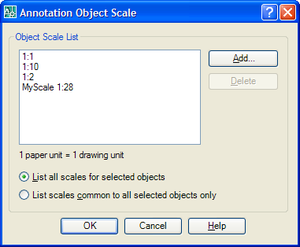
Attached_annotation_scale


Update:

From AutoCAD 2009 onwards, it's now possible to modify annotation scales on an object directly without relying on unsupported funcitonality in acmgdinternal.dll.

Here's the modified C# code:

using Autodesk.AutoCAD.ApplicationServices;

using Autodesk.AutoCAD.DatabaseServices;

using Autodesk.AutoCAD.EditorInput;

using Autodesk.AutoCAD.Runtime;


namespace AnnotationScaling

{

  public class Commands

  {

    [CommandMethod("ADS")]

    static public void addScale()

    {

      Document doc =

        Application.DocumentManager.MdiActiveDocument;

      Database db = doc.Database;

      Editor ed = doc.Editor;

      try

      {

        ObjectContextManager ocm =

          db.ObjectContextManager;

        if (ocm != null)

        {

          // Now get the Annotation Scaling context collection

          // (named ACDB_ANNOTATIONSCALES_COLLECTION)

          ObjectContextCollection occ =

            ocm.GetContextCollection("ACDB_ANNOTATIONSCALES");


          if (occ != null)

          {

            // Create a brand new scale context

            AnnotationScale asc = new AnnotationScale();

            asc.Name = "MyScale 1:28";

            asc.PaperUnits = 1;

            asc.DrawingUnits = 28;

            // Add it to the drawing's context collection

            occ.AddContext(asc);

          }

        }

      }

      catch (System.Exception ex)

      {

        ed.WriteMessage(ex.ToString());

      }

    }


    [CommandMethod("ATS")]

    static public void attachScale()

    {

      Document doc =

        Application.DocumentManager.MdiActiveDocument;

      Database db = doc.Database;

      Editor ed = doc.Editor;

      ObjectContextManager ocm =

        db.ObjectContextManager;

      ObjectContextCollection occ =

        ocm.GetContextCollection("ACDB_ANNOTATIONSCALES");


      Transaction tr =

        doc.TransactionManager.StartTransaction();

      using (tr)

      {

        PromptEntityOptions opts =

          new PromptEntityOptions("\nSelect entity: ");

        opts.SetRejectMessage(

          "\nEntity must support annotation scaling."

        );

        opts.AddAllowedClass(typeof(DBText), false);

        opts.AddAllowedClass(typeof(MText), false);

        opts.AddAllowedClass(typeof(Dimension), false);

        opts.AddAllowedClass(typeof(Leader), false);

        opts.AddAllowedClass(typeof(Table), false);

        opts.AddAllowedClass(typeof(Hatch), false);


        PromptEntityResult per = ed.GetEntity(opts);

        if (per.ObjectId != ObjectId.Null)

        {

          DBObject obj =

            tr.GetObject(per.ObjectId, OpenMode.ForRead);

          if (obj != null)

          {

            obj.UpgradeOpen();

            obj.Annotative = AnnotativeStates.True;

            obj.AddContext(occ.GetContext("1:1"));

            obj.AddContext(occ.GetContext("1:2"));

            obj.AddContext(occ.GetContext("1:10"));

            ObjectContext oc = occ.GetContext("MyScale 1:28");

            if (oc != null)

            {

              obj.AddContext(oc);           

            }

          }

        }

        tr.Commit();

      }

    }

  }

}

43 responses to “Making AutoCAD objects annotative using .NET”

  1. Nikolay Poleshchuk Avatar
    Nikolay Poleshchuk

    Kean, interesting!
    I see a new type of context: object context. Can you describe it?

  2. Hi Nikolay,

    All I have is what's in the ObjectARX Reference, describing the AcDbObjectContext class:

    >>>
    Abstract base class for representing a particular context which may affect the properties and/or behavior of one or more types of objects.Classes that are derived from this base class are used to represent a particular type of context such as annotation scale.
    <<<

    Regards,

    Kean

  3. Roland Feletic Avatar
    Roland Feletic

    Hi Kean, thank you for this code.
    Now I tried your code but it didn't work for BlockReferences, you get an "eIvalidInput" error when you try it. It would be nice if you could tell us how to do it for BlockReferences.
    Also if you want to see the result for dimensions you have to do something more. I don't know if it is the right way, but I inserted the line "obj.UpgradeOpen()" after adding the context.

  4. Kean Walmsley Avatar
    Kean Walmsley

    Hi Roland,

    OK - my mistake. I should not allow selection of BlockReferences in the above code (I'll remove it). Here's what's said in the online help:

    >>>
    Annotative block definitions create annotative block references. Annotative block references and attributes initially support the current annotation scale at the time they are inserted. You should insert annotative block references with a unit factor of 1.

    You cannot change the Annotative property of individual block references.
    <<<

    Regards,

    Kean

  5. Kean Walmsley Avatar
    Kean Walmsley

    I removed the lines allowing selection of BlockReference and AttributeReference objects from the above code.

    About the dimension issue - it seems to work fine for me (I just used DIM VERT to create a dimension, used ATS to make it annotative, and I see the glyph when I hover over it and I get the appropriate annotation properties in the properties palette).

    Any hints on what do I need to do to reproduce the problem?

    Regards,

    Kean

  6. Nikolay Poleshchuk Avatar
    Nikolay Poleshchuk

    Kean, I think that table object does not support annotative scale too.

  7. Roland Feletic Avatar
    Roland Feletic

    Hi Kean,
    thank you again. If I want to use a block with different scales, what do I have to do then?
    I will have a look at the dimension problem on monday when i'm back to work.

  8. Kean Walmsley Avatar

    Hi Roland,

    You need to create annotative block definitions. This is from the online help:

    >>>
    To create an annotative block definition

    1. Click Draw menu -> Block -> Make.... or At the command prompt, enter block.
    2. In the Block Definition dialog box, enter a block name in the Name box.
    3. Under Objects, select Convert to Block.
    4. Click Select Objects.
    5. Under Behavior, select Annotative.
    6. Use your pointing device to select objects to be included in block definition. Press ENTER to complete object selection.
    7. In the Block Definition dialog box, under Base Point, specify the block insertion point.
    8. Click OK.
    <<<

    Then when you insert the block, it will pivk up the current annotation scale:

    >>>
    Annotative block definitions create annotative block references. Annotative block references and attributes initially support the current annotation scale at the time they are inserted. You should insert annotative block references with a unit factor of 1.
    <<<

    Regards,

    Kean

  9. Kean Walmsley Avatar

    Hi Nikolay,

    I think you're right... it was listed as annotative in a version of the docs I looked at, but I don't see it as being annotative. I'll remove the option to select a table from the code.

    Thanks,

    Kean

  10. Roland Feletic Avatar
    Roland Feletic

    Hi Kean,
    I know how to make an annotative block 😉 I'm testing spago since the alpha release.
    The problem i have is to insert an external drawing as a block with .NET (and VBA, also in VBA it inserts an annotative DWG as non annotative).
    1. How do I now if the drawing is annotative or not?
    2. How do I insert the drawing as a block and make it annotative?
    3. And if i insert the annotative block, is it possible to insert it for more annotative scales (eg. inserting the block for annotation scale "1:100" and "1:50")?

    Now the problem with the dimensions. It doesn' matter how I do it, I have to do it like this to see the annotation-scales for a dimension.

    if (oc != null)
    {
    ObjectContexts.AddContext(obj, oc);
    }
    obj.UpgradeOpen();

    Regards
    Roland

  11. Kean Walmsley Avatar

    Hi Roland,

    I'm afraid I'm no mind reader - your previous descriptions were missing a lot of information. Even now I have no idea how you are inserting the external DWG programmatically.

    Also, this is going off-topic, in that it's only tangentially related to the blog post. I'd suggest submitting the question - with code and a DWG - to my team via the ADN website or posting it on the Discussion Groups.

    As for the dimension problem - on my system I don't need to make that change to my code - the object is already open for write, and it works just fine. Have you modified other parts of the code?

    Regards,

    Kean

  12. Roland Feletic Avatar
    Roland Feletic

    Hi Kean,
    thank you for your response, I will post my annotative block problems in the discussion group.

    As for the dimension problem I didn't change your code (just deleted the lines for adding 1:2 and 1:10), but it is no problem, it works when I add the line like in my previous post.

    Regards
    Roland

  13. Roland Feletic Avatar
    Roland Feletic

    Hi Kean,
    I tested a little bit with inserting an annotative block into the drawing and it didn't work as the help said. It didn't insert the block at the current annotative scale, just the attributes where inserted at the current annotation-scale.
    Therefore i tried to add the context and it did work.
    Here is the code for inserting an annotative block which is working for me if someone want to know.

    using Autodesk.AutoCAD.ApplicationServices;
    using Autodesk.AutoCAD.DatabaseServices;
    using Autodesk.AutoCAD.EditorInput;
    using Autodesk.AutoCAD.Runtime;
    using Autodesk.AutoCAD.Geometry;
    using Autodesk.AutoCAD.Internal;

    [assembly: CommandClass(typeof(RSNNAcadApp.Test.InsertBlock))]
    namespace RSNNAcadApp.Test
    {
    public class InsertBlock
    {
    //Inserts a blockreference at Point 0,0,0
    [CommandMethod("InsertTest")]
    static public void InsertBlockTest()
    {
    ObjectId tmpBlockId;

    Document doc = Application.DocumentManager.MdiActiveDocument;
    Database db = doc.Database;
    Editor ed = doc.Editor;
    Transaction tr = doc.TransactionManager.StartTransaction();
    try
    {
    using (tr)
    {
    //Get Blockname and Id
    PromptStringOptions BlockNameOption = new PromptStringOptions("Blockname:");
    BlockNameOption.AllowSpaces = false;
    PromptResult BlockNameResult = ed.GetString(BlockNameOption);
    BlockTable bt = (BlockTable)tr.GetObject(db.BlockTableId, OpenMode.ForRead, false);

    if (BlockNameResult.Status == PromptStatus.Cancel)
    return;

    else if (BlockNameResult.Status == PromptStatus.OK)
    {
    string tmpBlockName = BlockNameResult.StringResult;

    tmpBlockId = bt[tmpBlockName];

    BlockTableRecord btr = (BlockTableRecord)tr.GetObject(bt[BlockTableRecord.ModelSpace], OpenMode.ForWrite);

    Point3d ObjPunkt = Point3d.Origin;
    BlockReference BlockRef = new BlockReference(ObjPunkt, tmpBlockId);
    ObjectId BlObj = btr.AppendEntity(BlockRef);
    tr.AddNewlyCreatedDBObject(BlockRef, true);

    BlockTableRecord btAttRec = (BlockTableRecord)tr.GetObject(tmpBlockId, OpenMode.ForRead);

    ed.WriteMessage(string.Format("Block {0} annotative!", btAttRec.Annotative == AnnotativeStates.True ? "is" : "is not"));

    //Attach Current Annotation-Scale.
    //If you don't add the content the block and the following attribute will not inserted correct.
    ObjectContextManager ocm = db.ObjectContextManager;
    ObjectContextCollection occ = ocm.GetContextCollection("ACDB_ANNOTATIONSCALES");

    DBObject obj = tr.GetObject(BlObj, OpenMode.ForRead);
    if (obj != null)
    {
    //ObjectContexts.AddContext(obj, occ.GetContext("1:1"));
    ObjectContexts.AddContext(obj, occ.CurrentContext);
    }

    //Add the attributes
    foreach (ObjectId idAtt in btAttRec)
    {
    Entity ent = (Entity)tr.GetObject(idAtt, OpenMode.ForRead);
    if (ent is AttributeDefinition)
    {
    AttributeDefinition attDef = (AttributeDefinition)ent;
    AttributeReference attRef = new AttributeReference();
    attRef.SetAttributeFromBlock(attDef, BlockRef.BlockTransform);
    ObjectId AttObj = BlockRef.AttributeCollection.AppendAttribute(attRef);
    tr.AddNewlyCreatedDBObject(attRef, true);
    /* //You do not need to insert the CurrentContext to AttributeReference because it is inserted with it.
    DBObject aobj = tr.GetObject(AttObj, OpenMode.ForRead);
    if (aobj != null)
    {
    //ObjectContexts.AddContext(aobj, occ.GetContext("1:1"));
    ObjectContexts.AddContext(aobj, occ.CurrentContext);
    }
    */
    }
    }
    }

    tr.Commit();
    }
    }
    catch (System.Exception ex)
    {
    ed.WriteMessage(ex.ToString());
    }
    finally
    {
    tr.Dispose();
    }

    }

    }
    }

    Regards
    Roland

  14. Kean Walmsley Avatar

    Hi Roland,

    OK, *now* I see what you wanted to do... 🙂

    The help refers to the INSERT command, whereas you wanted to programmatically insert an annotative block. Yes - I can see why you'd have to do what you've done.

    Thanks for sharing the code!

    Kean

  15. Roland Feletic Avatar
    Roland Feletic

    I know it is an old post, but I want to delete all annotation-scales which are not used. Is it possible to see if an AnnotationScale is used or not by any objects? The following code deletes all scales, it doesn't matter if they are used or not except the current annoscale and 1:1.

    [CommandMethod("ASDELETE")]
    public void DeleteAll()
    {
    try
    {
    ObjectContextManager ocm =
    db.ObjectContextManager;
    if (ocm != null)
    {
    // Now get the Annotation Scaling context collection
    // (named ACDB_ANNOTATIONSCALES_COLLECTION)
    ObjectContextCollection occ =
    ocm.GetContextCollection("ACDB_ANNOTATIONSCALES");
    if (occ != null)
    {
    foreach (ObjectContext oc in occ)
    {

    if (oc is AnnotationScale)
    {
    try
    {
    AnnotationScale scale = (AnnotationScale)oc;
    if (scale.Name != "1:1")
    if (oc.Name != occ.CurrentContext.Name)
    {
    ed.WriteMessage(string.Format("\n{0} wird gelöscht", scale.Name));
    occ.RemoveContext(scale.Name);
    }
    }
    catch (System.Exception e)
    {
    ed.WriteMessage(e.ToString());
    }
    }

    }

    }
    }
    }
    catch (System.Exception ex)
    {
    ed.WriteMessage(ex.ToString());
    }
    }

  16. Kean Walmsley Avatar

    Hi Roland,

    I don't know how you'd do this: for something like a style you'd get the object ID and use the "purge" function on the database to check the references to it, but I don't know whether this would work for Annotation Scales (assuming you could get the object ID of the dictionary entry).

    Regards,

    Kean

  17. Roland Feletic Avatar
    Roland Feletic

    Thank you, Kean,
    I will have a look at it. But I also hope that in the next release it is possible to purge all the unused annotation-scales with AutoCAD.

    Regards
    Roland

  18. Armin Müller Avatar

    Hi Kean
    I try to add annotations to MTEXT objects with the COM interface and have no luck so far. I know they get stored somewhere inside AcadDictionary. If I parse an entity object with added annotation scales I get the same amount of entries of ObjectName "AcDbMTextObjectContextData" things. But there are no interfaces to read them out or to create such things. Any ideas?

    The code I used to get the dictionary items looks as below:

    AcadEntity entity = ...

    if ( entity.HasExtensionDictionary )
    {
    AcadDictionary dict = entity.GetExtensionDictionary( );
    DumpAcadDictionary( dict, "" );
    }

    private void DumpAcadDictionary( AcadDictionary dict, string offset )
    {
    for ( int i = 0; i < dict.Count; i++ )
    {
    AcadObject obj = dict.Item( i );

    Console.WriteLine( "{0}Item: {1} {2}", offset, i, obj.ObjectName );

    if ( obj.ObjectName == "AcDbDictionary" )
    {
    DumpAcadDictionary( ( AcadDictionary ) obj, offset + " " );
    }
    if ( obj.HasExtensionDictionary )
    {
    AcadDictionary subDict = obj.GetExtensionDictionary( );
    DumpAcadDictionary( subDict, offset + " " );
    }
    }
    if ( dict.HasExtensionDictionary )
    {
    AcadDictionary subDict = dict.GetExtensionDictionary( );
    DumpAcadDictionary( subDict, offset + " " );
    }
    }

  19. Hi Armin,

    I don't think you can rely on adding Annotation Scales manually into the extension dictionary: I'd suggest using the technique I've shown with the managed interface, instead. You mention COM, but seem to be coding in C#, so that shouldn't be a big issue (unless I'm missing something).

    Regards,

    Kean

  20. Newbie question: How do you compile the above code for use in AutoCAD?

  21. Kean Walmsley Avatar

    Hi David,

    I'd suggest checking out this introductory post.

    Regards,

    Kean

  22. Hi Kean,

    i was asked to search for 5 examples of elevation, 3D animation and step by step procedure of gear making.. All of this were made using autocad.. do you have any of these? this is my project and i have seen already 3 samples of elevation and 3D animation but i still need 2 more each and the step by step gear making using autocad.. it's hard to find one and my time is limited only in searching.. can you help me?

  23. Hi Zyra,

    Are you looking for code samples or content samples? If content, you might try the Content Search tool on the Autodesk Labs website.

    If content then I'd suggest posting something to the appropriate discussion group, depending on the technology you're interested in.

    Regards,

    Kean

  24. Hi there Kean,
    I got Visual Studio .NET 2008 that has a C# compiler.
    I loaded your above code (for "Making AutoCAD objects annotative using .NET"), I referenced the ACDBMGD.DLL and ACMGD.DLL from AutoCAD 2008, and the .Internal in "using Autodesk.AutoCAD.Internal;" statement is missing. As such I was not able to compile the code. Can you please tell me what to do in order to compile your code?
    Thanks in advance for any help.
    Have a nice day and happy 4th of July.
    Regards,
    Stefan

  25. Kean Walmsley Avatar

    There should also be an assembly in the AutoCAD folder called acmgdinternal.dll. Be warned: the APIs exposed by this assembly are not officially supported.

    Kean

  26. Good afternoon Kean,
    Thank you for that information.
    Now I got another error message:
    "The name 'ObjectContexts' does not exist in the current context".
    It refers to four statement like the following one:
    ObjectContexts.AddContext(obj), occ.GetContext("1:1"));
    Any idea how to fix these errors?
    Thanks a lot.
    Regards,
    Stefan

  27. Correction: the statement shown in my previous comment should read:
    ObjectContexts.AddContext(obj, occ.GetContext("1:1"));
    Sorry for that mistake.
    Regards,
    Stefan

  28. Kean Walmsley Avatar

    As long as you have the "using Autodesk.AutoCAD.Internal;" statement at the top, this error should not appear. Did you remove it, when trying to resolve the previous problem, by any chance?

    Kean

  29. Good morning Kean,
    No, I did not remove that statement.
    I kept your original code intact.
    The only modification I made is that I referenced those 2 .dll files I told you in my previous e-mails and the 3rd .dll you told me a while ago.
    Any other advice?
    Thanks.
    Regards,
    Stefan

  30. Kean Walmsley Avatar

    You might try prefixing ObjectContexts with its namespace:

    Autodesk.AutoCAD.Internal.ObjectContexts.AddContext(...);

    Kean

  31. Hello there Kean,
    That was it!
    Thanks a lot!
    The Class has been successfully compiled.
    I'd like to ask you something more: can you please show me how to run this Class?
    I know VB but I do not know C#.
    It appears that I need another Class as startup.
    If this is not a big deal for you, would you please help me again with that startup Class and show me where do I have to put it?
    Thank you very much for all your help.
    Regards,
    Stefan

  32. Kean Walmsley Avatar

    Hi Stefan,

    You should probably work through the .NET Labs found on the AutoCAD Developer Center.

    This should help get you started and understand how to set up a project properly.

    Regards,

    Kean

  33. Trevor Templeton Avatar
    Trevor Templeton

    I know this is a very old post but I thought that some may be interested in this slightly modified version of attachscale this one allows blocks

    [CommandMethod("ATS")]
    static public void attachScale()
    {
    Document doc = Application.DocumentManager.MdiActiveDocument;
    Database db = doc.Database;
    Editor ed = doc.Editor;
    ObjectContextManager ocm = db.ObjectContextManager;
    ObjectContextCollection occ = ocm.GetContextCollection("ACDB_ANNOTATIONSCALES");
    Transaction tr = doc.TransactionManager.StartTransaction();
    using (tr)
    {
    PromptEntityOptions opts = new PromptEntityOptions("\nSelect entity: ");
    opts.SetRejectMessage("\nEntity must support annotation scaling.");
    opts.AddAllowedClass(typeof(DBText), false);
    opts.AddAllowedClass(typeof(MText), false);
    opts.AddAllowedClass(typeof(Dimension), false);
    opts.AddAllowedClass(typeof(Leader), false);
    opts.AddAllowedClass(typeof(Hatch), false);
    opts.AddAllowedClass(typeof(BlockReference), false);
    PromptEntityResult per = ed.GetEntity(opts);
    if (per.ObjectId != ObjectId.Null)
    {
    DBObject obj = tr.GetObject(per.ObjectId, OpenMode.ForRead);
    if (obj != null)
    {
    if (System.Convert.ToString(obj.GetType()) == "Autodesk.AutoCAD.DatabaseServices.BlockReference")
    {
    BlockReference br = (BlockReference)tr.GetObject(per.ObjectId, OpenMode.ForRead);
    if (br != null)
    {

    BlockTable bt = (BlockTable)tr.GetObject(db.BlockTableId, OpenMode.ForRead);
    foreach (ObjectId ids in bt)
    {
    BlockTableRecord btr = (BlockTableRecord)tr.GetObject(ids, OpenMode.ForRead);
    if (btr.Name == br.Name)
    {

    btr.UpgradeOpen();
    btr.Annotative = AnnotativeStates.True;
    br.UpgradeOpen();
    ObjectContexts.AddContext(br, occ.GetContext("1:1"));
    ObjectContexts.AddContext(br, occ.GetContext("1:2"));
    ObjectContexts.AddContext(br, occ.GetContext("1:10"));
    ObjectContext oc = occ.GetContext("1:500");
    if (oc != null)
    {
    ObjectContexts.AddContext(br, oc);
    }
    }
    }
    }
    }
    else
    {

    obj.UpgradeOpen();
    obj.Annotative = AnnotativeStates.True;
    ObjectContexts.AddContext(obj, occ.GetContext("1:1"));
    ObjectContexts.AddContext(obj, occ.GetContext("1:2"));
    ObjectContexts.AddContext(obj, occ.GetContext("1:10"));
    ObjectContext oc = occ.GetContext("1:500");
    if (oc != null)
    {
    ObjectContexts.AddContext(obj, oc);
    }
    }
    }
    }
    tr.Commit();
    }
    }

  34. I've used your delete unused scales and add scales example to create an application that puts our standard scales into files using scales defined in an xml file. The program works great except that I can't seem to sort the order of the scales in the list (like the move up/down option in the scale list dialog). Is there a way to do this programmatically?

  35. If you look into the scale list dictionary (stored as "ACAD_SCALELIST" under the Named Objects Dictionary), you'll see a number of objects, stored with keys A0..A9, B0..B9, C0..C9, etc. The various scales are stored under these which indicate the order of the scales in the list.

    You should be able to reorder the contents of the list to get what you want.

    By the way, I worked all this out using the very useful ARXDBG tool (referred to in this previous post).

    Kean

  36. Patrick Ottenschläger Avatar
    Patrick Ottenschläger

    Hi Kean,

    Is it possible to create an annotative dimensionstyle?
    I've tried to copy an annotative dimensionstyle from one dwg in a new dwg. but in the new dwg the dimensionstyle wasn't annotative. How i can copy annotative dimensionstyle with .NET?

    regards

  37. Hi Patrick,

    I don't know... it should be possible to use wblockCloneObjects() for this, but I've never tried, myself.

    Someone on the AutoCAD .NET Discussion Group should be able to help.

    Kean

  38. Hi Kean,

    Old post I realize, but it was the first relevant one I found. As I'm sure you're aware, when you have an annotative object in a drawing, specifically a non-annotative 3D block reference with annotative attributes, the attributes can be placed at different locations and when you change scales acad remembers where the attribute is for the different scales. What I'd like to know is if there is a way to define at least two seperate locations when creating the definition. So, the block is a particular size and at smaller scales I would put the text inside the boundary and at larger scales when the text won't fit inside I would put it outside the boundary.

    Possible? (I am using Vanilla 2010, VS2005)

  39. Hi David,

    I don't know if it's possible without some kind of event-based approach (where you modify the text position programmatically when it's clear there's a problem fitting).

    You might try asking either via ADN or the AutoCAD .NET Discussion Group, in case anyone there knows a different way of handling this.

    Kean

  40. Hi Kean

    Can you please explain how to use ARXDBG tool to reorder the contents in the scale list.

    Do you have any sample solution.

    Thanks.

  41. Kean Walmsley Avatar

    Hi Arul,

    ArxDbg is a read-only tool (at least that's the way I use it).

    Please post your request to the AutoCAD .NET discussion group.

    Regards,

    Kean

  42. Hi there, thank you for this code. what actually happens if we add an annotative state - a scale of say 1:2 - to a line; what is the result/benefit of this?

    1. Kean Walmsley Avatar

      I don't think there's either result or benefit. The objects you attach annotative scale information to need to know what to do with it.

      But then this post is a decade old: if you need up-to-date knowledge, please post on the AutoCAD forum.

      Kean

Leave a Reply to Nikolay Poleshchuk Cancel reply

Your email address will not be published. Required fields are marked *