Rendering AutoCAD models offscreen using .NET

This question came up in an internal discussion, and I thought I'd share the code provided by our Engineering team with you (with a few minor additions from my side, of course).

The idea is to render a 3D scene off-screen (i.e. save to file the rendered image not visible in the editor). In the below code, we do zoom to the extents of the 3D model that gets created, just to show it's there, but the rendering activity itself is not performed by the 3D view that is used to generate the graphics for AutoCAD's editor window.

A 3D model does need to be loaded in the editor for this to work, so I decided to add a simple sphere to the modelspace and set its material to one that renders nicely (Sitework.Paving - Surfacing.Riverstone.Mortared). The code doesn't import the material programmatically, so you'll want to make sure it's there in the drawing to get the full effect of the rendering (by dragging the material into the drawing view from the materials tool palette, for instance), or to change the code to point to one that exists in the active drawing.

Here's the C# code:

using Autodesk.AutoCAD.ApplicationServices;

using Autodesk.AutoCAD.DatabaseServices;

using Autodesk.AutoCAD.EditorInput;

using Autodesk.AutoCAD.Runtime;

using Autodesk.AutoCAD.GraphicsSystem;

using Autodesk.AutoCAD.Interop;

using System.Drawing;

namespace OffscreenRendering

{

  public class Commands

  {

    [CommandMethod("OSR")]

    static public void OffscreenRender()

    {

      CreateSphere();

      RenderToFile("c:\\sphere.png");

    }

    static public void CreateSphere()

    {

      Document doc =

        Application.DocumentManager.MdiActiveDocument;

      Database db = doc.Database;

      Editor ed = doc.Editor;

      Transaction tr =

        doc.TransactionManager.StartTransaction();

      using (tr)

      {

        BlockTable bt =

          (BlockTable)tr.GetObject(

            db.BlockTableId,

            OpenMode.ForRead

          );

        BlockTableRecord btr =

          (BlockTableRecord)tr.GetObject(

            bt[BlockTableRecord.ModelSpace],

            OpenMode.ForWrite

          );

        Solid3d sol = new Solid3d();

        sol.CreateSphere(10.0);

        const string matname =

          "Sitework.Paving - Surfacing.Riverstone.Mortared";

        DBDictionary matdict =

          (DBDictionary)tr.GetObject(

            db.MaterialDictionaryId,

            OpenMode.ForRead

          );

        if (matdict.Contains(matname))

        {

          sol.Material = matname;

        }

        else

        {

          ed.WriteMessage(

            "\nMaterial (" + matname + ") not found" +

            " - sphere will be rendered without it.",

            matname

          );

        }

        btr.AppendEntity(sol);

        tr.AddNewlyCreatedDBObject(sol, true);

        tr.Commit();

      }

      AcadApplication acadApp =

        (AcadApplication)Application.AcadApplication;

      acadApp.ZoomExtents();

    }

    static public void RenderToFile(string filename)

    {

      Document doc =

        Application.DocumentManager.MdiActiveDocument;

      Editor ed = doc.Editor;

      int vpn =

        System.Convert.ToInt32(

          Application.GetSystemVariable("CVPORT")

        );

      View gsv =

        doc.GraphicsManager.GetGsView(vpn, true);

      using (View view = gsv.Clone(true, true))

      {

        Device dev =

          doc.GraphicsManager.CreateAutoCADOffScreenDevice();

        using (dev)

        {

          dev.OnSize(doc.GraphicsManager.DisplaySize);

          dev.DeviceRenderType = RendererType.FullRender;

          dev.Add(view);

          using (Bitmap bitmap = view.RenderToImage())

          {

            bitmap.Save(filename);

            ed.WriteMessage(

              "\nRendered image saved to: " +

              filename

            );

          }

        }

      }

    }

  }

}

And here's the resized contents of the file created at c:\sphere.png by the OSR command:
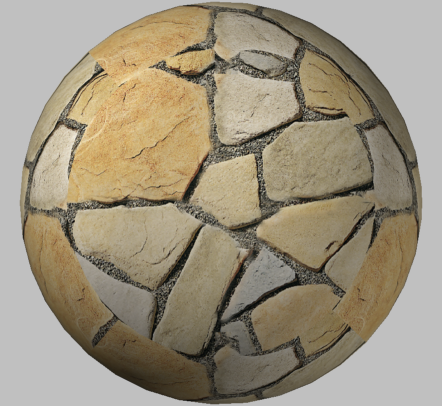
Offscreen_rendered_sphere

28 responses to “Rendering AutoCAD models offscreen using .NET”

  1. Hi Kean,
    Which version of AutoCAD/ObjectARX is needed to run this example?

    Thanks for sharing with us your knowledge 😉

    Regards,

    Rubén Dopico

  2. Hi Rubén,

    My apologies - I keep forgetting to put that information in my posts <sigh>.

    This code uses API functionality that was introduced in AutoCAD 2007.

    Regards.

    Kean

  3. Your work looks great! I had a question...I am rendering an interior scene, and I can't seem to get it really real looking any suggestions?

  4. Sorry, Melissa - I'm really not a rendering expert. I'm sure someone on the discussion groups (discussion.autodesk.com) will be able to help.

  5. I see comments that some of the code you used includes items from autocad 2007, is the autocad.interop namespace available for 2006? If so it might explain some problems i am having.

  6. The Interop namespace is needed when you're working with AutoCAD's COM interface - these have been in the product for a long time, so I doubt this is the issue you're facing.

    Regards,

    Kean

  7. I’m interested in porting your C# code to VBA. Is it possible?

  8. Hi Roberto,

    To the best of my knowledge, the Graphics System has not been exposed through COM. So an ObjectARX or .NET component will be needed to implement this function (which can then be called from VBA, should you so wish).

    Regards,

    Kean

  9. Hi Kean

    Sorry for a little offtopic but this is the closest project i found.

    I am working on project where i need to open .dwg 3D drawing and then render it from current view. i also post topic here forums.autodesk.com/t5/NET/open-dwg-file-in-ACD2013-and-render-it/td-p/3609348
    I am new in programing plugins so any help would be appreciated.

    Regards,
    Domen

  10. Hi Domen,

    Hopefully someone on the discussion group will be able to help. I would think this post would be a good starting point, at least.

    Regards,

    Kean

  11. Hi Kean,

    The code View gsv = doc.GraphicsManager.GetGsView(vpn, true) gets only the top position of the view. How can I get the current 3D view to render?

    If I draw a 3D box instead of a sphere, view.RenderToImage() always renders at the top position, so I don't see the 3D view of this box.

    Thank you,
    Khoa

  12. Hi Khoa,

    That should be getting the view based on the active viewport (as pointed to by the CVPORT system variable).

    You might also look at SetViewFromViewport(), which may prove useful.

    You may want to post your follow-up question to the AutoCAD .NET Discussion Group, in case someone there can help.

    Regards,

    Kean

  13. Hi Kean,

    SetViewFromViewport() works only on current view on screen, does not work on view from open drawing database. Please see my post forums.autodesk.com/t5/NET/Different-rendered-images-for-opened-and-un-opened-DWG-files/td-p/3615756

    Thanks,
    Khoa

  14. Hi Kean,

    thank you for the useful code! Just a question: is it possible to programmatically import materials into MaterialDictionary?

    Antonio

  15. Hi Antonio,

    It should be: the ACAD_MATERIAL dictionary just contains AcDbMaterial objects (which are Autodesk.AutoCAD.DatabaseServices.Material objects in .NET) that have Xrecords in their Extension Dictionaries for various properties (and presumably just calling the object's methods will cause these to be created).

    So you should be able to create your own materials programmatically: if you want to launch some kind of existing import command programmatically (I don't know if one exists) then that's a different question.

    Kean

  16. Hi Kean! Thanks for your code...Is it possible to edit rendering settings or just load a default/custom preset (High, Presentation...) when we deal with an off-screen device? Thanks

  17. I don't believe so: this approach works via the 3D graphics sub-system, and is disconnected from the "traditional" rendering mechanism.

    Kean

  18. Ok, so no way to improve off-screen rendering quality?

  19. Not my area, I'm afraid. Have you tried this?

    rendering.360.autodesk.com

    Kean

  20. Hi Kean. Is it possible to render image from camera entity, using .net?

    Thank you,
    Volodymyr

    1. Kean Walmsley Avatar

      Hi Volodymyr,

      You could presumably set the GsView to the one "defined" by the camera...

      Regards,

      Kean

  21. Hi Kean,

    How can I render to a Bitmap a BlockTableRecord object ?

    Thanks

  22. Hi Kean,

    Thank you, that helped. One more question though. I that post the output size of the image is 190 x 120. Is there a way to specify the desired size, for example let's say I want 160 x 160.

    Mihail

    1. Hi Mihail,

      You might try changing the dimensions of AutoCAD before calling BLOCKICON, to see if that changes anything.

      Otherwise I suggest posting to the forum, to see if someone there can help.

      Kean

  23. Christopher Fugitt Avatar
    Christopher Fugitt

    Kean, If you are looking for a topic to blog about, I'm sure updating this blog post to account for all of the changes in the API would be appreciated. Lots of unanswered questions on the forums regarding items related to this post. I know since I spent about 4 hours trying to get this to work for AutoCAD 2017. I keep getting "Operation is not valid due to the current state of the object." related errors.

    1. Christopher Fugitt Avatar
      Christopher Fugitt

      Well I may have exaggerated my 40 minutes into 4 hours.

      1. Hi Chris,

        It's not something I'm going to get to anytime soon (I'm on an extended trip with my family and my few hours available for work are being devoted elsewhere). If there's anything in the thread that should be posted as an update, I'd be happy to do so. Someone will need to spell out what changes are needed, though, as I won't have the chance to investigate or test.

        Best,

        Kean

Leave a Reply to Christopher Fugitt Cancel reply

Your email address will not be published. Required fields are marked *