Applying a gradient fill to an AutoCAD hatch using .NET

So, back in the saddle after an eventful week off, back in the UK. Aside from the extremely changeable weather (even by British standards) and the heightened security at UK airports, the week went swimmingly... 🙂

It's now Friday night, and disappointingly I've spent nearly two days regaining control of my inbox. I really wanted to make a quick post before the weekend, so rather than diving into the issue I'd planned on tackling (Palettes), I decided to take a shot at a request I'd received by email a few weeks ago: to show how to create a gradient fill using .NET.

I started by reusing the code from this previous post: so much of the code I needed was there already, it had to be easy to adjust the hatch to use a gradient fill, right? Well, no - it took me much longer than I'd expected to work this one out. Maybe I should have stuck with Palettes, after all...

I decided to use a spherical gradient fill of two colours (the default colours used when you create a two-tone gradient fill using the UI), as this shows one of the trickier parts of the API, that of specifying the colours themselves. One other call it took me a while to work out was to set the HatchObjectType property - if you don't do that then you'll get an eAmbiguousOutput exception.

Here's the C# code:

using Autodesk.AutoCAD.ApplicationServices;

using Autodesk.AutoCAD.DatabaseServices;

using Autodesk.AutoCAD.EditorInput;

using Autodesk.AutoCAD.Runtime;

using Autodesk.AutoCAD.Colors;

namespace HatchGradient

{

  public class Commands

  {

    [CommandMethod("GFH")]

    static public void GradientFillHatch()

    {

      Document doc =

        Application.DocumentManager.MdiActiveDocument;

      Editor ed = doc.Editor;

      // Ask the user to select a hatch boundary

      PromptEntityOptions opt =

        new PromptEntityOptions(

          "\nSelect boundary: "

        );

      opt.SetRejectMessage("\nObject must be a curve.");

      opt.AddAllowedClass(typeof(Curve), false);

      PromptEntityResult res =

        ed.GetEntity(opt);

      if (res.Status == PromptStatus.OK)

      {

        Transaction tr =

          doc.TransactionManager.StartTransaction();

        using (tr)

        {

          // Check the entity is a closed curve

          DBObject obj =

            tr.GetObject(

              res.ObjectId,

              OpenMode.ForRead

            );

          Curve cur = obj as Curve;

          if (cur != null && cur.Closed == false)

          {

            ed.WriteMessage("\nLoop must be a closed curve.");

          }

          else

          {

            // We'll add the hatch to the model space

            BlockTable bt =

              (BlockTable)tr.GetObject(

                doc.Database.BlockTableId,

                OpenMode.ForRead

              );

            BlockTableRecord btr =

              (BlockTableRecord)tr.GetObject(

                bt[BlockTableRecord.ModelSpace],

                OpenMode.ForWrite

              );

            Hatch hat = new Hatch();

            hat.SetDatabaseDefaults();

            // Firstly make it clear we want a gradient fill

            hat.HatchObjectType =

              HatchObjectType.GradientObject;

            // Let's use the pre-defined spherical gradient

            hat.SetGradient(

              GradientPatternType.PreDefinedGradient,

              "SPHERICAL");

            // We're defining two colours

            hat.GradientOneColorMode = false;

            GradientColor[] gcs = new GradientColor[2];

            gcs[0] =

              new GradientColor(

                Color.FromRgb(0, 0, 255),

                0 // First colour must have value of 0

              );

            gcs[1] =

              new GradientColor(

                Color.FromRgb(255, 255, 153),

                1 // Second colour must have value of 1

              );

            hat.SetGradientColors(gcs);

            // Add the hatch to the model space

            // and the transaction

            ObjectId hatId = btr.AppendEntity(hat);

            tr.AddNewlyCreatedDBObject(hat, true);

            // Add the hatch loop and complete the hatch

            ObjectIdCollection ids =

              new ObjectIdCollection();

            ids.Add(res.ObjectId);

            hat.Associative = true;

            hat.AppendLoop(

              HatchLoopTypes.Default,

              ids

            );

            hat.EvaluateHatch(true);

            tr.Commit();

          }

        }

      }

    }

  }

}

Here's what you get when you run the GFH command and select a polyline boundary you've created previously:
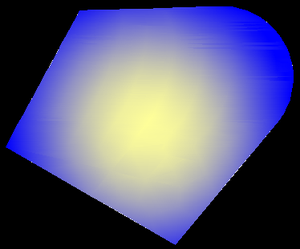
Gradientfilled_hatch

That's it for this week - have a great weekend, all of you.

13 responses to “Applying a gradient fill to an AutoCAD hatch using .NET”

  1. Hello Kean,

    Let me just start by saying you rock! Your blogs have been tremendously helpful for our project. I am new to RealDWG and have never used AutoCAD, but I do have a basic understanding of the dwg architecture. I have a question that I can't seem to find an answer for that is related to this post. Basically, I want to fill an Entity with a solid color (instead of a gradient). I'm guessing this is fairly easy but just not sure how to accomplish. Can you please point me in a direction of a sample that would help us figure this out? We are using VB.net 3.5 with RealDWG 2010.

    Thanks!
    Matt

  2. Hello Matt,

    It is fairly easy: you can use a very similar technique to the above code, but rather than create a gradient fill you use the "SOLID" pre-defined hatch pattern.

    hat.SetHatchPattern(HatchPatternType.PreDefined, "SOLID");

    I haven't actually tested this line of code, but I'm pretty sure it will work.

    Kean

  3. Thanks for the follow up. 🙂 I was able to get the gradient sample to work as well, which is actually pretty cool so I think we'll go that route. Your help is much appreciated!

    Matt

  4. hello.
    not have an example of how to apply hatch to an existing object.

  5. This post should help.

    Kean

  6. Nice post! Do you know if it is possible to define a 3-color gradient for an AutoCAD hatch entity?

  7. You'll only be able to use the API to do what's possible via the UI, in this case (so I suggest checking there).

    Kean

  8. Hello. I could not get it works with VB.NET. Having problem with definition of gcs (GradientColor[] gcs = new GradientColor[2];) Could you please provde this part of the code in VB?

    Thank you in advance.

    Regards,

    Anton.

    1. I don't usually have time to do this, but as it's a quick one...

      Dim gcs(2) As GradientColor

      Kean

      1. Wow! Thank you for your fast answer and sorry for disturbing.

        I have already tried this. I got every time "unhendeled execption" when call "acHatch.SetGradientColors(gcs)". I have the following code:

        Dim acHatch As Hatch = New Hatch()
        acBlkTblRec.AppendEntity(acHatch)
        acTransLine.AddNewlyCreatedDBObject(acHatch, True)
        acHatch.SetDatabaseDefaults()
        acHatch.HatchObjectType = HatchObjectType.GradientObject
        acHatch.SetGradient(GradientPatternType.PreDefinedGradient, "LINEAR")
        acHatch.GradientOneColorMode = False

        Dim gcs(2) As GradientColor
        acHatch.GradientAngle = 0

        gcs(1) = New GradientColor(Color.FromRgb(0, 0, 255), 0)
        gcs(2) = New GradientColor(Color.FromRgb(255, 0, 255), 1)
        acHatch.SetGradientColors(gcs)

        acHatch.Associative = False
        acHatch.AppendLoop(HatchLoopTypes.Default, acObjIdColl)
        acHatch.EvaluateHatch(True)

        1. Sorry - I really don't have time to investigate... please do post to the AutoCAD .NET discussion group, and I'm sure someone there will help.

          forums.autodesk.com/

          Kean

  9. Hello Kean,

    Is there any way to access the gradient "centered" property? Something like "hat.GradientCentered = true;"

    Thanks for this and all your postings! It's really helping me!

    Martin

    1. Hi Martin,

      I'm no longer working with AutoCAD - please post your support questions to the AutoCAD .NET forum.

      Many thanks,

      Kean

Leave a Reply to Tesla NX Cancel reply

Your email address will not be published. Required fields are marked *