Using a modeless .NET dialog to display properties of multiple AutoCAD objects

After a few comments on this previous post I decided that, rather than rushing on to show palettes, I'd first extend the existing code to work with multiple entities and provide specific support for solids.

Here are the main changes to the way the code works:

Changes to the Commands class

  • The form object is now a static member, and so is shared across documents
    • To support this I added a DocumentCreated event to make sure it gets added when new documents are created or opened
  • Initialization/termination happens via IExtensionApplication, not on class construction/destruction
  • In OnMonitorPoint we get the first (rather than the last, which is what I'd done previously) ObjectID from each path

Changes to the TypeViewerForm class

  • The form has been stretched to allow more information to be visible
  • We now expose a SetObjectIds() function, to support multiple objects
    • This function gets the type information for each of the objects passed in
    • For Solid3d objects it gets the "solid type" via COM, as this is not exposed via the managed interface
    • It also displays the colour index for each object, to help distinguish between multiple objects of the same type
  • Now use Hide() rather than Close(), which allows subsequent uses of the VT command

Here's the modified C# code for the command implementation:

using Autodesk.AutoCAD.ApplicationServices;

using Autodesk.AutoCAD.DatabaseServices;

using Autodesk.AutoCAD.EditorInput;

using Autodesk.AutoCAD.Runtime;

using System;

using CustomDialogs;

namespace CustomDialogs

{

  public class Commands : IExtensionApplication

  {

    static TypeViewerForm tvf;

    public void Initialize()

    {

      tvf = new TypeViewerForm();

      DocumentCollection dm =

        Application.DocumentManager;

      dm.DocumentCreated +=

        new DocumentCollectionEventHandler(OnDocumentCreated);

      foreach (Document doc in dm)

      {

        doc.Editor.PointMonitor +=

          new PointMonitorEventHandler(OnMonitorPoint);

      }

    }

    public void Terminate()

    {

      try

      {

        tvf.Dispose();

        DocumentCollection dm =

          Application.DocumentManager;

        if (dm != null)

        {

          Editor ed = dm.MdiActiveDocument.Editor;

          ed.PointMonitor -=

            new PointMonitorEventHandler(OnMonitorPoint);

        }

      }

      catch (System.Exception)

      {

        // The editor may no longer

        // be available on unload

      }

    }

    private void OnDocumentCreated(

      object sender,

      DocumentCollectionEventArgs e

    )

    {

      e.Document.Editor.PointMonitor +=

        new PointMonitorEventHandler(OnMonitorPoint);

    }

    private void OnMonitorPoint(

      object sender,

      PointMonitorEventArgs e

    )

    {

      FullSubentityPath[] paths =

        e.Context.GetPickedEntities();

      if (paths.Length <= 0)

      {

        tvf.SetObjectId(ObjectId.Null);

        return;

      };

      ObjectIdCollection idc = new ObjectIdCollection();

      foreach (FullSubentityPath path in paths)

      {

        // Just add the first ID in the list from each path

        ObjectId[] ids = path.GetObjectIds();

        idc.Add(ids[0]);

      }

      tvf.SetObjectIds(idc);

    }

    [CommandMethod("vt",CommandFlags.UsePickSet)]

    public void ViewType()

    {

      Application.ShowModelessDialog(null, tvf, false);

    }

  }

}

And for the form:

using Autodesk.AutoCAD.ApplicationServices;

using Autodesk.AutoCAD.DatabaseServices;

using Autodesk.AutoCAD.EditorInput;

using Autodesk.AutoCAD.Runtime;

using Autodesk.AutoCAD.Interop;

using Autodesk.AutoCAD.Interop.Common;

using System;

using System.Collections.Generic;

using System.ComponentModel;

using System.Data;

using System.Drawing;

using System.Text;

using System.Windows.Forms;

namespace CustomDialogs

{

  public partial class TypeViewerForm : Form

  {

    public TypeViewerForm()

    {

      InitializeComponent();

    }

    public void SetObjectText(string text)

    {

      typeTextBox.Text = text;

    }

    public void SetObjectIds(ObjectIdCollection ids)

    {

      if (ids.Count < 0)

      {

        SetObjectText("");

      }

      else

      {

        Document doc =

          Autodesk.AutoCAD.ApplicationServices.

            Application.DocumentManager.MdiActiveDocument;

        DocumentLock loc =

          doc.LockDocument();

        using (loc)

        {

          string info =

            "Number of objects: " +

            ids.Count.ToString() + "\r\n";

          Transaction tr =

            doc.TransactionManager.StartTransaction();

          using (tr)

          {

            foreach (ObjectId id in ids)

            {

              Entity ent =

                (Entity)tr.GetObject(id, OpenMode.ForRead);

              Solid3d sol = ent as Solid3d;

              if (sol != null)

              {

                Acad3DSolid oSol =

                  (Acad3DSolid)sol.AcadObject;

                // Put in a try-catch block, as it's possible

                // for solids to not support this property,

                // it seems (better safe than sorry)

                try

                {

                  string solidType = oSol.SolidType;

                  info +=

                    ent.GetType().ToString() +

                    " (" + solidType + ") : " +

                    ent.ColorIndex.ToString() + "\r\n";

                }

                catch (System.Exception)

                {

                  info +=

                    ent.GetType().ToString() +

                    " : " +

                    ent.ColorIndex.ToString() + "\r\n";

                }

              }

              else

              {

                info +=

                  ent.GetType().ToString() +

                  " : " +

                  ent.ColorIndex.ToString() + "\r\n";

              }

            }

            tr.Commit();

          }

          SetObjectText(info);

        }

      }

    }

    public void SetObjectId(ObjectId id)

    {

      if (id == ObjectId.Null)

      {

        SetObjectText("");

      }

      else

      {

        Document doc =

          Autodesk.AutoCAD.ApplicationServices.

            Application.DocumentManager.MdiActiveDocument;

        DocumentLock loc =

          doc.LockDocument();

        using (loc)

        {

          Transaction tr =

            doc.TransactionManager.StartTransaction();

          using (tr)

          {

            DBObject obj =

              tr.GetObject(id, OpenMode.ForRead);

            SetObjectText(obj.GetType().ToString());

            tr.Commit();

          }

        }

      }

    }

    private void closeButton_Click(object sender, EventArgs e)

    {

      this.Hide();

    }

  }

}

The complete project can be downloaded from here.

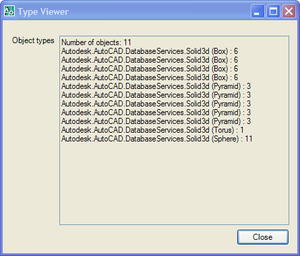
Here's what you get when you run the VT command and hover over a number of Solid3d objects:
Modeless_dialog_1

You'll see that a number of "duplicate" objects listed... this is because we have multiple sub-objects under the cursor, each of which is listed passed into the event via a separate sub-entity path. We could easily remove duplicates from the list as we create it, or make better use of the path information to find out more about the sub-entities themselves.

13 responses to “Using a modeless .NET dialog to display properties of multiple AutoCAD objects”

  1. Kean,

    Terrific! Your blog is an outstanding benefit to those of us learning to access AutoCAD via dotNet.

    I notice that the palette we create is not visible in the CUI editor's workspace or in the left pane either. Would it be a difficult job to expose the palette there, to make it seem like a totally integral part of AutoCAD?

    Thanks,
    -- Allan

  2. Whoops! Wrong page! I meant to put that on the "Using a palette from .NET to display properties of multiple AutoCAD objects" page at keanw.com/...

    -- Allan

  3. Kean Walmsley Avatar

    Allan,

    Thanks for clarifying - my answer probably covers both scenarios, in any case.

    Unfortunately this level of integration is not something that's provided automatically. There's no built-in connection between Palettese and CUI - it would have to be replumbed from our side or (and I'm not sure this is even possible) layered from your side, by connecting the settings for your PaletteSet with the data stored in the CUI file.

    This is really a question for the ADN team, as it's outside my personal experience.

    Regards,

    Kean

  4. Kean,

    I cannot get the fullsubentitypath to fill as anything other than null in any of the three programs in this series that call for it. I have had this problem in other code as well and cannot figure it out. I am running Autocad 2008, .Net 2005, WinXP on a x64 machine.

    Thanks.

  5. Israel,

    Does it occur on any other machines? I haven't come across this problem, myself, but may be missing steps to reproduce it.

    My best suggestion, at this stage, is to reinstall AutoCAD, to see if that helps.

    Regards,

    Kean

  6. Kean,

    I do read your blog regularly and are very useful. This sample code works for most the entity types but not hatch entity. Can you give me hints so that it can work with hatch entities.

    Regards,
    Kailas Dhage

  7. Kean Walmsley Avatar

    Kailas,

    How is it not working? Does it not select the entity, or does it show incorrect object information? This is an old post - and has some UI - so it'll take me time to investigate.

    Regards,

    Kean

  8. Kean,

    Thanks for quick reply. The following line always return array with zero length when mouse is over hatch entity.

    FullSubentityPath[] paths =
    e.Context.GetPickedEntities();

    Regards,
    Kailas Dhage

  9. Kean Walmsley Avatar

    Kailas,

    Are you sure this isn't a hatch selection issue? They can be quite tricky to select.

    Try comparing the process with selection from a standard command (such as SELECT).

    Regards,

    Kean

  10. Kean,

    This issue is only with AC2007
    and not with AC2010/2011.

    I have not test with AC2008/2009

    Regards,
    Kailas Dhage

  11. Kailas,

    Then I'm afraid there's not much I can do to help. Clearly something changed in terms of hatch selection (probably a change to allow hatches to be selected without being strictly on their graphics), and that's a core change I can't easily help retrofit.

    Regards,

    Kean

  12. Hi Kean:
    Your blog is amazing! But now I have some problems here.
    I want to know if there is some way to rebuild a new Vlax-Dump-Object lispfunction which provides exactly the same effects like origin dump-object, but returning property-names string list instead? I have met a lot of problems in those objects which can not directly get ObjectId (like Acad's .Application object) or built in create-object method for .dll, com or .net like "Scripting.FileSystemObject", which the old dump-object function can finish neatly, except returning those annoying un-reusable error messages... I want to define a "get-set-properties" funs which can jump over all those objects related, using those lists infos.

  13. Thanks, mudman. 🙂

    Sorry for the delayed response - this comment was flagged as spam and I only just realised.

    A few new property-related functions were introduced in AutoCAD 2012. Perhaps these help? I think they were along the lines of (getproperty) or (setproperty) rather than (getpropertynames), but it's worth looking into.

    Regards

    Kean

Leave a Reply to Israel Cancel reply

Your email address will not be published. Required fields are marked *