Using a palette from .NET to display properties of multiple AutoCAD objects

After a brief interlude we're back on the series of posts showing how to implement basic user-interfaces inside AutoCAD using .NET. Here's the series so far:

In this post we're going to swap out the modeless form we've been using in the last few posts in the series and replace it with an instance of AutoCAD's in-built palette class (Autodesk.AutoCAD.Windows.PaletteSet).

Firstly, why bother? Well, the PaletteSet class is realy cool: it provides docking, auto-hide, transparency and fixes the annoying focus-related issues we see with normal modeless dialogs.

And the best is that you get all this basically for free - the implementation work needed is really minimal. I started by copying liberal amounts of code from the DockingPalette sample on the ObjectARX SDK, and then deleted what wasn't needed for this project (which turned out to be most of it).

Here's the updated Command implementation. This really has very minor changes, as the palette implementation is all hidden inside the new TypeViewerPalette class.

using Autodesk.AutoCAD.ApplicationServices;

using Autodesk.AutoCAD.DatabaseServices;

using Autodesk.AutoCAD.EditorInput;

using Autodesk.AutoCAD.Runtime;

using System;

using CustomDialogs;

namespace CustomDialogs

{

  public class Commands : IExtensionApplication

  {

    static TypeViewerPalette tvp;

    public void Initialize()

    {

      tvp = new TypeViewerPalette();

      DocumentCollection dm =

        Application.DocumentManager;

      dm.DocumentCreated +=

        new DocumentCollectionEventHandler(OnDocumentCreated);

      foreach (Document doc in dm)

      {

        doc.Editor.PointMonitor +=

          new PointMonitorEventHandler(OnMonitorPoint);

      }

    }

    public void Terminate()

    {

      try

      {

        DocumentCollection dm =

          Application.DocumentManager;

        if (dm != null)

        {

          Editor ed = dm.MdiActiveDocument.Editor;

          ed.PointMonitor -=

            new PointMonitorEventHandler(OnMonitorPoint);

        }

      }

      catch (System.Exception)

      {

        // The editor may no longer

        // be available on unload

      }

    }

    private void OnDocumentCreated(

      object sender,

      DocumentCollectionEventArgs e

    )

    {

      e.Document.Editor.PointMonitor +=

        new PointMonitorEventHandler(OnMonitorPoint);

    }

    private void OnMonitorPoint(

      object sender,

      PointMonitorEventArgs e

    )

    {

      FullSubentityPath[] paths =

        e.Context.GetPickedEntities();

      if (paths.Length <= 0)

      {

        tvp.SetObjectId(ObjectId.Null);

        return;

      };

      ObjectIdCollection idc = new ObjectIdCollection();

      foreach (FullSubentityPath path in paths)

      {

        // Just add the first ID in the list from each path

        ObjectId[] ids = path.GetObjectIds();

        idc.Add(ids[0]);

      }

      tvp.SetObjectIds(idc);

    }

    [CommandMethod("vt",CommandFlags.UsePickSet)]

    public void ViewType()

    {

      tvp.Show();

    }

  }

}

As for the TypeViewerPalette class: I started by migrating the SetObjectId[s]()/SetObjectText() protocol across from the old TypeViewerForm class - the most complicated part of which involved exposing the contents of our palette (which we define and load as a User Control) via a member variable that can be accessed from SetObjectText(). Other than that it was all just copy & paste.

Here's the C# code:

using Autodesk.AutoCAD.ApplicationServices;

using Autodesk.AutoCAD.DatabaseServices;

using Autodesk.AutoCAD.EditorInput;

using Autodesk.AutoCAD.Interop;

using Autodesk.AutoCAD.Interop.Common;

using Autodesk.AutoCAD.Windows;

using TypeViewer;

namespace CustomDialogs

{

  public class TypeViewerPalette

  {

    // We cannot derive from PaletteSet

    // so we contain it

    static PaletteSet ps;

    // We need to make the textbox available

    // via a static member

    static TypeViewerControl tvc;

    public TypeViewerPalette()

    {

      tvc = new TypeViewerControl();

    }

    public void Show()

    {

      if (ps == null)

      {

        ps = new PaletteSet("Type Viewer");

        ps.Style =

          PaletteSetStyles.NameEditable |

          PaletteSetStyles.ShowPropertiesMenu |

          PaletteSetStyles.ShowAutoHideButton |

          PaletteSetStyles.ShowCloseButton;

        ps.MinimumSize =

          new System.Drawing.Size(300, 300);

        ps.Add("Type Viewer 1", tvc);

      }

      ps.Visible = true;

    }

    public void SetObjectText(string text)

    {

      tvc.typeTextBox.Text = text;

    }

    public void SetObjectIds(ObjectIdCollection ids)

    {

      if (ids.Count < 0)

      {

        SetObjectText("");

      }

      else

      {

        Document doc =

          Autodesk.AutoCAD.ApplicationServices.

            Application.DocumentManager.MdiActiveDocument;

        DocumentLock loc =

          doc.LockDocument();

        using (loc)

        {

          string info =

            "Number of objects: " +

            ids.Count.ToString() + "\r\n";

          Transaction tr =

            doc.TransactionManager.StartTransaction();

          using (tr)

          {

            foreach (ObjectId id in ids)

            {

              Entity ent =

                (Entity)tr.GetObject(id, OpenMode.ForRead);

              Solid3d sol = ent as Solid3d;

              if (sol != null)

              {

                Acad3DSolid oSol =

                  (Acad3DSolid)sol.AcadObject;

                // Put in a try-catch block, as it's possible

                // for solids to not support this property,

                // it seems (better safe than sorry)

                try

                {

                  string solidType = oSol.SolidType;

                  info +=

                    ent.GetType().ToString() +

                    " (" + solidType + ") : " +

                    ent.ColorIndex.ToString() + "\r\n";

                }

                catch (System.Exception)

                {

                  info +=

                    ent.GetType().ToString() +

                    " : " +

                    ent.ColorIndex.ToString() + "\r\n";

                }

              }

              else

              {

                info +=

                  ent.GetType().ToString() +

                  " : " +

                  ent.ColorIndex.ToString() + "\r\n";

              }

            }

            tr.Commit();

          }

          SetObjectText(info);

        }

      }

    }

    public void SetObjectId(ObjectId id)

    {

      if (id == ObjectId.Null)

      {

        SetObjectText("");

      }

      else

      {

        Document doc =

          Autodesk.AutoCAD.ApplicationServices.

            Application.DocumentManager.MdiActiveDocument;

        DocumentLock loc =

          doc.LockDocument();

        using (loc)

        {

          Transaction tr =

            doc.TransactionManager.StartTransaction();

          using (tr)

          {

            DBObject obj =

              tr.GetObject(id, OpenMode.ForRead);

            SetObjectText(obj.GetType().ToString());

            tr.Commit();

          }

        }

      }

    }

  }

}

Here's what you get when you run the VT command and manipulate the palette's docking/transparency before hovering over a set of drawing objects:
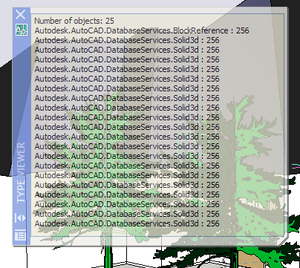
Palette_1

You can download the source for this project from here .

3 responses to “Using a palette from .NET to display properties of multiple AutoCAD objects”

  1. Tony Tanzillo Avatar

    "Firstly, why bother? Well, the PaletteSet class is realy cool: it provides docking, auto-hide, transparency and fixes the annoying focus-related issues we see with normal modeless dialogs"

    Thanks for some good basic samples of using the PropertyGrid. In the future, you might want consider doing a bit more testing before presenting them.

    A bit more thorough testing in this particular case would have uncovered the significant problems that exist with AutoCAD's Palettes and .NET controls like the PropertyGrid.

    To see one major problem, place a PropertyGrid on a Palette and add it to a PaletteSet. Create the PaletteSet and show it. Dock the PaletteSet to any side of the AutoCAD window. Then, assign an object to the PropertyGrid's SelectedObject property, which has properties that use drop-down editing components (either drop-down combo boxes, or dropdown controls like the standard Color editor used by .NET for editing a color property).

    Then, with the PaletteSet docked, try to edit the properties of the assigned object(s) that use the aforementioned dropdown editors, and note what happens.

    I thought I'd mention this in the hope that your readers do not get the impression that using the PropertyGrid on a Palette is feasable, as it is not, or at least not until Autodesk figures out how to resolve the issues that can be seen by just following the above steps.

    It's great to publish samples of how to exploit the .NET framework and its wealth of functionality. But in cases like this (using the PropertyGrid on a Palette) where, practicle application is severely hampered and unfeasable because of show-stopping issues, those issues warrant mention and discussion in the context of even the most basic samples.

  2. Tony -

    There's no PropertyGrid in this sample, just a TextBox, so I don't see what "more thorough testing" I've failed to perform.

    I'm not aware of specific issues around the use of a PropertyGrid with a Palette, but it sounds like an interesting topic to cover at some point.

    Regards,

    Kean

  3. Jim Dowthwaite Avatar
    Jim Dowthwaite

    Any chance we could get this in VB.Net?

  4. Kean Walmsley Avatar

    It should be straightforward to recreate the project for VB.NET - the code can be translated using an online translator such as this one. The User Control can be recreated from scratch - just add one to your project and add a TextBox to it that is docked on all sides (you'll need to rename it typeTextBox, but that's all).

    I'd do it myself, but I'm busy working on the next post.

    Regards,

    Kean

  5. Jim Dowthwaite Avatar

    The code translator worked great. Thanks 🙂

  6. Hi Kean,
    Can we create property palette for a custom entity via wrapper in C#?

    Regards,
    Vignesh. S

  7. Hi Vignesh,

    The interface the property palette uses to access object properties is currently COM. You should be able to do this from C#, although I haven't tried it myself.

    Regards,

    Kean

  8. I'm making a palette in VB.net, but loading is very inconsistant, and i can't seem to get it to resize from code. sometimes it comes in all crazed and can't be resized, i've learned that this usually happens if i've already closed a drawing in that session of autocad. does anybody know a remedy for this situation? anybody else had this problem? it usually works just fine if i load my palette just after i start autocad, but i need it to be able to be loaded anytime for my other users. thanks for whatever help anybody can give on this, if you need me to post my code just let me know.

  9. Hi Tim,

    I'd suggest posting your question to the AutoCAD .NET Discussion Group.

    Regards,

    Kean

  10. This may be a dumb question, but how can one tell the name of the references that must be loaded? For example, what DLL's must I reference to get the code to work? In particular, I can't tell what to load to have CustomDialogs work.

  11. If this code is in the same project, there should be no need for references other than what's already in the code. At least I hope that's right - it's been a while since I posted this.

    Kean

  12. >>Isadore Garcia
    >>In particular, I can't tell what to load to >>have CustomDialogs work.

    With any luck you've already figured this out, but just in case...Don't feel bad, because I overlooked it at first, and I searched through the object browser and even a couple of additional .dll's and did not find CustomDialogs. Then I noticed CustomDialogs is the Namespace Kean created in the code. I'm guessing you left the Using (or Imports) statement in, but changed the namespace to something else.

  13. Hi again Kean,

    I just got around to attempting to impliment this, as a replacement for my modeless dialog, and it's wiggidy-wacked:(

    I had to hack up the sample pretty good, as I had a whole different need. Mostly, though, I just got rid of all the pointmonitor stuff as I don't need to react to anything. What happens is, when I first show the palette, it looks fine except I can't get it to show undocked, even though I added a line to set the Dock property to none.

    Then, while the palette is shown I am prompting the user for a selection, and if you manipulate the palette, the contents disappear, and my selection prompt gets canceled.

    If you let the thing show where it wants, and don't touch it, everything works fine, including when I update the text (my user control has 5 fixed labels, and 5 label controls I update with values). But if you touch the palette to move it, undock it, etc... it misbehaves badly.

    For now I have switched my code back to the modeless dialog, but I still see this as a valuable tool that I'd like to get figured out.

  14. It turns out it's not directly possible to set a palette to be floating on launch from .NET: you can do it using ObjectARX (C++) - and even have a small ObjectARX component in your application that does this for your .NET palettes - but I don't see a way to do it purely in .NET.

    As for the other problem... I don't see it in my sample, so there's not much I can do to help. Please submit it via ADN or the AutoCAD .NET Discussion Group.

    Kean

  15. Hi,
    Is there any work around to solve the problem of Property Grid DropDown controls inaccessibility when the PaletteSet is Docked.

    I faced the same problem, when adding the DevExpress Controls. but, i got a work around for that case by just keeping the focus of the PaletteSet to true (PaletteSet.KeepFocus = True). It solves the problem temporarily. Still it is just a work around.

    Even, the same workaround is not working for the PropertyGrid.

    I need your suggestion for this case.

    Thanks and Regards,
    Vignesh. S

  16. Vignesh,

    This post was not actually about using the PropertyGrid: I suggest that you submit your question via the ADN website as you work for an ADN member.

    Regards,

    Kean

  17. Thank you for your Suggestion.

    Regards,
    Vignesh. S

  18. Hello,

    Is there a way to control when the PalleteSet is closed?

    Regards,

    Jernej

  19. I would think you could call Close() on it, although I haven't tried this myself.

    Kean

  20. That is right. But problem is because PalleteSet is modeless and has no closing event, so I don't know when it gets closed.

  21. Ah, that's a different question (and one I don't know the answer to). I suggest submitting the question via ADN.

    Kean

  22. May be with StateChanged event. The argument PaletteSetStateEventArgs has a property NewState which is an enum with a Show member.

  23. Hi Kean

    How can I rename the PaletteSet each time AutoCAD loads? I want to append our version number to the end of the name, but AutoCAD does not honour the name change. I've tried with and without PaletteSetStyles.NameEditable but it doesn't make any difference.

    Kind regards
    Michael

  24. It's not intuitive, but the Name property has to be set after Visible = true.

  25. Hi,
    maybe it's the version, but i can make the palette to be floating in AutoCAD 2012.
    It's a little tricky though, because you have to change the docking propetry AFTER you make the palette visible and you have to change the size AFTER you make it floating

    myPaletteSet.Visible = True
    myPaletteSet = DockSides.None
    myPaletteSet = New Size(840, 391)

  26. Thanks, Matus.

    Kean

  27. Hi Kean!
    My VS2008 says "The type or namespace name 'TypeViewer' could not be found (are you missing a using directive or an assembly reference?)"
    Which assembly reference is needed?
    Thx, Stephan

  28. Hi Stephan,

    Did this happen when you loaded the project from the provided source?

    I can't remember the details, off the top of my head: it may be the "using TypeViewer;" statement is causing an issue (and may not be needed, depending on your project structure).

    Let me know, and I'll take a closer look.

    Kean

  29. Hi Mr Kean, Thank you for this post. I am wanting to know if there is any advantage of using PaletteSet etc vs WPF for presenting a UI for AutoCAD plugins - you make allusion to it in the following sentence:

    "the PaletteSet class is realy cool: it provides docking, auto-hide, transparency and fixes the annoying focus-related issues we see with normal modeless dialogs."

    but can we not have the cake and eat it too with WPF as well? (i now have to choose between the WPF route vs using the AutoCAD classes route) to display information to the user.

    would be interested to hear your thoughts.

  30. is this source code still available?

    1. The code that's linked to from the end of the blog post?

      Kean

  31. Yes and now I clicked and able to download. thanks
    keanw.com/files/TypeViewerSource4.zip

Leave a Reply to Stephan Bartl Cancel reply

Your email address will not be published. Required fields are marked *