I thought it would be interesting to spend a few posts looking into the multileader or MLeader functionality in AutoCAD 2008.
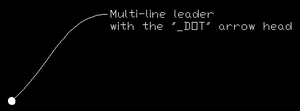
To get things started, here's some simple code that prompts the user for a couple of points and then creates a single spline-segment multileader with multi-line text at the points specified. It also uses the technique shown in this previous post to specify a custom arrow-head.
Here's the C# code:
using Autodesk.AutoCAD.Runtime;
using Autodesk.AutoCAD.ApplicationServices;
using Autodesk.AutoCAD.DatabaseServices;
using Autodesk.AutoCAD.EditorInput;
using Autodesk.AutoCAD.Geometry;
namespace DimensionLibrary
{
public class DimensionCommands
{
static ObjectId GetArrowObjectId(string newArrName)
{
ObjectId arrObjId = ObjectId.Null;
Document doc =
Application.DocumentManager.MdiActiveDocument;
Database db = doc.Database;
// Get the current value of DIMBLK
string oldArrName =
Application.GetSystemVariable(
"DIMBLK"
) as string;
// Set DIMBLK to the new style
// (this action may create a new block)
Application.SetSystemVariable(
"DIMBLK",
newArrName
);
// Reset the previous value of DIMBLK
if (oldArrName.Length != 0)
Application.SetSystemVariable(
"DIMBLK",
oldArrName
);
// Now get the objectId of the block
Transaction tr =
db.TransactionManager.StartTransaction();
using(tr)
{
BlockTable bt =
(BlockTable)tr.GetObject(
db.BlockTableId,
OpenMode.ForRead
);
arrObjId = bt[newArrName];
tr.Commit();
}
return arrObjId;
}
[CommandMethod("mymld")]
static public void CreateMultiLeader()
{
Document doc =
Application.DocumentManager.MdiActiveDocument;
Editor ed = doc.Editor;
Database db = doc.Database;
const string arrowName = "_DOT";
ObjectId arrId = GetArrowObjectId(arrowName);
// Get the start point of the leader
PromptPointResult result =
ed.GetPoint(
"\nSpecify leader arrowhead location: "
);
if (result.Status != PromptStatus.OK)
return;
Point3d startPt = result.Value;
// Get the end point of the leader
PromptPointOptions opts =
new PromptPointOptions(
"\nSpecify landing location: "
);
opts.BasePoint = startPt;
opts.UseBasePoint = true;
result = ed.GetPoint(opts);
if (result.Status != PromptStatus.OK)
return;
Point3d endPt = result.Value;
Transaction tr =
db.TransactionManager.StartTransaction();
using (tr)
{
try
{
BlockTable bt =
(BlockTable)tr.GetObject(
db.BlockTableId,
OpenMode.ForRead
);
BlockTableRecord btr =
(BlockTableRecord)tr.GetObject(
bt[BlockTableRecord.ModelSpace],
OpenMode.ForWrite
);
// Create the MLeader
MLeader mld = new MLeader();
int ldNum = mld.AddLeader();
int lnNum = mld.AddLeaderLine(ldNum);
mld.AddFirstVertex(lnNum, startPt);
mld.AddLastVertex(lnNum, endPt);
mld.ArrowSymbolId = arrId;
mld.LeaderLineType =
LeaderType.SplineLeader;
// Create the MText
MText mt = new MText();
mt.Contents =
"Multi-line leader\n" +
"with the \"" +
arrowName +
"\" arrow head";
mt.Location = endPt;
mld.ContentType =
ContentType.MTextContent;
mld.MText = mt;
// Add the MLeader
btr.AppendEntity(mld);
tr.AddNewlyCreatedDBObject(mld, true);
tr.Commit();
}
catch
{
// Would also happen automatically
// if we didn't commit
tr.Abort();
}
}
}
}
}
Here's what you get when you run the MYMLD command:
There seem to be a lot of interesting possibilities with this new class... be sure to let me know if you have suggestions for further topics related to MLeaders (or anything else, come to think of it).


Leave a Reply to Tesla NX Cancel reply