Driving a basic AutoCAD plot using .NET

I just missed my connecting flight in Chicago, so have 3 hours to pass until the next, and decided to post some code I finally got around to writing on the plane from Zurich.

I've had a few requests for code showing how to plot using the .NET API in AutoCAD. There's an existing ObjectARX (C++) sample on the SDK, under samples/editor/AsdkPlotAPI, but there isn't a publicly posted .NET version right now.

Here's the C# code I put together. Please bear in mind that it was written during less than ideal coding conditions, and I haven't spent a substantial amount of time going through it... it seems to work fine for me, but do post a comment if you have trouble with it.

using Autodesk.AutoCAD.Runtime;

using Autodesk.AutoCAD.ApplicationServices;

using Autodesk.AutoCAD.DatabaseServices;

using Autodesk.AutoCAD.EditorInput;

using Autodesk.AutoCAD.Geometry;

using Autodesk.AutoCAD.PlottingServices;

namespace PlottingApplication

{

  public class PlottingCommands

  {

    [CommandMethod("simplot")]

    static public void SimplePlot()

    {

      Document doc =

        Application.DocumentManager.MdiActiveDocument;

      Editor ed = doc.Editor;

      Database db = doc.Database;

      Transaction tr =

        db.TransactionManager.StartTransaction();

      using (tr)

      {

        // We'll be plotting the current layout

        BlockTableRecord btr =

          (BlockTableRecord)tr.GetObject(

            db.CurrentSpaceId,

            OpenMode.ForRead

          );

        Layout lo =

          (Layout)tr.GetObject(

            btr.LayoutId,

            OpenMode.ForRead

          );

        // We need a PlotInfo object

        // linked to the layout

        PlotInfo pi = new PlotInfo();

        pi.Layout = btr.LayoutId;

        // We need a PlotSettings object

        // based on the layout settings

        // which we then customize

        PlotSettings ps =

          new PlotSettings(lo.ModelType);

        ps.CopyFrom(lo);

        // The PlotSettingsValidator helps

        // create a valid PlotSettings object

        PlotSettingsValidator psv =

          PlotSettingsValidator.Current;

        // We'll plot the extents, centered and

        // scaled to fit

        psv.SetPlotType(

          ps,

          Autodesk.AutoCAD.DatabaseServices.PlotType.Extents

        );

        psv.SetUseStandardScale(ps, true);

        psv.SetStdScaleType(ps, StdScaleType.ScaleToFit);

        psv.SetPlotCentered(ps, true);

        // We'll use the standard DWF PC3, as

        // for today we're just plotting to file

        psv.SetPlotConfigurationName(

          ps,

          "DWF6 ePlot.pc3",

          "ANSI_A_(8.50_x_11.00_Inches)"

        );

        // We need to link the PlotInfo to the

        // PlotSettings and then validate it

        pi.OverrideSettings = ps;

        PlotInfoValidator piv =

          new PlotInfoValidator();

        piv.MediaMatchingPolicy =

          MatchingPolicy.MatchEnabled;

        piv.Validate(pi);

        // A PlotEngine does the actual plotting

        // (can also create one for Preview)

        if (PlotFactory.ProcessPlotState ==

            ProcessPlotState.NotPlotting)

        {

          PlotEngine pe =

            PlotFactory.CreatePublishEngine();

          using (pe)

          {

            // Create a Progress Dialog to provide info

            // and allow thej user to cancel

            PlotProgressDialog ppd =

              new PlotProgressDialog(false, 1, true);

            using (ppd)

            {

              ppd.set_PlotMsgString(

                PlotMessageIndex.DialogTitle,

                "Custom Plot Progress"

              );

              ppd.set_PlotMsgString(

                PlotMessageIndex.CancelJobButtonMessage,

                "Cancel Job"

              );

              ppd.set_PlotMsgString(

                PlotMessageIndex.CancelSheetButtonMessage,

                "Cancel Sheet"

              );

              ppd.set_PlotMsgString(

                PlotMessageIndex.SheetSetProgressCaption,

                "Sheet Set Progress"

              );

              ppd.set_PlotMsgString(

                PlotMessageIndex.SheetProgressCaption,

                "Sheet Progress"

              );

              ppd.LowerPlotProgressRange = 0;

              ppd.UpperPlotProgressRange = 100;

              ppd.PlotProgressPos = 0;

              // Let's start the plot, at last

              ppd.OnBeginPlot();

              ppd.IsVisible = true;

              pe.BeginPlot(ppd, null);

              // We'll be plotting a single document

              pe.BeginDocument(

                pi,

                doc.Name,

                null,

                1,

                true, // Let's plot to file

                "c:\\test-output"

              );

              // Which contains a single sheet

              ppd.OnBeginSheet();

              ppd.LowerSheetProgressRange = 0;

              ppd.UpperSheetProgressRange = 100;

              ppd.SheetProgressPos = 0;

              PlotPageInfo ppi = new PlotPageInfo();

              pe.BeginPage(

                ppi,

                pi,

                true,

                null

              );

              pe.BeginGenerateGraphics(null);

              pe.EndGenerateGraphics(null);

              // Finish the sheet

              pe.EndPage(null);

              ppd.SheetProgressPos = 100;

              ppd.OnEndSheet();

              // Finish the document

              pe.EndDocument(null);

              // And finish the plot

              ppd.PlotProgressPos = 100;

              ppd.OnEndPlot();

              pe.EndPlot(null);

            }

          }

        }

        else

        {

          ed.WriteMessage(

            "\nAnother plot is in progress."

          );

        }

      }

    }

  }

}

A few comments on the code: I chose to plot to a file using the standard DWF plot driver/PC3 file, mainly as it avoids having to second-guess what printers/plotters everyone uses. 🙂 The SDK sample populates comboboxes in a dialog to allow selection of the device and the media size, but I've just gone with a choice that should work on all systems.

Here's what you should see when you launch the SIMPLOT command:
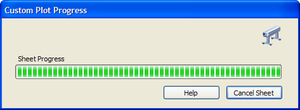
Plot_progress

The output file should be created in "c:\test-output.dwf".

I added a simple check to fail gracefully when another plot is in progress... as this code will drive either a foreground or a background plot (depending on the value of the BACKGROUNDPLOT system variable), there's clear scope for failure if the code doesn't check via PlotFactory.ProcessPlotState (or handle the exception if another plot is already happening when you call PlotFactory.CreatePublishEngine()).

Now that I'm online I've found there's quite a similar code sample to the ADN site (also converted from the original SDK sample, I suspect):

How to plot using AutoCAD's .NET Managed API?

  1. Sir,

    I am Akash, pursuing Masters in Construction Management from Indian Institute of Technology- Madras, Chennai (India)

    I had been using the VB 6.0 version till date and still would be continuing my work with that..

    I have an application to be coded where in 1) I have a set of coordinates say 6 coordinates for a cuboidal shape in excel sheet.
    2) I want to use them in Autocad to plot a drawing (every cuboid) based on these coordinates by importing from Excel file.

    3) I have a series of such cuboids to be connected to make a long span. I want this Plot to be finally displayed on VB form where my application is there.

    I look forward to receive some useful information from you at the earliest..

    PS: I have a bigger constraint in switchhing over to .Net for my application hence, please keep VB 6.0 in mind..

  2. Kean Walmsley Avatar

    Akash - please have your institute join ADN (if they're not already a member) or submit your question to one of the discussion groups.

    Regards,

    Kean

  3. Michael Csikos Avatar
    Michael Csikos

    G'day Kean

    Thanks for a great site.

    I am having trouble doing consecutive prints from one method call. I am trying to produce a DWF and a PDF of a drawing, but the second plot fails because the first plot does not start immediately. I have tried sleeping the thread and checking the ProcessPlotState. I also tried starting the plot in a separate thread, but that is crashing AutoCAD (even with try/catch blocks).

    Any ideas?

    Regards
    Michael

  4. Kean Walmsley Avatar

    Hi Michael,

    You probably need to make sure background plotting is disabled. If the BACKGROUNDPLOT sysvar is set to 1 or 3, then PLOT will background plot (which is not what you want).

    Cheers,

    Kean

  5. Michael Csikos Avatar
    Michael Csikos

    Thanks Kean, that did the trick.

  6. Dear Kean,

    I'm currently working on VBA for AutoCAD Mechanical 2007. I wonder if there is a way to edit the pc3/pmp files programatically from this interface. The goal is to enable the users to create custom sized flowsheets without manually add the Papersize to the pc3.
    So I'd like to create a mask, where the user types the desired width (height is given by the rolls in the plotter...) and they get their layout correctly sized. Wath I did as workaround is that I set up a 15 m long papersize for all Paperrolls and set the Cutting mode to extents. The only problem is, if I set up a Page Layout, users will get the whole 15 m as paper and this will be confusing I think... So can I access these settings programatically from VBA?
    Thanks in advance,
    Daniel

  7. Dear Daniel,

    The recommended way of changing plot configurations is via the API, not by modifying PC3 files. This API is exposed via C++ (ObjectARX) and .NET.

    I don't know of a way to access the API directly from VBA - you may need to include a C++ or .NET module in your application for this.

    Regards,

    Kean

  8. I'm writing some code for automatic PDF plotting (Won't go into details) but I'm new to AutoCAD.Net and I've been having problems adapting your code.

    I've tried stipping back my changes up to the point where it is basically a copy and paste of the above code without the progress bar in a hope to find what's wrong and I've made it to the point where even though my code is exactly the same I get this error: Autodesk.AutoCAD.Runtime.Exception: eInvalidInput
    at Autodesk.AutoCAD.DatabaseServices.PlotSettingsValidator.SetPlotConfigurationName(PlotSettings plotSet, String plotDeviceName, String mediaName)

    My code for that line being:
    Psv.SetPlotConfigurationName(Ps, "PDF Creator - A1.pc3", "A1");

    Any ideas?

  9. My best suggestion would be to double-check your assumptions by testing your code against another device/driver.

    Kean

  10. I've made it to the point where this all works except for the actual plot. It gets to the line "Pe.BeginPage(PpInfo, PInfo, true, null);"
    and then as soon as I step past it I get an error in AutoCAD saying "INTERNAL ERROR: !dbplotset.cpp@422: eLockViolation"

    Nobody seems to be able to give me a straight answer as to what this means, or why my code has only minor differences to yours (negligible) and yet when I run them together mine hits that point and crashes while yours doesn't.

  11. A lock violation typically means that access to a document has been attempted without it being locked or a second attempt has been made to access a currently locked document - I forget exactly which.

    The current document is locked implicitly when a command is entered, so perhaps you're not plotting the current document and have forgotten to lock it?

    Another (less likely) possibility is that it's somehow related to background plotting.

    If these suggestions don't help I suggest contacting the ADN team (if you're a member), or post it to the AutoCAD .NET Discussion Group, if not.

    Kean

  12. I figured it was something to do with access to the document. That being said, I thought I had already tested for that by commenting out practically my entire program apart from the plotting code and yet I'm still getting the same error. I then thought it was because the command is being run from a modeless dialog, but figured that wouldn't have any influence on a command run from it.

    At the moment my entire program is a foreach statement: foreach(string CurrentDwg in LstDwg.Items)
    this encloses: Autodesk.AutoCAD.ApplicationServices.Application.DocumentManager.Open(CurrentDwg, false);
    and then proceeds straight to your plot code. After this is closes and discards changes.

  13. How is "the command" being run from a modeless dialog? If the code is simply behind a button (or another control), then it's running in the session context, so you must lock documents manually.

    The best way to drive functionality from a modeless dialog is to define actual commands and fire them off using SendStringToExecute(). That takes care of locking and lots of other bits and pieces.

    Although as you're looping through documents, you'll need to lock them yourself.

    Kean

  14. Once you enter the CommandMethod I've set up it opens the dialog. You select the settings you want to use (drawings, job number, etc.) and press the "Go" button.

    The above code is then run.

    The only thing I can think of now is closing each drawing, and then opening as read only before the plot code.

    I'll look into SendStringToExecute but for my purposes it may not work too well. At least I know where I'm going wrong now. Sort of.

  15. Try using Document.LockDocument() before you plot each one.

    SendStringToExecute() is actually a red herring, in this case: you have a session command that is working with multiple documents, so document locking is most likely the answer.

    Kean

  16. WORKED FIRST TIME!

    Can't believe the entire problem was missing 3 words!

  17. Patrick Ottenschläger Avatar
    Patrick Ottenschläger

    Hello Kean!

    If I run your function in modelspace, all is ok, but if I run your function when a layout with viewport is active i always get the error "eNotCurrentLayout" at "piv.Validate(pi);"!
    Is their something which i don't understand or works this function only if the modelspace is active?

    thanks in advance
    Patrick

  18. Hi Patrick,

    It works fine when a paperspace layout is selected, but I see it does fail if the modelspace viewport within that layout is active.

    I haven't coded to check for that (which it would take me some work to do), but there are couple of easy ways to code defensively for this case.

    1) You could execute a PSPACE command prior to executing the plot.
    2) You could use COM to do the same...

    Include the namespace for AutoCAD's COM interop assembly (after adding the assembly reference, of course):

    using Autodesk.AutoCAD.Interop;

    And this code early on in the SIMPLOT command:

    AcadDocument ad =
    (AcadDocument)doc.AcadDocument;
    ad.MSpace = false;

    I hope this helps,

    Kean

  19. I have used your example to some success, with the addition of reading the active layout's canonical media size before setting the new plot configuration.
    Having solved that one, I am having difficulty modifying to produce a plot preview. Do you have any pointers?

  20. Kean Walmsley Avatar

    This post should help.

    Kean

  21. Thanks for the pointers to the preview code.

    I have managed finally to program a custom eTransmit command that includes the plot to PDF and DWF along with a bound drawing.

    I was performing some final testing with a particularly large file (70MB) on a standard ISO plot. The plot to PDF can be completed manually, however when I execute the plot using .net I receive a System.AccessViolationException.
    Any attempts to avoid this using a Try Catch results in a pure virtual function call.

    The error occurs at:

    pe.BeginGenerateGraphics(null);

    The plot does appear to begin to work...

    Any ideas?

  22. Kean Walmsley Avatar

    Hi Mark,

    Sorry - I have no idea what's happening, although something about it makes it smell like a memory issue. I'd check to see whether the issue is reproducible with a slightly modified scenario:

    a) on another system
    b) with another, similarly-sized, drawing
    c) using a different (perhaps non-PDF) driver

    I'd also suggest submitting your question to the ADN team, if you're a member.

    Regards,

    Kean

  23. Kean Walmsley Avatar

    (meaning a, b or c, not a, b and c... 🙂

    Kean

  24. Alberto Benitez Avatar
    Alberto Benitez

    Hello Kean, Do you have any sample in RealDWG application? thank you

  25. Here's a sample, although it's unrelated to this post (you can't plot from RealDWG).

    Kean

  26. Isidoro Aguilera Avatar
    Isidoro Aguilera

    Is there any way to change de vector resolution with API when plotting to DWF?

  27. Sorry, Isidoro, I don't know the answer.

    Please try the discussion groups or ADN.

    Kean

  28. Jordan Tymburski Avatar
    Jordan Tymburski

    Hey Kean,
    I've been looking all over the internet/your blog/.NET Developer guide but I can't figure out how to change which layout is active. I figured out how to declare a non-active layout but can't seem to make it active. My goal is to be able to draw different stuff on 4 different layouts. Thanks.

  29. Jordan Tymburski Avatar
    Jordan Tymburski

    I feel stupid but right after I posted this, I was looking through the list of secondary functions on my layout object and ran into .BlockTableRecordId. Put that straight into the block table record declaration and worked perfectly. Thanks anyway.

    BlockTableRecord btr = trans.GetObject(layout2.BlockTableRecordId, OpenMode.ForWrite) as BlockTableRecord;

  30. Habeeb Moideenkutty Avatar
    Habeeb Moideenkutty

    Hi Kean,
    I am newbie to .net. I have a silly query. Can you please help me with the creation of a command for plotting the active drawing with a single stroke command? I was able to do the same with VBA, but .net is not taking me anywhere. For the last three days I was searching on the net in vain to get some idea or sample code..please help..thanks

  31. Hi Habeeb,

    It sounds like a plumbing problem: the code in this post should allow you to create a command to plot the active drawing and you can then use CUI to set up some kind of keyboard shortcut to make it happen.

    But that's just a guess: if I were you I would ask the ADN team (if you're a member) or post to the AutoCAD .NET Discussion Group. Those are really your best avenues to get support related to this kind of thing.

    Regards,

    Kean

  32. i am using this code with autocad DWG to PDF driver. BACKGROUNDPLOT is set to 0. Why plot process is longer than standart plot by hand?

  33. I have no idea: this isn't the experience I've had with the code, so perhaps there's something specific to the way you've implemented it or the driver you're using.

    Kean

  34. I copy paste your code and it always break at last line (pe.EndPlot(null))
    It give me a AutoCad Send Report dialog.

    I have tried in modelspace and in paperspace, it's always the same problem?

    Thanks

  35. Kean Walmsley Avatar

    Sorry - I have no idea what's causing this in your version of the code/on your system...

    Kean

  36. Thanks for the code! I converted the code to VB.NET and it's working fine. But I have a few tweaks that I want to do, so I'm hoping you can shed some light on.
    1. I want to print only from Model space instead of the current layout.
    2. I noticed this only prints to an A Size. Is there a way to use the current paper size that's associated the layout.
    Thanks!

  37. Hi Kean, This is works when any file open, Excellent. I would like to get files from folder and do conver into pdf like as you done attribute change withoiut open drawings. Is there any advice please?

  38. Hi Paul,

    Have you tried the "DWF/PDF Batch Publish for AutoCAD" Plugin of the Month?

    Regards,

    Kean

  39. Hi Kean, Many thanks for your reply. Yes I download the flug-inc , its bit difficult for me as I am new just started .net. I saw your basic plot example , fro that I just modify the code: All I want to print into pdf one drawing without open it. Please have a look the below codes, and tell me if anything need to change please, It would be greatly appriciated for your time.

    Document doc = Autodesk.AutoCAD.ApplicationServices.Application.DocumentManager.MdiActiveDocument;

    Editor ed = doc.Editor;
    Database db = doc.Database;
    db.ReadDwgFile("C:\test.dwg", FileShare.Read, false, "");
    Transaction tr = db.TransactionManager.StartTransaction();
    PlotInfo pi = new PlotInfo();

    using (db)
    {

    try
    {
    using (tr)
    {

    BlockTableRecord btr = (BlockTableRecord)tr.GetObject(db.CurrentSpaceId, OpenMode.ForRead);
    Layout lo = (Layout)tr.GetObject(btr.LayoutId, OpenMode.ForRead);

    pi.Layout = btr.LayoutId;
    PlotSettings ps = new PlotSettings(lo.ModelType);
    ps.CopyFrom(lo);

    PlotSettingsValidator psv = PlotSettingsValidator.Current;
    psv.SetPlotType(ps, Autodesk.AutoCAD.DatabaseServices.PlotType.Extents);

    psv.SetUseStandardScale(ps, true);
    psv.SetStdScaleType(ps, StdScaleType.ScaleToFit);
    psv.SetPlotCentered(ps, true);

    psv.SetPlotConfigurationName(ps, "Adobe PDF.pc3", "A3");

    pi.OverrideSettings = ps;
    PlotInfoValidator piv = new PlotInfoValidator();
    piv.MediaMatchingPolicy = MatchingPolicy.MatchEnabled;
    piv.Validate(pi);

    if (PlotFactory.ProcessPlotState == ProcessPlotState.NotPlotting)
    {

    PlotEngine pe = PlotFactory.CreatePublishEngine();
    using (pe)
    {

    PlotProgressDialog ppd = new PlotProgressDialog(false,1, true);
    using (ppd)
    {
    ppd.set_PlotMsgString(PlotMessageIndex.DialogTitle, "T&G: Converting PDF")
    ppd.set_PlotMsgString(PlotMessageIndex.CancelJobButtonMessage, "Cancel Job");
    ppd.set_PlotMsgString(PlotMessageIndex.CancelSheetButtonMessage, "Cancel Sheet");
    ppd.set_PlotMsgString(PlotMessageIndex.SheetSetProgressCaption, "Sheet Set Progress");
    ppd.set_PlotMsgString(PlotMessageIndex.SheetProgressCaption, "PDF convert in progress . . .");

    ppd.LowerPlotProgressRange = 0;
    ppd.UpperPlotProgressRange = 100;
    ppd.PlotProgressPos = 0;
    ppd.OnBeginPlot();
    ppd.IsVisible = true;
    pe.BeginPlot(ppd, null);

    pe.BeginDocument(pi, doc.Name, null, 1, true, "c:\\pdf");

    ppd.OnBeginSheet();
    ppd.LowerSheetProgressRange = 0;
    ppd.UpperSheetProgressRange = 100;
    ppd.SheetProgressPos = 0;

    PlotPageInfo ppi = new PlotPageInfo();
    pe.BeginPage(ppi, pi, true, null);
    pe.BeginGenerateGraphics(null);
    pe.EndGenerateGraphics(null);

    pe.EndPage(null);
    ppd.SheetProgressPos = 100;
    ppd.OnEndSheet();

    pe.EndDocument(null);
    ppd.PlotProgressPos = 100;
    ppd.OnEndPlot();
    pe.EndPlot(null);

    }

    }

    }

    else
    {
    ed.WriteMessage("\nAnother plot is in progress.");
    }
    }
    }
    catch (System.Exception ex)
    {
    ed.WriteMessage("\nProblem to make PDF : {0} - \"{1}\"", ex.Message);
    }
    }

  40. Hi Paiul,

    You can't plot a drawing that is not loaded into the editor. The Batch Publish tool is really your best bet for bulk PDF creation.

    Regards,

    Kean

  41. Hi Kean, many thanks for your reply. I am trying ..., I have other question if you can help me out please. In VB i done to open a dwg file then do some operation & close it by progam. How it is possible in .Net(C#)?

    such as after click button "C:\test.dwg" will open then draw a line on it then save & close..

    Do you have any example please. I would be greatly appriciated for your great help.

  42. Hi Paiul,

    This isn't a support forum: I generally don't have time to answer questions not directly related to my posts.

    Having said that, I suggest checking out these posts on batch processing.

    Also, we're working on a replacement for the Script Pro tool which may be of interest (it will be published as a Plugin of the Month in the coming months).

    In future, please post your questions to the ADN team, if you're a member, or otherwise the AutoCAD .NET Discussion Group.

    Regards,

    Kean

  43. Kean,
    I have used your plot routine (many thanks) to create a DWFx and generally works fine. I set the plotter name and paper size to 420 x 297mm however sometimes the plot has the paper rotated. The drawing Orientation is still 'landscape' so i end up with a small landscape dwg on a portrait sheet. Nothing seems to fix it. I have set the paper to default to the plotter default but it is the same as the one in the code.
    psv.SetPlotConfigurationName(ps, "DWFx ePlot (XPS Compatible).pc3", "ISO_expand_A3_(420.00_x_297.00_MM)");

    Do you have any Ideas. I am using Acade2010 and VS2010.
    Thanks

    Kris K

  44. Apologies for the delay - I didn't receive a notification for this comment, so it slipped through the cracks.

    1. If you're in model-space, it should just work. Otherwise you can force it to model-space by opening the BlockTable and passing in the contained model-space ObjectId instead of db.CurrentSpaceId (a common technique - just search my blog for "BlockTableRecord.ModelSpace").

    2. You should be able to pass in lo.CanonicalMediaName instead of the hard-coded papersize (at least I hope so).

    Regards,

    Kean

  45. Kris,

    Sorry - I don't know this one, off the top of my head.

    Please post the problem to ADN, if you're a member, or otherwise to the AutoCAD .NET Discussion Group.

    Regards,

    Kean

  46. Kean,

    This is my first project in C#. I am trying to plot a drawing, which is made by C#. First I used the plot example for Autodesk and I a error in VS2010. I seached on the net and found the you code. I gives me the same error. What is causing this?

    Greetings from the Netherlands

    Robin

    Error1Cannot convert type 'Autodesk.AutoCAD.DatabaseServices.DBObject' to 'Valveco.AutoCAD.Layout'C:\Users\huizingar\Documents\Visual Studio 2010\Visual Studio 2010\Projects\Valveco.AutoCAD\Valveco.AutoCAD\Utility.cs40519Valveco.AutoCAD

  47. Robin,

    This error really has nothing to do with my code: there must be something specific to the way you're trying to integrate it into your application.

    Perhaps someone on the AutoCAD .NET Discussion Group will be able to help (I really don't have time to provide support unless specifically related to incorrect code I've posted).

    Regards,

    Kean

  48. How can I plot to device instead of to file.

  49. Kean Walmsley Avatar

    You should be able to choose an appropriate configuration during the call to SetPlotConfigurationName().

    Kean

    1. Hello Kean i want to print all the windows or viewport in a pdf of a single sheet how can i do that?

      1. Hi Ajay,

        If it's not clear how to use this blog's posts to do what you need, please post your question to the AutoCAD .NET Discussion Group.

        Many thanks,

        Kean

    2. Hello Kean I have a sheet which include multiple windows and I want to print all that window in a single pdf. When I an using plot command it only print pdf of a first window.Please suggest me the solution for that.

      1. Hi Ajay,

        As you've repeated your question, I'll repeat my response.

        If it's not clear how to use this blog's posts to do what you need, please post your question to the AutoCAD .NET Discussion Group.

        Many thanks,

        Kean

  50. I Ken I've used your code (converted in VBNET) and it works perfectly with one dwg already loaded in autocad. Now I'm trying to loading a dwg by code and next plotting it with this code

    Dim doc As Document = Application.DocumentManager.Open("c:\Test.dwg", False)
    SimplePlot()
    doc.CloseAndDiscard()

    But Autocad crash with the error dbplotset.cpp@427 eLockViolation

    Why? where is the difference?

  51. When you run code on a different, editor-resident drawing, then you need to lock it (using Document.LockDocument()) before pretty much any operation of consequence.

    Kean

  52. Great!!!! Now it works perfectly

    Thanks Kean

  53. Hi Kean,

    I have implemented this version of your code in my own application for plotting various locations from modelspace and everything seems to run perfectly if default paper sizes are used.

    What I am in need of some kind of help with is with custom paper sizes. I read somewhere that custom paper sizes are referenced with their internal names, hence showing "user123" etc. which creates a lot of confusion.
    I was wondering if you could point me in the right direction, knowing you dont provide custom support :S Thanks for your time reading this though 🙂

  54. Kean Walmsley Avatar

    Have you tried using the CanonicalMediaSize of your custom paper size?

    Kean

  55. How does this compare in speed to writing a script from .NET and launching it via Core Console that you mentioned in another post?

  56. Kean Walmsley Avatar

    I don't know how they would compare speed-wise (I haven't tried it, as yet).

    But if it's running as a background process, does speed matter that much?

    A quick foreground process arguably is more distracting than a somewhat slower background process, after all.

    Kean

  57. Dear Kean,

    Thank you for your fruitful codes and much infomation.I appreciate them.

    To prevent from "eLockViolation" error, put the statement below.

    using (DocumentLock docLock = curDoc.LockDocument())
    {
    ...
    }

    This statement has 'AutoCAD Document' locked, so eLockViolation problem must be solved.

    However, "Object ARX Plot Invalid Input" error has occured at "pe.EndPlot(null);".

    I can't get it.

    Do you have any solution about this problem?

  58. Dear Daikichi-san,

    I'm afraid I don't known under which circumstances this error is being generated. Please post a more complete problem description either via ADN or to the AutoCAD .NET Discussion Group.

    Best regards,

    Kean

  59. Hi kean,

    I copied your code into my plug-in class, and tested it.

    There are no error shown in debugging. But the problem was that there was no "c:\test-output.dwf" file to be created. About 5 seconds after every sentence in "simplot" had been executed, there was AutoCad erro report interface popped out, and told me that a software problem has caused autocad to close unexpectedly.

    I tried use try-- catch to find what exception happened in the "simplot", but can not catch any exception.

    It seems that your program is good, but some of my setting in autocad caused this problem.

    Would you please tell what may cause this problem?

  60. Hi kean,

    I Have just found that add the following sentence in front of your program will solve the problem.

    Application.SetSystemVariable("BACKGROUNDPLOT", 0);

    best regards,

  61. I have created a .net plotting program based largely on your example. If I plot through the native AutoCAD plot dialog box, AutoCAD puts an entry in the PlotandPublishLog.CSV file, but when I plot through the .net program it does not add an entry. Do you know how to get it to log the plots through the .net application?

  62. It would make sense that the API doesn't populate that file (at least not automatically). I'm not aware of any way to turn on automatic population of this CSV, although you could presumably write to it yourself programmatically.

    Kean

  63. Hi Kean,

    I just started using the SDK for AutoCAD, I was wondering if you can recommend me some tutorials or lessons that will help me start with my project. Thank you in advance. I will really appreciate your help.

  64. Kean Walmsley Avatar

    Hi Dimitar,

    I'd start with the resources on the AutoCAD Developer Center, such as the AutoCAD .NET Labs and perhaps the My First Plugin training (if you're also new to programming).

    Regards,

    Kean

  65. I tried printing to a printer and it is still setting the option for print to file. I changed:
    psv.SetPlotConfigurationName(ps, "DWG to PDF.pc3", "ANSI_A_(11.00_x_8.50_Inches)") to:
    psv.SetPlotConfigurationName(ps, devName, medName)
    Where devName and medName are my printer name and paper size.

  66. There's also a Boolean flag in the call to pe.BeginDocument() that will need to be set to false...

    Kean

  67. Kean,
    is there an way add custom paper sizes in "DWG to PDF.pc3" such as 297*1000 or 297*842 etc, whose height all are 297,but width could be any size by programing.

    Regards,
    Qu from China

    1. Qu,

      As far as I'm aware there isn't a programmatic way of doing this: you would need to set the files up manually.

      But do post to ADN or the discussion groups, in case someone there can help.

      Regards,

      Kean

  68. Dear Sir,
    Pease help me
    How can I get dst file path before open AcSmSheetSet?
    Editor ed = Autodesk.AutoCAD.ApplicationServices.Application.DocumentManager.MdiActiveDocument.Editor;
    AcSmSheetSetMgr scmrg = new AcSmSheetSetMgr();
    AcSmDatabase scdb = new AcSmDatabase(); // AcSmDatabase contains hierarchical of object that includes subsets and sheet objects.
    try
    {

    string dstfile = @"C:\Program Files\Autodesk\AutoCAD 2016\Sample\Sheet Sets\Architectural\IRD Addition.dst";
    scdb = scmrg.OpenDatabase(dstfile, true);
    scdb = scmrg.FindOpenDatabase(dstfile);

    //
    string mainsheet = scdb.GetFileName();
    scdb.LockDb(scdb);
    AcSmSheetSet ss = scdb.GetSheetSet(); // call GetSheetSet to retrieve a pointer to the main sheet set objects.
    string ssname = ss.GetName();
    ProcessEnumerator(ss.GetSheetEnumerator(), ssname);
    }
    catch (Exception ex)
    {

    MessageBox.Show(ex.ToString());

    }
    Now , I used IRD Addioton.dst. I would like to get the path current dst file that is opening in the autocad now.
    There is ths.dst file including many drawing files. Now It is opened to edit. I can't get the dst file path.
    Pleas help me.

    1. Dear Thiha,

      Please post support requests to the AutoCAD .NET Discussion Group:

      forums.autodesk.com/

      Regards,

      Kean

  69. Thanks Kean Walmsley. I have asked the question but every one ignore that. I'm sorry, I disobey to ask question here, in command.
    forums.autodesk.com/

  70. Kean,

    Thank you so much for this Site.I successfully implemented this code in Autocad.Autodesk version 2017 for generating PDF using Background PlOT. My code includes retrieval of data from Database and display in autocad table using C#. When I tried the same code in Autocad.Mechanical Version 2017,the generated PDF don't include Autocad table.(It Includes Other diagrams e.g. Circle,Line etc. but not the table which is imported from Database)

    Can you help me with this ?

    Thanks in advance !!

  71. sir,
    In order to convert dwg file to pdf file, instead of using "DWF6 ePlot.pc3" I am using "DWG To PDF.pc3". but throws an error of Invalid input.
    Kindly help.

    1. Kean Walmsley Avatar

      Please post your support requests via the appropriate Autodesk forum.

      Kean

  72. بَحرانی اِحسان Avatar
    بَحرانی اِحسان

    hi
    to change plotter in SetPlotConfigurationName we need plotter and canonicalmedianame, is there a way to change plotter without knowing this?!
    i want to set plotter first, and then get list of canonicalmedianames, so the user can select one of them.
    can you help me via this?!

    1. Please post your support questions to the AutoCAD .NET forum.

      Many thanks,

      Kean

Leave a Reply to Kean Walmsley Cancel reply

Your email address will not be published. Required fields are marked *