AU Handouts: There's More to .DWG Than AutoCAD® - Part 2

[This post continues from the last post, which I've been back and modified slightly since it was posted.]

Using the DWG Thumbnail in a simple application

Thumbnail images, when they exist inside a drawing, live in a predictable place at the beginning of the file. This makes it possible for a module – such as an ActiveX control – to extract the thumbnail information when pointed at a DWG file and generate an image from it. All done without the need for RealDWG (which also does this, but with a much heavier runtime component).

A number of 3rd party tools are available to do this – I'd suggest searching on Google – and our team provides one to ADN members, along with a number of other ActiveX controls for display of layers, linetypes, hatch patterns, slides, etc. etc.:

http://adn.autodesk.com/adn/servlet/item?siteID=4814862&id=9628824&linkID=4900509

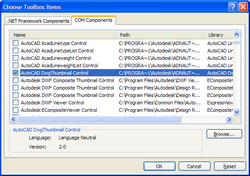
To make use of the DWG Thumbnail control in your application, you need to add it to your Visual Studio Toolbox, by right-clicking on it, selecting "Choose Items…" and using the COM Components tab to browse to the DwgThumbnail.ocx file. On my system the file is under "C:\Program Files\Autodesk\ADN AutoCAD Utilities\Utilities\AutoCAD Controls".
Dwg_thumbnail_adding_to_toolbox Dwg_thumbnail_in_toolbox

Figure 7 – adding the DWG Thumbnail control to your Visual Studio Toolbox

Now you can add control to your form and implement some logic to set the DwgFileName property to the location of your DWG file.

Embedding DWG TrueView in an HTML page or dialog

DWG TrueView can be embedded in an HTML page or dialog and controlled via its COM Automation interface, whether from HTML scripting (JavaScript, VBScript) or another choice of scripting language, if embedded in a dialog. There is a large caveat: this is not a fully supported mode of working with DWG TrueView, so don't have very high hopes. Simple embedding should work, but if you're trying to do anything more complex you're likely to run into problems.

Here's an HTML fragment, which shows how to embed the DWG TrueView ActiveX control:

[from https://projectpoint.buzzsaw.com/constructionmanagement/public/testDWG.htm?public]

<object

  id="dwgViewerCtrl"

  classid="clsid:6C7DC044-FB1E-4140-9223-052E5ABE7D24"

  height="100%"

  width="100%"

  data="DATA:application/x-oleobject;BASE64,RMB9bB77QEGSIwUuWr59JAAHAAARTAAArjAAAA==

">

</object>

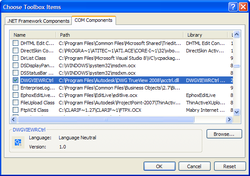
It's also straightforward to embed DWG TrueView in your .NET application, just like the DWG Thumbnail control: from your Visual Studio Toolbox, right-click and select "Choose Items…", selecting the "COM Components" tab and then the "DWGVIEWRCtrl" item from the list of controls:
Trueview_to_toolbox Trueview_in_toolbox

Figure 8 – adding the DWG TrueView control to your Visual Studio Toolbox

Now you simply need to add it to your form, and add some logic to select the filename to pass into the PutSourcePath() method of the control (either via a browse button, a text box or a hard-coded path).

To compare the capabilities of these two controls, we're now going to build a simple application that embeds the DWG Thumbnail control alongside DWG TrueView.

After adding the controls to our Toolbox, we design a simple form (ComparisonForm), with a single button to "Load" a DWG file (LoadButton). This button browses for a DWG and loads it into the DWG Thumbnail control and into DWG TrueView.

Here's the code:

Public Class ComparisonForm

  Private Sub LoadButton_Click _

    (ByVal sender As System.Object, _

    ByVal e As System.EventArgs) _

    Handles LoadButton.Click

    Dim dlg As New System.Windows.Forms.OpenFileDialog()

    dlg.InitialDirectory = _

      System.Environment.CurrentDirectory

    dlg.Filter = _

      "DWG files (*.dwg)|*.dwg|All files (*.*)|*.*"

    Dim oc As Cursor = Me.Cursor

    Dim fn As String = ""

    If dlg.ShowDialog() = Windows.Forms.DialogResult.OK Then

      Me.Cursor = Cursors.WaitCursor

      fn = dlg.FileName()

      Me.Refresh()

    End If

    If fn <> "" Then

      Me.AxDwgThumbnail1.DwgFileName = fn

      Me.AxDwgThumbnail1.Refresh()

      Me.AxAcCtrl1.PutSourcePath(fn)

    End If

    Me.Cursor = oc

  End Sub

End Class

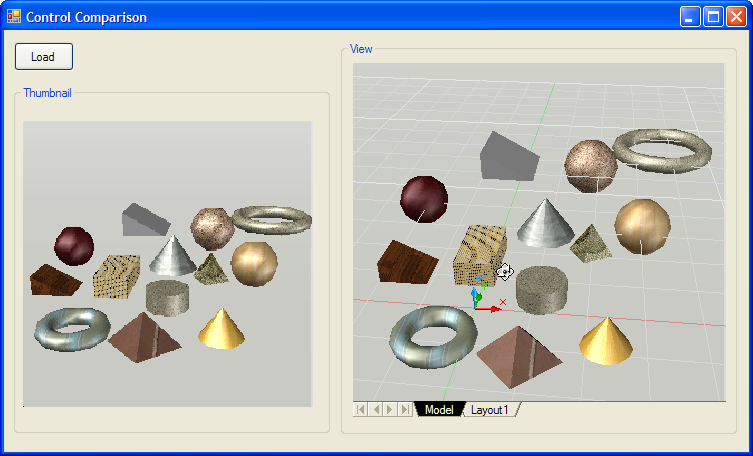
When we run the application and select our DWG, we see it loaded into both controls (the Thumbnail loads almost instantaneously, the DWG file takes longer to load into DWG TrueView, of course, as DWG TrueView also needs to be instantiated behind the scenes):
Dwg_thumbnail_and_trueview

Figure 9 – embedding the DWG Thumbnail control alongside DWG TrueView

  1. Good stuff Kean,
    You've been kicked (a good thing) - Trackback from CadKicks.com
    cadkicks.com/adk...

  2. Hai Kaen,
    Your code for DWG thumbnail and Dwg trueview works great.But I am using volo view in my vb6 application.Can you help me to code for zoom window on click of a button using volo view in vb6.I dont want to use right pop up menu.Already I have got for zoom extends.Please help me to do this.

    Thanks in advance,
    Saranya.

  3. Kean Walmsley Avatar

    Hi Saranya,

    Sorry - Volo View has not been a supported product for several years, I believe. I have neither information nor any recollection of how to do this.

    Regards,

    Kean

  4. Hi Kean,
    Thanks for ur fast reply.Kindly suggest any free ocx or dll for displaying dwg drawings in vb6.Also controlling layers and zoom options.If you give any sample codes in vb6 that will be more helpful

    regards,
    saranya

  5. Kean Walmsley Avatar

    DWG TrueView. I no longer use VB6, so cannot help you with samples, either.

    Kean

  6. Thanks.

    I have one more query.I have to extract dimensional values of a selected dwg drawing and export to excel.I have code for capturing block attributes.But some dimensions are not there in block attributes.Suppose I have capture 4 dimensions say a,b c,d only a,b are there in block attributes.How to capture the remaining 2 i.e c,d from the drawing.Please help me with this.

    Regards,
    Saranya.

  7. Kean Walmsley Avatar

    Saranya - this is not an avenue to receive support. Please post your questions to one of our discussion groups or submit them via ADN, if you're a member.

    Kean

  8. Where i casn get & how install DWGThumbnail AciveX Control pls?

  9. As mentioned in the article, you need to be a member of the Autodesk Developer Network to get this particular control.

    Kean

  10. Hi Kean,

    I want to display the drawing coordinates in a label, and I need to do zoom in passing the coordinates to the zoom. Any idea of how to do this?

  11. Sorry, Dennis: this isn't a support forum, so please submit your questions via ADN (if you're a member) or one of our online discussion groups.

    Kean

  12. Hi Kean, I am unable to use this DWG True View control technique with True View 2009/2010 in a Vista 64 development environment. I am not able to add the COM control to the toolbox. Is this still possible with 2009/10/11 True View? Or is it a 64-bit issue? I have been using this control for ages, thanks for the invaluable blog. Regards, Dale

  13. Hi Dale,

    I haven't hit this, myself, as I'm not using a 64-bit OS, as yet. I assume you've installed the 64-bit version of DWG TrueView: beyond that I don't have much to suggest, I'm afraid.

    Regards,

    Kean

  14. Hi Kean,
    Thanks for the prompt reply. Below is extra info in case you hear something.
    On Vista 64 I have been unable to add the control:
    1. DWGVIEWRCtrl is not listed in the COM Components tab or .Net Components tab.
    2. Using Browse to select the DWG True View 2009 control results in message: "Self-registration for C:\Program Files\DWG TrueView 2009\AcCtrl.dll failed"

    DWG True View 2009 (x64) is installed and working ok.
    Windows 7 (x64) has reached consumer level so I guess we will all be hitting 64-bit OS IDE soon. Thanks again, Dale

  15. Hi Kean, I have a resolution from ADN support that other readers of your blog might find helpful. Quote from Marat:"Visual Studio can't place 64-bit controls on forms simply because Visual Studio is a 32-bit application.
    In other words, it is not possible to place the DWG True View ActiveX 64-bit control in a form at the design time.
    A solution is to add the 64-bit ActiveX control to the .NET form at run time." He sent a C# sample and I have built a VB.net TrueView sample if anyone needs. Regards, Dale

  16. Hey Dale. I looking for a solution for my Autocad 2011 64 bits. Can you send me your sample?

    Thanks in advance.

    jvn

  17. does somebody has the code behind the unreachable site:
    [from projectpoint.buzzsaw.com/constructionmanagement/public/testDWG.htm?public]

    I'm trying since monday to embed the dwg trueviewer in a simple webpage.

    I've searched hard on the internet and the only thing I really found was this link.

    I'm really lost...
    Here's the code I used, but it's not working properly, only a blankpage apears with a black border:

    <object id="dwgViewerCtrl" classid="clsid:6C7DC044-FB1E-4140-9223-052E5ABE7D24" height="100%" width="100%" data="DATA:application/x-oleobject;BASE64,RMB9bB77QEGSIwUuWr59JAAHAAARTAAArjAAAA==">

    <param name="src" value="http://localhost/Office.dwg">
    </object>

    I've tested also src with "C:......Office.dwg"

    Nothing.

    Do you have the html-code, not only a fragment?

    thanks in advance!

    cheers, rob

  18. object id="dwgViewerCtrl" classid="clsid:6C7DC044-FB1E-4140-9223-052E5ABE7D24" height="100%" width="100%" data="DATA:application/x-oleobject;BASE64,RMB9bB77QEGSIwUuWr59JAAHAAARTAAArjAAAA=="

    param name="src" value="http://localhost/Office.dwg"
    /object

  19. Hi Robert,

    You should find some samples here:

    projectpoint.buzzsaw.com/constructionmanagement/public/Sample

    Regards,

    Kean

  20. Please i need some routine in vba for appplications where am i preview any block.(sorry for my english)
    thanks

  21. Sorry - if the information in this post doesn't help you, please post your request to the appropriate online discussion forum.

    Kean

  22. Jürgen A. Becker Avatar

    Hi Kean,

    I downloaded the DWGThumbnail-Control from the ADN-Website.
    Just one question: Can we ship this control with our application? Is it free to use?

    Regards Jürgen

  23. Hi Jürgen,

    You should check the EULA that comes with it, but my recollection is that if you're an ADN member then you can ship it without any additional charge.

    Regards,

    Kean

  24. When I try to drop DWG TrueView 2013 ActiveX (AcCtrl.dll) control from the Toolbox to myForm in Visual Studio 2010, the VS2010 is collapsing.
    When I changed the target Framework (2.0, 3.0, 3.5, 3.5 Client, 4.0, 4.0 Client) the result was the same.
    Do you have any idea how can I use this control in VS2010?
    My task is to implement a DWG viewer into our C# desktop application.

  25. Hi Kean,
    DWGThumbnail.ocx is no more with AutoCAD 2010-2012 or above.
    Are you aware of any alternative?

    Thanks

  26. In addition, ocx controls may not be working in 64bit AutoCAD, right?

  27. I haven't used TrueView in this way in several releases: I suggest asking via the Discussion Groups or the ADN team.

    Kean

  28. I think the ADN team has a 64-bit version of the DWG Thumbnail control (and for a recent version of AutoCAD).

    I suggest posting a question over on the AutoCAD DevBlog.

    Kean

Leave a Reply to Dale Bartlett Cancel reply

Your email address will not be published. Required fields are marked *