My first F# application for AutoCAD

I couldn't resist... I just had to have a play with this technology, today. 🙂

Here are the steps to get your first (very simple) F# application working inside AutoCAD.

First we need to download and install the latest F# distributable from here (at the time of writing this was the July 31 release - 1.9.2.9).

We create a base F# project, selecting the "F# Project" template:
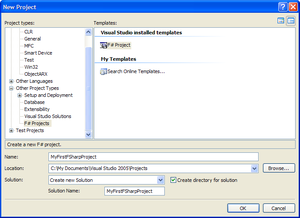
New_fsharp_project

We now add a new item to the project of type "F# Source File" to the project:
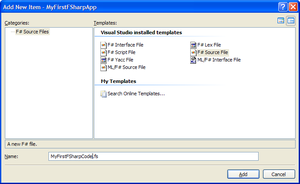
New_fsharp_source_file

The file created contains a lot of boilerplate code that is definitely worth looking at to get a feel for the basics of the F# language.

We now go ahead and replace this with our own F# code (which I created by borrowing liberally from one of the F# samples from CodePlex... I should say - once again - that this is my very first attempt at using F#, so this was intended to be functional rather than elegant :-).

(* Use lightweight F# syntax *)

#light

(* Declare a specific namespace

  and module name

*)

module MyNamespace.MyApplication

(* Import managed assemblies *)

open System

open System.Windows.Forms

open Autodesk.AutoCAD.Runtime

(* Now we declare our command *)

[<CommandMethod("Test")>]

let f () =

  (* Create our form *)

  let frm = new Form()

  frm.Text <- "This is a WinForm"

  frm.Height <- 80

  frm.Width <- 360

  frm.StartPosition <-

    FormStartPosition.CenterScreen

  (* Create the contents:

      a Label

      a TextBox

      a Button

  *)

  let lb = new Label()

  lb.Text <- "Enter text: "

  lb.Width <- 60

  lb.Left <- 10

  lb.Top <- 12

  let tb = new TextBox()

  tb.Left <- 80

  tb.Top <- 10

  tb.Width <- 200

  (* Define an EventHandler for

    the Click event and attach

    it to the Button

  *)

  let mb _ _ =

    ignore(

      MessageBox.Show(

        tb.Text,

        "Text typed:"

      )

    )

  let eh = new EventHandler(mb)

  let bt = new Button()

  bt.Text <- "Submit"

  bt.Left <- 290

  bt.Top <- 8

  bt.Width <- 50

  bt.Click.AddHandler(eh)

  (* Add the controls to our Form *)

  frm.Controls.Add(lb)

  frm.Controls.Add(tb)

  frm.Controls.Add(bt)

  (* Display the Form *)

  Application.Run(frm)

To get this code to build, we have to add assembly references to AutoCAD's managed assemblies in our project settings, as well as setting the project type to "DLL":
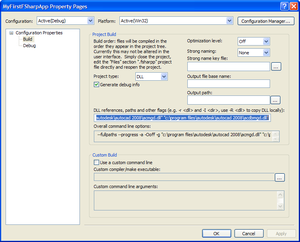
Fsharp_project_settings

The application should now build, creating "myfirstfsharpapp.dll". We load this in AutoCAD using the standard NETLOAD command, and then execute our TEST command:
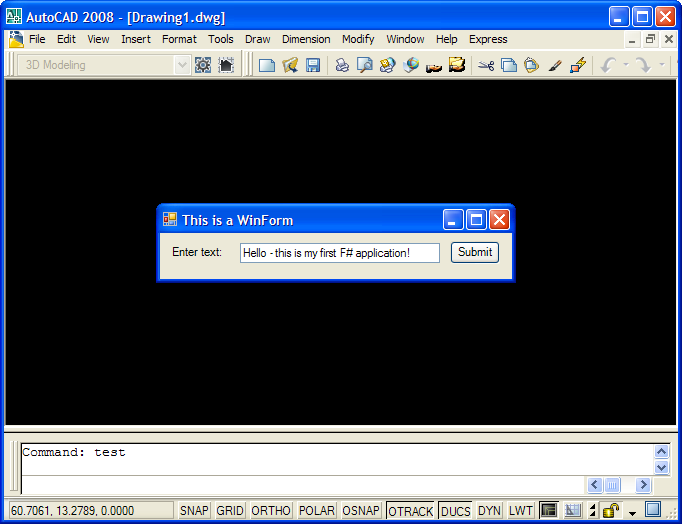
First_fsharp_application_running

When we enter some text and click "Submit", a message box is displayed with the string we entered:
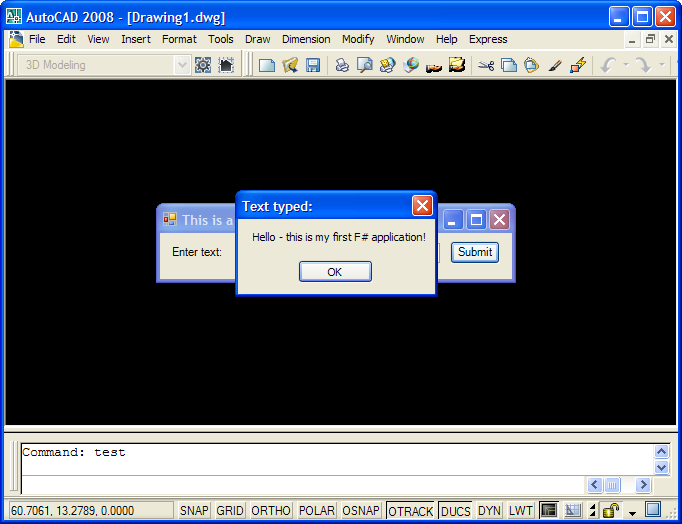
First_fsharp_application_running_2

That's it for this first attempt. In future posts I hope to solve more interesting problems with the F# language, but you do, of course, have to start somewhere.

  1. What is the advantage compare with C#? Is it necessary to learn this new language?

  2. There's certainly no need to learn it: it's another tool that may be of use to developers working in certain domains. The Wikipedia link in the article should be of some use in understanding the basic concepts of functional programming languages, otherwise this page has a quite good explanation/comparison.

    Kean

  3. Fernando Malard Avatar

    Kean,

    Will the F# open an opportunity to Autodesk replaces the AutoLISP language?
    F# is a functional programming as AutoLISP so it would be easier to create a cross-language conversion tool to migrate AutoLISP code to F#?
    Maybe Autodesk is planning to create its own .NET based AutoLISP...say A# ? 🙂

    Please keep posting information about F# x AutoCAD.

    Regards,

  4. There are no plans to replace AutoLISP with F# (and I don't see us having any in my lifetime): the F# language is likely to be of use to developers integrating math-intensive/simulation technologies with AutoCAD (and other, yet-to-be-determined-by-me-at-least uses), but it is not an easy leap, even from LISP.

    I'd like to gather information on what we might do inside AutoCAD to make F# a more natural environment for development, but only to provide tighter integration of an additional language option.

    Kean

  5. Good stuff Kean,
    You've been kicked (a good thing) - Trackback from CadKicks.com
    cadkicks.com/adk...

  6. With Lisp one could use a function from a text string in a database (for example "(setq QTY (* 2.5 WIDTH))" to calculate part specific quantities for BOM:s. I haven't found a way to do this in vb(.net), perhaps F# could do the trick?

  7. Hi Thomas,

    Yes - one of the features of LISP is the (eval) function.

    It doesn't appeat to be native functionality in either C# or VB.NET, but it does appear to be possible to implement:

    1
    1

    It remains to be seen whether either technique can be used to call through AutoCAD's managed API (the first one seems likely, I haven't really looked into the implementation of the second).

    The equivalent in F# appears to be the 1 mechanism.

    Regards,

    Kean

  8. DO YOU HAVE ANY DevTV Introduction to REALDWG Programming ?

  9. It's in the works and should be available sometime next year.

    Kean

  10. Are there any extra dependencies on the F#-compiled dll as compared to a C#-compiled one?

    I can run this example fine on my machine, but my colleague cannot get the TEST command after he NETLOADs the dll.

    Would you have any guess why?

    It's always tricky to debug things that work on one machine and not the other, when there's no obvious difference in the setup. He doesn't have F# installed, but I'm assuming that's not necessary?

    Any ideas would be greatly appreciated.
    Thanks.

  11. While F# code does compile down to IL, it does depend on certain new namespaces implemented in assemblies that are installed by with the F# implementation. So you will (for now) need to install F# on machines running the code, until it becomes a more fully integrated part of Visual Studio and probably the .NET Framework.

    Regards,

    Kean

  12. Just for completeness, I should mention that it's possible to remove the dependency of an F# application to the F# assemblies by compiling with the --standalone flag. This has the disadvantage of adding about 1Mb to the application as it statistically links the F# library.

Leave a Reply to Fernando Malard Cancel reply

Your email address will not be published. Required fields are marked *