This was a fun one to work on. The code in this post combines and extends upon techniques shown in two earlier posts: one showing how to plot multiple sheets and the other showing how to preview a single-sheet plot.
One of the key differences when plotting or previewing is that while plotting can directly support multiple sheets (assuming the device does so), previewing does not. The good news is that AutoCAD provides you the user interface elements to allow cycling through plots: the user is provided with "Next" and "Previous" buttons - it's then up to you to implement the appropriate logic to preview different sheets when the buttons are used.
I chose to use the same helper function for both preview and plot, even though they are a little different in nature. The reason is obvious (to me, at least) - it reduces the amount of code to debug and maintain - but it might, for some, make the code a little less easy to read. Ultimately the trick I used was to reduce the set of sheets being handled at the beginning of the function to a single sheet in the case of a preview, which allowed me to combine both approaches in a single function.
Here's the C# code:
using Autodesk.AutoCAD.Runtime;
using Autodesk.AutoCAD.ApplicationServices;
using Autodesk.AutoCAD.DatabaseServices;
using Autodesk.AutoCAD.EditorInput;
using Autodesk.AutoCAD.PlottingServices;
using System.Collections.Generic;
namespace PlottingApplication
{
public class PreviewCommands
{
[CommandMethod("mprev")]
static public void MultiSheetPreview()
{
Document doc =
Application.DocumentManager.MdiActiveDocument;
Editor ed = doc.Editor;
Database db = doc.Database;
ObjectIdCollection layoutsToPlot =
new ObjectIdCollection();
Transaction tr =
db.TransactionManager.StartTransaction();
using (tr)
{
// First we need to collect the layouts to
// plot/preview in tab order
SortedDictionary<int, ObjectId> layoutDict =
new SortedDictionary<int, ObjectId>();
BlockTable bt =
(BlockTable)tr.GetObject(
db.BlockTableId,
OpenMode.ForRead
);
foreach (ObjectId btrId in bt)
{
BlockTableRecord btr =
(BlockTableRecord)tr.GetObject(
btrId,
OpenMode.ForRead
);
if (btr.IsLayout &&
btr.Name.ToUpper() !=
BlockTableRecord.ModelSpace.ToUpper())
{
// The dictionary we're using will
// sort on the tab order of the layout
Layout lo =
(Layout)tr.GetObject(
btr.LayoutId,
OpenMode.ForRead
);
layoutDict.Add(lo.TabOrder,btrId);
}
}
// Let's now get the layout IDs and add them to a
// standard ObjectIdCollection
SortedDictionary<int,ObjectId>.ValueCollection vc =
layoutDict.Values;
foreach (ObjectId id in vc)
{
layoutsToPlot.Add(id);
}
// Committing is cheaper than aborting
tr.Commit();
}
// PlotEngines do the previewing and plotting
if (PlotFactory.ProcessPlotState ==
ProcessPlotState.NotPlotting)
{
int layoutNum = 0;
bool isFinished = false;
bool isReadyForPlot = false;
while (!isFinished)
{
// Create the preview engine with the appropriate
// buttons enabled - this depends on which
// layout in the list is being previewed
PreviewEngineFlags flags =
PreviewEngineFlags.Plot;
if (layoutNum > 0)
flags |= PreviewEngineFlags.PreviousSheet;
if (layoutNum < layoutsToPlot.Count - 1)
flags |= PreviewEngineFlags.NextSheet;
PlotEngine pre =
PlotFactory.CreatePreviewEngine((int)flags);
using (pre)
{
PreviewEndPlotStatus stat =
MultiplePlotOrPreview(
pre,
true,
layoutsToPlot,
layoutNum,
""
);
// We're not checking the list bounds for
// next/previous as the buttons are only shown
// when they can be used
if (stat == PreviewEndPlotStatus.Next)
{
layoutNum++;
}
else if (stat == PreviewEndPlotStatus.Previous)
{
layoutNum--;
}
else if (stat == PreviewEndPlotStatus.Normal ||
stat == PreviewEndPlotStatus.Cancel)
{
isFinished = true;
}
else if (stat == PreviewEndPlotStatus.Plot)
{
isFinished = true;
isReadyForPlot = true;
}
}
}
// If the plot button was used to exit the preview...
if (isReadyForPlot)
{
PlotEngine ple =
PlotFactory.CreatePublishEngine();
using (ple)
{
PreviewEndPlotStatus stat =
MultiplePlotOrPreview(
ple,
false,
layoutsToPlot,
-1,
"c:\\multisheet-previewed-plot"
);
}
}
}
else
{
ed.WriteMessage(
"\nAnother plot is in progress."
);
}
}
static PreviewEndPlotStatus MultiplePlotOrPreview(
PlotEngine pe,
bool isPreview,
ObjectIdCollection layoutSet,
int layoutNumIfPreview,
string filename
)
{
Document doc =
Application.DocumentManager.MdiActiveDocument;
Editor ed = doc.Editor;
Database db = doc.Database;
PreviewEndPlotStatus ret =
PreviewEndPlotStatus.Cancel;
ObjectIdCollection layoutsToPlot;
if (isPreview && layoutNumIfPreview >= 0)
{
// Preview is really pre-sheet, so we reduce the
// sheet collection to contain the one we want
layoutsToPlot = new ObjectIdCollection();
layoutsToPlot.Add(
layoutSet[layoutNumIfPreview]
);
}
else
{
// If we're plotting we need all the sheets,
// so copy the ObjectIds across
ObjectId[] ids = new ObjectId[layoutSet.Count];
layoutSet.CopyTo(ids,0);
layoutsToPlot = new ObjectIdCollection(ids);
}
Transaction tr =
db.TransactionManager.StartTransaction();
using (tr)
{
// Create a Progress Dialog to provide info
// and allow thej user to cancel
PlotProgressDialog ppd =
new PlotProgressDialog(
isPreview,
layoutsToPlot.Count,
true
);
using (ppd)
{
int numSheet = 1;
foreach (ObjectId btrId in layoutsToPlot)
{
BlockTableRecord btr =
(BlockTableRecord)tr.GetObject(
btrId,
OpenMode.ForRead
);
Layout lo =
(Layout)tr.GetObject(
btr.LayoutId,
OpenMode.ForRead
);
// We need a PlotSettings object
// based on the layout settings
// which we then customize
PlotSettings ps =
new PlotSettings(lo.ModelType);
ps.CopyFrom(lo);
// The PlotSettingsValidator helps
// create a valid PlotSettings object
PlotSettingsValidator psv =
PlotSettingsValidator.Current;
// We'll plot the extents, centered and
// scaled to fit
psv.SetPlotType(
ps,
Autodesk.AutoCAD.DatabaseServices.PlotType.Extents
);
psv.SetUseStandardScale(ps, true);
psv.SetStdScaleType(ps, StdScaleType.ScaleToFit);
psv.SetPlotCentered(ps, true);
// We'll use the standard DWFx PC3, as
// this supports multiple sheets
psv.SetPlotConfigurationName(
ps,
"DWFx ePlot (XPS Compatible).pc3",
"ANSI_A_(8.50_x_11.00_Inches)"
);
// We need a PlotInfo object
// linked to the layout
PlotInfo pi = new PlotInfo();
pi.Layout = btr.LayoutId;
// Make the layout we're plotting current
LayoutManager.Current.CurrentLayout =
lo.LayoutName;
// We need to link the PlotInfo to the
// PlotSettings and then validate it
pi.OverrideSettings = ps;
PlotInfoValidator piv =
new PlotInfoValidator();
piv.MediaMatchingPolicy =
MatchingPolicy.MatchEnabled;
piv.Validate(pi);
// We set the sheet name per sheet
ppd.set_PlotMsgString(
PlotMessageIndex.SheetName,
doc.Name.Substring(
doc.Name.LastIndexOf("\\") + 1
) +
" - " +
lo.LayoutName
);
if (numSheet == 1)
{
// All other messages get set once
ppd.set_PlotMsgString(
PlotMessageIndex.DialogTitle,
"Custom Preview Progress"
);
ppd.set_PlotMsgString(
PlotMessageIndex.CancelJobButtonMessage,
"Cancel Job"
);
ppd.set_PlotMsgString(
PlotMessageIndex.CancelSheetButtonMessage,
"Cancel Sheet"
);
ppd.set_PlotMsgString(
PlotMessageIndex.SheetSetProgressCaption,
"Sheet Set Progress"
);
ppd.set_PlotMsgString(
PlotMessageIndex.SheetProgressCaption,
"Sheet Progress"
);
ppd.LowerPlotProgressRange = 0;
ppd.UpperPlotProgressRange = 100;
ppd.PlotProgressPos = 0;
// Let's start the plot/preview, at last
ppd.OnBeginPlot();
ppd.IsVisible = true;
pe.BeginPlot(ppd, null);
// We'll be plotting a single document
pe.BeginDocument(
pi,
doc.Name,
null,
1,
!isPreview,
filename
);
}
// Which may contains multiple sheets
ppd.LowerSheetProgressRange = 0;
ppd.UpperSheetProgressRange = 100;
ppd.SheetProgressPos = 0;
PlotPageInfo ppi = new PlotPageInfo();
pe.BeginPage(
ppi,
pi,
(numSheet == layoutsToPlot.Count),
null
);
ppd.OnBeginSheet();
pe.BeginGenerateGraphics(null);
ppd.SheetProgressPos = 50;
pe.EndGenerateGraphics(null);
// Finish the sheet
PreviewEndPlotInfo pepi =
new PreviewEndPlotInfo();
pe.EndPage(pepi);
ret = pepi.Status;
ppd.SheetProgressPos = 100;
ppd.OnEndSheet();
numSheet++;
// Update the overall progress
ppd.PlotProgressPos +=
(100 / layoutsToPlot.Count);
}
// Finish the document
pe.EndDocument(null);
// And finish the plot
ppd.PlotProgressPos = 100;
ppd.OnEndPlot();
pe.EndPlot(null);
}
}
return ret;
}
}
}
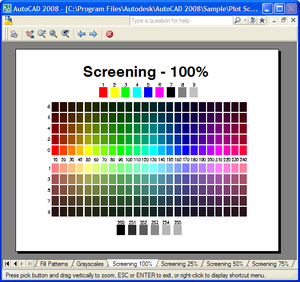
Here's what you see when you run the MPREV command:
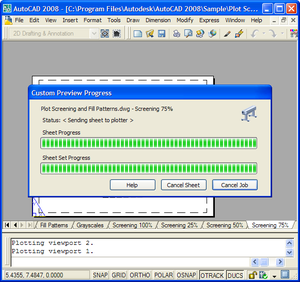
Once you select the plot button, the plot gets driven as before:


Leave a Reply to Jim Dowthwaite Cancel reply