This may strike you as a fairly bizarre title for a post, but I was inspired to develop the below code by a robotic lawnmower we bought about a year ago. This fantastic tool bounces around our garden, changing direction randomly when it hits the lawn's boundary. I got to thinking how to implement a similar technique to hatch a boundary with a polyline. While this is mostly for fun, I can see a few interesting potential uses: you might use the technique to test randomly generated paths of, for example, a robot or you might simply want to supplement traditional hatching with something more random in nature.
The principle is actually very simple: we're going to take a point on the edge of the boundary, and fire a ray (an infinite line) in a random direction - but planar to the boundary - and find out where it intersects the boundary. The tricky piece is that - depending on how "jagged" your boundary is - the ray may actually intersect multiple (i.e. > 2) times. If we want to stay inside the boundary - a requirement for my little robotic hatcher - we need to exclude the segments that would lead us to exiting the boundary to reach the other end.
Excluding the "bad" segments actually proved to be the tricky part. I ended up taking a DevNote from the ADN site (Testing Whether A Point Lies Inside A Curve, for those of you who are ADN members), and converting the C++ code to C#. I won't comment much on the implementation - it's using a similar technique to the one I have in my own code, firing rays to determine intersections - but to be frank I'm only vaguely aware of how it works (ah, the joys of copy & paste development :-).
Here's the converted code. I have it saved in a file called point-in-curve.cs, but clearly the specific name doesn't matter, as long as it is included in your project.
using Autodesk.AutoCAD.DatabaseServices;
using Autodesk.AutoCAD.Geometry;
namespace PointInCurve
{
public class Fns
{
enum IncidenceType
{
ToLeft = 0,
ToRight = 1,
ToFront = 2,
Unknown
};
static IncidenceType CurveIncidence(
Curve cur,
double param,
Vector3d dir,
Vector3d normal
)
{
Vector3d deriv1 =
cur.GetFirstDerivative(param);
if (deriv1.IsParallelTo(dir))
{
// Need second degree analysis
Vector3d deriv2 =
cur.GetSecondDerivative(param);
if (deriv2.IsZeroLength() ||
deriv2.IsParallelTo(dir))
return IncidenceType.ToFront;
else
if (deriv2.CrossProduct(dir).
DotProduct(normal) < 0)
return IncidenceType.ToRight;
else
return IncidenceType.ToLeft;
}
if (deriv1.CrossProduct(dir).
DotProduct(normal) < 0)
return IncidenceType.ToLeft;
else
return IncidenceType.ToRight;
}
static public bool IsInsideCurve(
Curve cur,
Point3d testPt
)
{
if (!cur.Closed)
// Cannot be inside
return false;
Polyline2d poly2d = cur as Polyline2d;
if (poly2d != null &&
poly2d.PolyType != Poly2dType.SimplePoly)
// Not supported
return false;
Point3d ptOnCurve =
cur.GetClosestPointTo(testPt, false);
if (Tolerance.Equals(testPt, ptOnCurve))
return true;
// Check it's planar
Plane plane = cur.GetPlane();
if (!cur.IsPlanar)
return false;
// Make the test ray from the plane
Vector3d normal = plane.Normal;
Vector3d testVector =
normal.GetPerpendicularVector();
Ray ray = new Ray();
ray.BasePoint = testPt;
ray.UnitDir = testVector;
Point3dCollection intersectionPoints =
new Point3dCollection();
// Fire the ray at the curve
cur.IntersectWith(
ray,
Intersect.OnBothOperands,
intersectionPoints,
0, 0
);
ray.Dispose();
int numberOfInters =
intersectionPoints.Count;
if (numberOfInters == 0)
// Must be outside
return false;
int nGlancingHits = 0;
double epsilon = 2e-6; // (trust me on this)
for (int i = 0; i < numberOfInters; i++)
{
// Get the first point, and get its parameter
Point3d hitPt = intersectionPoints[i];
double hitParam =
cur.GetParameterAtPoint(hitPt);
double inParam = hitParam - epsilon;
double outParam = hitParam + epsilon;
IncidenceType inIncidence =
CurveIncidence(cur, inParam, testVector, normal);
IncidenceType outIncidence =
CurveIncidence(cur, outParam, testVector, normal);
if ((inIncidence == IncidenceType.ToRight &&
outIncidence == IncidenceType.ToLeft) ||
(inIncidence == IncidenceType.ToLeft &&
outIncidence == IncidenceType.ToRight))
nGlancingHits++;
}
return ((numberOfInters + nGlancingHits) % 2 == 1);
}
}
}
I then implemented my own code to make use of this library (in this case saved in bounce-hatch.cs):
using Autodesk.AutoCAD.Runtime;
using Autodesk.AutoCAD.ApplicationServices;
using Autodesk.AutoCAD.DatabaseServices;
using Autodesk.AutoCAD.Geometry;
using Autodesk.AutoCAD.EditorInput;
using PointInCurve;
namespace BounceHatch
{
public class Commands
{
// Get a vector in a random direction
public Vector3d randomUnitVector(
PlanarEntity pl
)
{
// Create our random number generator
System.Random ran =
new System.Random();
// First we get the absolute value
// of our x and y coordinates
double x = ran.NextDouble();
double y = ran.NextDouble();
// Then we negate them, half of the time
if (ran.NextDouble() < 0.5)
x = -x;
if (ran.NextDouble() < 0.5)
y = -y;
// Create a 2D vector and return it as
// 3D on our plane
Vector2d v2 = new Vector2d(x, y);
return new Vector3d(pl, v2);
}
// Allow tracing in 3 colours, depending on
// whether the vector was accepted, rejected,
// or superseded by a better one
enum TraceType
{
Accepted = 0,
Rejected = 1,
Superseded = 2
};
void TraceSegment(
Point3d start,
Point3d end,
TraceType type
)
{
Editor ed =
Application.DocumentManager.MdiActiveDocument.Editor;
int vecCol = 0;
switch (type)
{
case TraceType.Accepted:
vecCol = 3;
break;
case TraceType.Rejected:
vecCol = 1;
break;
case TraceType.Superseded:
vecCol = 2;
break;
}
Matrix3d trans =
ed.CurrentUserCoordinateSystem.Inverse();
ed.DrawVector(
start.TransformBy(trans),
end.TransformBy(trans),
vecCol,
false
);
}
// Test whether a segment goes outside our boundary
bool TestSegment(
Curve cur,
Point3d start,
Vector3d vec
)
{
// Test 10 points along the segment...
// (This is inefficient, but it's not a problem for
// this application. Some of the redundant overhead
// of firing rays for each iteration could be factored
// out, among other enhancements, I expect.)
bool result = true;
for (int i = 1; i < 10; i++)
{
Point3d test = start + (vec * 0.1 * i);
// Call into our IsInsideCurve library function,
// "and"-ing the results
result &=
PointInCurve.Fns.IsInsideCurve(cur, test);
if (!result)
break;
}
return result;
}
// For a particular boundary, get the next vertex on the
// curve, found by firing a ray in a random direction
Point3d nextBoundaryPoint(
Curve cur,
Point3d start,
bool trace
)
{
// Create and define our ray
Ray ray = new Ray();
ray.BasePoint = start;
ray.UnitDir =
randomUnitVector(cur.GetPlane());
// Get the intersection points until we
// have at least 2 returned
// (will usually happen straightaway)
Point3dCollection pts =
new Point3dCollection();
do
{
cur.IntersectWith(
ray,
Intersect.OnBothOperands,
pts,
0, 0
);
if (pts.Count < 2)
{
ray.UnitDir =
randomUnitVector(cur.GetPlane());
}
}
while (pts.Count < 2);
ray.Dispose();
// For each of the intersection points - which
// are points elsewhere on the boundary - let's
// check to make sure we don't have to leave the
// area to reach them
bool first = true;
double nextLen = 0.0;
Point3d nextPt = start;
foreach (Point3d pt in pts)
{
// Get the distance between this intersection
// and the last accepted point - both points
// are on our ray
Vector3d vec = pt - start;
double len = vec.Length;
// If the vector length is positive and either
// the first to be a candidate or closer than
// the previous one (we generally select the
// closest non-zero option) then check it out
// further
if (len > Tolerance.Global.EqualVector &&
(first || len < nextLen))
{
// Run our tests to make sure the segment is
// inside our boundary
if (TestSegment(cur, start, vec))
{
// Draw the previous segment before overwriting
if (trace)
TraceSegment(
start,
nextPt,
TraceType.Superseded
);
nextLen = len;
nextPt = pt;
first = false;
}
else
// This segment has been rejected,
// as it goes outside
if (trace)
TraceSegment(
start,
pt,
TraceType.Rejected
);
}
}
// Draw our accepted segment and return it
if (nextLen > Tolerance.Global.EqualVector)
{
if (trace)
TraceSegment(
start,
nextPt,
TraceType.Accepted
);
return nextPt;
}
else
// If we didn't find a good segment, throw an
// exception to be handled by the calling function
throw new Exception(
ErrorStatus.PointNotOnEntity,
"Could not find another intersection point."
);
}
[CommandMethod("BOUNCE")]
public void BounceHatch()
{
Document doc =
Application.DocumentManager.MdiActiveDocument;
Database db = doc.Database;
Editor ed = doc.Editor;
bool doTrace = false;
// Get various bits of user input
PromptEntityOptions peo =
new PromptEntityOptions(
"\nSelect point on closed loop: "
);
PromptEntityResult per =
ed.GetEntity(peo);
if (per.Status != PromptStatus.OK)
return;
PromptIntegerOptions pio =
new PromptIntegerOptions(
"\nEnter number of segments: "
);
pio.DefaultValue = 500;
PromptIntegerResult pir =
ed.GetInteger(pio);
if (pir.Status != PromptStatus.OK)
return;
PromptKeywordOptions pko =
new PromptKeywordOptions(
"\nDisplay segment trace: "
);
pko.Keywords.Add("Yes");
pko.Keywords.Add("No");
pko.Keywords.Default = "Yes";
PromptResult pkr =
ed.GetKeywords(pko);
if (pkr.Status != PromptStatus.OK)
return;
Transaction tr =
db.TransactionManager.StartTransaction();
using (tr)
{
// Check the selected object - make sure it's
// a closed loop (could do some more checks here)
DBObject obj =
tr.GetObject(per.ObjectId, OpenMode.ForRead);
Curve cur = obj as Curve;
if (cur == null)
ed.WriteMessage("\nThis is not a curve.");
else
{
if (!cur.Closed)
ed.WriteMessage("\nLoop is not closed.");
else
{
// Extract parameters from our user-input...
// A flag for our vector tracing
doTrace = (pkr.StringResult == "Yes");
// The number of segments
int numBounces = pir.Value;
// The first vertex of our path
Point3d latest =
per.PickedPoint.
TransformBy(ed.CurrentUserCoordinateSystem).
OrthoProject(cur.GetPlane());
// Create our polyline path, adding the
// initial vertex
Polyline path = new Polyline();
path.Normal = cur.GetPlane().Normal;
path.AddVertexAt(
0,
latest.Convert2d(cur.GetPlane()),
0.0, 0.0, 0.0
);
// For each segment, get the next vertex
// and add it to the path
int i = 1;
while (i <= numBounces)
{
try
{
Point3d next =
nextBoundaryPoint(cur, latest, doTrace);
path.AddVertexAt(
i++,
next.Convert2d(cur.GetPlane()),
0.0, 0.0, 0.0
);
latest = next;
}
catch (Exception ex)
{
// If there's an exception we know about
// then ignore it and allow the loop to
// continue (we probably did not increment
// i in this case, as it will fail on
// nextBoundaryPoint)
if (ex.ErrorStatus !=
ErrorStatus.PointNotOnEntity)
throw ex;
}
}
// Open the modelspace
BlockTable bt =
(BlockTable)
tr.GetObject(
db.BlockTableId,
OpenMode.ForRead
);
BlockTableRecord btr =
(BlockTableRecord)
tr.GetObject(
bt[BlockTableRecord.ModelSpace],
OpenMode.ForWrite
);
// We need to transform the path polyline so
// that it's over our boundary
path.TransformBy(
Matrix3d.Displacement(
cur.StartPoint - Point3d.Origin
)
);
// Add our path to the modelspace
btr.AppendEntity(path);
tr.AddNewlyCreatedDBObject(path, true);
}
}
// Commit, whether we added a path or not.
tr.Commit();
// If we're tracing, pause for user input
// before regenerating the graphics
if (doTrace)
{
pko =
new PromptKeywordOptions(
"\nPress return to clear trace vectors: "
);
pko.AllowNone = true;
pko.AllowArbitraryInput = true;
pkr = ed.GetKeywords(pko);
ed.Regen();
}
}
}
}
}
As I've mentioned in the above code, this is not the most efficient possible implementation: we do several (currently 10) checks per potential vertex, to see whether it needs to be excluded. This number might well be reduced, or the library could be updated to provide a more efficient implementation. But for our purposes it works fine, so I'm not going to worry too much. Optimization is left as an exercise for the reader. 🙂
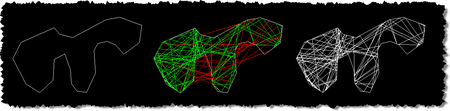
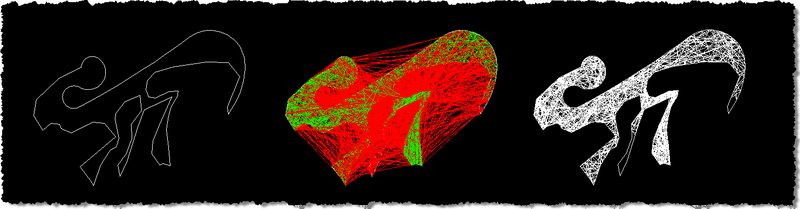
Here's what happens when we run the BOUNCE command on a couple of boundaries. The first one I just created for testing - it's a lightweight polyline with three downward prongs that makes it likely that rays fired from the boundary will intersect it multiple (>2) times. For each of these examples I've composed three views: the boundary (pre-hatching), the trace vectors displayed to show the successful vectors (in green) and the excluded vectors (in red), and then the final hatch.
This first loop has been hatched with 100 segments, to clearly show the way the pattern works (or can work, as it's randomly generated).
The second loop I started drawing with straight segments and then switched to arcs. Somehow I ended up creating something that looks like it's out of Alien, although I wasn't (consciously, at least) in any way inspired by Giger (even though he's Swiss and has a museum in nearby Gruyères). Anyway, this one I hatched with 1000 segments, selecting the initial point on the boundary of the left-most leg: you can see that even with that many segments, not every piece of the boundary was reached using a random algorithm.
Update:
While working with this a little more, I realised I was not disposing the ray objects we were using for intersection calculations. I've now fixed the above code by inserting calls to ray.Dispose() in the appropriate places.


Leave a Reply to Juergen.Becker@CAD-Becker.de Cancel reply