Using a jig to rotate an AutoCAD entity via .NET

An interesting request came in via a previous post followed up by a similar question came in via another post. The original problem was to rotate a rectangular polyline entity around its centre, and be able to continue rotating it afterwards. A few things were interesting to me:

  • Rectangles are simply polylines between four points, so have no inherent concept of either a centre point or a rotation angle
    • The obvious answer (to me, at least) being to calculate the centre and store the rotation as XData on the polyline
  • To modify an entity graphically it makes sense to use a jig
    • Most examples show how to use jigs to create new entities, not modify existing ones

So with that in mind, I created the below C# code to solve this problem:

using Autodesk.AutoCAD.ApplicationServices;

using Autodesk.AutoCAD.DatabaseServices;

using Autodesk.AutoCAD.EditorInput;

using Autodesk.AutoCAD.Runtime;

using Autodesk.AutoCAD.Geometry;


namespace RotatingRectangles

{

  public class Commands

  {

    // Define some constants we'll use to

    // store our XData


    // AppName is our RDS (TTIF, for

    // "Through The InterFace") plus an indicator

    // what it's for (ROTation)


    const string kRegAppName = "TTIF_ROT";

    const int kAppCode = 1001;

    const int kRotCode = 1040;


    class RotateJig : EntityJig

    {

      // Declare some internal state


      double m_baseAngle, m_deltaAngle;

      Point3d m_rotationPoint;

      Matrix3d m_ucs;


      // Constructor sets the state and clones

      // the entity passed in

      // (adequate for simple entities)


      public RotateJig(

        Entity ent,

        Point3d rotationPoint,

        double baseAngle,

        Matrix3d ucs)

        : base(ent.Clone() as Entity)

      {

        m_rotationPoint = rotationPoint;

        m_baseAngle = baseAngle;

        m_ucs = ucs;

      }


      protected override SamplerStatus Sampler(

        JigPrompts jp

      )

      {

        // We acquire a single angular value


        JigPromptAngleOptions jo =

          new JigPromptAngleOptions(

            "\nAngle of rotation: "

          );

        jo.BasePoint = m_rotationPoint;

        jo.UseBasePoint = true;


        PromptDoubleResult pdr =

          jp.AcquireAngle(jo);


        if (pdr.Status == PromptStatus.OK)

        {

          // Check if it has changed or not

          // (reduces flicker)


          if (m_baseAngle == pdr.Value)

          {

            return SamplerStatus.NoChange;

          }

          else

          {

            // Set the change in angle to

            // the new value


            m_deltaAngle = pdr.Value;

            return SamplerStatus.OK;

          }

        }

        return SamplerStatus.Cancel;

      }


      protected override bool Update()

      {

        // Filter out the case where a zero delta is provided


        if (m_deltaAngle > Tolerance.Global.EqualPoint)

        {

          // We rotate the polyline by the change

          // minus the base angle


          Matrix3d trans =

            Matrix3d.Rotation(

              m_deltaAngle - m_baseAngle,

              m_ucs.CoordinateSystem3d.Zaxis,

              m_rotationPoint);

          Entity.TransformBy(trans);


          // The base becomes the previous delta

          // and the delta gets set to zero


          m_baseAngle = m_deltaAngle;

          m_deltaAngle = 0.0;

        }


        return true;

      }


      public Entity GetEntity()

      {

        return Entity;

      }


      public double GetRotation()

      {

        // The overall rotation is the

        // base plus the delta


        return m_baseAngle + m_deltaAngle;

      }

    }


    [CommandMethod("ROT")]

    public void RotateEntity()

    {

      Document doc =

        Application.DocumentManager.MdiActiveDocument;

      Editor ed = doc.Editor;

      Database db = doc.Database;


      // First we prompt for the entity to rotate


      PromptEntityOptions peo =

        new PromptEntityOptions(

          "\nSelect entity to rotate: "

        );

      PromptEntityResult per =

        ed.GetEntity(peo);


      if (per.Status == PromptStatus.OK)

      {

        Transaction tr =

          db.TransactionManager.StartTransaction();

        using (tr)

        {

          DBObject obj =

            tr.GetObject(per.ObjectId, OpenMode.ForRead);

          Entity ent = obj as Entity;


          // Use the origin as the default center


          Point3d rotationPoint = Point3d.Origin;


          // If the entity is a polyline,

          // assume it is rectangular and then

          // set the rotation point as its center


          Polyline pl = obj as Polyline;

          if (pl != null)

          {

            LineSegment3d ps0 =

              pl.GetLineSegmentAt(0);

            LineSegment3d ps1 =

              pl.GetLineSegmentAt(1);

            Vector3d vec =

              ((ps0.EndPoint - ps0.StartPoint) / 2.0) +

              ((ps1.EndPoint - ps1.StartPoint) / 2.0);

            rotationPoint = pl.StartPoint + vec;

          }


          // Get the base rotation angle stored with the

          // entity, if there was one (default is 0.0)


          double baseAngle = GetStoredRotation(obj);


          if (ent != null)

          {

            // Get the current UCS, to pass to the Jig


            Matrix3d ucs =

              ed.CurrentUserCoordinateSystem;


            // Create our jig object


            RotateJig jig =

              new RotateJig(

                ent,

                rotationPoint,

                baseAngle,

                ucs

              );


            PromptResult res = ed.Drag(jig);

            if (res.Status == PromptStatus.OK)

            {

              // Get the overall rotation angle

              // and dispose of the temp clone


              double newAngle = jig.GetRotation();

              jig.GetEntity().Dispose();


              // Rotate the original entity


              Matrix3d trans =

                Matrix3d.Rotation(

                  newAngle - baseAngle,

                  ucs.CoordinateSystem3d.Zaxis,

                  rotationPoint);


              ent.UpgradeOpen();

              ent.TransformBy(trans);


              // Store the new rotation as XData


              SetStoredRotation(ent, newAngle);

            }

          }

          tr.Commit();

        }

      }

    }


    // Helper function to create a RegApp


    static void AddRegAppTableRecord(string regAppName)

    {

      Document doc =

        Application.DocumentManager.MdiActiveDocument;

      Editor ed = doc.Editor;

      Database db = doc.Database;


      Transaction tr =

        doc.TransactionManager.StartTransaction();

      using (tr)

      {

        RegAppTable rat =

          (RegAppTable)tr.GetObject(

            db.RegAppTableId,

            OpenMode.ForRead,

            false

          );

        if (!rat.Has(regAppName))

        {

          rat.UpgradeOpen();

          RegAppTableRecord ratr =

            new RegAppTableRecord();

          ratr.Name = regAppName;

          rat.Add(ratr);

          tr.AddNewlyCreatedDBObject(ratr, true);

        }

        tr.Commit();

      }

    }


    // Store our rotation angle as XData


    private void SetStoredRotation(

      DBObject obj, double rotation)

    {

      AddRegAppTableRecord(kRegAppName);

      ResultBuffer rb = obj.XData;

      if (rb == null)

      {

        rb =

          new ResultBuffer(

            new TypedValue(kAppCode, kRegAppName),

            new TypedValue(kRotCode, rotation)

          );

      }

      else

      {

        // We can simply add our values - no need

        // to remove the previous ones, the new ones

        // are the ones that get stored


        rb.Add(new TypedValue(kAppCode, kRegAppName));

        rb.Add(new TypedValue(kRotCode, rotation));

      }

      obj.XData = rb;

      rb.Dispose();

    }


    // Retrieve the existing rotation angle from XData


    private double GetStoredRotation(DBObject obj)

    {

      double ret = 0.0;


      ResultBuffer rb = obj.XData;

      if (rb != null)

      {

        // If we find our group code, it means that on

        // the next iteration, we'll get our rotation


        bool bReadyForRot = false;

        foreach (TypedValue tv in rb)

        {

          if (bReadyForRot)

          {

            if (tv.TypeCode == kRotCode)

              ret = (double)tv.Value;

            bReadyForRot = false;

          }

          if (tv.TypeCode == kAppCode)

            bReadyForRot = true;

        }

        rb.Dispose();

      }

      return ret;

    }

  }

}

To try this out, we can use the RECTANG command, to create a horizontal rectangle, and then use our custom ROT command to rotate it:

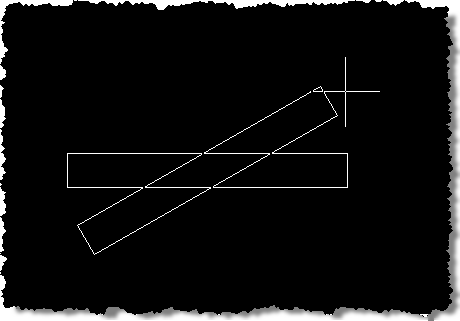
Horizontal rectangle Rotating a rectangle Rotated rectangle

Calling the ROT command subsequently works fine, as it "remembers" the angle it was rotated at. If other tools are used to rotate the rectangle, all bets are off. One alternative would be to determine the "rotation" by performing slightly deeper analysis on the rectangle: determining the longer side and getting its angle should do it. It would also be trivial to implement a command to set the rotation to one input by the user (whether by selecting two points or entering it).

Update:

For some reason the Update() function gets called with a zero angle - something I've only noticed in AutoCAD 2011, so far. To protect against this, I've adjusted the above code to check m_deltaAngle against the standard tolerance: if it's less than that we ignore the call. This seems to solve the problem reported in the comments (thanks, Guillermo!).

34 responses to “Using a jig to rotate an AutoCAD entity via .NET”

  1. Fernando Malard Avatar

    Great Kean!

    Is it possible to create a Jig class on C# (as you did) and use it from inside an unmanaged C++ code module?

    Further, if I have a .NET wrapper around my custom entity C++ class can I use the same approach to create my custom class Jig inside C# ?

    Best regards.

  2. Hi Fernando,

    I haven't tried it, but I think you can have managed sections within unmanaged C++ that can call (for instance) C# code.

    And yes - the same approach should work for custom entities with managed wrappers.

    Kean

  3. Hi Kean,

    Any time Great!!

    This is exactly what I was searching for... My only problem is that when I perform the rotation with the ROT command the only thing that moves is the upper segment of the rectangle and not the whole entity (like in your screenshot). I don't know if I go wrong somewere (I only cut and pasted your code!) or what else... Anyone got the same problem?

    Regards,

    Danny

  4. Hi Danny,

    Sounds like your rectangle is actually a series of lines, rather than being a single polyline. Have you tried creating the rectangle via the RECTANG command?

    The code would need to be modified to handle a series of lines...

    Cheers,

    Kean

  5. Hi Kean,

    I create my rectangle with the command RECTANG and it's actually a single Polyline. I didn't change anything from your code and debugging things seems works.

    Here is a screenshot that show exactly the problem.

    download337.mediafir...

    Cheers,

    Danny

  6. Hi Danny,

    Very strange. Please email me a DWG and let me know which version of AutoCAD you're using.

    Cheers,

    Kean

  7. Hi Kean, I've been experimenting with block insertion and rotation jigs and was wondering if you have any samples that show how to use a jig for scaling an object? (or if it's even possible?)

    Thanks in advance,

    Alex.

  8. Hi Alex,

    I haven't attempted this, myself.

    Regards,

    Kean

  9. SUBIR KUMAR DUTTA Avatar
    SUBIR KUMAR DUTTA

    Hi Kean,

    Is there any feature in AutoCAD VBA similar to jig. Actually I have developed an application using AutoCAD VBA to simulate the path by a 2 ARM 3D Robot after reading a .cnc file with GCODEs. Its working smoothly.

    But what I also want to implement a rubber band like of thing . When user will try to move the gripper of the robot ( a point object in gripper layer with specific handle in my case ) , the robot arms will also react to rotate / align using my earlier inverse kinematics solution.

    In future I am planning to convert it into ObjectARX code for multiple arms in 3D envelop ( not only moving in 2d pane ).

  10. Hi Subir,

    I don't know of a way to do this from VBA, other than by calling a command defined using ObjectARX or .NET.

    You should feel free to submit your support questions to my team via the ADN website, as you work for an ADN member.

    Regards,

    Kean

  11. Hi kean,

    great work, is it possible to modify the point of rotation too?

  12. Absolutely: check the assignment of the rotationPoint variable... you should be able to manipulate that to suit your needs.

    Kean

  13. Something doesn't seem quite right in the Sampler function. I believe Update gets called whenever Sampler returns SamplerStatus.OK. Since m_deltaAngle is set to 0.0 in Update, it will pretty much always be 0.0 in Sampler. Thus,

    if(m_deltaAngle == pdr.Value)
    will always be false... and does nothing to reduce flicker.

  14. You're quite right, Mike.

    The test should be against m_baseAngle rather than m_deltaAngle.

    I've fixed the code in the post - thanks for bringing this to my attention.

    Kean

  15. Hi, Kean. What to do if: i draw a polyline, then change WCS to UCS and then use your function? Base angle is incorrect

  16. Hi Modis,

    The base angle could be considered in terms of the WCS, and therefore would need transforming relative to the current UCS (this would need to be done when getting the angle and then probably transformed backwards when setting it).

    This is unfortunately being left as an exercise for the reader...

    Good luck!

    Kean

  17. Guillermo Bellmann Avatar
    Guillermo Bellmann

    Hi Kean,
    I've tried this example in AutoCAD 2011 and got a strange behavior:
    When I rotate the rectangle the jig works fine, then, when I decide to finish, I just click the screen and the rectang doesn't rotate.
    I tried putting a value for the angle, and this way it works fine.
    If I use the command with just the mouse click after the rectangle was rotated, it returns to the original position, i.e. zero degrees...
    Hope you can help.
    Thanks in advance.
    Regards

  18. Hi Guillermo,

    I've made a small change to the above code (as described in the Update section at the bottom), to address this.

    Thanks for the feedback!

    Kean

  19. Guillermo Bellmann Avatar
    Guillermo Bellmann

    Excellent!!! Now it works as expected, thank you.
    BTW, great blog!

  20. Hi Kean,
    Using the code above that checks against the tolerance, I notice that when I cut ortho on - I can hit 90, 180, and 270 degree angles, but it won't rotate back to 0. If I turn ortho off, I get full 360 degrees rotation.

    Any ideas?

    Thanks
    Jason

  21. Hi Jason,

    Does it only happen when checking the tolerance?

    Cheers,

    Kean

  22. Yes - when I comment out the tolerance check, it will rotate fine with ortho on - however it still inserts back at 0 rotation as mentioned above.

  23. Kean Walmsley Avatar

    Hi Jason,

    I've tried to work around this issue, but with no luck. The "incremental rotation" approach doesn't play well with Ortho, given that additional Update() call in the jig.

    Perhaps ADN or someone on the AutoCAD .NET Discussion Group can help.

    Sorry for the bad news,

    Kean

  24. Hi Kean,
    Could you suggest any modification to not display the original object during the rotation?
    Great blog BTW.

  25. Kean Walmsley Avatar

    Hi Sam,

    Thanks!

    You might try setting the visibility to false (after selection) before the jig itself starts.

    Cheers,

    Kean

  26. Hi Kean,
    Great job!
    But can you tell me can i use this code not for one selected object but for delection set?

  27. Kean Walmsley Avatar
    Kean Walmsley

    Hi SS,

    You'd need to turn it into a DrawJig and then do some work to manipulate a list of entities.

    Which is beyond the scope of this post, unfortunately. Someone on the AutoCAD .NET Discussion Group may have something to share, though.

    Regards,

    Kean

  28. Hi. First of all I'd just like to say that your blog has proven an invaluable resource for starting with developing of a CAD plugin. Lastly I'd like to ask why you are using "complex" matrix-transformations when a BlockReference has a perfectly good "Rotation" property? Or does that "Rotation"-property not work as I would expect it to?

    - Alxandr

  29. Kean Walmsley Avatar

    Hi Alxandr,

    This code is intended to work with AutoCAD entities that don't all have a handy Rotation property. If you want to target BlockReferences specifically, you could certainly choose to simplify the code slightly.

    Regards,

    Kean

  30. Hi Kean,

    I am trying to rotate a series of entities (all object IDs are stored in an object ID Collection variable). I'd like to make a jig of this so that the user can see where they are rotating the entities to. Is this possible?

    Thanks,
    Alex

    1. Hi Alex,

      Sure - although you'll need a DrawJig rather than an EntityJig.

      Regards,

      Kean

      1. Oh, okay. I'll work on that. Thank you for the quick reply.

  31. Hi thx for the post - one question why is a cloned entity passed to the jig base class constructor? Chrs

    1. Sorry - please post to the discussion groups for this kind of question. I'm not working with this stuff, right now, and someone else should really comment.

      Kean

Leave a Reply to Kean Walmsley Cancel reply

Your email address will not be published. Required fields are marked *