Back in this previous post we looked at some code to add new annotation scales and attach them to textual entities inside AutoCAD. As a comment on that post, someone requested information on how to safely delete annotation scales from a drawing. I (very) speculatively responded, at the time, that it was probably appropriate to use Database.Purge() to make sure there were no dependencies on the scales before erasing them. I've just seen an internal email confirming this, so I thought I'd write it up in a quick post. [As a side not, this is presumably the technique used in the scale list cleanup utility.]
Here's the C# code:
using Autodesk.AutoCAD.ApplicationServices;
using Autodesk.AutoCAD.DatabaseServices;
using Autodesk.AutoCAD.EditorInput;
using Autodesk.AutoCAD.Runtime;
namespace AnnotationScaling
{
public class Commands
{
[CommandMethod("ASD")]
public void DeleteAll()
{
Document doc =
Application.DocumentManager.MdiActiveDocument;
Database db = doc.Database;
Editor ed = doc.Editor;
ObjectContextManager ocm =
db.ObjectContextManager;
if (ocm != null)
{
// Now get the Annotation Scaling context collection
// (named ACDB_ANNOTATIONSCALES_COLLECTION)
ObjectContextCollection occ =
ocm.GetContextCollection("ACDB_ANNOTATIONSCALES");
if (occ != null)
{
// Create a collection to collect the IDs
ObjectIdCollection oic =
new ObjectIdCollection();
foreach (ObjectContext oc in occ)
{
if (oc is AnnotationScale)
oic.Add(
new ObjectId(oc.UniqueIdentifier)
);
}
// Check the object references using Purge
// (this does NOT purge the objects, it only
// filters the objects that are not purgable)
db.Purge(oic);
// Now let's erase each of the objects left
Transaction tr =
db.TransactionManager.StartTransaction();
using (tr)
{
// Maintain a count which we decrement for
// each error we receive on open/erase
int count = oic.Count;
foreach (ObjectId id in oic)
{
try
{
DBObject obj =
tr.GetObject(id, OpenMode.ForWrite);
obj.Erase();
}
catch
{
count--;
}
}
tr.Commit();
// Inform the user of the results
ed.WriteMessage(
"\n{0} annotation scale{1} removed.",
count,
count == 1 ? "" : "s"
);
}
}
}
}
}
}
To test this, take a look at the number of annotation scales by running the SCALELISTEDIT command in a new drawing (based on acad.dwt):
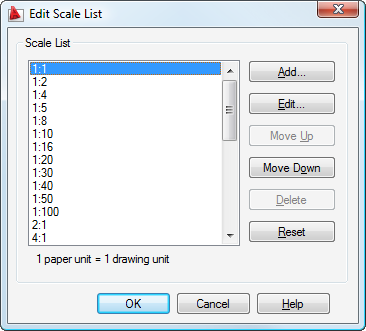
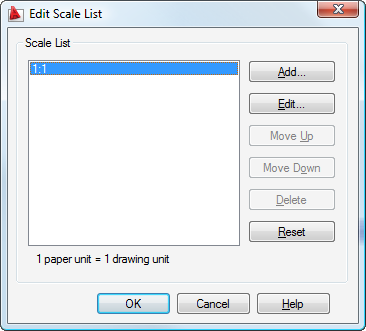
Here's what happens when we run the ASD command:
Command: ASD
32 annotation scales removed.
And here's the greatly-reduced list of annotation scale objects when we re-run SCALELISTEDIT:


Leave a Reply to steve Cancel reply