AutoCAD .NET version of the ObjectARX BlockView sample

Fenton Webb, from DevTech Americas, has been beavering away on a .NET port of the ObjectARX BlockView sample (found on the ObjectARX SDK under samples/graphics/BlockView). Thanks, Fents! 🙂

Here is the C# source project for Visual Studio 2005. To build it you will almost certainly need to remap the acdbmgd.dll and acmgd.dll assembly references in the project.

One important note: if you load this project and try to view the BlockViewDialog in the Visual Studio Designer, the Visual Studio application will almost certainly crash. This is because the Designer is attempting to load into the dialog the GsPreviewCtrl component which depends on AutoCAD (and therefore cannot be instantiated outside of the AutoCAD process). At least that's what appears to be happening.

To temporarily allow the dialog to load - so you can make changes to the dialog's menu, etc. - you will need to edit the C# code in the BlockViewDialog.Designer.cs file. There are two edits that are needed - one that declares a variable for the control (lines 650-651) and one that instantiates it (lines 107-108):

Comment out line 650 and uncomment line 651, so...

  650     private GsPreviewCtrl mPreviewCtrl;

  651     //private System.Windows.Forms.Panel mPreviewCtrl;

... becomes...

  650     //private GsPreviewCtrl mPreviewCtrl;

  651     private System.Windows.Forms.Panel mPreviewCtrl;


And do the same for lines 107 and 108, so...

  107       //this.mPreviewCtrl = new System.Windows.Forms.Panel();

  108       this.mPreviewCtrl = new GsPreviewCtrl();


... becomes...

  107       this.mPreviewCtrl = new System.Windows.Forms.Panel();

  108       //this.mPreviewCtrl = new GsPreviewCtrl();

Then the dialog should load properly in the Visual Studio Designer, with no crash (although you'll need to change the code back to the way it was to build the application, of course).

As for what the application does, here's the original sample's ReadMe, updated to reflect the new application's behaviour:

------------------------

Block View Sample Readme

------------------------

- NETLOAD the BlockView.NET.dll module

- Run command BView at the AutoCAD command line.

- Default operation is to display the current drawing using the current view settings of the current drawing.

Function Descriptions

---------------------

File->Open

Opens an existing drawing into the Block View dialog (by clearing the GraphicsSystem.View).

File->Output Image to Disk

Allows you to output a JPG;BMP;TIFF;PNG files as a snaphot of the current view shown in the BlockView dialog.

File->AcGsDevice Config

View or edit the current GraphicsSystem.Device configuration settings.

View->Zoom

Allows Zoom Extents/Zoom Window/Zoom In-Out functionality

View->Settings->Show

Allows the toggling of various GraphicsSystem.View settings such as Linetype/Material and Sectioning

View->Render Mode

Allows you to switch the rendering mode.

View->View Style

Allows you to change the view style of the GraphicsSystem.View. It has the same options as the SHADEMODE command.

Tools->ReMap Colors->Custom

Allows you to remap the color palette. This is particularily useful if you want to show a GraphicsSystem.View as a paperspace layout, with a white background. In this case you will need to remap white entities to appear in a different color.

Tools->ReMap Colors->Standard Colors

Restores the Color Palette back to the original one.

Tools->Add an Entity->To This Database

Adds an entity to the Model Space and adds to the GraphicsSystem.View.

Tools->Add an Entity->Temporary

Adds an entity just to the GraphicsSystem.View.


Here's a quick snapshot of the BlockView dialog with a conceptual view of the standard 3D view sample:
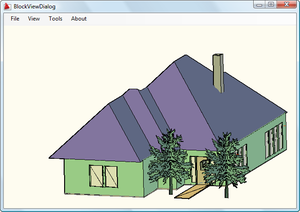
Blockview_conceptual

Update:

Head on over to the ADN DevBlog for an updated version of this sample for AutoCAD 2015 onwards.

28 responses to “AutoCAD .NET version of the ObjectARX BlockView sample”

  1. Hi Kean.

    The failure that happens when Visual Studio tries to load the AutoCAD interop assemblies is a fairly common problem.

    One way it can be dealt with is through the use a simple test that tells if the code is running in the Visual Studio IDE, or in AutoCAD.

    For that I generally use System.Process to get the name of the current process, and if it is 'acad', then I know its safe to call AutoCAD APIs.

    In this case, a test like that can be used to skip the contstruction of the preview control, when the code is running in the IDE.

  2. Kean Walmsley Avatar

    Great suggestion - thanks, Tony.

    Kean

  3. Fernando Malard Avatar

    Kean,

    Do you recommend the same approach to use the BlockView inside a WPF form?

    I remember Fenton have talked something about it on AU2008 class...not sure.

    Fernando.

  4. Fernando,

    I don't know of any specific issues: I do recommend giving it a try and letting us know if you hit any issues. 🙂

    Regards,

    Kean

  5. Hello,
    Is this a stable control? I have tried working with it in .NET but it is working very unstable. Maybe I don't know how to work with it. Are there any other .NET examples beside the one above. I have also used this control in c++ ObjectARX and there was no problem.

  6. Hi Jernej,

    I don't know of any stability issues, but then I haven't integrated this control into any serious application.

    Please submit any issues you hit to the ADN team, and we'll take a look.

    Thanks,

    Kean

  7. Hi Kean,

    If I use the GsPreviewCtrl in my form, the ViewToBeDestroyed event is not fired when the form is closed. This leads to a Fatal Error crash after a couple of minutes of using the form. I have done everything as in your BlockView sample, but nothing doing.

    The BlockView sample fires the event successfully and closes gracefully. Any idea what I am missing?

    Thanks and a very happy New Year to you and all readers of this blog.

  8. Happy New Year to you, too!

    As this isn't my code (and you're an ADN member) I suggest posting your question via the ADN site.

    You're likely to get a better response from them.

    Kean

  9. Mohammad Afghari Avatar
    Mohammad Afghari

    Is there any way to add select
    entity feature to this component?

  10. Cattoor Bjorn Avatar

    Thanks for this fantastic code!I really appreciate it.

  11. I came looking for a simple way to create a thumbnail bitmap from a block reference and wound up with something generic enough I thought more people might find it useful.

    Using BlockView and a little of the render to file stuff at keanw.com/2007/04/rendering_autoc.html , I got my bitmap created, but I also came up with an architecture that lets you load the control in the designer without crashing Visual Studio. Instead of inheriting a PreviewCtrl class that the designer can't handle, I created a wrapper class in 100 lines of code that takes a plain old Panel object and hooks in the view/model/device and an OnPaint event to redraw the view.

    The code for the class (which can be dropped into any old ACAD addon project) looks like this:

    ********************************************
    using System;
    using System.Collections.Generic;
    using System.Drawing;
    using System.Linq;
    using System.Text;

    using Autodesk.AutoCAD.ApplicationServices;
    using Autodesk.AutoCAD.DatabaseServices;
    using Autodesk.AutoCAD.Geometry;
    using Autodesk.AutoCAD.GraphicsSystem;

    namespace SNS.DesignData.Draw.Forms
    {
    public class EntityViewManager : IDisposable
    {
    View _view = new View();
    Device _device;
    Model _model;
    System.Windows.Forms.Panel _control;

    static Manager GraphicsManager
    {
    get { return Application.DocumentManager.MdiActiveDocument.GraphicsManager; }
    }

    public EntityViewManager(Entity ent, System.Windows.Forms.Panel control)
    {
    _device = GraphicsManager.CreateAutoCADDevice(control.Handle);
    _device.OnSize(control.Size);
    _device.BackgroundColor = control.BackColor;
    _device.Add(_view);
    _model = GraphicsManager.CreateAutoCADModel();
    _view.Add(ent, _model);
    // TODO: Figure out why line weight is not displayed

    SetView(_view, ent);

    // TODO: Figure out why text from overrides is not displayed
    _view.Update();

    _control = control;
    _control.Paint += control_Paint;
    }

    public static Bitmap GetBitmap(Entity ent, Size size, Color backgroundColor)
    {
    Bitmap result = new Bitmap(size.Width, size.Height);

    using (View view = new View())
    using (Device device = GraphicsManager.CreateAutoCADOffScreenDevice())
    using (Model model = GraphicsManager.CreateAutoCADModel())
    {
    view.Add(ent, model);
    device.Add(view);
    device.OnSize(size);
    device.BackgroundColor = backgroundColor;
    device.DeviceRenderType = RendererType.FullRender;

    SetView(view, ent);

    result = view.RenderToImage();
    device.EraseAll();
    }
    return result;
    }

    static void SetView(View view, Entity ent)
    {
    Extents3d viewExtents = ent.GeometricExtents;
    Point3d boxCenter = viewExtents.MinPoint + 0.5 * (viewExtents.MaxPoint - viewExtents.MinPoint);
    Point3d eye = boxCenter + Vector3d.ZAxis;
    double xMax = Math.Abs(viewExtents.MaxPoint.X - viewExtents.MinPoint.X + 1);
    double yMax = Math.Abs(viewExtents.MaxPoint.Y - viewExtents.MinPoint.Y + 1);
    view.SetView(eye, boxCenter, Vector3d.YAxis, xMax, yMax);
    }

    void control_Paint(object sender, System.Windows.Forms.PaintEventArgs e)
    {
    _view.Invalidate();
    _view.Update();
    }

    #region IDisposable Members

    public void Dispose()
    {
    _control.Paint -= control_Paint;
    _control.Invalidate();
    _device.Erase(_view);
    _view.EraseAll();
    _model.Dispose();
    _view.Dispose();
    _device.Dispose();
    }

    #endregion
    }
    }
    ********************************************

    To use this to render an entity in a dialog temporarily I just do a using (var view = new EntityViewManager(ent, controlPreview)), and when I leave the using clause the view is cleared and the placeholder control reverts to normal. ent is any ACAD database object type and controlPreview is the Panel control hosted in your dialog.

    For a longer-lived preview the dialog will probably need an EntityViewManager member variable, created when the dialog is displayed and disposed when the dialog is closed. I did this in a modeless palette and had to make sure to also dispose of the EntityViewManager upon notification that the current document was closing because by the time the palette was destroyed the current document was gone and the model/view/device couldn't be disposed cleanly.

    The static GetBitmap method is pretty straightforward, tacked onto this class to make use of the common view/extent/eye setup code.

    You may notice the two TODOs. If the entity passed in is a Polyline with Lineweight set thick, the control only displays a thin line. I keep expecting to find a ShowLineWeight property on one of the view/model/device objects somewhere, but so far no luck.

    The more complicated TODO is because I'm also playing with overrules to draw some text and extra lines next to polylines with certain xdata (see keanw.com/overrules/ ). If I pass one of these lines to the wrapper, the extra lines show up but the text does not. I'm completely stumped on this behavior.

  12. Thanks for posting this, Chuck.

    I'll take a closer look, when I get the chance - at first glance it looks very interesting.

    Kean

  13. Hi Kean:

    I've downloaded the code.
    I run the code in vs2008 and cad2010.
    When I use the commnad add an entity to the database after I open a dwg file ,there is some wrong occur.It's tip eWrongDatabase.

    I've changed the code like that:
    original code ://next add it to the current space
    //using (BlockTableRecord curSpace = mPreviewCtrl.mCurrentDwg.CurrentSpaceId.Open(OpenMode.ForWrite) as BlockTableRecord)
    // curSpace.AppendEntity(sphere);

    replaced code:
    ObjectId entId;
    Database pDb = new Database();
    pDb=mPreviewCtrl.mCurrentDwg;
    if (pDb != null)
    {
    using (Transaction trans = pDb.TransactionManager.StartTransaction())
    {
    try
    {
    BlockTable bt = (BlockTable)trans.GetObject(pDb.BlockTableId, OpenMode.ForRead);
    BlockTableRecord btr = (BlockTableRecord)trans.GetObject(bt[BlockTableRecord.ModelSpace], OpenMode.ForWrite);

    entId = btr.AppendEntity(sphere);
    trans.AddNewlyCreatedDBObject(sphere, true);
    trans.Commit();
    }
    catch (System.Exception ex)
    {
    MessageBox.Show(ex.ToString());
    }

    }

  14. Hi Alex,

    I'm afraid I can't provide support for your extensions to this code. I suggest you post your question to ADN or the AutoCAD .NET Discussion Group.

    You seem to be mixing Open/Close (although I don't see a Close() call) with transactions - a very bad idea. Hopefully someone on the discussion group will be able to help.

    Regards,

    Kean

  15. Hi Kean:

    I am intersted in a similar functionality in a .exe program running external to Acad (with Acad installed and - possibly - running).
    Is it possible for such a program to use the Acad .NET API to acomplish this?
    Thanks
    alex
    N.B. No relation to the post above 🙂

  16. Hi Alex,

    How about this?

    keanw.com/2008/03/embedding-autoc.html

    Cheers,

    Kean

  17. Hi Tony

    Could you elaborate on that? Where do you put the checking code?
    I can't seem to make it work.

    Thanks

    alex

  18. You can find a revised/refactored version of the BlockView.NET sample here:

    forums.autodesk.com/t5/NET/Blockview-NET/m-p/3676654#M31712

    The refactored code fixes the problems with opening the BlockViewDialog in the designer, so you don't have to resort to using the workaround suggested in this blog post.

  19. Hi Kean,
    Thanks for this nice piece of code. I just wonder if we can
    doc.SendStringToExecute("(command ""zoom"" ""e"")" + '\r' + '\n', true, false, false);

    I'm just trying to call AutoCAD's built-in Zoom Extents command in BlockView.

    Is that possible?

    Best regards
    Farrukh

  20. And is there any way to simply generate bmp/png/jpg from dwg files? I need to show a preview of selected dwg from a ListView dialog.

    Thanks

  21. Hi Farrukh,

    No, you can't target the block view window with AutoCAD commands: look at the approach used by the Zoom option, instead.

    This may be of help:

    keanw.com/2007/04/taking_a_snapsh_1.html

    You might also find something on the ADN DevBlog, if I remember correctly (although I couldn't find the exact thing):

    adndevblog.typepad.com/autocad

    Regards,

    Kean

  22. Kean,
    Yes, I tried that approach, but its not working as standard Zoom Extents in Top view is doing. That makes me to call the Lisp methodology.

    I'm trying to set two things:
    Permanently set TOP view
    Zoom Extents.

    Thanks much for all help.

    Regards

  23. Has anyone seen a VB.Net version of this code?
    I don't have the world of experience in C# and would to have a read in a different format.

    Thanks.

  24. Dispose of the Control on Close fixed this issue for me. (rightly or wronly)

  25. Hi Kean:

    when i change to acad19.0,

    the namespace Autodesk.AutoCAD.GraphicsSystem
    {
    [Wrapper("AcGsView")]
    public class View : DisposableWrapper
    do not have the 'Viewport' property

    how to change the code?

    the error line is on GsPreviewCtrl.cs line 174 System.Drawing.Rectangle view_rect = mpView.Viewport;

    1. Hi there,

      Please take a look at the updated BlockView project for AutoCAD 2015 onwards:

      adndevblog.typepad.com/autocad/

      Regards,

      Kean

Leave a Reply to Vrender Company Cancel reply

Your email address will not be published. Required fields are marked *