In the introductory post we first looked at a simple turtle graphics engine for AutoCAD, which was followed up by this series looking at using it to generate fractals (here are parts 1 & 2).
This post continues the organic fractal theme, by looking at another fractal found in nature, the humble fern. I found some simple Logo code in a presentation on the web:
to fern :size
if :size < 4 [stop]
fd :size / 25
lt 90 fern :size * .3
rt 90
rt 90 fern :size * .3
lt 90 fern :size * .85
bk :size / 25
end
This - when translated to use our turtle engine inside AutoCAD - creates a somewhat straight, unnatural-looking fern:

To make things a little more interesting, I generalised out some of the parameters to allow easy tweaking within the code. Here's the C# code including the complete TurtleEngine implementation, as before:
using Autodesk.AutoCAD.ApplicationServices;
using Autodesk.AutoCAD.DatabaseServices;
using Autodesk.AutoCAD.EditorInput;
using Autodesk.AutoCAD.Runtime;
using Autodesk.AutoCAD.Geometry;
using Autodesk.AutoCAD.Colors;
using System;
namespace TurtleGraphics
{
// This class encapsulates pen
// information and will be
// used by our TurtleEngine
class Pen
{
// Private members
private Color m_color;
private double m_width;
private bool m_down;
// Public properties
public Color Color
{
get { return m_color; }
set { m_color = value; }
}
public double Width
{
get { return m_width; }
set { m_width = value; }
}
public bool Down
{
get { return m_down; }
set { m_down = value; }
}
// Constructor
public Pen()
{
m_color =
Color.FromColorIndex(ColorMethod.ByAci, 0);
m_width = 0.0;
m_down = false;
}
}
// The main Turtle Graphics engine
class TurtleEngine
{
// Private members
private Transaction m_trans;
private Polyline m_poly;
private Pen m_pen;
private Point3d m_position;
private Vector3d m_direction;
private bool m_updateGraphics;
// Public properties
public Point3d Position
{
get { return m_position; }
set { m_position = value; }
}
public Vector3d Direction
{
get { return m_direction; }
set { m_direction = value; }
}
// Constructor
public TurtleEngine(Transaction tr)
{
m_pen = new Pen();
m_trans = tr;
m_poly = null;
m_position = Point3d.Origin;
m_direction = new Vector3d(1.0, 0.0, 0.0);
m_updateGraphics = false;
}
// Public methods
public void Turn(double angle)
{
// Rotate our direction by the
// specified angle
Matrix3d mat =
Matrix3d.Rotation(
angle,
Vector3d.ZAxis,
Position
);
Direction =
Direction.TransformBy(mat);
}
public void Move(double distance)
{
// Move the cursor by a specified
// distance in the direction in
// which we're pointing
Point3d oldPos = Position;
Position += Direction * distance;
// If the pen is down, we draw something
if (m_pen.Down)
GenerateSegment(oldPos, Position);
}
public void PenDown()
{
m_pen.Down = true;
}
public void PenUp()
{
m_pen.Down = false;
// We'll start a new entity with the next
// use of the pen
m_poly = null;
}
public void SetPenWidth(double width)
{
m_pen.Width = width;
}
public void SetPenColor(int idx)
{
// Right now we just use an ACI,
// to make the code simpler
Color col =
Color.FromColorIndex(
ColorMethod.ByAci,
(short)idx
);
// If we have to change the color,
// we'll start a new entity
// (if the entity type we're creating
// supports per-segment colors, we
// don't need to do this)
if (col != m_pen.Color)
{
m_poly = null;
m_pen.Color = col;
}
}
// Internal helper to generate geometry
// (this could be optimised to keep the
// object we're generating open, rather
// than having to reopen it each time)
private void GenerateSegment(
Point3d oldPos, Point3d newPos)
{
Document doc =
Application.DocumentManager.MdiActiveDocument;
Database db = doc.Database;
Editor ed = doc.Editor;
Autodesk.AutoCAD.ApplicationServices.
TransactionManager tm =
doc.TransactionManager;
Plane plane;
// Create the current object, if there is none
if (m_poly == null)
{
BlockTable bt =
(BlockTable)m_trans.GetObject(
db.BlockTableId,
OpenMode.ForRead
);
BlockTableRecord ms =
(BlockTableRecord)m_trans.GetObject(
bt[BlockTableRecord.ModelSpace],
OpenMode.ForWrite
);
// Create the polyline
m_poly = new Polyline();
m_poly.Color = m_pen.Color;
// Define its plane
plane = new Plane(
m_poly.Ecs.CoordinateSystem3d.Origin,
m_poly.Ecs.CoordinateSystem3d.Zaxis
);
// Add the first vertex
m_poly.AddVertexAt(
0, oldPos.Convert2d(plane),
0.0, m_pen.Width, m_pen.Width
);
// Add the polyline to the database
ms.AppendEntity(m_poly);
m_trans.AddNewlyCreatedDBObject(m_poly, true);
}
else
{
// Calculate its plane
plane = new Plane(
m_poly.Ecs.CoordinateSystem3d.Origin,
m_poly.Ecs.CoordinateSystem3d.Zaxis
);
}
// Make sure the previous vertex has its
// width set appropriately
if (m_pen.Width > 0.0)
{
m_poly.SetStartWidthAt(
m_poly.NumberOfVertices - 1,
m_pen.Width
);
m_poly.SetEndWidthAt(
m_poly.NumberOfVertices - 1,
m_pen.Width
);
}
// Add the new vertex
m_poly.AddVertexAt(
m_poly.NumberOfVertices,
newPos.Convert2d(plane),
0.0, m_pen.Width, m_pen.Width
);
// Display the graphics, to avoid long,
// black-box operations
if (m_updateGraphics)
{
tm.QueueForGraphicsFlush();
tm.FlushGraphics();
ed.UpdateScreen();
}
}
}
public class Commands
{
static void Fern(
TurtleEngine te,
double distance
)
{
const double minDist = 0.3;
const double widthFactor = 0.1;
const double stemFactor = 0.04;
const double restFactor = 0.85;
const double branchFactor = 0.3;
const int stemSegs = 5;
const int stemSegAngle = 1;
if (distance < minDist)
return;
// Width of the trunk/branch is a fraction
// of the length
te.SetPenWidth(
distance * stemFactor * widthFactor
);
// Draw the stem
for (int i = 0; i < stemSegs; i++)
{
te.Move(distance * stemFactor / stemSegs);
if (i < stemSegs - 1)
te.Turn(-stemSegAngle * Math.PI / 180);
}
// Draw the left-hand sub-fern
te.Turn(Math.PI / 2);
Fern(te, distance * branchFactor);
// Draw the right-hand sub-fern
te.Turn(-Math.PI);
Fern(te, distance * branchFactor);
// Draw the rest of the fern to the front
te.Turn(Math.PI / 2);
Fern(te, distance * restFactor);
// Draw back down to the start of this sub-
// fern, with the same thickness, as this
// may have changed in deeper sub-ferns
te.SetPenWidth(
distance * stemFactor * widthFactor
);
for (int i = 0; i < stemSegs; i++)
{
te.Move(-distance * stemFactor / stemSegs);
if (i < stemSegs - 1)
te.Turn(stemSegAngle * Math.PI / 180);
}
}
static public bool GetFernInfo(
out Point3d position,
out double treeLength
)
{
Document doc =
Application.DocumentManager.MdiActiveDocument;
Editor ed = doc.Editor;
treeLength = 0;
position = Point3d.Origin;
PromptPointOptions ppo =
new PromptPointOptions(
"\nSelect base point of fern: "
);
PromptPointResult ppr =
ed.GetPoint(ppo);
if (ppr.Status != PromptStatus.OK)
return false;
position = ppr.Value;
PromptDoubleOptions pdo =
new PromptDoubleOptions(
"\nEnter fern length <100>: "
);
pdo.AllowNone = true;
PromptDoubleResult pdr =
ed.GetDouble(pdo);
if (pdr.Status != PromptStatus.None &&
pdr.Status != PromptStatus.OK)
return false;
if (pdr.Status == PromptStatus.OK)
treeLength = pdr.Value;
else
treeLength = 100;
return true;
}
[CommandMethod("FF")]
static public void FractalFern()
{
Document doc =
Application.DocumentManager.MdiActiveDocument;
double fernLength;
Point3d position;
if (!GetFernInfo(out position, out fernLength))
return;
Transaction tr =
doc.TransactionManager.StartTransaction();
using (tr)
{
TurtleEngine te = new TurtleEngine(tr);
// Draw a fractal fern
te.Position = position;
te.SetPenColor(92);
te.SetPenWidth(0);
te.Turn(Math.PI / 2);
te.PenDown();
Fern(te, fernLength);
tr.Commit();
}
}
}
}
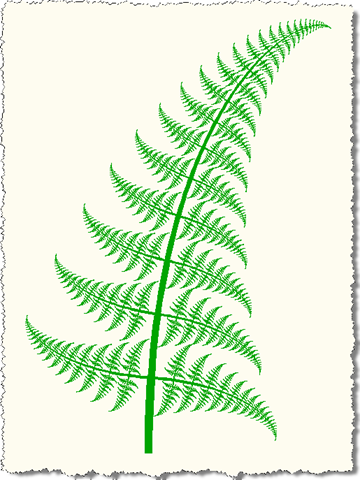
When we run the FF command, selecting a location and the default tree length, we see a more natural (although in no way random) form:
Tweaking the stemSegAngle constant to be -2 instead of 1 gives a further differentiated result:
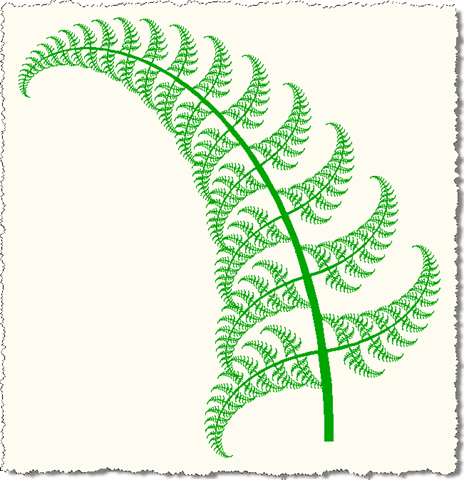
Incidentally, to get the original, "straight" fern, simply change the stemSegs constant to 1. The curved ferns will each take n times as much space in memory/on disk as the straight ones (where n is the value of stemSegs). This is because we're not storing actual curves, but using multiple straight line segments.
Any of the constants in the Fern() function could be presented for the user to enter, of course (i.e. populated by the GetFernInfo() function and passed as parameters into the Fern() function).


Leave a Reply to Patrick Cancel reply