Rolling back the effect of AutoCAD commands using .NET

Another big thank you to Jeremy Tammik, from our DevTech team in Europe, for providing this elegant sample. This is another one Jeremy presented at the recent advanced custom entity workshop in Prague. I have added some initial commentary as well as some steps to see the code working. Jeremy also provided the code for the last post.

We sometimes want to stop entities from being modified in certain ways, and there are a few different approaches possible, for instance: at the simplest - and least granular - level, we can place entities on locked layers or veto certain commands using an editor reactor.  Or we can go all-out and implement custom objects that have complete control over their behaviour. The below technique provides a nice balance between control and simplicity: it makes use of a Document event to check when a particular command is being called, a Database event to cache the information we wish to restore and finally another Document event to restore it. In this case it's all about location (or should I say "location, location, location" ? :-). We're caching an object's state before the MOVE command (which changes an object's position in the model), but if we wanted to roll back the effect of other commands, we would probably want to cache other properties.

Here's the C# code:

using System.Diagnostics;

using Autodesk.AutoCAD.ApplicationServices;

using Autodesk.AutoCAD.DatabaseServices;

using Autodesk.AutoCAD.Geometry;

using Autodesk.AutoCAD.Runtime;

namespace Reactor

{

  /// <summary>

  /// Reactor command.

  /// 

  /// Demonstrate a simple object reactor, as well as

  /// cascaded event handling.

  /// 

  /// In this sample, the MOVE command is cancelled for

  /// all red circles. This is achieved by attaching an

  /// editor reactor and watching for the MOVE command begin.

  /// When triggered, the reactor attaches an object reactor

  /// to the database and watches for red circles. If any are

  /// detected, their object id and original position are

  /// stored. When the command ends, the positions are

  /// restored and the object reactor removed again.

  /// 

  /// Reactors create overhead, so we should add them only

  /// when needed and remove them as soon as possible

  /// afterwards.

  /// </summary>

  public class CmdReactor

  {

    private static Document _doc;

    private static ObjectIdCollection _ids =

      new ObjectIdCollection();

    private static Point3dCollection _pts =

      new Point3dCollection();

    [CommandMethod("REACTOR")]

    static public void Reactor()

    {

      _doc =

        Application.DocumentManager.MdiActiveDocument;

      _doc.CommandWillStart +=

        new CommandEventHandler(doc_CommandWillStart);

    }

    static void doc_CommandWillStart(

      object sender,

      CommandEventArgs e

    )

    {

      if (e.GlobalCommandName == "MOVE")

      {

        _ids.Clear();

        _pts.Clear();

        _doc.Database.ObjectOpenedForModify +=

          new ObjectEventHandler(_db_ObjectOpenedForModify);

        _doc.CommandCancelled +=

          new CommandEventHandler(_doc_CommandEnded);

        _doc.CommandEnded +=

          new CommandEventHandler(_doc_CommandEnded);

        _doc.CommandFailed +=

          new CommandEventHandler(_doc_CommandEnded);

      }

    }

    static void removeEventHandlers()

    {

      _doc.CommandCancelled -=

        new CommandEventHandler(_doc_CommandEnded);

      _doc.CommandEnded -=

        new CommandEventHandler(_doc_CommandEnded);

      _doc.CommandFailed -=

        new CommandEventHandler(_doc_CommandEnded);

      _doc.Database.ObjectOpenedForModify -=

        new ObjectEventHandler(_db_ObjectOpenedForModify);

    }

    static void _doc_CommandEnded(

      object sender,

      CommandEventArgs e

    )

    {

      // Remove database reactor before restoring positions

      removeEventHandlers();

      rollbackLocations();

    }

    static void _db_ObjectOpenedForModify(

      object sender,

      ObjectEventArgs e

    )

    {

      Circle circle = e.DBObject as Circle;

      if (null != circle && 1 == circle.ColorIndex)

      {

        // In AutoCAD 2007, OpenedForModify is called only

        // once by MOVE.

        // In 2008, OpenedForModify is called multiple

        // times by the MOVE command ... we are only

        // interested in the first call, because

        // in the second one, the object location

        // has already been changed:

        if (!_ids.Contains(circle.ObjectId))

        {

          _ids.Add(circle.ObjectId);

          _pts.Add(circle.Center);

        }

      }

    }

    static void rollbackLocations()

    {

      Debug.Assert(

        _ids.Count == _pts.Count,

        "Expected same number of ids and locations"

      );

      Transaction t =

        _doc.Database.TransactionManager.StartTransaction();

      using (t)

      {

        int i = 0;

        foreach (ObjectId id in _ids)

        {

          Circle circle =

            t.GetObject(id, OpenMode.ForWrite) as Circle;

          circle.Center = _pts[i++];

        }

        t.Commit();

      }

    }

  }

}

To see the code at work, draw some circles and make some of them red:
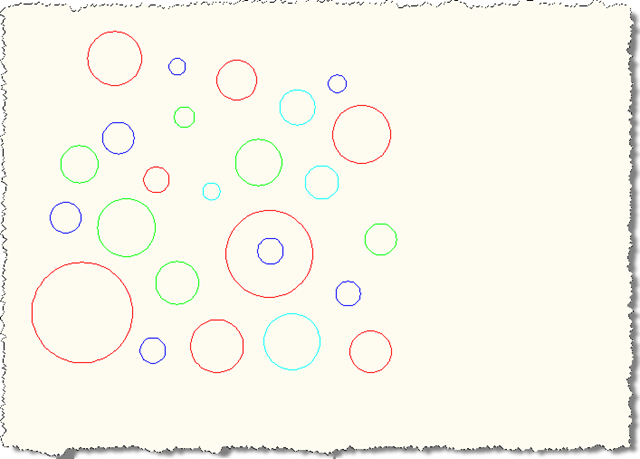
Lots of circles

Now run the REACTOR command and try to MOVE all the circles:
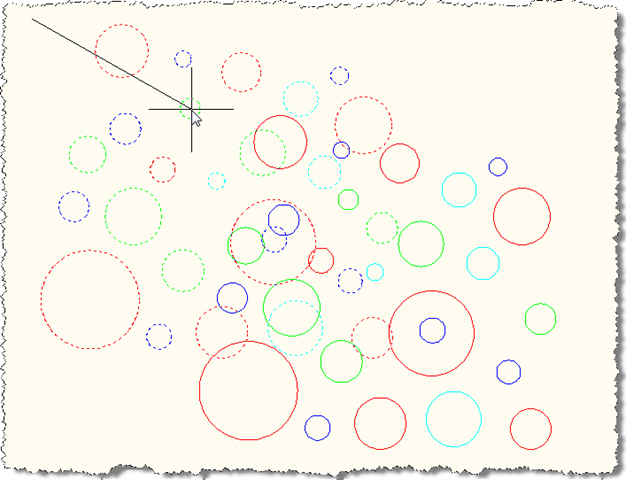
Moving the circles

Although all the circles are dragged during the move, once we complete the command we can see that the red circles have remained in the same location (or have, in fact, had their location rolled back). The other circles have been moved, as expected.
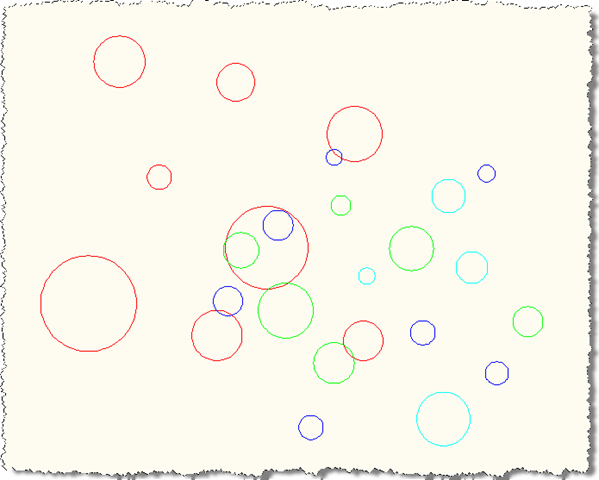
Circles post-move

13 responses to “Rolling back the effect of AutoCAD commands using .NET”

  1. Hi Kean,

    Another excellent example! Between this example and keanw.com/...
    (Blocking AutoCAD commands from .NET) really got me thinking.

    By any chance would it be possible to provide an example to prevent a user from using the EXPLODE command for a given block name?

    Thanks,

    Nick

  2. Hi Nick,

    Hmm - an interesting question.

    There's a DevNote on the ADN site that should help, and I'll see if I can turn it into a post for you (adding some logic to check for a specific block name).

    Here's an excerpt from this document:

    "The EXPLODE command works on a Block reference by deepcloning the contents of the referenced block in kDcExplode context, and finally erasing the block reference itself. So, one solution to prevent explode is to exclude the block's contents from deepClone operation and un-erase the block reference after the explode command ends."

    Regards,

    Kean

  3. Hi Kean,
    Very cool picture!
    When I open your blog today,I am very surprise to find that you have changed both the blog style and your picture,the new blog style is very nice.
    But I have question.Is the picture yourself?I fell it's very different to the previous one.:-)

  4. Hi Travor,

    Yes, it's me. Just two different views of the same person. 🙂

    I'll post something about the blog's updated look later today.

    Thanks for the feedback,

    Kean

  5. Hi Kean.

    Thanks for the great examples.

    An issue I've come across myself that led me away from this approach, is that modifying objects from the 'commandEnded' reactor notification has been known to corrupt undo/redo and can effectively disable redo.

  6. Thanks, Tony - that's interesting. If possible I'd like to get hold of a reproducible case that we can look into further.

    Regards,

    Kean

  7. Hi Kean - In AutoCAD 2009, it seems the problem was addressed, because I can no longer repro it, but can on earlier releases. In fact, your code as-is should be all that's needed running on an earlier release.

    As an aside, while the code is useful as an example of reversing changes to objects for specific commands, it would not prevent all possible ways that certain objects can be modified (or in this case, moved). So for example, a LISP or VBA macro that uses the ActiveX API to move objects will bypass a command reactor-based approach.

    In any case, another way to arrive at the same functionality is by using a selection filter (the Editor.SelectionAdded event).

    In the handler of that event, we can remove whatever objects we want from the selection based on what command(s) are running or various other criteria.

    I think I'd prefer that approach for this specific example and ones like it, if for no other reason, it doesn't confuse the user by allowing the objects be selected and dragged, and they will instead behave as if they were on a locked layer.

  8. J. Daniel Smith Avatar

    Tony: I thought of the same thing. Such code is useful and interesting, but it is not completely robust. That may be fine for some "in house, end user" type of utility; but other situations may require more than just looking for a specific AutoCAD command.

  9. Hi Kean,
    Thanks for the very useful example.

    I got an issue on clearing the reactors. The 'ObjectOpenedForModify' delegate is not cleared in CommandEnded. It is active for the complete session and being called by other object modify commands.

    Could u help me on this issue?

  10. Hi Velan,

    I don't see this: the reactor is added at the beginning of each command, and only really does something when MOVE is used.

    There is no command that completely removes the top-level reactor, but that would be very easy to add.

    If you have modified the code and it doesn't work for you, please submit it via the ADN site or post it to the AutoCAD .NET Discussion Group. Someone there will be able to help you, I'm sure.

    Kean

  11. Hi Kean,
    Thanks for the quick reply.
    I didn't change anything on the example code.
    But the reactor is not removed after the completion of MOVE command.

    Right now, I am working on it and I will post it to AutoCAD .Net discussion group as you suggested.

    Velan.

  12. بَحرانی اِحسان Avatar
    بَحرانی اِحسان

    HI Kean,

    Is there a way to attach reactor to dwg file?
    (i want to know which entities were edited, the previous values not matter, just i want to know which objectids are edited, my idea is to use something like dimassoc to assoc to every entity and when edited, that thing associated to entities automaticaly remove.)

    Thanks,

    Ehsan.

    1. Kean Walmsley Avatar

      Hi Ehsan,

      Please post your support questions to the AutoCAD .NET forum.

      Many thanks,

      Kean

Leave a Reply to J. Daniel Smith Cancel reply

Your email address will not be published. Required fields are marked *