The following question came in as a comment on this previous post:
Your example above shows how to create a property type filter, how do you add layers to a group type filter (LayerGroup class)? I can create the group filter but can't figure out how to add layers to the group. The filterexpression method is available but doesn't seem to work (at least not like with the LayerFilter object)
To tackle this, let's start by looking at the documentation on the LayerGroup class in the .NET Reference (currently part of the ObjectARX Reference):
LayerGroup is derived from LayerFilter and serves as the access to layer group filters. It allows the client to specify and retrieve a set of layer IDs. The filter() method returns true if the object ID of the given layer is contained in the set of layer IDs for the LayerGroup.
Specifying the filter criteria is done solely by using LayerId. LayerGroup doesn't use a filter expression string, so FilterExpression and FilterExpressionTree return a null pointer.
The recommended way of identifying LayerGroup filters in a group of layer filters is to query the IsIdFilter property, which returns true for an LayerGroup.
So, at the root of the question, we need to create a LayerGroup and add the ObjectIds of the LayerTableRecords we wish to include in the group to its LayerIds property.
I started by taking the code in the post referred to above and extended it to contain a new CLG command to Create a Layer Group. This command lists the available layers for the user to select from, and creates a layer group containing the selected layers.
Here's the updated C# code - pay particular attention to the new CLG command, of course:
using Autodesk.AutoCAD.ApplicationServices;
using Autodesk.AutoCAD.DatabaseServices;
using Autodesk.AutoCAD.EditorInput;
using Autodesk.AutoCAD.Runtime;
using Autodesk.AutoCAD.LayerManager;
using System.Collections.Generic;
namespace LayerFilters
{
public class Commands
{
[CommandMethod("LLFS")]
static public void ListLayerFilters()
{
Document doc =
Application.DocumentManager.MdiActiveDocument;
Database db = doc.Database;
Editor ed = doc.Editor;
// List the nested layer filters
LayerFilterCollection lfc =
db.LayerFilters.Root.NestedFilters;
for (int i = 0; i < lfc.Count; ++i)
{
LayerFilter lf = lfc[i];
ed.WriteMessage(
"\n{0} - {1} (can{2} be deleted)",
i + 1,
lf.Name,
(lf.AllowDelete ? "" : "not")
);
}
}
[CommandMethod("CLFS")]
static public void CreateLayerFilters()
{
Document doc =
Application.DocumentManager.MdiActiveDocument;
Database db = doc.Database;
Editor ed = doc.Editor;
try
{
// Get the existing layer filters
// (we will add to them and set them back)
LayerFilterTree lft =
db.LayerFilters;
LayerFilterCollection lfc =
lft.Root.NestedFilters;
// Create three new layer filters
LayerFilter lf1 = new LayerFilter();
lf1.Name = "Unlocked Layers";
lf1.FilterExpression = "LOCKED==\"False\"";
LayerFilter lf2 = new LayerFilter();
lf2.Name = "White Layers";
lf2.FilterExpression = "COLOR==\"7\"";
LayerFilter lf3 = new LayerFilter();
lf3.Name = "Visible Layers";
lf3.FilterExpression =
"OFF==\"False\" AND FROZEN==\"False\"";
// Add them to the collection
lfc.Add(lf1);
lfc.Add(lf2);
lfc.Add(lf3);
// Set them back on the Database
db.LayerFilters = lft;
// List the layer filters, to see the new ones
ListLayerFilters();
}
catch (Exception ex)
{
ed.WriteMessage(
"\nException: {0}",
ex.Message
);
}
}
[CommandMethod("CLG")]
static public void CreateLayerGroup()
{
Document doc =
Application.DocumentManager.MdiActiveDocument;
Database db = doc.Database;
Editor ed = doc.Editor;
// A list of the layers' names & IDs contained
// in the current database, sorted by layer name
SortedList<string, ObjectId> ld =
new SortedList<string, ObjectId>();
// A list of the selected layers' IDs
ObjectIdCollection lids =
new ObjectIdCollection();
// Start by populating the list of names/IDs
// from the LayerTable
Transaction tr =
db.TransactionManager.StartTransaction();
using (tr)
{
LayerTable lt =
(LayerTable)tr.GetObject(
db.LayerTableId,
OpenMode.ForRead
);
foreach(ObjectId lid in lt)
{
LayerTableRecord ltr =
(LayerTableRecord)tr.GetObject(
lid,
OpenMode.ForRead
);
ld.Add(ltr.Name, lid);
}
}
// Display a numbered list of the available layers
ed.WriteMessage("\nLayers available for group:");
int i = 1;
foreach (KeyValuePair<string,ObjectId> kv in ld)
{
ed.WriteMessage(
"\n{0} - {1}",
i++,
kv.Key
);
}
// We will ask the user to select from the list
PromptIntegerOptions pio =
new PromptIntegerOptions(
"\nEnter number of layer to add: "
);
pio.LowerLimit = 1;
pio.UpperLimit = ld.Count;
pio.AllowNone = true;
// And will do so in a loop, waiting for
// Escape or Enter to terminate
PromptIntegerResult pir;
do
{
// Select one from the list
pir = ed.GetInteger(pio);
if (pir.Status == PromptStatus.OK)
{
// Get the layer's name
string ln =
ld.Keys[pir.Value-1];
// And then its ID
ObjectId lid;
ld.TryGetValue(ln, out lid);
// Add the layer'd ID to the list, is it's not
// already on it
if (lids.Contains(lid))
{
ed.WriteMessage(
"\nLayer \"{0}\" has already been selected.",
ln
);
}
else
{
lids.Add(lid);
ed.WriteMessage(
"\nAdded \"{0}\" to selected layers.",
ln
);
}
}
} while (pir.Status == PromptStatus.OK);
// Now we've selected our layers, let's create the group
try
{
if (lids.Count > 0)
{
// Get the existing layer filters
// (we will add to them and set them back)
LayerFilterTree lft =
db.LayerFilters;
LayerFilterCollection lfc =
lft.Root.NestedFilters;
// Create a new layer group
LayerGroup lg = new LayerGroup();
lg.Name = "My Layer Group";
// Add our layers' IDs to the list
foreach (ObjectId id in lids)
lg.LayerIds.Add(id);
// Add the group to the collection
lfc.Add(lg);
// Set them back on the Database
db.LayerFilters = lft;
ed.WriteMessage(
"\n\"{0}\" group created containing {1} layers.\n",
lg.Name,
lids.Count
);
// List the layer filters, to see the new group
ListLayerFilters();
}
}
catch (Exception ex)
{
ed.WriteMessage(
"\nException: {0}",
ex.Message
);
}
}
[CommandMethod("DLF")]
static public void DeleteLayerFilter()
{
Document doc =
Application.DocumentManager.MdiActiveDocument;
Database db = doc.Database;
Editor ed = doc.Editor;
ListLayerFilters();
try
{
// Get the existing layer filters
// (we will add to them and set them back)
LayerFilterTree lft =
db.LayerFilters;
LayerFilterCollection lfc =
lft.Root.NestedFilters;
// Prompt for the index of the filter to delete
PromptIntegerOptions pio =
new PromptIntegerOptions(
"\n\nEnter index of filter to delete"
);
pio.LowerLimit = 1;
pio.UpperLimit = lfc.Count;
PromptIntegerResult pir =
ed.GetInteger(pio);
// Get the selected filter
LayerFilter lf = lfc[pir.Value - 1];
// If it's possible to delete it, do so
if (!lf.AllowDelete)
{
ed.WriteMessage(
"\nLayer filter cannot be deleted."
);
}
else
{
lfc.Remove(lf);
db.LayerFilters = lft;
ListLayerFilters();
}
}
catch(Exception ex)
{
ed.WriteMessage(
"\nException: {0}",
ex.Message
);
}
}
}
}
Here's what happens when we run the code on a drawing containing a number of layers (all of which have the default properties for new layers):
Command: CLG
Layers available for group:
1 - 0
2 - Layer1
3 - Layer2
4 - Layer3
5 - Layer4
6 - Layer5
7 - Layer6
8 - Layer7
9 - Layer8
10 - Layer9
11 - Test1
12 - Test2
13 - Test3
14 - Test4
15 - Test5
Enter number of layer to add: 2
Added "Layer1" to selected layers.
Enter number of layer to add: 4
Added "Layer3" to selected layers.
Enter number of layer to add: 6
Added "Layer5" to selected layers.
Enter number of layer to add: 8
Added "Layer7" to selected layers.
Enter number of layer to add: 11
Added "Test1" to selected layers.
Enter number of layer to add: 15
Added "Test5" to selected layers.
Enter number of layer to add:
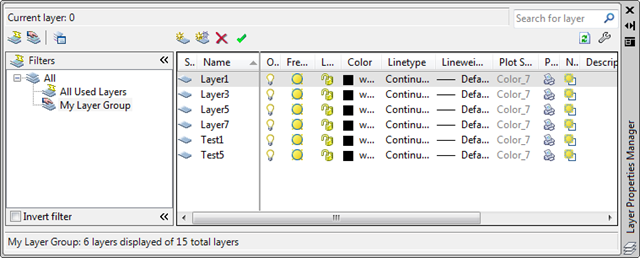
"My Layer Group" group created containing 6 layers.
1 - My Layer Group (can be deleted)
2 - All Used Layers (cannot be deleted)
3 - Unreconciled New Layers (cannot be deleted)
4 - Viewport Overrides (cannot be deleted)
I've hard-coded the name of the new layer group to be "My Layer Group". It's a trivial exercise to modify the code to ask the user to enter a name, each time.
Here is how our new group looks in AutoCAD's Layer dialog:
Update
See this post for a tidied-up and extended version of the above code.


Leave a Reply