More quiet command-calling: adding an inspection dimension inside AutoCAD using .NET

I'm still a little frazzled after transcribing the 18,000 word interview with John Walker (and largely with two fingers - at such times the fact that I've never learned to touch-type is a significant cause of frustration, as you might imagine). I'm also attending meetings all this coming week, so I've gone for the cheap option, once again, of dipping into my magic folder of code generated and provided by my team.

The technique for this one came from a response sent out by Philippe Leefsma, from DevTech EMEA, but he did mention a colleague helped him by suggesting the technique. So thanks to Philippe and our anonymous colleague for the initial idea of calling -DIMINSPECT.

The problem solved by Philippe's code is that no API is exposed via .NET to enable the "inspection" capability of dimensions inside AutoCAD. The protocol is there in ObjectARX, in the AcDbDimension class, but this has - at the time of writing - not been exposed via  the managed API. One option would be to create a wrapper or mixed-mode module to call through to unmanaged C++, but the following approach simply calls through to the -DIMINSPECT command (the command-line version of DIMINSPECT) to set the inspection parameters.

I've integrated - and extended - the technique shown in this previous post to send the command as quietly as possible. One problem I realised with the previous implementation is that UNDO might leave the user in a problematic state - with the NOMUTT variable set to 1. This modified approach does a couple of things differently:

  • Rather than using the NOMUTT command to set the system variable, it launches another custom command, FINISH_COMMAND
    • This command has been registered with the NoUndoMarker command-flag, to make it invisible to the undo mechanism (well, at least in terms of automatic undo)
    • It sets the NOMUTT variable to 0
    • It should be possible to share this command across others that have the need to call commands quietly
  • It uses the COM API to create an undo group around the operations we want to consider one "command"
  • The implementation related to the "quiet command calling" technique is wrapped up in a code region to make it easy to hide

One remaining - and, so far, unavoidable - piece of noise on the command-line is due to our use of the (handent) function: it echoes entity name of the selected dimension.

Here's the C# code:

using Autodesk.AutoCAD.ApplicationServices;

using Autodesk.AutoCAD.DatabaseServices;

using Autodesk.AutoCAD.EditorInput;

using Autodesk.AutoCAD.Runtime;

using Autodesk.AutoCAD.Interop;

namespace InspectDimension

{

  public class Commands

  {

    [CommandMethod("INSP")]

    static public void InspectDim()

    {

      Document doc =

        Application.DocumentManager.MdiActiveDocument;

      Database db = doc.Database;

      Editor ed = doc.Editor;

      PromptEntityOptions peo =

        new PromptEntityOptions("\nSelect a dimension: ");

      peo.SetRejectMessage(

        "\nEntity must be a dimension."

      );

      peo.AddAllowedClass(typeof(Dimension), false);

      PromptEntityResult per = ed.GetEntity(peo);

      if (per.Status != PromptStatus.OK)

        return;

      Transaction tr =

        db.TransactionManager.StartTransaction();

      using (tr)

      {

        Dimension dim =

          tr.GetObject(per.ObjectId, OpenMode.ForRead)

            as Dimension;

        if (dim != null)

        {

          string shape = "Round";

          string label = "myLabel";

          string rate = "100%";

          string cmd =

            "-DIMINSPECT Add (handent \"" +

            dim.Handle + "\"" + ") \n" +

            shape + "\n" + label + "\n" +

            rate + "\n";

          SendQuietCommand(doc, cmd);

        };

        tr.Commit();

      }

    }

    #region QuietCommandCalling

    const string kFinishCmd = "FINISH_COMMAND";

    private static void SendQuietCommand(

      Document doc,

      string cmd

    )

    {

      // Get the old value of NOMUTT

      object nomutt =

        Application.GetSystemVariable("NOMUTT");

      // Add the string to reset NOMUTT afterwards

      AcadDocument oDoc =

        (AcadDocument)doc.AcadDocument;

      oDoc.StartUndoMark();

      cmd += "_" + kFinishCmd + " ";

      // Set NOMUTT to 1, reducing cmd-line noise

      Application.SetSystemVariable("NOMUTT", 1);

      doc.SendStringToExecute(cmd, true, false, false);

    }

    [CommandMethod(kFinishCmd, CommandFlags.NoUndoMarker)]

    static public void FinishCommand()

    {

      Document doc =

        Application.DocumentManager.MdiActiveDocument;

      AcadDocument oDoc =

        (AcadDocument)doc.AcadDocument;

      oDoc.EndUndoMark();

      Application.SetSystemVariable("NOMUTT", 0);

    }

    #endregion

  }

}

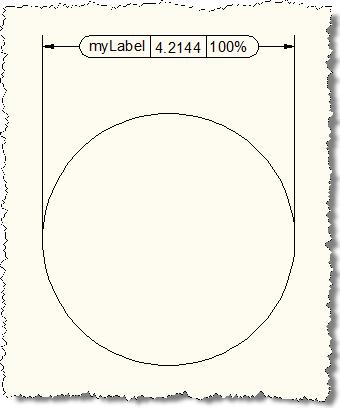
Here are the results of running the INSP command and selecting a dimension object. First the command-line output:

Command: INSP

Select a dimension: <Entity name: -401f99f0>

Command:

And now the graphics, before and after calling INSP and selecting the dimension:

Before -DIMINSPECT After -DIMINSPECT

In the end the post didn't turn out to be quite as quick to write as expected, but anyway - so it goes. I'm now halfway from Zürich to Washington, D.C., and had the time to kill. I probably won't have the luxury when I'm preparing my post for the middle of the week, unless I end up suffering from jet-lag. 🙂

19 responses to “More quiet command-calling: adding an inspection dimension inside AutoCAD using .NET”

  1. Thanks for another great example.

    For this type of problem, I generally prefer a non-command based solution, like the one at this URL:

    http://www.caddzone.com/Ins...

  2. Interesting - thanks, Tony.

    Kean

  3. Massimo Cicognani Avatar

    Thank you for your example!

    Speaking of quiet command execution, shouldn't the echo parameter in SendStringToExecute() just replace the NOMUTT variable use?

    I have also a more general question: I'am trying to keep my code free of Interop references (this is maybe another point to discuss) and I don't find a way to replace the StartUndoMark() and EndUndoMark() methods. Is there another way to do that without COM referncing?

  4. You mean the quiet flag should prevent all information being displayed on the command-line by the command? I can see a case where you would want the command itself to be hidden, but information to be presented.

    There's no way I know to avoid this particular use of the COM API. I personally don't see a problem with this - there's no significant performance penalty and I see no great risk of the COM API being deprecated.

    Regards,

    Kean

  5. Massimo Cicognani Avatar

    Thank you Kean,
    my personal concern is to make a reference to 'version dependant' type-libs... i.e. What happens if my application is executed with a different version of AutoCAD, maybe 2008 or 2010, anf I got a reference to 'AutoCAD 2009' typelibrary?
    Maybe I'm a little O.T. here... sorry about that

  6. It's easy to invoke COM methods without having to reference the Interop assemblies, using late binding:

    Document doc = Autodesk.AutoCAD.ApplicationServices.Application.DocumentManager.MdiActiveDocument;

    object oAcadDoc = doc.AcadDocument;
    oAcadDoc.GetType().InvokeMember("StartUndoGroup", BindingFlags.InvokeMethod, null, oAcadDoc, null);

  7. Oops...

    Sorry, in that example, the method name should have been "StartUndoMark", not "StartUndoGroup" 😮

  8. Hi Kean...

    Regarding the need to reference the AutoCAD COM interop assemblies, Massimo makes a very legitimate point.

    Becuase the COM interop assemblies are version-specific/dependent, it's wise to avoid referencing them if possible.

    Regards,

  9. Fair enough - I hadn't been thinking about that aspect, admittedly.

    Kean

    P.S. We probably should have called in StartUndoGroup - that's much more consistent. 🙂

  10. Massimo Cicognani Avatar

    Thank you all,

    Tony, late binding is certainly a solution but isn't my favourite... in the first place for performance, and it's a nightmare to code 'on the blind'... (well 20 years ago was the only way to code, but I got used to Intellisense... I'm getting lazy...)

    I'm targeting multiple platforms from 2007 and above, both 32 and 64 bit, .NET was a natural choice and I hoped COM objects and methods were all exposed.

    It's reasonable to think that future versions will expose more objects and methods?

  11. If you're an ADN member you can submit the enhancement request via the ADN website.

    Regards,

    Kean

  12. "late binding is certainly a solution but isn't my favourite... in the first place for performance, and it's a nightmare to code 'on the blind'..."

    If you're calling COM methods that often then you might have a point, but for occasional calls to COM methods when there is no managed equivalent (which is the case here), the performance hit of late binding is of little consequence.

    The COM api's are themselves implemented in ObjectARX which means that you already have managed APIs to do most of what the COM apis do, without having to depend on COM interop.

    In this case, since you are issuing commands to get something done, you can just as easily use the UNDO/Begin and Undo/End subcommands to achieve the same thing.

  13. Hi Kean,
    First I would like to agree with Massimo regarding the use of version dependant libraries....I am personally unfamiliar with the process of late binding, so some things are proving difficult to avoid. I also loathe the practice of sending strings to the command line, since there are a number of ways user settings can impact the command line operation (for instance EXPERT).

    That said I was going to suggest that in your post when you mention you could not suppress the 'handent' return value from the command line, if you call (princ) at the end of the lisp it should be quiet.

  14. Thanks - I originally did try (princ) (I had the same instinct as you), but that stopped the results of (handent) being picked up by the command.

    Kean

  15. I certainly don't want to give the impression that I think you don't know your stuff, but I thought about it again (and looked closer at the command string) and noticed that only the handent function is actually a lisp command that you are calling to use the return val as an argument to the -diminspect command. Therefore obviously you can't just stick a (princ) in the middle of the command, so my next idea is, did you try using (vl-cmdf ...) to execute the entire command string as a lisp command, and put the (princ) statement after the vl-cmdf statement?

  16. That's certainly an option - even using the standard (command) function would probably do it.

    It just depends on how important that last piece of echoing is to you - I'd tend not to introduce the additional overhead of sending a string containing (command) unless it was really worth it.

    And that will depend on your users, of course.

    Kean

  17. The reason I would use (vl-cmdf) is that it evaluates all of the arguments prior to executing the command, and the (command) method always returns 'nil' but (vl-cmdf) doesn't.

  18. Hi, In many case I use the "FINISH_COMMAND" to termanate or remove selection in the draw. Now With ACAD 2013 this command it's been removed. Do you know another command that do the same things?

    Thank you very much.

  19. I haven't used this (or even heard of this) myself.

    Are you sure it's a standard AutoCAD command/capability?

    Kean

Leave a Reply to Massimo Cicognani Cancel reply

Your email address will not be published. Required fields are marked *