Tired of not being able to NETUNLOAD from AutoCAD? "Edit and Continue" to the rescue!

A question came in on a previous post:

Hello, I write applications for Autocad Map and Civil3d platforms, mostly with ObjectARX. I would like to do more with .NET but so far the main reason preventing this is not having the NETUNLOAD command.. With arx I can just arxunload and arxload the application for modifications in a second. But with .NET I have to restart the heavy environment and do all kinds of lengthy initializations before being able to try even small changes in code, this can take a minute or more.. Maybe it is possible to create an utility, for development purposes, to unload a .net assembly from Autocad ?

NETUNLOAD has been requested many times by developers, but unfortunately would require a significant change for the .NET API - one it's unclear there'd be significant benefit in making. The root of the situation is that .NET assemblies cannot be unloaded from an AppDomain.

To implement a NETUNLOAD command, we would have to host each assembly in a separate AppDomain and then destroy the AppDomain to unload it. It's altogether possible to implement your own bootstrapper assembly that does just this: I'm going to give that a try, to see how it works, but in the meantime I thought I'd point out (or remind you of) a capability that to greatly reduces the need to continually unload modules from AutoCAD: Visual Studio's Edit and Continue.

Edit and Continue has been around since VB6, although you may not have looked at it in recent versions of Visual Studio. I personally didn't start finding it usable again until Visual Studio 2005 (and its Express Editions). If you'd previously turned your back on it, I suggest taking another look.

To enable Edit and Continue, start by editing the Debugging options (accessed via Tools -> Options in the Visual Studio editor):
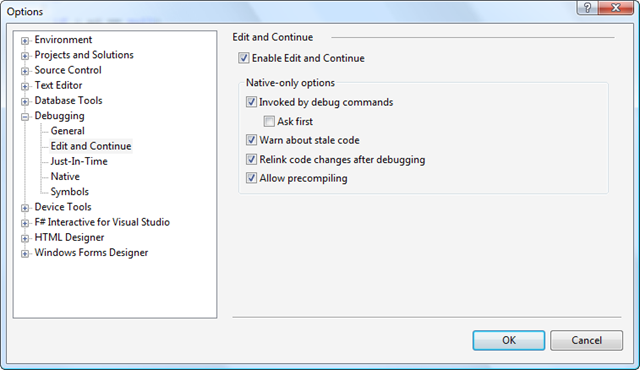
Debugging Options - Edit and Continue

If you attempt to edit the code before the module has been loaded, you'll get this error:
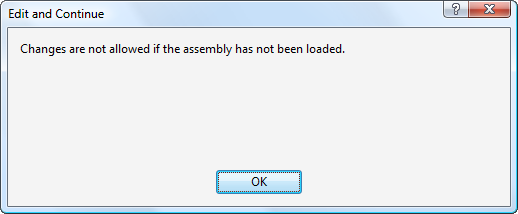
Edit and Continue - assembly not loaded

And if you try to edit the code before a breakpoint has hit, you'll get this altogether more obscure error:
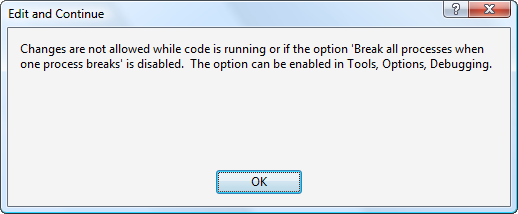
Edit and Continue - breakpoint not hit

This message wasn't very helpful - at least not to me. My code wasn't running, as such (although I agree that someone's code was 🙂 and the setting mentioned was set correctly. Anyway - breaking into your code allows you to then edit the code, which should be obvious by a message on the application status-bar that tells you when the "continue" piece is successful:
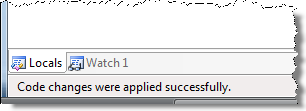
Edit and Continue - code changes applied

I'd be curious to hear about others opinions of Edit and Continue: does it meet your debugging needs, or do you still see NETUNLOAD as important functionality? (There are clearly still areas - unrelated to debugging - where it might be useful to unload .NET assemblies. To be clear, I'd be happy to receive input on those areas, also.)

28 responses to “Tired of not being able to NETUNLOAD from AutoCAD? "Edit and Continue" to the rescue!”

  1. I kind of thought VSTA would help the issue, since the ide would already be inside the acad environment. But I wondering now, would VSTA allow you to stop all code, edit the project, and run again?
    If so, that will be when the .net api catches on with more people.
    Also, I have had problems getting edit and continue to work, even with settings correct.
    I think it might be that it only allows changes to the current line (shown yellow) or something. Fenton ran into this at AU last year, curious is you have ever seen this.

  2. Not all rountine can Edit and Continue.

  3. I don't know anything about how VSTA handles that - I would need to check with someone in our Revit team. I have no reason to believe it wouldn't support Edit and Continue.

    I'll ask Fenton about the issue he hit - I haven't hit these problems myself, but I'm probably a much lighter user of our APIs than he is. I've certainly been able to edit more than just the current line, for instance.

    Any details on cases scenarios where it doesn't work would be helpful to share.

    Kean

  4. thx.
    Also, are there instructions on how to make a menu image dll with VS?
    I used to use vb6 and a util that made the rsc file. I can use Resource Hacker too, but it only allows adding images one by one, not a whole folder at once.
    I tried making a dll with VS, but get clouds for icons, there must be a step I'm skipping.
    I've done lots of these menu dll's so know to close acad, delete mnr file...and so on.
    The dll itself (from VS 2008) is not right, so far, thx

  5. Hi guys,

    Hmmm, I can't really remember the exact issue that James was talking about above. I think it was simply because the debugger hadn't "broken" at the point which I thought it had (the stress of live coding!). Now I know how to use Edit and Continue effectively (meaning follow Kean's post above and don't change too much code while debugging) I don't really have problems with it.

    Actually, the only time I know of that really doesn't allow Edit and Continue is when "Enable Mixed Mode Debugging" is on.

    I hope this helps.
    Cheers
    Fenton

  6. Hi James,

    Sorry - you'll have to ask ADN support (or the discussion groups) about that one.

    Regards,

    Kean

  7. Hi Kean,
    First, I was looking for a way to 'NETunload' because my program looks for a code in the registry to determine if it should continue.
    If that code is not present, or not decryptable by my function, then the installation is not licensed, and therefore I want to unload it. I've been forced to merely unload the menu, and attempt to shut down autocad (although I might want to do something to intentionally crash autocad at that point)

    Second, long, long ago in a cubicle far, far away...(just downstairs actually). I used to be able to 'edit and continue', but at some point in time for reasons I can't explain, it stopped working. Having seen your article I tried to go back and check my settings, but I still can't get it to work now.

    All it tells me is that 'Cannot Currently Modify the text of the editor. It is read only' on the status bar.

    Worse than that, sometimes my watches and/or quick-watches (by hovering over variables during a break) show 'Nothing' or the initialized state of a variable, like a null string for a string, or zero for an integer, even when I know the variable has some other value stored in it. This problem makes it particularly difficult to find a problem in an algorithm when I can't examine the gozinas and gozoutas.

  8. One option would be to perform a check at the beginning of each command, and only execute the guts if the application is properly licensed.

    I'm not sure what the issue you're facing is due to: there may be a setting that needs to be made, although the watch variable issue seems very strange to me. Not something I've seen myself... I'm mostly using C#, which may make a difference.

    Kean

  9. Hi again..
    The watch problem is truly annoying, but my best guess is that it is an issue with VS 2005. I have just learned to be wary of watch values, and if needed I put debug messaging into the code to output the variables I want to watch. A little tedious, but it gets the job done.

    Now, I have searched all over the object browser, searched TTIF, searched the objectArx documentation, and I even tried (reluctantly) the activeX acFocusCtrl.dll that was for VBA, but I can not seem to 'activate' or 'focus' on the autocad window after I show a modeless form. I even found and tried to implement the Protected Overridable ReadOnly Property ShowWithoutActivation on the form, but it didn't change the behavior. I also tried converting my managed Document variable to the COM AcadDocument, which has an Activate method, but that did not work either. I would like to show the modeless form, which is for display purposes only, then return the focus to the Autocad window so the user can make selections. Any suggestions?

  10. I have used the edit & continue effectively, but I found another way around rebooting cad. I add a number to the end of my project name and increment that number as I make changes, and I keep loading the next dll. I'll do like 10 or 20 revisions then I'll start over and reboot cad to unload all the previous dlls.

    1. THAT is the best idea I have heard of in years of avoiding .Net coding because of this issue. Thanks for that one! I can now proceed to develop with some freedom.

  11. Hi Kean,
    You said "we would have to host each assembly in a separate AppDomain and then destroy the AppDomain to unload it. It's altogether possible to implement your own bootstrapper assembly that does just this".
    Actually application from separate AppDomain can't resolve some types from assembly "msvcm80, Version=8.0.50727.3053, Culture=neutral, PublicKeyToken=b03f5f7f11d50a3a" which use OpenMP 2.0 and throw (in deep) OpenMPWithMultipleAppdomainsException. I can't fix it.

    I think reason is here:
    msdn.microsoft.com/e...
    "If you attempt to load an application compiled with /openmp and /clr into a non-default application domain, a TypeInitializationException exception will be thrown outside the debugger and a OpenMPWithMultipleAppdomainsException exception will be thrown in the debugger."
    Some thoughts?

  12. David -

    As I suggested previously, the best way for a modeless UI to interact with AutoCAD is via the command-line. While you may not find it pretty it is the way we recommend, and comes with a number of advantages.

    Quiz -

    Sorry - this is put of my area of expertise. I suggest submitting it to the ADN support team, if you're a member.

    Kean

  13. Hi Kean,
    Thank you for reply.
    It isn't request for support, it is explanation why AutoCAD plugins can't be placed in separate AppDomain.
    I think there exist many other reasons why NETUNLOAD impossible (threads, sync, cross-domain interaction, etc ...) 🙂

  14. Hi Quiz,

    I see - thanks for clarifying.

    The separate AppDomains approach still seems likely to work for applications not built using /clr or /OpenMP (which I would think covers the majority of VB.NET and C# applications, at least). I'm still playing with this, but it is increasingly clear to me that the original design decision to use a single AppDomain was made for a good reason.

    Regards,

    Kean

  15. I know I'm chiming in a year and a half too late, but I just recently started working with AutoCAD add-ons and just found this post...

    You don't necessarily need to maintain a separate AppDomain for each add-on to unload it. You could maintain a single AppDomain, and if a user chooses to unload a particular assembly, reload (unload and reinitialize) the AppDomain without the assembly that the user specified. Having an AppDomain for each add-on assembly seems like the simplest approach, but I have no idea what the added resource cost would be

  16. An interesting idea, although I expect it would also have affect state being maintained by the plugins sharing the AppDomain.

    Kean

  17. twitter.com/CADbloke Avatar
    twitter.com/CADbloke

    A tip for 64 bit users - you have to set the projects to x86 & run in debug to use Edit & Continue. See
    1 & 1 for more details.

  18. Hi Kean,

    I have created a "NET-RELOAD" utility that saves me a lot of time with this. It allows you to modify code in Visual Studio, and then automatically re-compile and re-load the assembly into AutoCAD without having to re-start AutoCAD. It's a real time saver.

    Instead of trying to unload an assembly, the utility uses Visual Studio Automation (i.e. COM) to build a differently named assembly, and then automatically loads it into AutoCAD. The previously loaded commands are simply overridden.

    It should be noted that it doesn't work for debugging (i.e. place breakpoints and step through code). You'd still have to start AutoCAD from within Visual Studio to do this.

    Here's the link to download the utility: link

    You'll also get more details on how it works as well as the C# source code.

    I'd be interested to hear what you think of it.

    Art

    p.s. Kudos should go to Viktor for his post above. My utility was based on his suggestion.

  19. Please note that you might have to open the above link twice for it to work. It's an Autodesk Discussion Groups thing.

  20. Interesting - thanks, Art.

    Kean

  21. Elwin de Gooijer Avatar
    Elwin de Gooijer

    In Visual Studio 2015 is the "Edit and Continue" option removed... So if there is a way to make a "NETUNLOAD" or "NETUPDATE" command...please make it 😀

    1. Hi All,

      I've come across this post several times now and I know it might be a little late;

      I'm working on an Assembly loader for AutoCAD, at least I try to. The Assembly loader loads plugins/add-ons in a seperate AppDomain. So you can unload them again when needed.

      For so far I managed to create a child AppDomain with all the assemblies of an add-on incl. referenced assemblies.
      The only problem is, I can't get the main assembly fired up, I it doesn't get initialized (i.e. Commands are not available).

      Maybe Kean can help me a little bit. If I know how Autocad handles the initialization in the "DefaultDomain" for the loaded assemblies, I might be able to fix this for the child AppDomains.

      I'm almost there!!

    2. It was moved to Options/Debugging/General ... at the bottom.

  22. Hi All,

    I've come across this post several times now and I know it might be a little late;

    I'm working on an Assembly loader for AutoCAD, at least I try to. The Assembly loader loads plugins/add-ons in a seperate AppDomain. So you can unload them again when needed.

    For so far I managed to create a child AppDomain with all the assemblies of an add-on incl. referenced assemblies.
    The only problem is, I can't get the main assembly fired up, I it doesn't get initialized (i.e. Commands are not available).

    Maybe Kean can help me a little bit. If I know how Autocad handles the initialization in the "DefaultDomain" for the loaded assemblies, I might be able to fix this for the child AppDomains.

    I'm almost there!

    1. I remember hitting something similar, but it was many moons ago... I do recall never finding a way to make this work. 🙁

      I hope you have more luck, though!

      Kean

  23. I stumble many times in this website while searching a solution to unload my dll after loading it to autocad. I am newbie to .net in autocad and still not able to find a better way to debug a code without doing the restart of Autocad.
    The only process that I can do for now are to rename the <commandmethod("testcode")> to <commandmethod("testcode1")> and the DLL from Test.dll to Test1.dll before doing the netload to Autocad so that I can still modify the code in Visual Studio without closing the autocad and rebuild it again, for the next test it will be renamed as "TestCode2" and Test2.Dll. I don't know if there's an impact in AutoCad for this kind of testing process.

Leave a Reply to Quiz Cancel reply

Your email address will not be published. Required fields are marked *