Thanks again to Augusto Gonçalves, from our DevTech Americas team, for providing the original VB.NET code for this sample, as well as helping investigate an issue I faced during implementation.
When I saw a recent reply to a developer, showing how to implement a custom object snap in AutoCAD using .NET, I had a really strong sense of nostalgia: it reminded me of a couple of early samples I contributed to the ObjectARX SDK: the "third" sample, which showed how to create a custom osnap that snapped to a third of the way along a curve, and "divisor" which generalised the approach to fractions of any size and was my first real attempt at using C++ templates. Ah, the memories. The samples were retired from this year's SDK, but were still included up to and including the ObjectARX SDK for AutoCAD 2008.
Anyway, the code Augusto sent was very familiar, and it turns out he based it on some documentation that was probably, in turn, based on my C++ sample. So it has come full circle. 🙂
One thing I hadn't realised until I saw Augusto's email was that the ability to define custom object snaps had been exposed through .NET.
Here's the C# code that implements a new "quarter" object snap, which snaps to 1/4 and 3/4 along the length of a curve.
using Autodesk.AutoCAD.ApplicationServices;
using Autodesk.AutoCAD.Runtime;
using Autodesk.AutoCAD.DatabaseServices;
using Autodesk.AutoCAD.Geometry;
using Autodesk.AutoCAD.GraphicsInterface;
[assembly:ExtensionApplication(
typeof(OsnapApp.CustomOSnapApp))
]
namespace OsnapApp
{
// Register and unregister custom osnap
public class CustomOSnapApp : IExtensionApplication
{
private QuarterOsnapInfo _info =
new QuarterOsnapInfo();
private QuarterGlyph _glyph =
new QuarterGlyph();
private CustomObjectSnapMode _mode;
public void Initialize()
{
// Register custom osnap on initialize
_mode =
new CustomObjectSnapMode(
"Quarter",
"Quarter",
"Quarter of length",
_glyph
);
// Which kind of entity will use the osnap
_mode.ApplyToEntityType(
RXObject.GetClass(typeof(Polyline)),
new AddObjectSnapInfo(_info.SnapInfoPolyline)
);
_mode.ApplyToEntityType(
RXObject.GetClass(typeof(Curve)),
new AddObjectSnapInfo(_info.SnapInfoCurve)
);
_mode.ApplyToEntityType(
RXObject.GetClass(typeof(Entity)),
new AddObjectSnapInfo(_info.SnapInfoEntity)
);
// Activate the osnap
CustomObjectSnapMode.Activate("_Quarter");
}
// Unregister custom osnap on terminate
public void Terminate()
{
CustomObjectSnapMode.Deactivate("_Quarter");
}
}
// Create new quarter object snap
public class QuarterGlyph : Glyph
{
private Point3d _pt;
public override void SetLocation(Point3d point)
{
_pt = point;
}
public override void ViewportDraw(ViewportDraw vd)
{
int glyphPixels =
CustomObjectSnapMode.GlyphSize;
Point2d glyphSize =
vd.Viewport.GetNumPixelsInUnitSquare(_pt);
// Calculate the size of the glyph in WCS
// (use for text height factor)
// We'll add 20% to the size, as otherwise
// it looks a little too small
double glyphHeight =
(glyphPixels / glyphSize.Y) * 1.2;
string text = "¼";
// Translate the X-axis of the DCS to WCS
// (for the text direction) and the snap
// point itself (for the text location)
Matrix3d e2w = vd.Viewport.EyeToWorldTransform;
Vector3d dir = Vector3d.XAxis.TransformBy(e2w);
Point3d pt = _pt.TransformBy(e2w);
// Draw the centered text representing the glyph
vd.Geometry.Text(
pt,
vd.Viewport.ViewDirection,
dir,
glyphHeight,
1,
0,
text
);
}
}
// OSnap info
public class QuarterOsnapInfo
{
public void SnapInfoEntity(
ObjectSnapContext context,
ObjectSnapInfo result)
{
// Nothing here
}
public void SnapInfoCurve(
ObjectSnapContext context,
ObjectSnapInfo result
)
{
// For any curve
Curve cv = context.PickedObject as Curve;
if (cv == null)
return;
double startParam = cv.StartParam;
double endParam = cv.EndParam;
// Add osnap at first quarter
double param =
startParam + ((endParam - startParam) * 0.25);
Point3d pt = cv.GetPointAtParameter(param);
result.SnapPoints.Add(pt);
// Add osnap at third quarter
param =
startParam + ((endParam - startParam) * 0.75);
pt = cv.GetPointAtParameter(param);
result.SnapPoints.Add(pt);
if (cv.Closed)
{
pt = cv.StartPoint;
result.SnapPoints.Add(pt);
}
}
public void SnapInfoPolyline(
ObjectSnapContext context,
ObjectSnapInfo result)
{
// For polylines
Polyline pl = context.PickedObject as Polyline;
if (pl == null)
return;
// Get the overall start and end parameters
double plStartParam = pl.StartParam;
double plEndParam = pl.EndParam;
// Get the local
double startParam = plStartParam;
double endParam = startParam + 1.0;
while (endParam <= plEndParam)
{
// Calculate the snap point per vertex...
// Add osnap at first quarter
double param =
startParam + ((endParam - startParam) * 0.25);
Point3d pt = pl.GetPointAtParameter(param);
result.SnapPoints.Add(pt);
// Add osnap at third quarter
param =
startParam + ((endParam - startParam) * 0.75);
pt = pl.GetPointAtParameter(param);
result.SnapPoints.Add(pt);
startParam = endParam;
endParam += 1.0;
}
}
}
}
Some comments on the implementation:
- There's a blank callback that is the base implementation for entities
- We then override that for all Curve objects, using some code to divide a curve into quarters
- We do yet another implementation for all Polyline objects (which are Curves, but we want to treat them as a special case)
- For Polylines we snap within segments
- We could have implemented this by retrieving each segment and dividing that into quarters
- Instead I chose to rely on the fact that a Polyline's parameter is a "whole number" at each vertex, which means the code is the same for any kind of segment
- For Polylines we snap within segments
- In my original sample I adjusted the position of the text, to centre it on the snap point
- In this example I haven't done this, as when I looked at the code it wasn't accurate - when you zoomed in the text appeared in the wrong position
- As we're just using a single character (¼) as our glyph, this isn't a significant problem
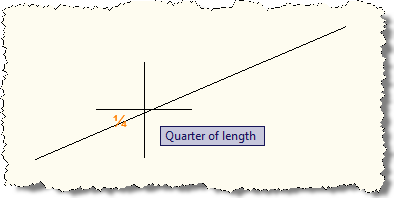
Here's what happens when we load our module and try snapping to a line inside AutoCAD:
Update:
I've just made a few minor changes to the above code to update it to work with AutoCAD 2012 (and maybe this is needed for prior versions, too - I'm not sure when the behaviour changed).
Here's the updated C# code:
using Autodesk.AutoCAD.ApplicationServices;
using Autodesk.AutoCAD.Runtime;
using Autodesk.AutoCAD.DatabaseServices;
using Autodesk.AutoCAD.Geometry;
using AcGi = Autodesk.AutoCAD.GraphicsInterface;
[assembly:ExtensionApplication(
typeof(OsnapApp.CustomOSnapApp))
]
namespace OsnapApp
{
// Register and unregister custom osnap
public class CustomOSnapApp : IExtensionApplication
{
private QuarterOsnapInfo _info =
new QuarterOsnapInfo();
private QuarterGlyph _glyph =
new QuarterGlyph();
private CustomObjectSnapMode _mode;
public void Initialize()
{
// Register custom osnap on initialize
_mode =
new CustomObjectSnapMode(
"Quarter",
"Quarter",
"Quarter of length",
_glyph
);
// Which kind of entity will use the osnap
_mode.ApplyToEntityType(
RXObject.GetClass(typeof(Polyline)),
new AddObjectSnapInfo(_info.SnapInfoPolyline)
);
_mode.ApplyToEntityType(
RXObject.GetClass(typeof(Curve)),
new AddObjectSnapInfo(_info.SnapInfoCurve)
);
_mode.ApplyToEntityType(
RXObject.GetClass(typeof(Entity)),
new AddObjectSnapInfo(_info.SnapInfoEntity)
);
// Activate the osnap
CustomObjectSnapMode.Activate("_Quarter");
}
// Unregister custom osnap on terminate
public void Terminate()
{
CustomObjectSnapMode.Deactivate("_Quarter");
}
}
// Create new quarter object snap
public class QuarterGlyph : AcGi.Glyph
{
private Point3d _pt;
public override void SetLocation(Point3d point)
{
_pt = point;
}
protected override void SubViewportDraw(AcGi.ViewportDraw vd)
{
int glyphPixels =
CustomObjectSnapMode.GlyphSize;
Point2d glyphSize =
vd.Viewport.GetNumPixelsInUnitSquare(_pt);
// Calculate the size of the glyph in WCS
// (use for text height factor)
// We'll add 20% to the size, as otherwise
// it looks a little too small
double glyphHeight =
(glyphPixels / glyphSize.Y) * 1.2;
string text = "¼";
// Translate the X-axis of the DCS to WCS
// (for the text direction) and the snap
// point itself (for the text location)
Matrix3d e2w = vd.Viewport.EyeToWorldTransform;
Vector3d dir = Vector3d.XAxis.TransformBy(e2w);
Point3d pt = _pt.TransformBy(e2w);
// Draw the centered text representing the glyph
vd.Geometry.Text(
pt,
vd.Viewport.ViewDirection,
dir,
glyphHeight,
1,
0,
text
);
}
}
// OSnap info
public class QuarterOsnapInfo
{
public void SnapInfoEntity(
ObjectSnapContext context,
ObjectSnapInfo result)
{
// Nothing here
}
public void SnapInfoCurve(
ObjectSnapContext context,
ObjectSnapInfo result
)
{
// For any curve
Curve cv = context.PickedObject as Curve;
if (cv == null)
return;
double startParam = cv.StartParam;
double endParam = cv.EndParam;
// Add osnap at first quarter
double param =
startParam + ((endParam - startParam) * 0.25);
Point3d pt = cv.GetPointAtParameter(param);
result.SnapPoints.Add(pt);
// Add osnap at third quarter
param =
startParam + ((endParam - startParam) * 0.75);
pt = cv.GetPointAtParameter(param);
result.SnapPoints.Add(pt);
if (cv.Closed)
{
pt = cv.StartPoint;
result.SnapPoints.Add(pt);
}
}
public void SnapInfoPolyline(
ObjectSnapContext context,
ObjectSnapInfo result)
{
// For polylines
Polyline pl = context.PickedObject as Polyline;
if (pl == null)
return;
// Get the overall start and end parameters
double plStartParam = pl.StartParam;
double plEndParam = pl.EndParam;
// Get the local
double startParam = plStartParam;
double endParam = startParam + 1.0;
while (endParam <= plEndParam)
{
// Calculate the snap point per vertex...
// Add osnap at first quarter
double param =
startParam + ((endParam - startParam) * 0.25);
Point3d pt = pl.GetPointAtParameter(param);
result.SnapPoints.Add(pt);
// Add osnap at third quarter
param =
startParam + ((endParam - startParam) * 0.75);
pt = pl.GetPointAtParameter(param);
result.SnapPoints.Add(pt);
startParam = endParam;
endParam += 1.0;
}
}
}
}
Update 2:
Please see this more recent post for an updated solution to this problem.


Leave a Reply to Will Hatch Cancel reply