Some of you may have stumbled across these previous posts, which show how to add custom context menu items for specific object types and to the default AutoCAD context menu. There is a third way to create and display context menus inside AutoCAD, and this approach may prove useful to those of you who wish to display context menus during particular custom commands.
One word of caution: I've been told that this technique does not currently work for transparent commands, so if your command needs to be called transparently then this may not be the approach for you (you should investigate asking for keywords, instead, as this should work without problem in this context).
Here's the C# code:
using Autodesk.AutoCAD.ApplicationServices;
using Autodesk.AutoCAD.EditorInput;
using Autodesk.AutoCAD.Runtime;
using Autodesk.AutoCAD.Windows;
using System;
namespace CommandContextMenu
{
public class Commands
{
public class MyContextMenu : ContextMenuExtension
{
public MyContextMenu()
{
this.Title = "Command context menu";
MenuItem mi = new MenuItem("Item One");
mi.Click +=
new EventHandler(Commands.OnClick);
this.MenuItems.Add(mi);
mi = new MenuItem("Item Two");
mi.Click +=
new EventHandler(Commands.OnClick);
this.MenuItems.Add(mi);
MenuItem smi = new MenuItem("Sub Item One");
smi.Click +=
new EventHandler(Commands.OnClick);
this.MenuItems.Add(smi);
}
};
[CommandMethod(
"mygroup",
"mycmd",
null,
CommandFlags.Modal,
typeof(MyContextMenu)
)]
public static void MyCommand()
{
Editor ed =
Application.DocumentManager.MdiActiveDocument.Editor;
ed.GetPoint("\nRight-click before selecting a point:");
}
static void OnClick(object sender, EventArgs e)
{
Editor ed =
Application.DocumentManager.MdiActiveDocument.Editor;
ed.WriteMessage("\nA context menu item was selected.");
}
}
}
A couple of points about getting this working: on my system I used AutoCAD's OPTIONS command to make sure the right-click menu gets displayed after a certain delay (I enabled the option from the "User Preferences" -> "Right-Click Customization" and then changed the longer click duration to 100 milliseconds, to save a little time. 🙂

The other option for enabling command menus is the SHORTCUTMENU system variable (the documentation inside AutoCAD will tell you about the various values).
Then, once inside the MYCMD command, I was able to right-click and see my custom menu:
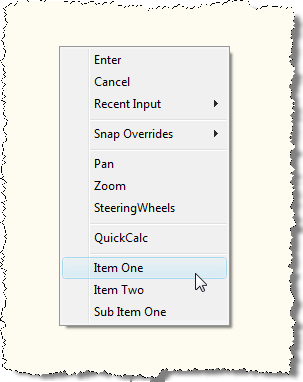
From the command-line, we can see that our callback was called successfully:
Command: MYCMD
Right-click before selecting a point:
A context menu item was selected.
If you wish to have separate callbacks for your various items, it's simply a matter of defining separate functions and passing them in as the Click event handler instead of Command.OnClick.


Leave a Reply