This post is one of the winning entries of the F# programming contest started at the beginning of the year. It was submitted by an old friend of mine, Qun Lu, who also happens to be a member of the AutoCAD engineering team, and makes use of a new API in AutoCAD 2010: the somewhat ominously-named Overrule API.
The Overrule API is really (and I mean really, really) cool. Yes, I know: another really cool API in AutoCAD 2010? Well, I'm honestly not one to hype things up, but I do have a tendency to get excited by technology that has incredibly interesting capabilities with a relatively low barrier of entry. And the Overrule API is one of those APIs. It's the answer to the question posed in this previous post, which raises concerns about translating the power and complexity of custom objects to the world of .NET:
So what's the right thing to do? Clearly we could just go ahead and expose the mechanism as it is today in ObjectARX. And yet here we are with a technology we know to be highly complex and difficult to implement, and an ideal opportunity to redesign it – enabling more people to harness it effectively at lower effort. The more favoured approach (at least from our perspective) would be to investigate further how better to meet developers' needs for enabling custom graphics/behaviour (a.k.a. stylization) in AutoCAD – in a way that could be supported technically for many releases to come.
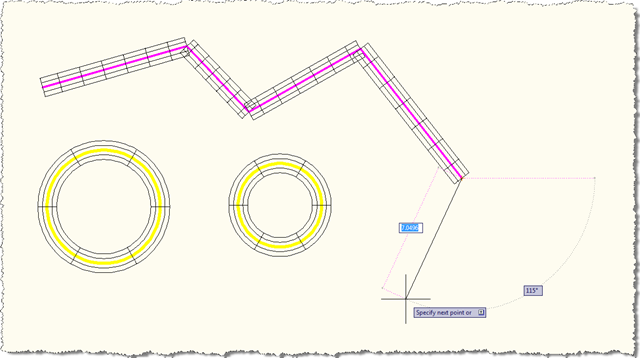
The Overrule API allows you to hook into the display and other aspects of the behaviour of entities inside AutoCAD. The below example is a great example: when enabled, the code overrules the display of lines and circles, to make them into coloured pipes. And all with very little code (which would also be true if the code were in C# or VB.NET).
Here's the F# code:
#light
module DrawOverrule.Commands
open Autodesk.AutoCAD.Runtime
open Autodesk.AutoCAD.ApplicationServices
open Autodesk.AutoCAD.DatabaseServices
open Autodesk.AutoCAD.Geometry
open Autodesk.AutoCAD.GraphicsInterface
open Autodesk.AutoCAD.Colors
type public DrawOverrule public () as this =
inherit DrawableOverrule()
static member public theOverrule =
new DrawOverrule()
static member private Radius = 0.5
member private this.sweepOpts = new SweepOptions()
override this.WorldDraw (d : Drawable, wd : WorldDraw) =
match d with
// Type-test and cast. If succeeds, cast to "line"
| 😕 Line as line ->
// Draw the line as is, with overruled attributes
base.WorldDraw(line, wd) |> ignore
if not line.Id.IsNull && line.Length > 0.0 then
// Draw a pipe around the line
let c = wd.SubEntityTraits.TrueColor
wd.SubEntityTraits.TrueColor <-
new EntityColor(0x00AfAfff)
wd.SubEntityTraits.LineWeight <-
LineWeight.LineWeight000
let clr =
new Circle
(line.StartPoint, line.EndPoint-line.StartPoint,
DrawOverrule.Radius)
let pipe = new ExtrudedSurface()
try
pipe.CreateExtrudedSurface
(clr, line.EndPoint-line.StartPoint, this.sweepOpts)
with
| e -> printfn("Failed with CreateExtrudedSurface")
clr.Dispose()
pipe.WorldDraw(wd) |> ignore
pipe.Dispose()
wd.SubEntityTraits.TrueColor <- c
true
| 😕 Circle as circle ->
// Draw the circle as is, with overruled attributes
base.WorldDraw(circle, wd) |> ignore
// needed to avoid ill-formed swept surface
if circle.Radius > DrawOverrule.Radius then
// draw a pipe around the cirle
let c = wd.SubEntityTraits.TrueColor
wd.SubEntityTraits.TrueColor <-
new EntityColor(0x3fffe0e0)
wd.SubEntityTraits.LineWeight <-
LineWeight.LineWeight000
let normal =
(circle.Center-circle.StartPoint).
CrossProduct(circle.Normal)
let clr =
new Circle
(circle.StartPoint, normal, DrawOverrule.Radius)
let pipe = new SweptSurface()
pipe.CreateSweptSurface(clr, circle, this.sweepOpts)
clr.Dispose()
pipe.WorldDraw(wd) |> ignore
pipe.Dispose()
wd.SubEntityTraits.TrueColor <- c
true
| _ ->
base.WorldDraw(d, wd)
override this.SetAttributes (d : Drawable, t : DrawableTraits) =
let b = base.SetAttributes(d, t)
match d with
| 😕 Line ->
// If d is LINE, set color to index 6
t.Color <- 6s
// and lineweight to .40 mm
t.LineWeight <- LineWeight.LineWeight040
| 😕 Circle ->
// If d is CIRCLE, set color to index 2
t.Color <- 2s
// and lineweight to .60 mm
t.LineWeight <- LineWeight.LineWeight060
| _ -> ()
b
let Overrule enable =
// Regen to see the effect
// (turn on/off Overruling and LWDISPLAY)
DrawableOverrule.Overruling <- enable
match enable with
| true -> Application.SetSystemVariable("LWDISPLAY", 1)
| false -> Application.SetSystemVariable("LWDISPLAY", 0)
let doc =
Application.DocumentManager.MdiActiveDocument
doc.SendStringToExecute("REGEN3\n", true, false, false)
doc.Editor.Regen()
// Now we declare our commands
[<CommandMethod("overrule1")>]
let OverruleStart() =
// Targeting all Drawables, but only affects Lines and Circles
ObjectOverrule.AddOverrule
(RXClass.GetClass(typeof<Drawable>),
DrawOverrule.theOverrule, true)
Overrule(true)
[<CommandMethod("overrule0")>]
let OverruleEnd() =
Overrule(false)
Here's what happens when we load the application, turn the overrule on using the OVERRULE1 command (OVERRULE0 is the command to turn the overrule off – it's details like this that tell you Qun's a real programmer… 😉 and draw some lines and circles:
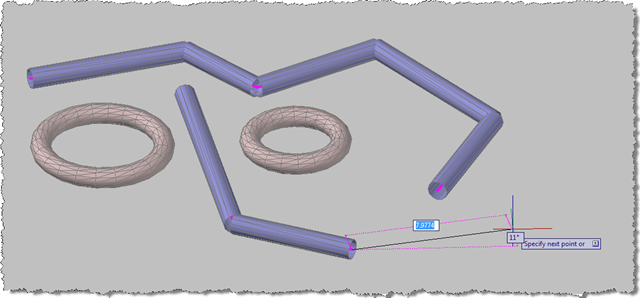
Even in a 3D view – this time with the realistic visual style applied – you get the piping effect when you draw simple geometry:
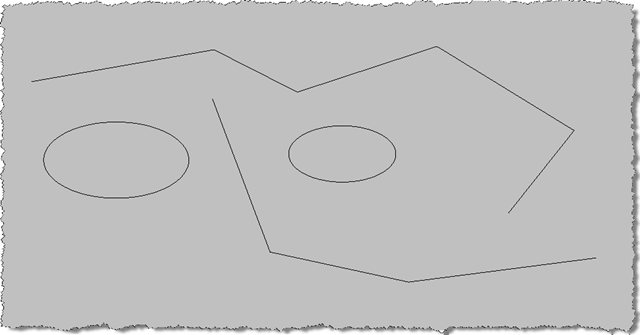
To be clear: these are standard AutoCAD lines and circles. When you use the OVERRULE0 command to disable the overrule, they revert to their original form:
I expect to follow this post – in time – with various more harnessing the power of this very cool API. If you have questions or ideas about how it might be used, be sure to post a comment.
Thanks & congratulations, Qun! Your copy of "Expert F#" is on its way to you via inter-office mail. 🙂 More soon on the other winning entry…


Leave a Reply to csharpbird Cancel reply