Exposing AutoCAD's Properties Palette functionality to .NET - Part 2

In the last post we looked at the code behind an ObjectARX module exposing AutoCAD's Properties Palette for use from managed .NET languages. Thanks again to Cyrille Fauvel for providing this implementation. In this post we're going to move right onto using this implementation from C#.

First things first: if you didn't understand much of what was said in the previous post in this series, Don't Panic! (Yes, that's a quick reference to The Hitchhiker's Guide to the Galaxy.) The actual implementation details aren't particularly important - you only really need to understand them if you want to expose additional interfaces to .NET in the same way (such as IFilterableProperty, the interface discussed in this previous post and something I expect to extend the application to handle, at some point).

Here is the project that contains both the ObjectARX module implementing exposing these interfaces and the sample we're showing today. You simply have to make sure the .NET module can find our asdkOPMNetExt.dll module (ideally both this and your .NET module should be located under AutoCAD's program folder).

Then you can simply implement code, as in the below sample, which loads and makes use of interfaces exposed by this assembly.

Here's the C# code:

using Autodesk.AutoCAD.ApplicationServices;

using Autodesk.AutoCAD.Runtime;

using Autodesk.AutoCAD.Windows.OPM;

using System;

using System.Reflection;

using System.Runtime.InteropServices;


namespace OPMNetSample

{

  #region Our Custom Property

  [

    Guid("F60AE3DA-0373-4d24-82D2-B2646517ABCB"),

    ProgId("OPMNetSample.CustomProperty.1"),


    // No class interface is generated for this class and

    // no interface is marked as the default.

    // Users are expected to expose functionality through

    // interfaces that will be explicitly exposed by the object

    // This means the object can only expose interfaces we define


    ClassInterface(ClassInterfaceType.None),

    // Set the default COM interface that will be used for

    // Automation. Languages like: C#, C++ and VB allow to

    //query for interface's we're interested in but Automation

    // only aware languages like javascript do not allow to

    // query interface(s) and create only the default one


    ComDefaultInterface(typeof(IDynamicProperty2)),

    ComVisible(true)

  ]

  public class CustomProp : IDynamicProperty2

  {


private IDynamicPropertyNotify2 m_pSink = null;


    // Unique property ID


    public void GetGUID(out Guid propGUID)

    {

      propGUID =

        new Guid("F60AE3DA-0373-4d24-82D2-B2646517ABCB");

    }


    // Property display name


    public void GetDisplayName(out string szName)

    {

      szName = "My integer property";

    }


    // Show/Hide property in the OPM, for this object instance


    public void IsPropertyEnabled(object pUnk, out int bEnabled)

    {

      bEnabled = 1;

    }


    // Is property showing but disabled


    public void IsPropertyReadOnly(out int bReadonly)

    {

      bReadonly = 0;

    }


    // Get the property description string


    public void GetDescription(out string szName)

    {

      szName =

        "This property is an integer";

    }


    // OPM will typically display these in an edit field

    // optional: meta data representing property type name,

    // ex. ACAD_ANGLE


    public void GetCurrentValueName(out string szName)

    {

      throw new System.NotImplementedException();

    }


    // What is the property type, ex. VT_R8


    public void GetCurrentValueType(out ushort varType)

    {

      // The Property Inspector supports the following data

      // types for dynamic properties:

      // VT_I2, VT_I4, VT_R4, VT_R8,VT_BSTR, VT_BOOL

      // and VT_USERDEFINED.


      varType = 3; // VT_I4

    }


    // Get the property value, passes the specific object

    // we need the property value for.


    public void GetCurrentValueData(object pUnk, ref object pVarData)

    {

      // TODO: Get the value and return it to AutoCAD


      // Because we said the value type was a 32b int (VT_I4)

      pVarData = (int)4;

    }


    // Set the property value, passes the specific object we

    // want to set the property value for


    public void SetCurrentValueData(object pUnk, object varData)

    {

      // TODO: Save the value returned to you


      // Because we said the value type was a 32b int (VT_I4)

      int myVal = (int)varData;

    }


    // OPM passes its implementation of IDynamicPropertyNotify, you

    // cache it and call it to inform OPM your property has changed


    public void Connect(object pSink)

    {

      m_pSink = (IDynamicPropertyNotify2)pSink;

    }


    public void Disconnect() {

      m_pSink = null;

    }

  }

  #endregion


  #region Application Entry Point

  public class MyEntryPoint : IExtensionApplication

  {

    protected internal CustomProp custProp = null;


    public void Initialize()

    {

      Assembly.LoadFrom("asdkOPMNetExt.dll");


      // Add the Dynamic Property


      Dictionary classDict = SystemObjects.ClassDictionary;

      RXClass lineDesc = (RXClass)classDict.At("AcDbLine");

      IPropertyManager2 pPropMan =

        (IPropertyManager2)xOPM.xGET_OPMPROPERTY_MANAGER(lineDesc);


      custProp = new CustomProp();

      pPropMan.AddProperty((object)custProp);

    }


    public void Terminate()

    {

      // Remove the Dynamic Property


      Dictionary classDict = SystemObjects.ClassDictionary;

      RXClass lineDesc = (RXClass)classDict.At("AcDbLine");

      IPropertyManager2 pPropMan =

        (IPropertyManager2)xOPM.xGET_OPMPROPERTY_MANAGER(lineDesc);


      pPropMan.RemoveProperty((object)custProp);

      custProp = null;

    }

  }

  #endregion

}

A few comments on what this code does…

It defines a class for our custom dynamic property (CustomProp), for which we need a unique GUID (and yes, by definition GUIDs are unique, but if you use the same one twice it ceases to be :-), and implement various callbacks to indicate the name, type, description and writeability of the property, as well as methods to get and set the property value. For this example our property is called "My integer property", and – guess what? – it's an integer, and has been hardcoded to have the value 4. We're not actually storing the data being exposed via this property, but in a real-world application you would probably store it either as XData attached to the object, inside an XRecord in the object's extension dictionary or in an external database of some kind.

In the rest of the code we're defining functions that are called when the module is loaded and when AutoCAD terminates (see this previous post for more information on this mechanism). We use the Initialize() callback to load our mixed-mode module for which we presented the code in the last post (asdkOPMNetExt.dll) and then go ahead and instantiate our property and attach it to line objects.Dynamic property defined using C#
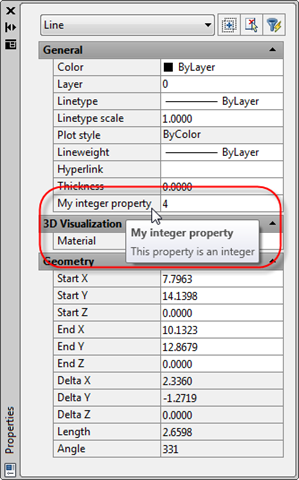
When we build and load the sample, making sure the Properties Palette is visible (using the PROPS command or by double-clicking on the line) and selecting a line we've just drawn, we should see our dynamic property appear, as shown in this image.

If you don't see the property appear, the application is probably having trouble loading asdkOPMNetExt.dll: as mentioned earlier I have placed both this and the sample application in the root folder of my AutoCAD installation. If you're not sure whether the module is loaded properly, you can step through the Initialize() function in the debugger or add a simple command to your code which will obviously only work if your application has been loaded (the Assembly.LoadFrom() call will throw an exception if it doesn't find the module, and if an exception is thrown from Initialize() the application will not be loaded, as described in this previous post).

For the sake of simplicity I'm going to leave this basic sample as having just one, hardwired property: hopefully it's obvious how the application could be extended to handle more properties and to store these properties with their objects (if not, let me know by posting a comment and I'll put together a more extensive example when I get the chance).

2 responses to “Exposing AutoCAD's Properties Palette functionality to .NET - Part 2”

  1. Hi,Kean
    Thanks for your great post about the .NET version of OPM.
    I run the application,and AutoCAD will failure if I modify the custom property.

  2. Hi CSharpbird,

    Oh wow - my sincere apologies... there was a mistake in the code both in the last post and the current post.

    I've now fixed the code in both posts as well as the project for download (please do try it again).

    In case people want to apply the "fix" themselves: the second parameter of SetCurrentValueData() was being incorrectly marshaled. To address this I made the following edits to the project:

    - On line 106 of IDynamicProperty2.h I changed "interior_ptr<Object^> varData" to "Object^ varData". This was probably copy & pasted at some point from GetCurrentValueData().

    - On line 107 of customPropertySample.cs I removed the "ref" keyword from the second parameter of the function signature.

    Now it should work correctly. Both Cyrille and I send our apologies on this one - one of us should have picked it up before posting. 🙁

    Regards,

    Kean

  3. HI,Kean
    I now can run the application.
    But it seems that the following functions are not exposed to .NET:
    MapPropertyToCategory
    GetCategoryName

  4. Correct - you would need to expose ICategorizeProperties to get this functionality. Again, this is something I hope to get to, at some point.

    Kean

  5. code converter to VB.net
    OPMNetSample.dll not loaded
    if include this Region

    #Region "Our Custom Property"
    <<guid("f60ae3da-0373-4d24-82d2-b2646517abcb"), progid("opmnetsample.customproperty.1"),="" classinterface(classinterfacetype.autodispatch),="" comdefaultinterface(gettype(idynamicproperty2)),="" comvisible(true)="">> _
    Public Class CustomProp
    Implements IDynamicProperty2
    Private m_pSink As IDynamicPropertyNotify2 = Nothing
    ' Unique property ID
    Public Sub GetGUID(ByRef propGUID As Guid) Implements IDynamicProperty2.GetGUID
    ' propGUID = New Guid("F60AE3DA-0373-4d24-82D2-B2646517ABCB")
    End Sub
    ' Property display name
    Public Sub GetDisplayName(ByRef szName As String) Implements IDynamicProperty2.GetDisplayName
    'szName = "My integer property"
    End Sub
    ' Show/Hide property in the OPM, for this object instance
    Public Sub IsPropertyEnabled(ByVal pUnk As Object, ByRef bEnabled As Integer) Implements IDynamicProperty2.IsPropertyEnabled
    bEnabled = 1
    End Sub
    ' Is property showing but disabled
    Public Sub IsPropertyReadOnly(ByRef bReadonly As Integer) Implements IDynamicProperty2.IsPropertyReadOnly
    'bReadonly = 0
    End Sub
    ' Get the property description string
    Public Sub GetDescription(ByRef szName As String) Implements IDynamicProperty2.GetDescription
    'szName = "This property is an integer"
    End Sub
    ' OPM will typically display these in an edit field

    ' optional: meta data representing property type name,

    ' ex. ACAD_ANGLE
    Public Sub GetCurrentValueName(ByRef szName As String) Implements IDynamicProperty2.GetCurrentValueName
    ' Throw New System.NotImplementedException()
    End Sub
    ' What is the property type, ex. VT_R8
    Public Sub GetCurrentValueType(ByRef varType As UShort) Implements IDynamicProperty2.GetCurrentValueType
    ' The Property Inspector supports the following data
    ' types for dynamic properties:
    ' VT_I2, VT_I4, VT_R4, VT_R8,VT_BSTR, VT_BOOL
    ' and VT_USERDEFINED.
    'varType = 3
    ' VT_I4
    End Sub
    ' Get the property value, passes the specific object
    ' we need the property value for.
    Public Sub GetCurrentValueData(ByVal pUnk As Object, ByRef pVarData As Object) Implements IDynamicProperty2.GetCurrentValueData
    ' TODO: Get the value and return it to AutoCAD
    ' Because we said the value type was a 32b int (VT_I4)
    'pVarData = CInt(4)
    End Sub
    ' Set the property value, passes the specific object we
    ' want to set the property value for
    Public Sub SetCurrentValueData(ByVal pUnk As Object, ByVal varData As Object) Implements IDynamicProperty2.SetCurrentValueData
    ' TODO: Save the value returned to you
    ' Because we said the value type was a 32b int (VT_I4)
    ' Dim myVal As Integer = CInt(varData)
    End Sub
    ' OPM passes its implementation of IDynamicPropertyNotify, you

    ' cache it and call it to inform OPM your property has changed
    Public Sub Connect(ByVal pSink As Object) Implements IDynamicProperty2.Connect
    '' m_pSink = DirectCast(pSink, IDynamicPropertyNotify2)
    End Sub
    Public Sub Disconnect() Implements IDynamicProperty2.Disconnect
    ' m_pSink = Nothing
    End Sub
    End Class
    #End Region

  6. code converter to VB.net
    OPMNetSample.dll not loaded
    if include this Region

    #Region "Our Custom Property"
    <>Guid("F60AE3DA-0373-4d24-82D2-B2646517ABCB"), ProgId("OPMNetSample.CustomProperty.1"), ClassInterface(ClassInterfaceType.AutoDispatch), ComDefaultInterface(GetType(IDynamicProperty2)), ComVisible(True)<> _
    Public Class CustomProp
    Implements IDynamicProperty2
    Private m_pSink As IDynamicPropertyNotify2 = Nothing
    ' Unique property ID
    Public Sub GetGUID(ByRef propGUID As Guid) Implements IDynamicProperty2.GetGUID
    ' propGUID = New Guid("F60AE3DA-0373-4d24-82D2-B2646517ABCB")
    End Sub
    ' Property display name
    Public Sub GetDisplayName(ByRef szName As String) Implements IDynamicProperty2.GetDisplayName
    'szName = "My integer property"
    End Sub
    ' Show/Hide property in the OPM, for this object instance
    Public Sub IsPropertyEnabled(ByVal pUnk As Object, ByRef bEnabled As Integer) Implements IDynamicProperty2.IsPropertyEnabled
    bEnabled = 1
    End Sub
    ' Is property showing but disabled
    Public Sub IsPropertyReadOnly(ByRef bReadonly As Integer) Implements IDynamicProperty2.IsPropertyReadOnly
    'bReadonly = 0
    End Sub
    ' Get the property description string
    Public Sub GetDescription(ByRef szName As String) Implements IDynamicProperty2.GetDescription
    'szName = "This property is an integer"
    End Sub
    ' OPM will typically display these in an edit field

    ' optional: meta data representing property type name,

    ' ex. ACAD_ANGLE
    Public Sub GetCurrentValueName(ByRef szName As String) Implements IDynamicProperty2.GetCurrentValueName
    ' Throw New System.NotImplementedException()
    End Sub
    ' What is the property type, ex. VT_R8
    Public Sub GetCurrentValueType(ByRef varType As UShort) Implements IDynamicProperty2.GetCurrentValueType
    ' The Property Inspector supports the following data
    ' types for dynamic properties:
    ' VT_I2, VT_I4, VT_R4, VT_R8,VT_BSTR, VT_BOOL
    ' and VT_USERDEFINED.
    'varType = 3
    ' VT_I4
    End Sub
    ' Get the property value, passes the specific object
    ' we need the property value for.
    Public Sub GetCurrentValueData(ByVal pUnk As Object, ByRef pVarData As Object) Implements IDynamicProperty2.GetCurrentValueData
    ' TODO: Get the value and return it to AutoCAD
    ' Because we said the value type was a 32b int (VT_I4)
    'pVarData = CInt(4)
    End Sub
    ' Set the property value, passes the specific object we
    ' want to set the property value for
    Public Sub SetCurrentValueData(ByVal pUnk As Object, ByVal varData As Object) Implements IDynamicProperty2.SetCurrentValueData
    ' TODO: Save the value returned to you
    ' Because we said the value type was a 32b int (VT_I4)
    ' Dim myVal As Integer = CInt(varData)
    End Sub
    ' OPM passes its implementation of IDynamicPropertyNotify, you

    ' cache it and call it to inform OPM your property has changed
    Public Sub Connect(ByVal pSink As Object) Implements IDynamicProperty2.Connect
    '' m_pSink = DirectCast(pSink, IDynamicPropertyNotify2)
    End Sub
    Public Sub Disconnect() Implements IDynamicProperty2.Disconnect
    ' m_pSink = Nothing
    End Sub
    End Class
    #End Region

  7. Ramon Jesus Gonzalez-Marquez Avatar
    Ramon Jesus Gonzalez-Marquez

    Hi Kean!!!

    I have a question regarding the GUID. How can we sure that we have a unique ID? Try and error? In other words, is there any tool or rule to generate them?

    Thanks in advance!!!!

  8. That is an excellent question and one I should have addressed in the post.

    If you open a "Visual Studio Command Prompt" (usually this is in the program group for VS - not sure about Express) you can run the GUIDGEN tool. This will allow you to generate new GUIDs in various copy/paste formats.

    Kean

  9. Ramon Jesus Gonzalez-Marquez Avatar
    Ramon Jesus Gonzalez-Marquez

    Thanks a lot for the answer. This GUID theme has been struggling me for some time since Jeremmy advanced me this code from Cyrille.

    I will try it.

    Thanks again, RJ.

  10. Ramon Jesus Gonzalez-Marquez Avatar
    Ramon Jesus Gonzalez-Marquez

    Hello again Kean!!

    After three weeks out of the Autocad programming... I've been involved in some conferences... I return again to this and I'm having some trouble to play with the dynamic properties. I'm able to add more than one but...
    they are static as the example you gave. How can I work with the objects?

    Another question is if it's possible to create categories in order not to have the properties under "General". Let say for example I would like this to appear under "Custom Data"

    Thanks in advance.

    Cheers RJ.

  11. Kean Walmsley Avatar

    You can store it in XData and retrieve it from there. Tomorrow's post will show it in the context of the Overrule API, in case.

    You would need to extend the code to support ICategorizedProperty (I think). I was planning on doing that at some point, but I have a long to-do list.

    Kean

  12. I have a custom object MyLine derived from AcDvPolyline. The property palette displays "Polyline" instead of "MyLine". How can this be achieved ?

    Thx Mark

  13. Kean Walmsley Avatar
    Kean Walmsley

    I think you may have to implement your own static COM interface for your MyLine object and point AutoCAD to it via GetClassID (a property which can also be overruled in AutoCAD 2010 using a PropertiesOverrule, by the way, which means you can control the properties shown in the Properties Palette even for standard objects).

    You may want to ask on the discussion groups or via ADN, as I confess I'm no expert in this area.

    Kean

    1. Hi Kean,
      encouraged by your comment in the brackets, I started an adn support request: "How to remove or disable a property in the properties palette for build-in entity?"
      I was surprised to get "Currently it is not possible to disable particular properties in OPM for
      in-built entities." as an answer... can you confirm that?
      Thanks a lot, Silke

      1. Kean Walmsley Avatar

        Hi Silke,

        It's been a while since I looked at this, but I suspect they're right. Sorry if this is bad news...

        Regards,

        Kean

  14. When a Polyline is clicked, in the property palette the vertex number is shown & when clicked "previous/next" buttons show up.
    Can this be achieved with a dynamic property ?

    Mark

  15. Kean Walmsley Avatar

    You can, although I haven't done it myself. Search the ObjectARX documentation for "IAcPiPropertyDisplay" - you need to implement this interface for your properties and implement the GetCustomPropertyCtrl() method, in particular. The various control types you can use (without implementing your own) can be found in the acpexctl.h header.

    I'll add this to my list of topics to cover, but it may take some time to get to (and I may well never reach it - you're better off asking ADN if you want timely help with this and you're a member).

    Kean

  16. Does anyone have a 64-bit version of asdkOPMNetExt.dll? I tried to compile it, but without success (I am not a guru of ObjectARX/C++)

  17. Hi Kean,

    I am reading your blog with great interest as it helps to make up for the patchy .NET API documentation!

    I am in the process of attempting to link data stored in a AutoCAD Entity Extension Dictionary as Xrecords to the properties palette in our AutoCAD application. As part of this I have been attempting to use this sample code and can sucessfully use the C# sample project. However, if i convert the sample project to VB.Net (the language u require) and reference the asdkOPMNetExt.dll I cannot get the resulting DLL to load into AutoCAD. Upon investigation the problem seems to be the CustomProp Class itself, and the sample will load if this is removed even if the reference and Assembly.load etc remain.

    Do you have any ideas what might cause this with VB.Net?

    Going forwards it would appear using this approach we would need to implement a custom property for each property we want and this is then associated with all Entities of that type, i.e. all lines even those without our data. Can this be changed to only specify them for particular instances of a Lines or would i need to write a custom Line class or simple overrule the enabled sub where our data is not present?

    Thanks in advance and keep up the informative blogging!

    Mat

  18. Kean Walmsley Avatar

    Hi Mat,

    There's no particular reason it can't work from VB.NET, as far as I'm aware. I assume it's some kind of conversion issue.

    I haven't done this, myself, but I believe that the IsPropertyEnabled() callback can be used to tell the Property Palette whether or not to show the property for a particular object (I hope I have that right).

    In case you hadn't seen it, you may also find this post to be of interest.

    Good luck,

    Kean

  19. Kean,

    Your blog has been a real life saver for me, thank you!

    I was wondering if you know of any resources that explain how to implement the PropertiesOverrule.

    Thanks!

  20. Took a fair bit of fiddling (and lots of crashes 🙂 ) but the .NET interface wrapper for ICategorizeProperties should be:

    [InteropServices::Guid("4D07FC10-F931-11ce-B001-00AA006884E5")]
    [InteropServices::InterfaceTypeAttribute(InteropServices::ComInterfaceType::InterfaceIsIUnknown)]
    [InteropServices::ComVisible(true)]
    public interface class ICategorizeProperties
    {
    void MapPropertyToCategory(
    [InteropServices::In] System::Int32 DispId,
    [InteropServices::Out] System::Int32% CategoryId
    );

    void GetCategoryName(
    [InteropServices::In] System::Int32 CategoryId,
    [InteropServices::In] System::UInt32 lcid,
    [InteropServices::Out,
    InteropServices::MarshalAs(
    InteropServices::UnmanagedType::BStr
    )
    ] interior_ptr<system::string^> name
    );
    };

  21. beh - "name" in the 3rd last line there should be the generics type argument to interior_ptr

  22. Humm - i managed to compile a 64 bit version but alas all the interfaces that marshal an IUnknown to an object pointer dont work (ie something in the prototype generated by .NET is different from the methods they're trying to override.

    Basically, i can see IsPropertyReadOnly and GetDisplayName etc get called but not IsPropertyEnabled etc.

    I assume that it's something to do with pointer sizing but no idea how to fix it.

    Has anyone else got this working?

    Kean, is the interface somehow different on 64bit for some of those methods? (the headers say no but...)

  23. Sorry - I know very little about the issues implementing COM interfaces on 64-bit platforms.

    I suggest posting your question to the ADN team, if you're a member, or otherwise the ObjectARX Discussion Group.

    Kean

  24. Ah ha! So - after talking to ADN and seeing that Kean's code does actually work in 64bit, I had to look at what i was actually doing with the properties to find my issue.

    Specifically IsPropertyEnabled was failing and I was doing the following:

    public void IsPropertyEnabled(object pUnk, out int bEnabled)
    {
    AcadObject obj = pUnk as AcadObject;
    int id = obj.ObjectID); // Fail here.
    ...
    }

    If I do this instead then it works:

    public void IsPropertyEnabled(object pUnk, out int bEnabled)
    {
    AcadObject obj = pUnk as AcadObject;
    string handle = obj.Handle; // works.
    ...
    }

    (note either will work on 32bit)

    Not sure why the ObjectId property doesn't work on 64bit but oh well - it's easy enough to use a handle instead.

    Hopefully the above will save someone some time and frustration.

    Cheers,
    Chris

  25. Brent Burgess Avatar

    Hi Kean,

    Can a property be added to the properties palette when there are no entities selected? In my instance, I would like to a combo box, with populated data.

    This blog has been a fantastic source of information!!

    Thanks

    Brent

  26. Kean Walmsley Avatar

    Hi Chris,

    Yes - this is a common problem migrating between 32- and 64-bit systems: you have to use Handle or ObjectId32 instead of ObjectId when using the COM interface, I believe.

    Regards,

    Kean

  27. Kean Walmsley Avatar

    Hi Brent,

    I recall there is a mode you can use - although I don't remember whether it's exposed via .NET - for adding such properties during command execution (I'm not sure about when no commands are active).

    I suggest either pinging ADN or posting on the AutoCAD .NET (or perhaps ObjectARX) discussion group.

    Regards,

    Kean

  28. I know it's half a year late but perhaps it will be useful to someone else.
    I used the following contstruct to get the relevant property manager:
    IPropertyManager2* pManager = (IPropertyManager2*)GET_OPMEXTENSION_CREATE_PROTOCOL()->CreateOPMObjectProtocol(NULL, 2)->GetPropertyManager();

    Then use the resulting property manager to attach properties to "No selection" state.

  29. Hi Kean,
    I take great pleasure reading your blog, and LOTS of useful information. I do however have a small question regarding this post.
    I was trying to implement the IDynamicEnumProperty interface.
    This is my interface definition in C#:

    [ComImport(), Guid("8B384028-ACB1-11d1-A2B4-080009DC639A"), InterfaceTypeAttribute(ComInterfaceType.InterfaceIsIUnknown)]
    public interface IDynamicEnumProperty
    {
    void GetNumPropertyValues(
    [Out]
    out int numValues);

    void GetPropValueData(
    int index,
    [In, Out, MarshalAs(UnmanagedType.Struct)]
    ref object varData
    );

    void GetPropValueName(
    int index,
    [Out]
    out string valueName);
    }

    And here is the implementation:
    public override void GetNumPropertyValues(out int numValues)
    {
    numValues = 2;
    }

    public override void GetPropValueName(int index, out string valueName)
    {
    valueName = "";
    switch (index)
    {
    case 0:
    valueName = "Value 1";
    break;
    case 1:
    valueName = "Value 2";
    break;
    }
    }

    public override void GetPropValueData(int index, ref object varData)
    {
    varData = index;
    }

    Still the drop down is not created...
    What am I doing wrong, or is there some example I can use?

    Best regards,
    Alex.

  30. Hi Alex,

    As I didn't implement this originally, I'm not really the one to be able to help you with this, I'm afraid. You'll hopefully be able to get help via one of the discussion groups or via ADN (if you're a member).

    Regards,

    Kean

  31. Thanks Kean,
    I'll try the ADN channel.

  32. How to extract the drawing data from autocad to my asp.net application

  33. How to extract the dwg drawing data from autocad to our asp.net application

  34. Kean Walmsley Avatar

    That's a big question - and off-topic for this post. You might want to ask on the discussion groups or to the ADN team for best practices.

    A lot depends on whether you want to implement a specific "export" routine that extracts the data and uploads it to your web-service, in some way, or if you want to host RealDWG on the server itself.

    But again - not a question that's related to this topic, in any way.

    Kean

  35. Hey CSmith!
    I know your comment is older than a year now but i'm currently trying to use asdkOPMNetExt.dll on a 64bit machine and i fail constantly. My proplem is that i'm not able to cast the com object as an AcadObject. It works fine in a 32bit environment but on 64bit i get an "Unable to cast..." Exception.
    That error occurs inside the functions GetCurrentValueData and SetCurrentValueData. I also tried to receive some Informations about the Com Object with Microsoft.VisualBasic.Information.TypeName(pVarData) but that returns just "Nothing". Also i can't even use the GetType() function on the Com Object. It also throws an Exception "Object reference not set to an instance of an object.mscorlib". Do you or anyone else have an idea what the problem could be.
    I'm using AutoCAD 2011 64bit by the way.

  36. Bastian Krüger Avatar
    Bastian Krüger

    Hi Kean!

    What if i want to have multiple properties? Do I have to have separate classes for each property or is it enough to create two instances of the same class (each with a different property name for example)?

  37. Hi Bastian,

    I would expect you'd be able to use instances rather than having to derive a new class for each property. But I don't recall whether I've actually done so, or not, so I suggest giving it a try.

    Regards,

    Kean

    1. What about showing properties for a real world object (Sewer pipe), it means a line with diameter and material as attributes in XRecords.

      The doubt is that in the DWG I'll have conventional lines and lines from sewer network with xRecords attached.

      How do I filter ? Thanks

      1. Sorry, Diego - can you explain more about your concern? I don't fully understand.

        Kean

  38. I assigned xrecords to cogo points in Civil 3D. I would like to use xrecords as the display name but the key to the xrecord I would like to use is the raw description of the cogo point that is selected. The problem I am having is that I do not have access to object in the GetDisplayName function to get the description from the point. Is there a work around.

    1. Kean Walmsley Avatar

      Unfortunately this mechanism isn't intended to have the property's display name based on object-specific (rather than type-specific) data.

      Kean

  39. Hi Kean,

    Thanks for the help !! May I please know if there is any update regarding the "ICategorizedProperty" for creating new categories in properties palette using .NET?

    Regards,
    AutoGeek

    1. Hi AutoGeek,

      Not that I'm aware of. You might try posting to ADN or the discussion groups.

      Regards,

      Kean

  40. Stoyan Kuzmič Pripyatsky Avatar
    Stoyan Kuzmič Pripyatsky

    Hi Kean, I managed to convert your OPM project for AutoCAD2009 to AutoCAD 2015 - I am using .NET overruling quite often and this also bring sometimes troubles with OPM - especially, when you set entity properties via drawable overrule - in this case I would need to be able to not just add new property but override existing. I wonder how I could get access to list of properties for specific entity type(getting list of IDynamicProperty2) - or where I could get at least their names (list of string) - interface exposes function GetDynamicPropertyByName - I tried Layer and other string but there is no description what is meant by Dynamic Property Name(IDynamicProperty2 itself has no property name or dynamic name).

    1. Kean Walmsley Avatar

      Hi Stoyan,

      I don't believe this is something you can do with the OPM API. I suggest contacting ADN or posting to the relevant forum - someone there should give you a definitive answer.

      Regards,

      Kean

  41. Hey Kean, I am struggling so much with getting some sort of handle from the pUnk argument. What can I cast it to? AcadObject no longer exists AFAIK.

    1. Hi Gregot,

      Sorry - I'm no longer working with AutoCAD. Please post your support questions to the AutoCAD .NET forum.

      Thanks,

      Kean

      1. Sure, no worries. Thanks for the reply! 🙂

    2. Just if anyone else encounters the same. I implemented IDynamicProperty (not IDynamicProperty2) along with IPropertyManager (not IPropertyManager2) according to dynops.h, where you get objectId as parameter right away. Just marshal it as UInt64 on 64-bit apps. Cheers!

      1. Thanks, Gregor!

        Kean

  42. I tried it with ACAD 2022 and it worked great. Nice work.
    Is there a version that support categorization support as well for properties?

    thanks in advance

    1. It's been some time since I've used it myself. Please post to the AutoCAD .NET forum - someone there will be able to help.

      Kean

Leave a Reply to Tommy Dunn Cancel reply

Your email address will not be published. Required fields are marked *