Triangulating an AutoCAD polyface mesh from a set of points using .NET

A huge thank you to Zeljko Gjuranic for providing this code for a guest post. The code is based on a paper of Zeljko's that was published in issue 11 of KoG magazine. The original paper is available in Croatian with an abstract in English.

The code in this post asks the user to select a set of points and then creates a polyface mesh by using Delaunay triangulation on those points.

[As we're creating a polyface mesh we're limited to 32,767 vertices. This is a known limitation when using the PolyFaceMesh object: with the new SubDMesh object in AutoCAD 2010 it should be possible to write a version that doesn't suffer from this limitation. Something to look forward to from a future post…]

Here's Zeljko's C# code, re-formatted very slightly for posting:

using Autodesk.AutoCAD.ApplicationServices;

using Autodesk.AutoCAD.DatabaseServices;

using Autodesk.AutoCAD.Runtime;

using Autodesk.AutoCAD.EditorInput;

using Autodesk.AutoCAD.Geometry;

using System;


public class Triangulate

{

  public bool circum(

    double x1, double y1, double x2,

    double y2, double x3, double y3,

    ref double xc, ref double yc, ref double r)

  {

    // Calculation of circumscribed circle coordinates and

    // squared radius


    const double eps = 1e-6;

    const double big = 1e12;

    bool result = true;

    double m1, m2, mx1, mx2, my1, my2, dx, dy;


    if ((Math.Abs(y1 - y2) < eps) && (Math.Abs(y2 - y3) < eps))

    {

      result = false;

      xc = x1; yc = y1; r = big;

    }

    else

    {

      if (Math.Abs(y2 - y1) < eps)

      {

        m2 = -(x3 - x2) / (y3 - y2);

        mx2 = (x2 + x3) / 2;

        my2 = (y2 + y3) / 2;

        xc = (x2 + x1) / 2;

        yc = m2 * (xc - mx2) + my2;

      }

      else if (Math.Abs(y3 - y2) < eps)

      {

        m1 = -(x2 - x1) / (y2 - y1);

        mx1 = (x1 + x2) / 2;

        my1 = (y1 + y2) / 2;

        xc = (x3 + x2) / 2;

        yc = m1 * (xc - mx1) + my1;

      }

      else

      {

        m1 = -(x2 - x1) / (y2 - y1);

        m2 = -(x3 - x2) / (y3 - y2);

        if (Math.Abs(m1 - m2) < eps)

        {

          result = false;

          xc = x1;

          yc = y1;

          r = big;

        }

        else

        {

          mx1 = (x1 + x2) / 2;

          mx2 = (x2 + x3) / 2;

          my1 = (y1 + y2) / 2;

          my2 = (y2 + y3) / 2;

          xc = (m1 * mx1 - m2 * mx2 + my2 - my1) / (m1 - m2);

          yc = m1 * (xc - mx1) + my1;

        }

      }

    }

    dx = x2 - xc;

    dy = y2 - yc;

    r = dx * dx + dy * dy;

    return result;

  }


  [CommandMethod("TRIANG")]

  public void TriangulateCommand()

  {

    const int maxpoints = 32767;


    Document doc =

      Application.DocumentManager.MdiActiveDocument;

    Database db = doc.Database;

    Editor ed = doc.Editor;


    TypedValue[] tvs = { new TypedValue(0, "POINT") };

    SelectionFilter sf =

      new SelectionFilter(tvs);

    PromptSelectionOptions pso = new PromptSelectionOptions();

    pso.MessageForAdding = "Select Points:";

    pso.AllowDuplicates = false;

    PromptSelectionResult psr = ed.GetSelection(pso, sf);


    if (psr.Status == PromptStatus.Error) return;

    if (psr.Status == PromptStatus.Cancel) return;


    SelectionSet ss = psr.Value;

    int npts = ss.Count;

    if (npts < 3)

    {

      ed.WriteMessage("Minimum 3 points must be selected!");

      return;

    }

    if (npts > maxpoints)

    {

      ed.WriteMessage("Maximum nuber of points exceeded!");

      return;

    }


    int i, j, k, ntri, ned, status1 = 0, status2 = 0;

    bool status;


    // Point coordinates


    double[] ptx = new double[maxpoints + 3];

    double[] pty = new double[maxpoints + 3];

    double[] ptz = new double[maxpoints + 3];


    // Triangle definitions


    int[] pt1 = new int[maxpoints * 2 + 1];

    int[] pt2 = new int[maxpoints * 2 + 1];

    int[] pt3 = new int[maxpoints * 2 + 1];


    // Circumscribed circle


    double[] cex = new double[maxpoints * 2 + 1];

    double[] cey = new double[maxpoints * 2 + 1];

    double[] rad = new double[maxpoints * 2 + 1];

    double xmin, ymin, xmax, ymax, dx, dy, xmid, ymid;

    int[] ed1 = new int[maxpoints * 2 + 1];

    int[] ed2 = new int[maxpoints * 2 + 1];


    ObjectId[] idarray = ss.GetObjectIds();

    Transaction tr =

      db.TransactionManager.StartTransaction();

    using (tr)

    {

      DBPoint ent;

      k = 0;

      for (i = 0; i < npts; i++)

      {

        ent =

          (DBPoint)tr.GetObject(idarray[k], OpenMode.ForRead, false);

        ptx[i] = ent.Position[0];

        pty[i] = ent.Position[1];

        ptz[i] = ent.Position[2];

        for (j = 0; j < i; j++)

          if ((ptx[i] == ptx[j]) && (pty[i] == pty[j]))

          {

            i--; npts--; status2++;

          }

        k++;

      }

      tr.Commit();

    }


    if (status2 > 0)

      ed.WriteMessage(

        "\nIgnored {0} point(s) with same coordinates.",

        status2

      );


    // Supertriangle


    xmin = ptx[0]; xmax = xmin;

    ymin = pty[0]; ymax = ymin;

    for (i = 0; i < npts; i++)

    {

      if (ptx[i] < xmin) xmin = ptx[i];

      if (ptx[i] > xmax) xmax = ptx[i];

      if (pty[i] < xmin) ymin = pty[i];

      if (pty[i] > xmin) ymax = pty[i];

    }

    dx = xmax - xmin; dy = ymax - ymin;

    xmid = (xmin + xmax) / 2; ymid = (ymin + ymax) / 2;

    i = npts;

    ptx[i] = xmid - (90 * (dx + dy)) - 100;

    pty[i] = ymid - (50 * (dx + dy)) - 100;

    ptz[i] = 0;

    pt1[0] = i;

    i++;

    ptx[i] = xmid + (90 * (dx + dy)) + 100;

    pty[i] = ymid - (50 * (dx + dy)) - 100;

    ptz[i] = 0;

    pt2[0] = i;

    i++;

    ptx[i] = xmid;

    pty[i] = ymid + 100 * (dx + dy + 1);

    ptz[i] = 0;

    pt3[0] = i;

    ntri = 1;

    circum(

      ptx[pt1[0]], pty[pt1[0]], ptx[pt2[0]],

      pty[pt2[0]], ptx[pt3[0]], pty[pt3[0]],

      ref cex[0], ref cey[0], ref rad[0]

    );


    // main loop

    for (i = 0; i < npts; i++)

    {

      ned = 0;

      xmin = ptx[i]; ymin = pty[i];

      j = 0;

      while (j < ntri)

      {

        dx = cex[j] - xmin; dy = cey[j] - ymin;

        if (((dx * dx) + (dy * dy)) < rad[j])

        {

          ed1[ned] = pt1[j]; ed2[ned] = pt2[j];

          ned++;

          ed1[ned] = pt2[j]; ed2[ned] = pt3[j];

          ned++;

          ed1[ned] = pt3[j]; ed2[ned] = pt1[j];

          ned++;

          ntri--;

          pt1[j] = pt1[ntri];

          pt2[j] = pt2[ntri];

          pt3[j] = pt3[ntri];

          cex[j] = cex[ntri];

          cey[j] = cey[ntri];

          rad[j] = rad[ntri];

          j--;

        }

        j++;

      }


      for (j = 0; j < ned - 1; j++)

        for (k = j + 1; k < ned; k++)

          if ((ed1[j] == ed2[k]) && (ed2[j] == ed1[k]))

          {

            ed1[j] = -1; ed2[j] = -1; ed1[k] = -1; ed2[k] = -1;

          }


      for (j = 0; j < ned; j++)

        if ((ed1[j] >= 0) && (ed2[j] >= 0))

        {

          pt1[ntri] = ed1[j]; pt2[ntri] = ed2[j]; pt3[ntri] = i;

          status =

            circum(

              ptx[pt1[ntri]], pty[pt1[ntri]], ptx[pt2[ntri]],

              pty[pt2[ntri]], ptx[pt3[ntri]], pty[pt3[ntri]],

              ref cex[ntri], ref cey[ntri], ref rad[ntri]

            );

          if (!status)

          {

            status1++;

          }

          ntri++;

        }

    }


    // removal of outer triangles

    i = 0;

    while (i < ntri)

    {

      if ((pt1[i] >= npts) || (pt2[i] >= npts) || (pt3[i] >= npts))

      {

        ntri--;

        pt1[i] = pt1[ntri];

        pt2[i] = pt2[ntri];

        pt3[i] = pt3[ntri];

        cex[i] = cex[ntri];

        cey[i] = cey[ntri];

        rad[i] = rad[ntri];

        i--;

      }

      i++;

    }


    tr = db.TransactionManager.StartTransaction();

    using (tr)

    {

      BlockTable bt =

        (BlockTable)tr.GetObject(

          db.BlockTableId,

          OpenMode.ForRead,

          false

        );

      BlockTableRecord btr =

        (BlockTableRecord)tr.GetObject(

          bt[BlockTableRecord.ModelSpace],

          OpenMode.ForWrite,

          false

        );


      PolyFaceMesh pfm = new PolyFaceMesh();

      btr.AppendEntity(pfm);

      tr.AddNewlyCreatedDBObject(pfm, true);

      for (i = 0; i < npts; i++)

      {

        PolyFaceMeshVertex vert =

          new PolyFaceMeshVertex(

            new Point3d(ptx[i], pty[i], ptz[i])

          );

        pfm.AppendVertex(vert);

        tr.AddNewlyCreatedDBObject(vert, true);

      }

      for (i = 0; i < ntri; i++)

      {

        FaceRecord face =

          new FaceRecord(

            (short)(pt1[i] + 1),

            (short)(pt2[i] + 1),

            (short)(pt3[i] + 1),

            0

          );

        pfm.AppendFaceRecord(face);

        tr.AddNewlyCreatedDBObject(face, true);

      }

      tr.Commit();

    }

    if (status1 > 0)

      ed.WriteMessage(

        "\nWarning! {0} thin triangle(s) found!" +

        " Wrong result possible!",

        status1

      );

    Application.UpdateScreen();

  }

}

To see the command in action, first we create a set of DBPoints (using AutoCAD's POINT command). I've created these points at different elevations, to put the code through its paces in three dimensions:
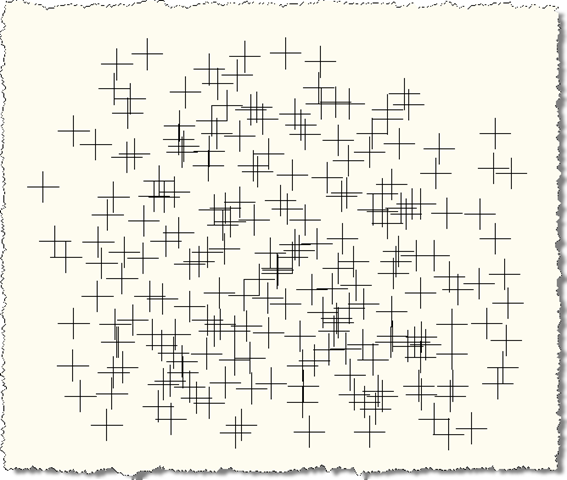
Points for triangulation

Running the TRIANG command and selecting these points creates a polyface mesh (here with PDMODE reset to 0):
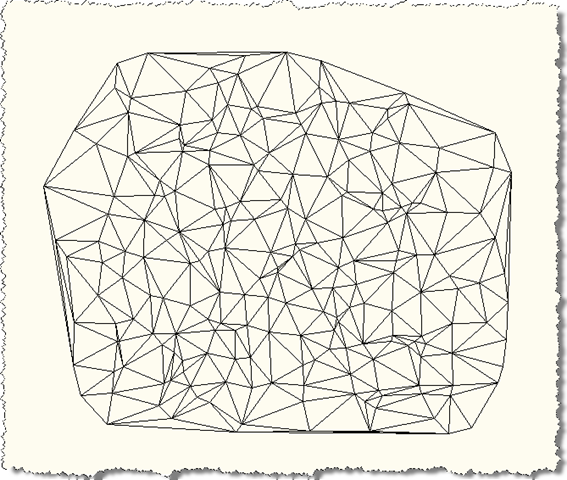
Triangulated mesh

And here's a 3D view on this mesh, to see the depth:
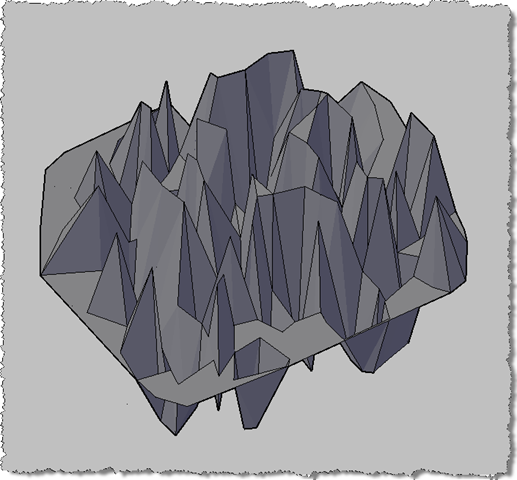
3D conceptual display of our triangulated mesh

Thanks again to Zeljko for providing this excellent sample!

  1. Fun stuff, you can find other examples of Paul Bourke’s algorithm here
    1

    The fastest .NET version I’ve seen can be found here, its a great example
    1

  2. Hi Kean,
    I've made a same code by producing 3D faces,
    I want to get a z value from a sets of point entities then create a table of that point with a z in it. It's like drape function in Civil3D. I wish using 3D for everything but sometimes the jobs is just create a setout point and using Civil 3D will take the process longer.
    I wish you have some tips for me how to drape a point or a polyline using autocad.net

    Regards,

    Ferry

  3. Hi Ferry,

    At this stage I would think that leveraging standard tools working with point clouds in our products might be the way for you to go. Have you looked at these, at all?

    Regards,

    Kean

  4. Hello everyone,

    Would it be possible to get instructions regarding this coding. I have no idea to do and I wish I could use this command.

    Thank you all

    Sam

  5. Kean Walmsley Avatar

    You might try following the steps in this post.

    Kean

  6. Hi Kean,

    How do you get the PolyFaceMesh colored (or shaded) in you 3D view. Is that a property to set to the PolyFaceMesh.

    Thanks

    Mourad

  7. Hi Mourad,

    I'm pretty sure that's just due to setting the Visual Style to Conceptual.

    If you're interested in per-face colouring, I did this once in F#:

    keanw.com/2007/11/a-mathematical-.html

    Hopefully this will give you some clues as to how to move forward.

    Regards,

    Kean

  8. Hi Kean,

    I would like to suggest a topic related to this one (if you find that would be interesting). Now I have an image (from google earth for example) that overlays the mesh, and I would like to shape it according to the interpolated Z values from mesh.

    I wrote a module that extracts interpolated Z value from any (X, Y) position inside the mesh domain.

    The question is : Is there a way to assign individual Z values for every pixel in a image?

    Kind Regards,

    Mourad

  9. Hi Mourad,

    Not exactly (unless you create a point cloud, in much the same way as the series of posts on Kinect integration shows).

    You could probably create a texture (by stretching the planar polygons to drape properly across the 3D mesh faces), but it sounds pretty tricky.

    Do let me know if you have any success with either of these approaches,

    Kean

  10. Hi Kean,

    How do I change the code so it returns 3Dfaces instead of a polyfacemesh?

    Kind regards,
    Tim

  11. Hi Tim,

    It should be straightforward enough. There's some code in this post that deals with 3D faces, that may be of some help:

    keanw.com/2012/06/face-tracking-inside-autocad-using-kinect.html

    Regards,

    Kean

  12. Kean,

    It was indeed straightforward, thank you for the link.

    Tim

  13. Dimitar Valkanov Avatar
    Dimitar Valkanov

    I've made a small project that calculates Constrained Delaunay Triangulation. It works with remarkable speed. It takes about 18 seconds for 1 000 000 points. May I post it here?

  14. If you're willing to share the source, I'd be happy to take a look and consider it for posting.

    My email address in is the About link by my photo - please send me an email.

    Kean

  15. Hi Kean,

    Can you help me how do I interpolated elevation to polyfacemesh?

    How do I determine intersection face with polyfacemesh to draw contour?

    Thanks

  16. Hi hoang long,

    Sorry - this sounds like quite a complicated request, and isn't one that I can afford to spend time on.

    I suggest posting something to the relevant online discussion forum - you may get help there.

    Regards,

    Kean

  17. Please, help me!
    I really need your help!

    I has already search very much websites, but I not get help.

  18. Hi Kean,

    I am very interested in having the Constrained Delaunay Triangulation written by Dimitar.

    If you don't mind, I'd like to have that source.

    Kind Regards and great thanks to Dimitar who thought about sharing that,

    Mourad

  19. Hi Mourad,

    I've followed up by email.

    Regards,

    Kean

  20. Hi Kean
    Can u please suggest me how to draw a traingle using onepoint and area??

    1. Kean Walmsley Avatar

      Please post to the discussion groups when you have support questions.

      Kean

  21. Hi Kean,

    I need to render Autocad models(drawing), meaning all the renderable objects on the scene, through ray casting technic. Therefore I need to triangulate the model to intersect ray-triangle. Is there any way to access triangles in the model(as I assume the Autocad engine probably triangulate all the objects within the model and render them, doesn't it?) apart from exporting the file to .FBX or other formats? The problem with .FBX is that it's slow(it writes the file twice). And other formats apparently only accept solids and not meshes.

    Thanks,
    Ali

    1. Hi Ali,

      This is off-topic: please post support questions to the relevant AutoCAD discussion group.

      Thanks,

      Kean

  22. Hello Kean and Mourad,

    If you don't mind Can I too have the Algorithm of Dimitar? Please...
    It's an humble request.

    Regards

    1. Hi Shah,

      I'll send you an email.

      Regards,

      Kean

  23. Anthony Rautio Avatar
    Anthony Rautio

    I was trying to get this to work in Revit with tessellatedshapebuilder. I had to modify the code of course for the arguments needed by that system. I split the array into groups of 3 to make triangles in Revit, am assuming the array of points is reordered in some way to for a list of connected faces? not sure, my result was very wonky and did not make a clean shape, just a bunch of disconnected faces. Not sure if this is because of difference in pollyface vs tesselatedface. here are two sections that changed the most for Revit, can anyone help untangle this mess?

    using (Autodesk.Revit.DB.Transaction t2 = new Autodesk.Revit.DB.Transaction(doc, "Do Stuff"))
    {
    t2.Start();
    XYZ ent = new XYZ();
    k = 0;
    for (i = 0; i < npts; i++)
    {
    ent = tpoints[k];
    ptx[i] = ent.X;
    pty[i] = ent.Y;
    ptz[i] = ent.Z;

    for (j = 0; j < i; j++)
    {
    if ((ptx[i] == ptx[j]) && (pty[i] == pty[j]))
    {
    i--; npts--; status2++;
    }
    }
    k++;
    }

    t2.Commit();
    }

    -----------------more of orginal code

    the ending code.

    TessellatedShapeBuilder builder = new TessellatedShapeBuilder();
    builder.OpenConnectedFaceSet(true);

    for (i = 0; i < npts; i++)
    {
    //TaskDialog.Show("Revit", i.ToString());
    int counter2 = 3;
    loopVertices.Clear();
    while (counter2 > 0)
    {
    XYZ vert = new XYZ(ptx[i], pty[i], ptz[i]);
    loopVertices.Add(vert);
    counter2 -= 1;
    i++;
    }
    builder.AddFace(new TessellatedFace(loopVertices, materialId));
    }

    builder.CloseConnectedFaceSet();
    builder.Build();
    TessellatedShapeBuilderResult result = builder.GetBuildResult();

    using (Autodesk.Revit.DB.Transaction t3 = new Autodesk.Revit.DB.Transaction(doc, "Create tessellated direct shape"))
    {
    t3.Start();

    DirectShape ds = DirectShape.CreateElement(doc, new ElementId(BuiltInCategory.OST_GenericModel));
    ds.ApplicationId = "Application id";
    ds.ApplicationDataId = "Geometry object id";

    ds.SetShape(result.GetGeometricalObjects());
    t3.Commit();
    }

    1. Anthony Rautio Avatar
      Anthony Rautio

      uploads.disquscdn.c...

      I am essentially looking for the same result that the topo command makes in Revit from a list of points.

      I auto topo pointclouds with a script, trying to adopt it to run off a box shape placed around a piece of point cloud equipment, so we can auto model equipment. works when the points are in the z direction (topography in revit) but trying to get it to work in x and y as well. Shooting perp from a grid of points on a plane towards the pcloud and finding nearest point. (again works for topo, just cant get the topo tool to work sideways (y as z, etc.)

      1. Kean Walmsley Avatar

        Hi Anthony,

        I'm no longer working with AutoCAD regularly. Please post your questions to the AutoCAD .NET forum.

        Thank you,

        Kean

Leave a Reply to Kean Walmsley Cancel reply

Your email address will not be published. Required fields are marked *