A new project wizard for AutoCAD .NET development

Some of you may remember a philosophical question I raised in a post some time ago. The overall consensus of the feedback we received was to prioritise delivering code samples (given a choice between code samples and wizard-like code-generation tools). Which we are doing, both via the ADN site and our developer blogs… but that doesn't mean some investment in code-generation tools isn't also appropriate, from time-to-time. 🙂

Cyrille Fauvel, who manages the Media & Entertainment arm of DevTech but also occasionally works on technical activities that relate to our other products, has put together a new (currently draft) version of the AutoCAD .NET Wizard. This tool integrates with the Visual Studio 2008 IDE (as well as the 2008 editions of Visual C# Express and Visual Basic Express), adding C#/VB.NET project templates for AutoCAD development. (This version of the tool only works with the 2008 versions – we're currently evaluating whether (and how) to support the 2005 versions of Visual Studio [Express] or simply to recommend using our previously posted templates.)

When you select one of these "Autodesk" project templates you will get a skeleton project that defines the application initialization protocol plus a few placeholder commands while setting up the ability to define localized commands.

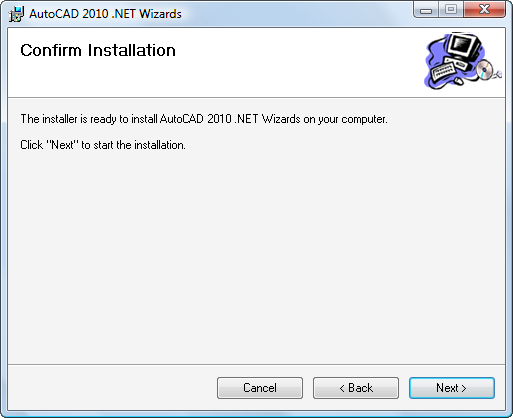
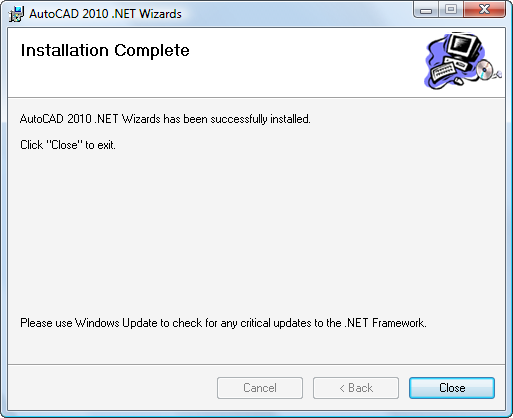
Here are a few images stepping you through the installation of this Wizard (nothing very surprising, which is why I've kept the thumbnails so small :-):

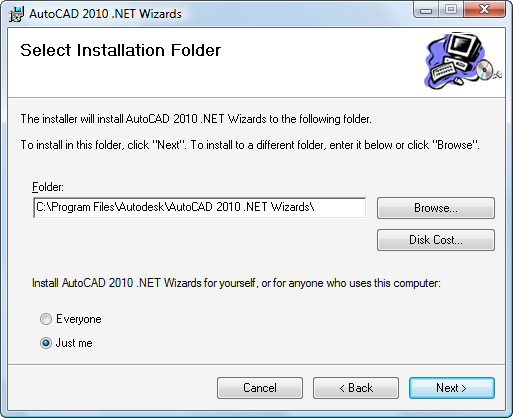
AutoCAD 2010 NET Wizards install AutoCAD 2010 NET Wizards install location AutoCAD 2010 NET Wizards install confirmation AutoCAD 2010 NET Wizards install progress AutoCAD 2010 NET Wizards install complete

[Note: the current installer requests an install location, which is unnecessary. The installer only uses this location for temporary files, removing them afterwards. This step will be removed from a future build of the tool.]

Once installed (and Visual Studio 2008 has been re-started), you will get some new options when you start a new project…
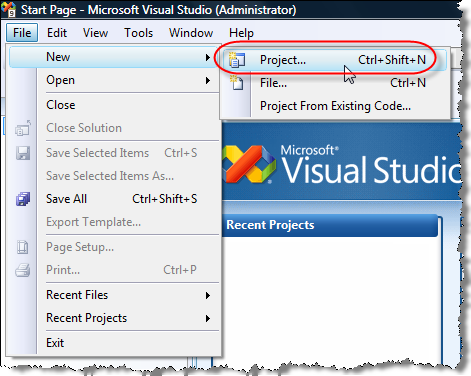
AutoCAD 2010 NET Wizards new project menu item

… that include the "AutoCAD 2010 plug-in" project template:
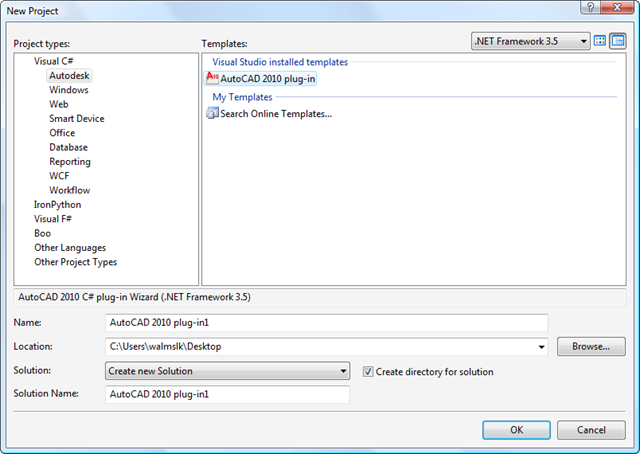
AutoCAD 2010 NET Wizards new project template

We've numbered these templates "2010", as they provide support for API features delivered with AutoCAD 2010, but if you don't select these features the created project should work with older versions of AutoCAD. At least that's the theory. 🙂

When you first select one of these project types, you will be asked to select the location of your ObjectARX SDK:
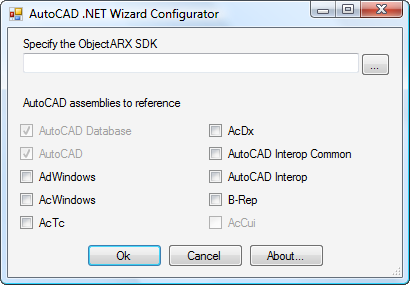
AutoCAD 2010 NET Wizards configurator

You should specify this along with the assemblies you would like to reference for this particular project:
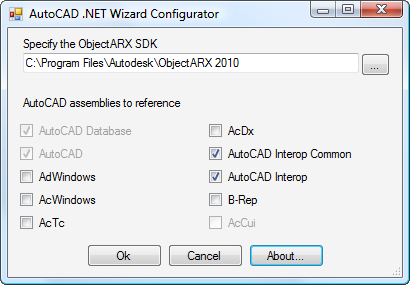
AutoCAD 2010 NET Wizards configurated

On completion of this dialog your skeleton project will be created.

[Something else to note: the tool currently creates projects which allow addition of Windows Presentation Foundation content – to do this we had to add a little piece of XML to the project file that specifies a target .NET Framework version of 3.0 or above as well as a GUID to identify the project as WPF-compatible. This tells Visual Studio to list WPF item-types when you add new items to the project, but I expect this to become another configuration option in a future version as some developers will want to target framework versions where WPF is unavailable.]

Let's take a look at the skeleton code created for a C# project, reformatted to fit the width of the blog…

First the myPlugin.cs file:

using System;

using Autodesk.AutoCAD.Runtime;

using Autodesk.AutoCAD.ApplicationServices;

using Autodesk.AutoCAD.DatabaseServices;

using Autodesk.AutoCAD.Geometry;

using Autodesk.AutoCAD.EditorInput;


// This line is not mandatory, but improves loading performance

[assembly: ExtensionApplication(

  typeof(Autodesk.AutoCAD.AutoCAD_2010_plug_in1.MyPlugin)

)]


namespace Autodesk.AutoCAD.AutoCAD_2010_plug_in1

{


  // This class is instantiated by AutoCAD once and kept alive for

  // the duration of the session. If you don't do any one time

  // initialization then you should remove this class.

  public class MyPlugin : IExtensionApplication

  {


    void IExtensionApplication.Initialize()

    {

      // Add one time initialization here

      // One common scenario is to setup a callback function here

      // that unmanaged code can call.

      // To do this:

      // 1. Export a function from unmanaged code that takes a

      //    function pointer and stores the passed in value in a

      //    global variable.

      // 2. Call this exported function in this function passing

      //    delegate.

      // 3. When unmanaged code needs the services of this managed

      //    module you simply call acrxLoadApp() and by the time

      //    acrxLoadApp returns  global function pointer is

      //    initialized to point to the C# delegate.

      // For more info see:

      //http://msdn2.microsoft.com/en-US/library/5zwkzwf4(VS.80).aspx

      //http://msdn2.microsoft.com/en-us/library/44ey4b32(VS.80).aspx

      //http://msdn2.microsoft.com/en-US/library/7esfatk4.aspx

      // as well as some of the existing AutoCAD managed apps.


      // Initialize your plug-in application here

    }


    void IExtensionApplication.Terminate()

    {

      // Do plug-in application clean up here

    }

  }

}

And now the myCommands.cs file:

using System;

using Autodesk.AutoCAD.Runtime;

using Autodesk.AutoCAD.ApplicationServices;

using Autodesk.AutoCAD.DatabaseServices;

using Autodesk.AutoCAD.Geometry;

using Autodesk.AutoCAD.EditorInput;


// This line is not mandatory, but improves loading performances

[assembly: CommandClass(

  typeof(Autodesk.AutoCAD.AutoCAD_2010_plug_in1.MyCommands)

)]


namespace Autodesk.AutoCAD.AutoCAD_2010_plug_in1

{


  // This class is instantiated by AutoCAD for each document when

  // a command is called by the user the first time in the context

  // of a given document. In other words, non static data in this

  // class is implicitly per-document!

  public class MyCommands

  {

    // The CommandMethod attribute can be applied to any public

    // member function of any public class.

    // The function should take no arguments and return nothing.

    // If the method is an intance member then the enclosing class is

    // intantiated for each document. If the member is a static

    // member then the enclosing class is NOT intantiated.

    //

    // NOTE: CommandMethod has overloads where you can provide helpid

    // and context menu.


    // Modal Command with localized name

    [CommandMethod(

      "MyGroup", "MyCommand", "MyCommandLocal", CommandFlags.Modal

    )]

    public void MyCommand() // This method can have any name

    {

      // Put your command code here

    }


    // Modal Command with pickfirst selection

    [CommandMethod(

      "MyGroup", "MyPickFirst", "MyPickFirstLocal",

      CommandFlags.Modal | CommandFlags.UsePickSet

    )]

    public void MyPickFirst() // This method can have any name

  &#
160; {

      PromptSelectionResult result =

        Application.DocumentManager.MdiActiveDocument.Editor.

          SelectImplied();

      if (result.Status == PromptStatus.OK)

      {

        // There are selected entities

        // Put your command using pickfirst set code here

      }

      else

      {

        // There are no selected entities

        // Put your command code here

      }

    }


    // Application Session Command with localized name

    [CommandMethod(

      "MyGroup", "MySessionCmd", "MySessionCmdLocal",

      CommandFlags.Modal | CommandFlags.Session

    )]

    public void MySessionCmd() // This method can have any name

    {

      // Put your command code here

    }


    // LispFunction is similar to CommandMethod but it creates a

    // lisp callable function. Many return types are supported not

    // just string or integer.

    [LispFunction("MyLispFunction", "MyLispFunctionLocal")]

    public int MyLispFunction(ResultBuffer args)

    // This method can have any name

    {

      // Put your command code here


      // Return a value to the AutoCAD Lisp Interpreter

      return 1;

    }

  }

}

The myCommands.resx file needed to define the local command names (for the MySessionCmd command) has also been added to the project automatically to help with command localization.

All well and good… but it may be that these project templates don't quite fit your internal needs, whether due to the copyright notices in the source and assembly properties [something I do expect to be removed from a future build – it doesn't make sense for Autodesk copyright notices to be placed in your project skeleton] or because you have a standard approach you've adopted for command registration (or whatever). The good news is that it's pretty easy for you to modify these baseline templates for your own needs:

  1. Locate the template you wish to update, e.g. "C:\Program Files\Microsoft Visual Studio 9.0\Common7\IDE\ProjectTemplates\CSharp\Autodesk\AutoCAD 2010 plug-in.zip" (this path will vary if you're running on a 64-bit or localized OS or if you're using an Express version of Visual Studio, but the technique should still work).
  2. Unzip the files somewh
    ere.
  3. Modify the source code and project setup to meet your needs.
  4. Modify the template file (MyTemplate.vstemplate – an XML file providing Visual Studio with additional information not stored in the project), as needed.
  5. ZIP the files back up, choosing a new name for the .ZIP archive.
  6. Post the file within the ProjectTemplates folder structure.
  7. Run Visual Studio with the /InstallVSTemplates command parameter (the easiest way is to open a "Visual Studio 2008 Command Prompt" and use it to execute "devenv /InstallVSTemplates").

As mentioned a few times, I do expect us to provide a new version of this tool with some minor wrinkles ironed out, but it's pretty much ready-to-go (and certainly ready for people to try out and respond with their feedback :-). Please let us know how you get on, whether by posting a comment or by emailing our wizard developers.

21 responses to “A new project wizard for AutoCAD .NET development”

  1. Tilo Pfliegner Avatar

    Just a hint for those who are trying to install the wizard under Vista x64 and getting an error code 2738 (like me). This site explains why.

  2. Nicely done lads! One thing to add would be an option for generating the required files for 'best practice' implementation of document events on every drawing that is open and opened. This invariable comes up in newsgroups and sites as there are a number of ways of doing it.

    I have a vague memory that the ARX Wizard Add-In did this...

    Cheers,
    Glenn.

  3. Stefan De Cock Avatar
    Stefan De Cock

    Hi,

    I don't know wether it's the right place to post this, but I give it a try :

    I'm looking for an example or some more detailed information about the Exporter class from MAP 3D in (VB).NET to export to SHAPE files.
    There is VERY little information in the ObjectARX .NET Developer's Guide, so can someone please direct me to an example of how to implement this ?

    Thanx,
    Stefan DC, Belgium

  4. Kean Walmsley Avatar

    Hi Stefan,

    As you seem to have guessed, this is not a forum for support. Please submit your question to the ADN team, if you're a member, or otherwise one of our online discussion groups.

    Regards,

    Kean

  5. Stephen Preston Avatar
    Stephen Preston

    @GlennR -

    The ObjectARX Wizards use a document manager reactor to facilitate the use of per document data. The same Wizard framework isn't needed in .NET for two reasons:

    1. If you implement your CommandMethods as non-static functions, then your CommandClass is instantiated per document (on first invocation of your command) - so you have per document data by default.

    2. Albert implemented the Document.UserData property in the APIto allow per document data storage via a hashtable.

    Does that answer your question, or are there other issues you're trying to address with document events?

    Cheers,

    Stephen

  6. Hey Kean,

    Thanks very much for taking the request and turning it into a post. I did manage, with a bit of head scratching, to translate the old VB.NET sample and the ARX SDK sample, to a C# plugin.

    I've posted this at theswamp here:

    theswamp.org/ind...

    One thing I noticed during this exercise and unless I'm fundamentally missing some key point somewhere in the process, is that for a check to be made and a fix offered up, there must exist an 'object in error' in the drawing you're trying to check.

    As an example, a company might say to a 3rd party subby, 'thou shalt use our titleblock and it must be xrefed into paperspace'...something along those lines. So, you have a company DWS with a titleblock xrefed into paperspace and all that, then you proceed to check a drawing.

    You get back alist of Xrefs (as that was your filter) but none of them are the company titleblock. They might all be in paperspace and pass eveything else, but they are not THE titleblock....does that make sense? You don't have an 'error object' as the titleblock doesn't exist, but the drawing from the subby is clearly in violation.

    Do you have any thoughts?

    Cheers,
    Glenn.

  7. Stephen Preston Avatar
    Stephen Preston

    Hi Glenn. Would you mind emailing me your contact details so I can discuss this with you? I don't want to fill up Kean's blog with a long discussion thread. My email address is stephen-dot-preston-at-autodesk-dot-com. (I hope putting it in that format will stop the spambots picking it up :-).

  8. After installing the wizard, i can't see my WPF controls and windows in xaml 🙁 I recieve an error
    The specified module could not be found. (Exception from HRESULT: 0x8007007E)
    at System.ModuleHandle.ResolveType(Int32 typeToken, RuntimeTypeHandle* typeInstArgs, Int32 typeInstCount, RuntimeTypeHandle* methodInstArgs, Int32 methodInstCount)
    at System.ModuleHandle.ResolveTypeHandle(Int32 typeToken, RuntimeTypeHandle[] typeInstantiationContext, RuntimeTypeHandle[] methodInstantiationContext)
    at System.Reflection.Module.ResolveType(Int32 metadataToken, Type[] genericTypeArguments, Type[] genericMethodArguments)
    at System.Reflection.CustomAttribute.FilterCustomAttributeRecord(CustomAttributeRecord caRecord, MetadataImport scope, Assembly& lastAptcaOkAssembly, Module decoratedModule, MetadataToken decoratedToken, RuntimeType attributeFilterType, Boolean mustBeInheritable, Object[] attributes, IList derivedAttributes, RuntimeType& attributeType, RuntimeMethodHandle& ctor, Boolean& ctorHasParameters, Boolean& isVarArg)
    at System.Reflection.CustomAttribute.GetCustomAttributes(Module decoratedModule, Int32 decoratedMetadataToken, Int32 pcaCount, RuntimeType attributeFilterType, Boolean mustBeInheritable, IList derivedAttributes)
    at System.Reflection.CustomAttribute.GetCustomAttributes(Assembly assembly, RuntimeType caType)
    at System.Reflection.Assembly.GetCustomAttributes(Type attributeType, Boolean inherit)
    at MS.Internal.Xaml.ReflectionProjectNode.BuildSubsumption()
    at MS.Internal.Xaml.ReflectionProjectNode.SubsumingNamespace(Identifier identifier)
    at MS.Internal.Xaml.XmlElement.BuildScope(PrefixScope parentScope, IParseContext context)
    at MS.Internal.Xaml.XmlElement.FindElementType(PrefixScope parentScope, IParseContext context)
    at MS.Internal.DocumentTrees.Markup.XamlSourceDocument.get_RootType()
    at Microsoft.Windows.Design.Documents.Trees.MarkupDocumentTreeManager.get_RootType()
    at Microsoft.Windows.Design.Documents.MarkupDocumentManager.CalculateLoadErrorState()
    at Microsoft.Windows.Design.Documents.MarkupDocumentManager.get_LoadState()
    at MS.Internal.Host.PersistenceSubsystem.Load()
    at MS.Internal.Host.Designer.Load()
    at MS.Internal.Designer.VSDesigner.Load()
    at MS.Internal.Designer.VSIsolatedDesigner.VSIsolatedView.Load()
    at MS.Internal.Designer.VSIsolatedDesigner.VSIsolatedDesignerFactory.Load(IsolatedView view)
    at MS.Internal.Host.Isolation.IsolatedDesigner.BootstrapProxy.LoadDesigner(IsolatedDesignerFactory factory, IsolatedView view)
    at MS.Internal.Host.Isolation.IsolatedDesigner.BootstrapProxy.LoadDesigner(IsolatedDesignerFactory factory, IsolatedView view)
    at MS.Internal.Host.Isolation.IsolatedDesigner.Load()
    at MS.Internal.Designer.DesignerPane.LoadDesignerView()

    Before installing the wizard everything worked fine 🙁

  9. Cyrille Fauvel Avatar
    Cyrille Fauvel

    The .NET wizards installer only copies a zip file into the ProjectTemplates folder, 2 DLL into the GAC, and run the 'devenv /InstallVSTemplates' command. So as you can see, we are not installing anything which could affect your system. However, that is really curious the problem arise after installing our wizards. We tested the .NET wizards installer on 32b and x64 XP and Vista platforms with Visual 2008 Express and/or Pro installed on the machine with no problem. So I am really curious to know what happened on your side. I just created a new project on my side and added a WPF item into it with no problem. Please let me know if you could fix the issue,

  10. No, I couldn't fix this issue,there is one problem more, after creating a plugin project i have an error like:
    "Cannot add "\inc-win32" as a reference path as it is relative. Please specify an absolute path"
    And the project not showing in the Visual studio but it's created. When i open it i should add references acmgd and acdbmgd, because it can't find them. Maybe that is the reason?

    My Autocad installation is in "C:\Program Files\Autocad 2010", ObjectArx is in "C:\ObjectArx 2010".

  11. Cyrille Fauvel Avatar

    When you invoke the .NET Wizards, there should be a dialog coming asking you to select the managed DLL from AutoCAD you want to include, and at the top of the dialog there is an edit field which should contain the path to the ARX SDK. The reason of this path is to tell Visual Studio where it can find the managed DLL, otherwise the project will not load into Visual Studio (you should prefer using the managed DLL from the ARX SDK versus the managed DLL from the AutoCAD folder because using the ones from AutoCAD otherwise Visual Studio will have problem when using the resource editors).

    If you got the error you mentionned, it is certainly because you left the field blank. Put "C:\ObjectArx 2010" and it should work. If it still fails, verify your copy of the SDK contains a folder named inc-win32.

    Please let me know if that fix the issue,

  12. YES!
    It solved the problem.
    For some reason if to add acmgd and acdbmgd from Autocad installation path the wpf elenets couldn't be shown. I added them from ObjectArx 2010 and everything works just fine!
    Thank you very much!

  13. Web application development Avatar
    Web application development

    First of all, just I want to say thank you very much for giving a very useful information. I am using a older version but now I can update new one very easily through your instruction.

  14. Has this been updated to work with Visual Studio 2010?

  15. It's a work-in-progress...

    Kean

  16. ben.senior@t-online.de Avatar
    ben.senior@t-online.de

    Kean,

    Has the 'Work-in-progress' progressed 😉

    Is there a wizard for VS 2010 for Windows 7 Pro 64 Bit yet.

    Ben

  17. ben.senior@t-online.de Avatar
    ben.senior@t-online.de

    Found it.

    Sorry to bother you.

  18. Hi, I was just wondering if there was a reference somewhere for what the various assemblies referenced during this wizard are used for. (e.g. AdWindows, AcWindows, B-Rep), so I know which ones to reference during project creation.

  19. Kean Walmsley Avatar

    Hi Gavin,

    I would hope the AutoCAD .NET Developer's Guide would help:

    autodesk.com/autocad-net-developers-guide

    If there are any gaps, let me know and I'll explain.

    Regards,

    Kean

  20. hi, i was install autocad.net wizard, but when creat new project with visual studio 2010 , it have not [comandmethod..] ? can you help me? pls, sr 😀 my eng is bad 😀

    1. Please post support-related questions to the Autodesk discussion groups.

      Thanks,

      Kean

Leave a Reply

Your email address will not be published. Required fields are marked *