I recently stumbled across this post which inspired me to do something similar in AutoCAD (the fact that both posts cover Fibonacci spirals and use F# is about where the similarity ends - they do things quite differently).
Fibonacci spirals are an approximation of the golden spiral, which for old timers out there will be reminiscent of the AutoCAD R12 (it was R12, wasn't it?) design collateral - the same as this one from AME 2.1 - which I still find cool after all these years. 🙂
The first thing was to create a function that returns a portion of the Fibonacci sequence:
let fibs n =
Seq.unfold (fun (n0, n1) -> Some(n0, (n1, n0 + n1))) (0I,1I)
|> Seq.take n
|> Seq.to_list
A few comments about this implementation:
- I searched online for tail-recursive Fibonacci implementations (not that we're likely to create a stack overflow with the number of recursions we're going to do, but I like to do things right when I can 🙂
- Tail-recursive solutions are easy if returning a specific number, but as we need to return a portion of the Fibonacci sequence things get a little more complicated
- Here's a quick reminder of how we can check that tail call optimization has happened, when we do choose to use tail recursion
- I ended up going for a lazily-evalulated solution, copied and modified from the Foundations of F# book by Robert Pickering
- Unfold (OK – I admit this Wikipedia entry is beyond obscure for most of us mere mortals – this post may be of more help) applies a function to a seed value to create what may be an infinite sequence of numbers (which is precisely what the Fibonacci sequence is, of course)
- We use the Seq data-type (essentially an IEnumerable in .NET) which is lazy
- This means that it only actually evaluates the various items in the list as we ask for them
- We then "take" the first n items from the list (n will be specified by the user), so only that number of items get evaluated
- We convert the results to a list to return to the caller
- I like the elegance of this solution and it's certainly efficient enough for our purposes
If you load this code into F# interactive and execute it against the first 20 numbers in the sequence, you get:
> fibs 20;;
val it : bigint list
= [0I; 1I; 1I; 2I; 3I; 5I; 8I; 13I; 21I; 34I; 55I; 89I; 144I; 233I; 377I; 610I;
987I; 1597I; 2584I; 4181I]
Otherwise the below implementation should be reasonably straightforward. We define a local addSegment function which we then call on each member of the subset of the Fibonacci sequence (in reverse, as we're drawing the curves from large to small). We use the iteri function to do this, as it provides us with a useful index into the list which then allows us to decide which of the four directions we're facing (the orientation of the arc rotates 90 degrees each time).
Here's the complete F# code:
#light
// Declare our namespace and module name
module Fibonacci.Spiral
// Import managed assemblies
open Autodesk.AutoCAD.Runtime
open Autodesk.AutoCAD.ApplicationServices
open Autodesk.AutoCAD.DatabaseServices
open Autodesk.AutoCAD.EditorInput
open Autodesk.AutoCAD.Geometry
open System
// A lazy Fibonacci sequence generator
let fibs n =
Seq.unfold (fun (n0, n1) -> Some(n0, (n1, n0 + n1))) (0I,1I)
|> Seq.take n
|> Seq.to_list
[<CommandMethod("fib")>]
let fibonacciSpiral() =
// Let's get the usual helpful AutoCAD objects
let doc =
Application.DocumentManager.MdiActiveDocument
let ed = doc.Editor
let db = doc.Database
// Ask the user how deep to go
let pio =
new PromptIntegerOptions("\nEnter number of levels: ")
pio.AllowNone <- true
pio.AllowZero <- false
pio.AllowNegative <- false
pio.DefaultValue <- 10
pio.LowerLimit <- 1
pio.UpperLimit <- 50
pio.UseDefaultValue <- true
let pir = ed.GetInteger(pio)
if pir.Status = PromptStatus.OK then
// We'll actually add one to the value provided
// as this gives more logical results
let levels = pir.Value + 1
// "use" has the same effect as "using" in C#
use tr =
db.TransactionManager.StartTransaction()
// Get appropriately-typed BlockTable and BTRs
let bt =
tr.GetObject
(db.BlockTableId,OpenMode.ForRead)
:?> BlockTable
let ms =
tr.GetObject
(bt.[BlockTableRecord.ModelSpace],
OpenMode.ForWrite)
:?> BlockTableRecord
// Create our polyline, set its defaults,
// add it to the modelspace and the transaction
let pl = new Polyline()
pl.SetDatabaseDefaults()
ms.AppendEntity(pl) |> ignore
tr.AddNewlyCreatedDBObject(pl, true)
pl.AddVertexAt
(pl.NumberOfVertices, Point2d.Origin, 0.0, 0.0, 0.0)
// We need a mutable start point variable for
// each of our arcs to connect
let start = ref Point3d.Origin
// Add an arc segment to our polyline
let addSegment i size =
// i is the index in the list provided by iteri
// Decide the directions of the "axes" and the arc's start
// angle based on one of four possibilities
let (xdir, ydir, startAngle) =
match (i % 4) with
| 0 -> (Vector3d.XAxis, Vector3d.YAxis, 0.0)
| 1 -> (-Vector3d.YAxis, Vector3d.XAxis, Math.PI * 1.5)
| 2 -> (-Vector3d.XAxis, -Vector3d.YAxis, Math.PI)
| 3 -> (Vector3d.YAxis, -Vector3d.XAxis, Math.PI / 2.0)
| _ -> failwith "Invalid modulus remainder!"
// The end angle is 90 degrees from the start
let endAngle = startAngle + Math.PI / 2.0
// The center of the arc is bottom right-hand corner
// of the box (direction goes along the bottom from
// left to right, so we go "size" units along the
// direction from the start point)
let center = !start + xdir * float size
// Bulge is defined as the tan of one quarter of the
// included angle (and negative, as we're going
// clockwise)
let bulge = Math.Tan((endAngle - startAngle) / -4.0)
// We need to convert our 3D start point to a 2D point
// on the plane of the polyline
let pos = (!start).Convert2d(pl.GetPlane())
// Now we just add the vertex at the end and mutate our
// start variable to contain the end of the arc
pl.AddVertexAt(pl.NumberOfVertices, pos, bulge, 0.0, 0.0)
start.contents <- center + ydir * float size
// Here's where we plug it all together...
// Get the first n fibonacci numbers, reverse the list and
// call our function on each one (passing its index along,
// too)
fibs levels |> List.rev |> List.iteri addSegment
tr.Commit()
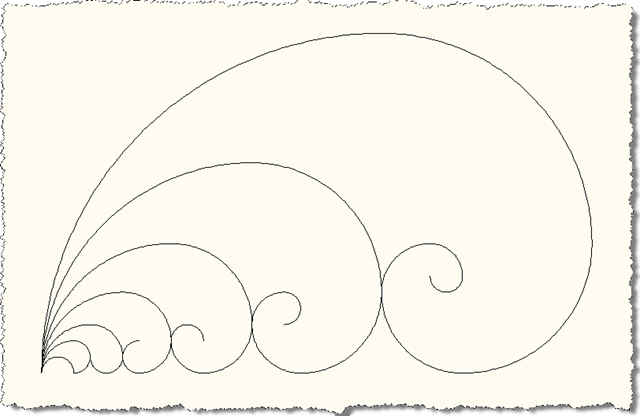
Here's what happens when we run the FIB command and select levels 1 to 8 (we need to call FIB eight times to do this), creating eight different Fibonacci spirals:
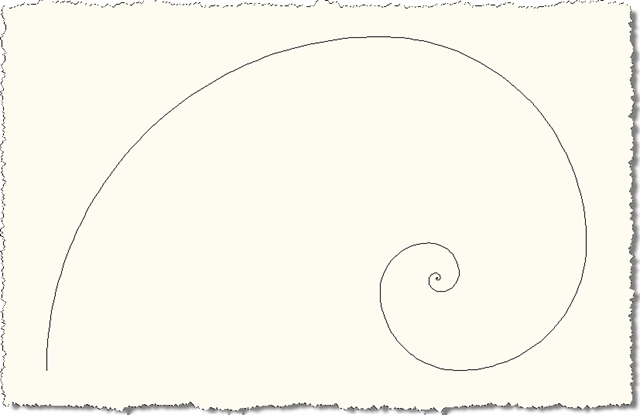
And here's the result for level 50, as a comparison (although unless you zoom right in it might as well be level 20):


Leave a Reply to Martin Duke Cancel reply