Adding a dynamic distance property to an AutoCAD object using .NET

Back in these previous posts, we introduced an ObjectARX module that exposed AutoCAD's Property Palette to .NET (thanks again to Cyrille Fauvel for his work on this :-). In this post we're going to build on this work to demonstrate how to integrate properties with more advanced editing controls into the Property Palette.

[Note: this sample does not deal with persisting the data with an object. If you want to store your data with a particular object, I suggest taking a look at this previous post which demonstrates how to use Xdata to do so.]

This code is being built on top of the sample project provided with the OPM .NET implementation, which I've posted previously for AutoCAD 2007-2009 and for AutoCAD 2010. It defines a custom dynamic property – much like the original CustomProp, an integer property – but this one implements a new interface, IAcPiPropertyDisplay. This special interface allows you to – among other things – specify a custom editing control, which gets instantiated by the Property Palette and is then used to allow editing of the property.

The ObjectARX documentation contains this information on the main method we're interested in implementing, GetCustomPropertyCtrl():

Supplies a custom ActiveX control for property display/edit on a per-property basis.

Before attempting to pick one of the ACPEX stock custom ActiveX controls for property display/edit, the Property Inspector calls this method to see if the object/command wishes to supply its own custom ActiveX control. This method is called on a per-property basis (both static and dynamic) for an object/command whose properties are active for display in the Property Inspector. 

The supplied custom control must implement IPropertyEditCtrl to be displayed for property value display/edit. The Property Inspector releases the output BSTR pointer after its use.

We want to enable this interface for use from .NET. In the previous cases we've had to do some extra work to expose or enable our Property Palette interfaces for use from .NET, but luckily this work has already been done for AutoCAD's Tool Palette implementation. We can now simply add an assembly reference to AcTcMgd.dll and include the Autodesk.AutoCAD.Windows.ToolPalette namespace in our code.

[Note: I found this assembly in the inc-win32 folder of the ObjectARX SDK for AutoCAD 2010 (I'm running AutoCAD 2010 on Vista 32-bit), and it's not clear to me when exactly we delivered this implementation - whether it was done for AutoCAD 2010 or beforehand. If AcTcMgd.dll is not available for your version of AutoCAD, it is still an option to expose this interface for use from .NET yourself, following the examples shown when we originally introduced the OPM .NET implementation.]

When we implement our GetCustomPropertyCtrl() method, we then need to set the string output argument to the ProgId of the editing control we wish to use. To decide an appropriate ProgId, I looked into the Registry, to identify the candidates:
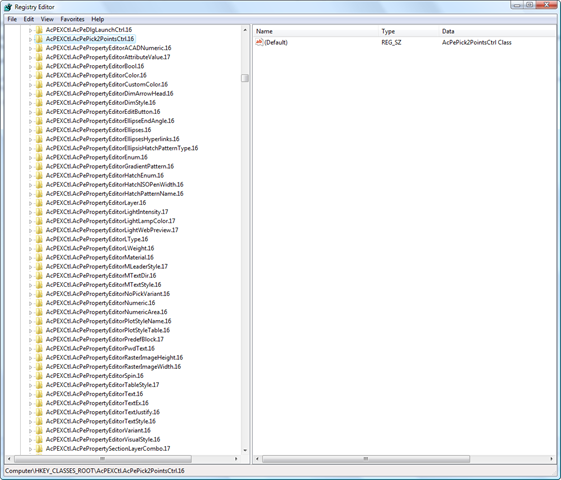
Various AcPEXCtl ProgIds in the Registry

It's also possible to implement your own truly custom editing control exposing the IPropertyEditCtrl interface, but that's way beyond the scope of this post. 🙂

For our custom distance property, we're going to use a (standard) custom control that allows the user to select two points in the drawing; the distance between them then gets set as our dynamic property's value. The ProgId for this control is "AcPEXCtl.AcPePick2PointsCtrl.16".

Otherwise the methods of IAcPiPropertyDisplay should be fairly straightforward to understand, although perhaps IsFullView() requires a little explanation: the "visible" parameter actually indicates whether the control should take up the whole of the row – obscuring the property name – which is why we set it to false.

One final note: I've remapped the GUID for the property, to prevent it from conflicting with the previous CustomProp implementation.

Here's the C# code for our custom distance property:

using Autodesk.AutoCAD.Runtime;

using Autodesk.AutoCAD.Windows.OPM;

using Autodesk.AutoCAD.Windows.ToolPalette;

using System;

using System.Reflection;

using System.Runtime.InteropServices;


namespace OPMNetSample

{

  #region Our Custom Distance Property

  [

    Guid("78286EBD-7380-4bb5-9EA6-1742677FA2E3"),

    ProgId("OPMNetSample.DistanceProperty.1"),

    ClassInterface(ClassInterfaceType.None),

    ComDefaultInterface(typeof(IDynamicProperty2)),

    ComVisible(true)< /p>

  ]

  public class DistanceProp : IDynamicProperty2, IAcPiPropertyDisplay

  {

    private IDynamicPropertyNotify2 _pSink = null;

    private double _value = 0.0;


    #region IDynamicProperty2 methods


    // Unique property ID


    public void GetGUID(out Guid propGUID)

    {

      propGUID =

        new Guid("78286EBD-7380-4bb5-9EA6-1742677FA2E3");

    }


    // Property display name


    public void GetDisplayName(out string szName)

    {

      szName = "Distance";

    }


    // Show/Hide property in the OPM, for this object instance


    public void IsPropertyEnabled(object pUnk, out int bEnabled)

    {

      bEnabled = 1;

    }


    // Is property showing but disabled


    public void IsPropertyReadOnly(out int bReadonly)

    {

      bReadonly = 0;

    }


    // Get the property description string


    public void GetDescription(out string szName)

    {

      szName =

        "This distance property is from picking two points";

    }


    // OPM will typically display these in an edit field

    // optional: meta data representin
g property type name,

    // ex. ACAD_ANGLE


    public void GetCurrentValueName(out string szName)

    {

      throw new System.NotImplementedException();

    }


    // What is the property type, ex. VT_R8


    public void GetCurrentValueType(out ushort varType)

    {

      // The Property Inspector supports the following data

      // types for dynamic properties:

      // VT_I2 (2), VT_I4 (3), VT_R4 (4), VT_R8 (5),

      // VT_BSTR (8), VT_BOOL (11), and VT_USERDEFINED (29).


      varType = 4; // VT_R4

    }


    // Get the property value, passes the specific object

    // we need the property value for.


    public void GetCurrentValueData(object pUnk, ref object pVarData)

    {

      pVarData = _value;

    }


    // Set the property value, passes the specific object we

    // want to set the property value for


    public void SetCurrentValueData(object pUnk, object varData)

    {

      _value = (double)varData;

    }


    // OPM passes its implementation of IDynamicPropertyNotify, you

    // cache it and call it to inform OPM your property has changed


    public void Connect(object pSink)

    {

      _pSink = (IDynamicPropertyNotify2)pSink;

    }


    public void Disconnect() {

      _pSink = null;

    }


    #endregion


;  #region
IAcPiPropertyDisplay methods


    public void GetCustomPropertyCtrl(

      object id, uint lcid, out string progId

    )

    {

      progId = "AcPEXCtl.AcPePick2PointsCtrl.16";

    }


    public void GetPropertyWeight(object id, out int propertyWeight)

    {

      propertyWeight = 0;

    }


    public void GetPropertyIcon(object id, out object icon)

    {

      icon = null;

    }


    public void GetPropTextColor(object id, out uint textColor)

    {

      textColor = 0;

    }


    public void IsFullView(

      object id, out bool visible, out uint integralHeight

    )

    {

      visible = false;

      integralHeight = 1;

    }

    #endregion

  }

  #endregion


  #region Application Entry Point

  public class MyEntryPoint : IExtensionApplication

  {

    protected internal DistanceProp distProp = null;


    public void Initialize()

    {

      Assembly.LoadFrom("asdkOPMNetExt.dll");


      // Add the Dynamic Property


      Dictionary classDict = SystemObjects.ClassDictionary;

      RXClass lineDesc = (RXClass)classDict.At("AcDbLine");

      IPropertyManager2 pPropMan =

        (IPropertyManager2)xOPM.xGET_OPMPROPERTY_MANAGER(lineDesc);


      distProp = new DistanceProp();

      pPropMan.AddProperty((object)distProp);

    }


    public void Terminate()

    {

      // Remove the Dynamic Property


      Dictionary classDict = SystemObjects.ClassDictionary;

      RXClass lineDesc = (RXClass)classDict.At("AcDbLine");

      IPropertyManager2 pPropMan =

        (IPropertyManager2)xOPM.xGET_OPMPROPERTY_MANAGER(lineDesc);


      pPropMan.RemoveProperty((object)distProp);

      distProp = null;

    }

  }

  #endregion

}

Here's what we see when we NETLOAD the asdkOPMNetExt.dll and our OPMNetSample.dll, and then select a standard line:
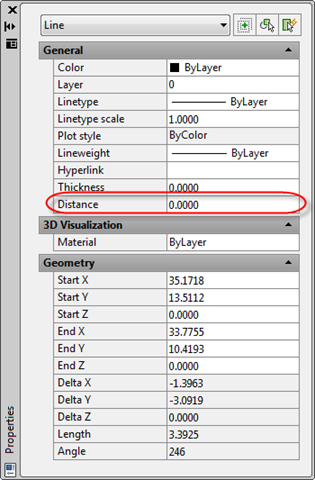
Our new dynamic distance property on the line object

When we select the property we see we get a custom editing icon:
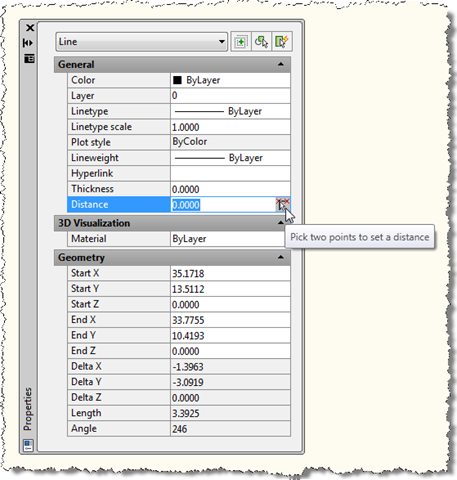
Our new dynamic distance property with its pick two points function

When we click that button, we get prompted to select two points in the drawing:

Pick a start point in the drawing:

Pick an end point in the drawing:

Once we've done so, the distance between the two points gets assigned to our property:
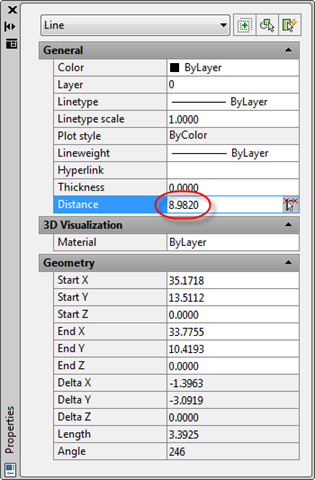
Our populated distance property

Bear in mind that we're currently storing this value with the property, not with the line itself. So you'll see the same value irrespective of the line you've selected. See the note at the beginning of this post if you wish to go further and attach this data per object.

I'm going to spend some time looking further into the capabilities of the custom control mechanism: in the next post in this series we'll look at hosting a masked string (as in a password) dynamic property inside the Property Palette. If you have suggestions for additional controls to implement, please let me know (and I'll see what I can figure out :-).

2 responses to “Adding a dynamic distance property to an AutoCAD object using .NET”

  1. In ACAD 2008 IAcPiPropertyDisplay is found in the namespace Autodesk.AutoCAD.Windows.Toolpalette which is part of acmgd.dll.
    In the inc-directory I found AcPexCtl16.tlb which contains several propertyeditors. Maybe there is a more elegant method than retrieving the progid from the registry.

  2. Kean Walmsley Avatar

    Thanks for the info on 2008, Mark.

    Yes, that TypeLib is there, but the problem remains that we need to identify the appropriate ProgId for the control we're using (something that's not very obvious from the TypeLib, at least not to me).

    At the end of the day identifying the ProgId is a one-off, design-time process: nothing is being retrieved programmatically at runtime, so elegance isn't really a significant factor.

    Kean

  3. My idea was to avoid version dependencies wherever possible. It seems that the progids didn't change since at least ACAD 2006, so we cannot do anything but hope for the best 🙂

  4. HOW CAN I CONVERT THESE CODES TO .DLL?
    ACTUALLI I TRIED TO MAKE USING BORLAND C++.........
    BUT WHEN IT IS LOADING BY NETLOAD CAD SHOWING SOME ERROR MSG.....
    SO WHAT CAN I DO??????????
    PL HELP ME............
    AM VERY MUCH BIGGENER IN THE WORLD OF PROGRAMING LANGUAGESS...........

  5. You need to use a development environment that generates a .NET assembly DLL from C# code (such as Visual Studio or Visual C# Express) and then reference the managed AutoCAD assemblies (AcMgd.dll, AcDbMgd.dll and AcTcMgd.dll). The asdkOPMNetExt.dll will need to have been NETLOADed (although I don't believe an assembly reference to it is needed in the C# project).

    Kean

  6. MY DOUBTS ARE GETTING HIGHER...PL HELP ME,.......
    WHERE I WILL GET THIS asdkOPMNetExt.dll ?
    AM USING ACAD 2009 ONLY...
    UR GIVEN SOME CODES IN C++......HOW CAN I MAKE AcMgd.dll, AcDbMgd.dll and AcTcMgd.dll THESE FILES FROM THAT CODE?

  7. The link to the package is in the post - here it is again, for your convenience.

    You don't make those DLLs from this code: you reference them from your .NET Class Library project.

    I suggest starting by looking at the introductory resources on the AutoCAD Developer Center - these will help you get started before attempting something more complex such as the technique shown in this post.

    Kean

  8. THANX FOR UR ADVICE..........I WILL GO THROUGH THAT........

  9. actually i netloded ur asdkOPMNetExt.dll & OPMNetSample.dll to my autocad 2010(link given above).it is loaded with out any problem.........but when i select a line & tried to change its length in property window it is not giving any option like "distence" ur given in above pics..
    insted of "distence" it is showing "my integer property" & its value is always "4" & it is not changable.....how can i solve this problem???????why it is happening like this?is any other dll file req?

  10. If I had to guess, I'd probably say you haven't copied & pasted the above code into the OPMNETSample project.

    Kean

  11. is it possible by using Microsoft Visual Basic 2008 Express Edition ?

  12. The code is in C#, so you'd be better either using Visual C# Express or converting the code to VB using a code translation tool.

    Kean

  13. actually am using Visual Basic 2008 Express Edition & Microsoft Visual C# 2008 Express Edition.....but in both case when am tring to open it is showing "this project type is not supported by this version"

  14. You're probably opening the solution which contains the C++ module. Try opening the .csproj file directly.

    Kean

  15. that also i tried.but not opening.same msg is been showing.actually am using not a registered version of Microsoft Visual C# 2008 Express Edition..it is a 30 days trial version......is this problem becouse of that?

  16. I have no idea. I had thought the Express editions were free, so I'm not sure why you'd meed to use a trial version (but that may just be my ignorance).

    Kean

  17. AFTER A LONG PRACTICE I OPENED THAT THINGS BY INSTALLING Microsoft Visual Studio 2008.NOW MY DOUBT IS WHERE I HAVE TO PASTE UR CODE..........ACTUALLI WHEN I AM OPENED THAT OPMNetSample.csproj MANY THINGS ARE THERE LIKE OPMNetExt.rc,IDynamicProperty2.h ETC.& SOME REFFREENCE ARE MISSING LIKE ACDBMGD & ACMGD.IS THESE REFFERENCES REQUERED TO BE CORRECTED?& WHERE I HAVE TO PASTE THESE CODES?
    PL HELP MEEEEEEEEE...........

  18. I HAVE ONE MORE DOUBT.FOR DOING .NET PROG IN AUTOCAD 2010 ObjectARX_2010_Win_64_and_32Bit.exe IS TO BE INSTALLED?ACTUALLI AM USING Microsoft Visual Studio 2008.

  19. HI Kean Walmsley,

    I want to add the property of FrameName its only provide for Line and Boundary object. Everyone have the unique FrameName. E.g., I can creaet the two line, and asign the framename one for fr001, and fr002 for second. If i click the line object it display that perticular assinged value only. I saw your previous post for add property and modify the object. but i need only for Line and Boundary only. how can i do this. pls guide me. i'm waiting for you replay.

    Regard,
    Dharanidharan R

  20. Hi Dharanidharan R,

    You can attach the property per class type (in this example it's just against AcDbLines (i.e. Lines) but you could assign it to others, too).

    Regards,

    Kean

  21. Bhoopathy Sreedharan Avatar
    Bhoopathy Sreedharan

    Hi Kean,

    I am not finding AcTcMgd.dll under the autocad directory.where can i find that?

    Bhoopathy Sreedharan.

  22. Best practice is to install the ObjectARX SDK for the oldest version of AutoCAD your module will support and add project references to the versions of the DLLs in the inc/inc-win32/inc-x64 sub-folders.

    Kean

  23. HI Kean Walmsley,

    I'm trying your code in my environment: Windows 7, 64 bit, Autocad 2012 & visual studio 2010. In autocad I get the following error: ..//asdkOPMNetExt.dll is incompatible with
    this version of AutoCAD.

    Is there a way how I can change your code to make it compatible with my environment? Or is there a new solution to this problem?

    Regard,
    Gonnissen G

  24. Hi Gonnissen,

    I've sent you a 64-bit version of the project by email.

    If anyone else needs this (in advance of me posting it formally), please drop me an email or post a comment.

    Regards,

    Kean

  25. Dear Kean Walmsley,
    I'm working with Autocad 2013
    64-bit and i have the same
    problem with the asdkOPMNetExt.dll.
    Is incompatible version with Autocad.

    Can I help me.

    Regards,

    Massimiliano

  26. Dear Massimiliano,

    I'll send you an email with a project for you to test.

    Regards,

    Kean

  27. My email bounced... can you send me a email I can then reply to? My email address is on the blog's About page.

    Kean

  28. Hi Kean Walmsley,
    I had replaced "AcPEXCtl.AcPePick2PointsCtrl.16" to "AcPEXCtl.AcPePropertyEditorEditButton.16".How can I catch the clicked button event.
    Thanks

  29. Hi masterhe,

    I haven't used that particular control myself, so I don't know. You might try asking ADN or the AutoCAD .NET Discussion Group.

    Regards,

    Kean

  30. Hi Keam Walmsley,
    Thanks so much for your blog, it has been indispensable. Can you please point me to the project with support for AutoCAD 2013 64-bit.

    Best Regards,
    Hala

  31. Hi Hala,

    I've sent you an email.

    Regards,

    Kean

  32. Hi Kean.
    Can u give me the same suggestion about to the project with support for AutoCAD 2013 64-bit.

  33. Hi Spikef,

    I've sent you an email.

    Regards,

    Kean

  34. hi kean
    where is the iterface IDynamicProperty2 from? it cannot be found in my project

  35. Hi Kean I solved my problem, but now i have another question, how should i do this for autocad 2013?
    thank u in advance

  36. Hi there,

    I'll follow up by email.

    Regards,

    Kean

  37. Dear Kean,
    Would you please send me asdkOPMNetExt.dll 64bit version for Autocad 2012, I am using VC# express 2010 win 7 64bit.

    regards,

    Heru H. Day

  38. Samir Bittar Rosas Avatar
    Samir Bittar Rosas

    Hi Kean, this is a great post and is a great way to have a better integration of our custom features to AutoCAD itself.

    Would you mind also pointing me to the AutoCAD 2013 64-bit compatible version of you DLL?

    Thanks

  39. Samir Bittar Rosas Avatar
    Samir Bittar Rosas

    Kean, thank you for the e-mail! Would you happen to know if the properties that we add by using this method will be detected and correctly exported using the DATAEXTRACTION command?

    1. I'm pretty sure they don't... but the best way to find out for sure is to try. 🙂

      Kean

      1. Samir Bittar Rosas Avatar
        Samir Bittar Rosas

        Just tried it, and yes, it does not work 🙂
        Would be amazing to be able to plug-in new properties on data extraction though!

  40. Hi Kean,

    I Need a 64bit version of OPM Can u email me..?

    1. Done.

      Kean

      1. Mohamed Alsaeedy Avatar
        Mohamed Alsaeedy

        Hi Kean,

        Dear Kean,
        Would you please send me asdkOPMNetExt.dll 64bit version for Autocad 2022
        and I Need a 64bit version of OPM Can u email me..

        1. Kean Walmsley Avatar

          Unfortunately I don't have this. Please check on the AutoCAD .NET forum - someone there should be able to help.

          Kean

Leave a Reply to Spikef Cancel reply

Your email address will not be published. Required fields are marked *