While I'm a huge fan of learning and using different programming languages – whether to train your brain to consider different potential solutions to a problem or to improve your job security and your ability to roll with the punches as the employment & technology landscapes shift – you will no doubt have noticed that the vast majority of my posts contain C# code.
A lot of my early programming (both work and fun) was in BASIC (whether BBC BASIC, Level II BASIC on the TRS-80 or GW-BASIC) and some of the more involved internal projects I've worked on at Autodesk have used one of VB's various incarnations. But over the years I've also invested a serious amount of time working with C & C++, which have somehow led to a deep, irrational attachment to curly braces and semi-colons. 🙂
Anyway, the aim behind most of my posts is to demonstrate the use AutoCAD's managed API from a mainstream .NET language, and so I've focused most of my energy on providing new samples in one particular language rather than spending time converting between them (which I tend to leave as an exercise for those readers who prefer VB.NET).
I do still get the occasional request for code in VB.NET rather than C#, and it occurred to me that it was a good time to mention a few of the resources I usually point people to, to help them with their code conversion efforts.
Firstly, here are some online conversion tools:
Carlos Aguilar Mares' Code Translator (C# <-> VB)
Kamal Patel's Convert C# to VB.NET (C# –> VB, VB –> C# on its way)
developerFusion's .net code converter (C# <-> VB)
In the past I've made use of the first two of these resources via a Visual Studio plugin letting you to copy C# code and paste it as VB, although I didn't end up bringing this across when I started using VS 2008. Kamal Patel also has a downloadable version of his C# to VB convertor for offline use (provided with full source-code).
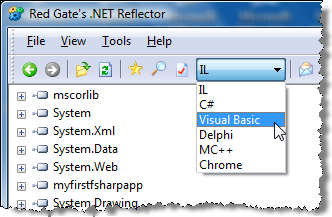 When offline I tend to use .NET Reflector, which also allows you to decompile a built (and hopefully not obfuscated 🙂 .NET assembly to C# or VB, among other language options (one of which I hadn't even heard before).
I have found none of these options to be perfect, especially when attempting to convert complex code: it's pretty rare that some tidy-up isn't needed on the output, whether related to the way casts are performed, event handlers are added/removed or some other issue. But they do provide a good starting point.
If you have experience with these or other code conversion tools – whether you use them successfully on a regular basis or have knowledge of their respective shortcomings – then please post a comment. I'm sure many of you have more real-world experience of using online code translation tools which would be relevant for this blog's readership.
Oh, and in case you want to hear the latest news of the strategy around the evolution of VB.NET and C# – in terms of the languages' "co-evolution" - I recommend watching this post on Channel 9. It's likely to make you more confident in investing in either C# or VB, knowing that Microsoft is committed to evolving both languages to have similar new features.


Leave a Reply