I'm just settling in after a week of very enjoyable paternity leave (thanks to all of you for your congratulatory messages :-). I have a few topics planned for the next few weeks, but in the meantime I'm going to post some code provided by our old friend Zeljko Gjuranic as a follow-up to this previous post.
Zeljko responded to the suggestion that – rather than creating the limited PolyFaceMesh object – his code should instead create the more modern SubDMesh (an object introduced in AutoCAD 2010). I've taken Zeljko's code and integrated it into the previous example, allowing creation of both PolyFaceMesh and SubDMesh objects from two separate commands. This allows us to compare the results. For even greater analysis capabilities, we'll see this code extended in a future post to add a depth to the SubDMesh and create a Solid3d from it, allowing more advanced volumetric analysis.
Here's Zeljko's C# code (edited for formatting and to run side-by-side with the previous implementation):
using Autodesk.AutoCAD.ApplicationServices;
using Autodesk.AutoCAD.DatabaseServices;
using Autodesk.AutoCAD.Runtime;
using Autodesk.AutoCAD.EditorInput;
using Autodesk.AutoCAD.Geometry;
using System;
public class Triangulate
{
public bool circum(
double x1, double y1, double x2,
double y2, double x3, double y3,
ref double xc, ref double yc, ref double r)
{
// Calculation of circumscribed circle coordinates and
// squared radius
const double eps = 1e-6;
const double big = 1e12;
bool result = true;
double m1, m2, mx1, mx2, my1, my2, dx, dy;
if ((Math.Abs(y1 - y2) < eps) && (Math.Abs(y2 - y3) < eps))
{
result = false;
xc = x1; yc = y1; r = big;
}
else
{
if (Math.Abs(y2 - y1) < eps)
{
m2 = -(x3 - x2) / (y3 - y2);
mx2 = (x2 + x3) / 2;
my2 = (y2 + y3) / 2;
xc = (x2 + x1) / 2;
yc = m2 * (xc - mx2) + my2;
}
else if (Math.Abs(y3 - y2) < eps)
{
m1 = -(x2 - x1) / (y2 - y1);
mx1 = (x1 + x2) / 2;
my1 = (y1 + y2) / 2;
xc = (x3 + x2) / 2;
yc = m1 * (xc - mx1) + my1;
}
else
{
m1 = -(x2 - x1) / (y2 - y1);
m2 = -(x3 - x2) / (y3 - y2);
if (Math.Abs(m1 - m2) < eps)
{
result = false;
xc = x1;
yc = y1;
r = big;
}
else
{
mx1 = (x1 + x2) / 2;
mx2 = (x2 + x3) / 2;
my1 = (y1 + y2) / 2;
my2 = (y2 + y3) / 2;
xc = (m1 * mx1 - m2 * mx2 + my2 - my1) / (m1 - m2);
yc = m1 * (xc - mx1) + my1;
}
}
}
dx = x2 - xc;
dy = y2 - yc;
r = dx * dx + dy * dy;
return result;
}
private enum OutputObjectType
{
PolyFaceMesh = 1,
SubDMesh = 2,
All = 3
}
private void TriangulatePoints(
OutputObjectType objType, int maxpoints
)
{
Document doc =
Application.DocumentManager.MdiActiveDocument;
Database db = doc.Database;
Editor ed = doc.Editor;
bool createSubDMesh =
(objType & OutputObjectType.SubDMesh) > 0;
bool createPolyFaceMesh =
(objType & OutputObjectType.PolyFaceMesh) > 0;
TypedValue[] tvs = { new TypedValue(0, "POINT") };
SelectionFilter sf =
new SelectionFilter(tvs);
PromptSelectionOptions pso = new PromptSelectionOptions();
pso.MessageForAdding = "\nSelect points:";
pso.AllowDuplicates = false;
PromptSelectionResult psr = ed.GetSelection(pso, sf);
if (psr.Status == PromptStatus.Error) return;
if (psr.Status == PromptStatus.Cancel) return;
SelectionSet ss = psr.Value;
int npts = ss.Count;
if (npts < 3)
{
ed.WriteMessage("Minimum of 3 points must be selected!");
return;
}
if (npts > maxpoints)
{
ed.WriteMessage("Maximum number of points exceeded!");
return;
}
int i, j, k, ntri, ned, nouted, status1 = 0, status2 = 0;
bool status;
// Point coordinates
double[] ptx = new double[maxpoints + 3];
double[] pty = new double[maxpoints + 3];
double[] ptz = new double[maxpoints + 3];
// Triangle definitions
int[] pt1 = new int[maxpoints * 2 + 1];
int[] pt2 = new int[maxpoints * 2 + 1];
int[] pt3 = new int[maxpoints * 2 + 1];
// Circumscribed circle
double[] cex = new double[maxpoints * 2 + 1];
double[] cey = new double[maxpoints * 2 + 1];
double[] rad = new double[maxpoints * 2 + 1];
double xmin, ymin, xmax, ymax, dx, dy, xmid, ymid;
int[] ed1 = new int[maxpoints * 2 + 1];
int[] ed2 = new int[maxpoints * 2 + 1];
ObjectId[] idarray = ss.GetObjectIds();
Transaction tr =
db.TransactionManager.StartTransaction();
using (tr)
{
DBPoint ent;
k = 0;
for (i = 0; i < npts; i++)
{
ent =
(DBPoint)tr.GetObject(idarray[k], OpenMode.ForRead, false);
ptx[i] = ent.Position[0];
pty[i] = ent.Position[1];
ptz[i] = ent.Position[2];
for (j = 0; j < i; j++)
if ((ptx[i] == ptx[j]) && (pty[i] == pty[j]))
{
i--; npts--; status2++;
}
k++;
}
tr.Commit();
}
if (status2 > 0)
ed.WriteMessage(
"\nIgnored {0} point(s) with same coordinates.",
status2
);
// Supertriangle
xmin = ptx[0]; xmax = xmin;
ymin = pty[0]; ymax = ymin;
for (i = 0; i < npts; i++)
{
if (ptx[i] < xmin) xmin = ptx[i];
if (ptx[i] > xmax) xmax = ptx[i];
if (pty[i] < xmin) ymin = pty[i];
if (pty[i] > xmin) ymax = pty[i];
}
dx = xmax - xmin; dy = ymax - ymin;
xmid = (xmin + xmax) / 2; ymid = (ymin + ymax) / 2;
i = npts;
ptx[i] = xmid - (90 * (dx + dy)) - 100;
pty[i] = ymid - (50 * (dx + dy)) - 100;
ptz[i] = 0;
pt1[0] = i;
i++;
ptx[i] = xmid + (90 * (dx + dy)) + 100;
pty[i] = ymid - (50 * (dx + dy)) - 100;
ptz[i] = 0;
pt2[0] = i;
i++;
ptx[i] = xmid;
pty[i] = ymid + 100 * (dx + dy + 1);
ptz[i] = 0;
pt3[0] = i;
ntri = 1;
circum(
ptx[pt1[0]], pty[pt1[0]], ptx[pt2[0]],
pty[pt2[0]], ptx[pt3[0]], pty[pt3[0]],
ref cex[0], ref cey[0], ref rad[0]
);
// Main loop
for (i = 0; i < npts; i++
)
{
ned = 0;
xmin = ptx[i]; ymin = pty[i];
j = 0;
while (j < ntri)
{
dx = cex[j] - xmin; dy = cey[j] - ymin;
if (((dx * dx) + (dy * dy)) < rad[j])
{
ed1[ned] = pt1[j]; ed2[ned] = pt2[j];
ned++;
ed1[ned] = pt2[j]; ed2[ned] = pt3[j];
ned++;
ed1[ned] = pt3[j]; ed2[ned] = pt1[j];
ned++;
ntri--;
pt1[j] = pt1[ntri];
pt2[j] = pt2[ntri];
pt3[j] = pt3[ntri];
cex[j] = cex[ntri];
cey[j] = cey[ntri];
rad[j] = rad[ntri];
j--;
}
j++;
}
for (j = 0; j < ned - 1; j++)
for (k = j + 1; k < ned; k++)
if ((ed1[j] == ed2[k]) && (ed2[j] == ed1[k]))
{
ed1[j] = -1; ed2[j] = -1; ed1[k] = -1; ed2[k] = -1;
}
for (j = 0; j < ned; j++)
if ((ed1[j] >= 0) && (ed2[j] >= 0))
{
pt1[ntri] = ed1[j]; pt2[ntri] = ed2[j]; pt3[ntri] = i;
status =
circum(
ptx[pt1[ntri]], pty[pt1[ntri]], ptx[pt2[ntri]],
pty[pt2[ntri]], ptx[pt3[ntri]], pty[pt3[ntri]],
ref cex[ntri], ref cey[ntri], ref rad[ntri]
);
if (!status)
{
status1++;
}
ntri++;
}
}
// Removal of outer triangles
i = 0; nouted = 0;
while (i < ntri)
{
if ((pt1[i] >= npts) || (pt2[i] >= npts) || (pt3[i] >= npts))
{
ntri--;
pt1[i] = pt1[ntri];
pt2[i] = pt2[ntri];
pt3[i] = pt3[ntri];
cex[i] = cex[ntri];
cey[i] = cey[ntri];
rad[i] = rad[ntri];
i--;
}
i++;
}
tr = db.TransactionManager.StartTransaction();
using (tr)
{
BlockTable bt =
(BlockTable)tr.GetObject(
db.BlockTableId,
OpenMode.ForRead,
false
);
BlockTableRecord btr =
(BlockTableRecord)tr.GetObject(
bt[BlockTableRecord.ModelSpace],
OpenMode.ForWrite,
false
);
if (createPolyFaceMesh)
{
PolyFaceMesh pfm = new PolyFaceMesh();
btr.AppendEntity(pfm);
tr.AddNewlyCreatedDBObject(pfm, true);
for (i = 0; i < npts; i++)
{
PolyFaceMeshVertex vert =
&
#160; new PolyFaceMeshVertex(
new Point3d(ptx[i], pty[i], ptz[i])
);
pfm.AppendVertex(vert);
tr.AddNewlyCreatedDBObject(vert, true);
}
for (i = 0; i < ntri; i++)
{
FaceRecord face =
new FaceRecord(
(short)(pt1[i] + 1),
(short)(pt2[i] + 1),
(short)(pt3[i] + 1),
0
);
pfm.AppendFaceRecord(face);
tr.AddNewlyCreatedDBObject(face, true);
}
}
if (createSubDMesh)
{
Point3dCollection vertarray = new Point3dCollection();
Int32Collection facearray = new Int32Collection();
for (i = 0; i < npts; i++)
vertarray.Add(new Point3d(ptx[i], pty[i], ptz[i]));
j = 0;
for (i = 0; i < ntri; i++)
{
facearray.Add(3);
facearray.Add(pt1[i]);
facearray.Add(pt2[i]);
facearray.Add(pt3[i]);
}
SubDMesh sdm = new SubDMesh();
sdm.SetDatabaseDefaults();
sdm.SetSubDMesh(vertarray, facearray, 0);
btr.AppendEntity(sdm);
tr.AddNewlyCreatedDBObject(sdm, true);
}
tr.Commit();
}
if (status1 > 0)
ed.WriteMessage(
"\nWarning! {0} thin triangle(s) found!" +
" Wrong result possible!",
status1
);
Application.UpdateScreen();
}
[CommandMethod("PFT")]
public void PolyFaceTriangulate()
{
TriangulatePoints(OutputObjectType.PolyFaceMesh, 32767);
}
[CommandMethod("SDT")]
public void SubDTriangulate()
{
TriangulatePoints(OutputObjectType.SubDMesh, 200000);
}
}
The code defines two commands: PFT, which triangulates a PolyFaceMesh from a set of points (limiting that set to 32,767, the upper-limit of vertices for this object) and SDT, which triangulates a SubDMesh (and here we've set an arbitrary limit to 200,000, but we could very easily increase that – we're not limited by the SubDMesh object itself).
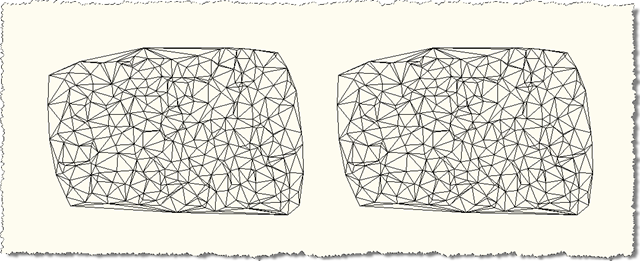
Let's see what happens when we run the PFT and SDT commands, using each to select an identical (but adjacent) set of points:
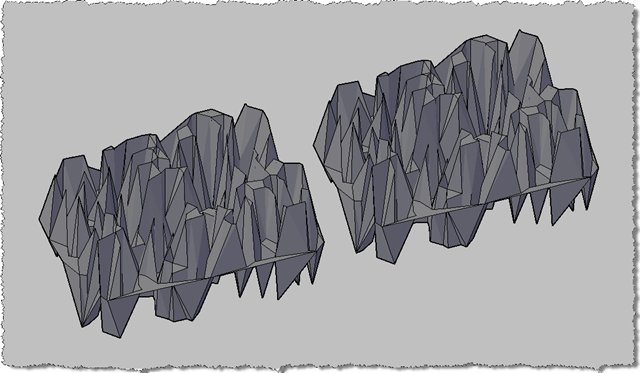
Here's are the two meshes in a 3D view with the conceptual visual style applied:
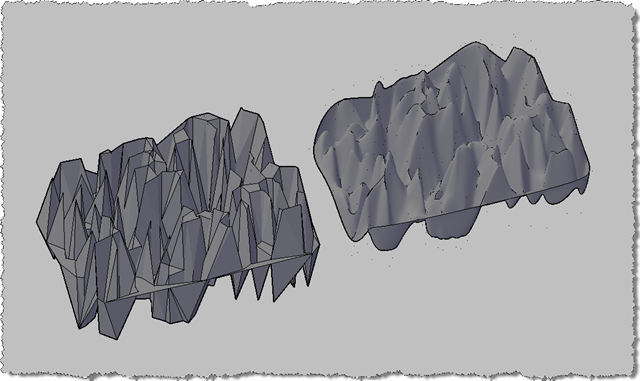
Just to highlight one major difference (other than capacity) between the PolyFaceMesh and SubDMesh objects, here's what we see when we increase the SubDMesh object's smoothing level:
In the next post (in this series, at least), we'll add code to create a Solid3d from the SubDMesh.


Leave a Reply to Ali Mobasshir Cancel reply