Creating non-rectangular paperspace viewports in AutoCAD using .NET

Thanks to Philippe Leefsma, from DevTech in Europe, for the ObjectARX code that inspired this post.

In AutoCAD it's possible to create non-rectangular viewports in paperspace using a variety of closed curve objects: circles, polylines (2D, 3D and lightweight), ellipses, regions, splines and faces. In this post we're going to see some code that creates four new viewports in the paperspace of the active drawing using a subset of these objects: an Ellipse, a Circle, a closed Spline and a closed Polyline.

Here's the C# code:

using Autodesk.AutoCAD.ApplicationServices;

using Autodesk.AutoCAD.Runtime;

using Autodesk.AutoCAD.DatabaseServices;

using Autodesk.AutoCAD.EditorInput;

using Autodesk.AutoCAD.Geometry;


namespace ViewportCreation

{

  public class Commands

  {

    [CommandMethod("NRVPS")]

    static public void CreateNonRectangularViewports()

    {

      Document doc =

        Application.DocumentManager.MdiActiveDocument;

      Database db = doc.Database;

      Editor ed = doc.Editor;


      // We're accessing drawing objects, so we need a transaction


      Transaction tr = db.TransactionManager.StartTransaction();

      using (tr)

      {

        // Get the primary paperspace from the block table


        BlockTable bt =

          (BlockTable)tr.GetObject(

            db.BlockTableId,

            OpenMode.ForRead

          );

        BlockTableRecord ps =

          (BlockTableRecord)tr.GetObject(

            bt[BlockTableRecord.PaperSpace],

            OpenMode.ForWrite

          );


        // Create a variety of objects for our clip boundaries


        DBObjectCollection objs = new DBObjectCollection();


        // An ellipse...


        Ellipse el =

          new Ellipse(

            new Point3d(3.5, 4.7, 0),

            Vector3d.ZAxis,

            new Vector3d(1.4, 0.03, 0),

            0.35, 0, 0

          );

        objs.Add(el);


        // A circle...


        Circle cir =

          new Circle(

            new Point3d(3.4, 1.9, 0),

            Vector3d.ZAxis,

            0.9

          );

        objs.Add(cir);


        // A closed polyline...


        Polyline pl =

          new Polyline(6);

        pl.AddVertexAt(0, new Point2d(4.92, 5.29), 0, 0, 0);

        pl.AddVertexAt(1, new Point2d(5.16, 6.02), 0, 0, 0);

        pl.AddVertexAt(2, new Point2d(6.12, 6.49), 0, 0, 0);

        pl.AddVertexAt(3, new Point2d(7.29, 6.26), -0.27, 0, 0);

        pl.AddVertexAt(4, new Point2d(8.11, 5.53), -0.47, 0, 0);

        pl.AddVertexAt(5, new Point2d(7.75, 5.41), 0, 0, 0);

        pl.Closed = true;

        objs.Add(pl);


        // A closed spline...


        Point3dCollection pts =

          new Point3dCollection(

            new Point3d[] {

              new Point3d (5.5, 2.06, 0),

              new Point3d (5.26, 2.62, 0),

              new Point3d (5.66, 4.16, 0),

              new Point3d (8.56, 4.21, 0),

              new Point3d (7.2, 0.86, 0),

              new Point3d (6.44, 2.85, 0),

              new Point3d (5.62, 1.8, 0),

              new Point3d (5.5, 2.06, 0)

            }

          );

        Spline sp = new Spline(pts, 2, 0.5);

        objs.Add(sp);


        // Add each to the paperspace blocktablerecord

        // and create/add an associated viewport object


        foreach (DBObject obj in objs)

        {

          Entity ent = obj as Entity;

          if (ent != null)

          {

            // Add our boundary to paperspace and the

            // transaction


            ObjectId id = ps.AppendEntity(ent);

            tr.AddNewlyCreatedDBObject(obj, true);


// Create our viewport, adding that also


            Viewport vp = new Viewport();

            ps.AppendEntity(vp);

            tr.AddNewlyCreatedDBObject(vp, true);


            // Set the boundary entity and turn the

            // viewport/clipping on


            vp.NonRectClipEntityId = id;

            vp.NonRectClipOn = true;

            vp.On = true;

          }

        }

        tr.Commit();

      }


      // Let's take a look at the results in paperspace


      db.TileMode = false;

    }

  }

}

Here's what happens when we draw some geometry in modelspace:

Some simple geometry in modelspace

And then call the NRVPS command to create our non-rectangular viewports:
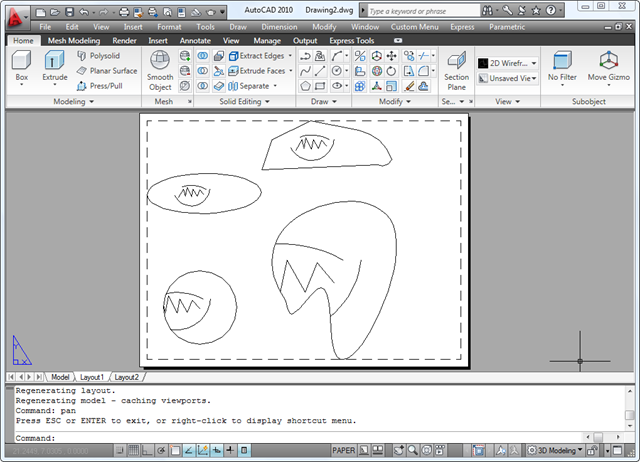
Our non-rectangular viewports

15 responses to “Creating non-rectangular paperspace viewports in AutoCAD using .NET”

  1. Hi,Kean,

    I'm looking for some sample code in .NET to do something like command "Boundary" can do in Autocad command line but having no luck. Is there a way to create a boundary using an internal point in .NET?

    Thanks!

  2. Hi Limin,

    Not without calling either the BHATCH or BOUNDARY commands (but we're very aware this is a longstanding requirement).

    Cheers,

    Kean

  3. Hi Kean,

    Thanks for the answer to save me time trying to do this in .NET. But I still have some questions if using "Boundary" command.

    1)How to get the object(polyline) created by boundary command? In VBA, it can be found in ThisDrawing.ModelSpace collection, but in .NET, I did not find it in Application.DocumentManager.MdiActiveDocument, or there is other approach?

    2)Is there a timing issue? I mean how to prevent .Net code run when "Boundary" is still running in command line?

  4. Hi Limin,

    I actually did you a disservice by attempting to answer your question. This really isn't a forum for getting support, and I usually don't answer handle questions this way.

    As an ADN member you should really be contacting ADN support with your question: they'll be able to share more specific information regarding this issue with you.

    Regards,

    Kean

  5. Hi,Kean,

    I tried other AutoDesk resource like ADN, .Net discussion forum and find your blog is the most helpful and efficient resource. Sorry to use too much of your time. I really appreciate your time and help.

  6. Hello Kean,
    I am new to Autocad API, so pardon me for this silly question,but i am looking for a way to convert splines into polylines. I am working with .NET and objectARX. Could you suggest any example which does that?
    Thanks,

  7. Hello Sami,

    Sorry - this isn't a forum for support, and I really don't have time to answer questions not directly related to my posts.

    Please submit your question to the ADN team, if you're a member, or otherwise the AutoCAD .NET Discussion Group.

    Kean

  8. Kean,
    I apologize for any inconvenience this question might have caused you. I am not aware of the purpose of this forum as could not find anything specifying that it is not meant for support and assumed by looking at other comments that you might have some time to guide someone in appropriate direction.
    Thanks.
    Sami

  9. Sami,

    Not a problem.

    I get a *lot* of email asking for help, but my "day job" is to manage a worldwide team - I barely get enough time to write posts.

    Thanks for understanding,

    Kean

  10. Hello Kean.
    Have a quesiton .
    Why Can't we add custom scale to none rectangular view port ?
    Regards,
    David

  11. Hello David,

    This sounds more like a product usage question (which is not really my specialty). Please head on over to the online discussion groups and post your question there.

    Regards,

    Kean

  12. Hi Kean,

    I can't seem to put the Ellipse at a horizontal position. Which bit of the code makes it go horizontal?

    Thanks!

    1. Kean Walmsley Avatar

      That should be based on the 3rd argument to the Ellipse constructor - the major axis - which is largely in the X direction in this example.

      Kean

  13. Hi, Kean,

    I managed to create a polygonal viewport yet after this I could't change the viewport's CustomScale value, which always equal to 0.

    Here is some coding:

    BlockTableRecord paperSpace = (BlockTableRecord)tr.GetObject(bt[BlockTableRecord.PaperSpace], OpenMode.ForWrite);
    Polyline3d p3d = new Polyline3d(Poly3dType.SimplePoly, vPts, true);
    Entity ent = p3d as Entity;
    paperSpace.UpgradeOpen();

    if (ent != null)
    {
    ObjectId id = paperSpace.AppendEntity(ent);
    tr.AddNewlyCreatedDBObject(p3d, true);
    //create vp
    paperSpace.AppendEntity(vp);
    tr.AddNewlyCreatedDBObject(vp, true);
    //set the boundary entity
    vp.NonRectClipEntityId = id;
    vp.NonRectClipOn = true;
    vp.SetDatabaseDefaults();
    vp.ViewDirection = new Vector3d(0, 0, 1);
    vp.On = true;
    vp.ViewCenter = centerPt;
    vp.CustomScale = custScale;

    }

    You have any idea how to reset that value ?
    Thanks

    1. Hi limoline,

      Please post your technical support questions to the relevant (in this case the AutoCAD .NET) forum.

      Best,

      Kean

Leave a Reply to Limin Cancel reply

Your email address will not be published. Required fields are marked *