As a comment on this previous post, MikeR posted this request:
Hi Kean, I'm the one that instigated this original question about group filters. That part is working fine and I can also set the active group filter in the file. Now I need to make parent & child filters. How can I add child filters to an existing parent filter at the root? Thanks, Mike
The below code is an update of that shown previously, the main addition being the CNLG command to create a nested layer group. I also took the chance to fix a minor bug (I forgot to let the user cancel at one place we request input) and to refactor some newly shared code into the SelectLayers() function.
Here's the updated C# code:
using Autodesk.AutoCAD.ApplicationServices;
using Autodesk.AutoCAD.DatabaseServices;
using Autodesk.AutoCAD.EditorInput;
using Autodesk.AutoCAD.Runtime;
using Autodesk.AutoCAD.LayerManager;
using System.Collections.Generic;
namespace LayerFilters
{
public class Commands
{
[CommandMethod("LLFS")]
static public void ListLayerFilters()
{
Document doc =
Application.DocumentManager.MdiActiveDocument;
Database db = doc.Database;
Editor ed = doc.Editor;
// List the nested layer filters
LayerFilterCollection lfc =
db.LayerFilters.Root.NestedFilters;
for (int i = 0; i < lfc.Count; i++)
{
LayerFilter lf = lfc[i];
ed.WriteMessage(
"\n{0} - {1} (can{2} be deleted)",
i + 1,
lf.Name,
(lf.AllowDelete ? "" : "not")
);
}
}
[CommandMethod("CLFS")]
static public void CreateLayerF
ilters()
{
Document doc =
Application.DocumentManager.MdiActiveDocument;
Database db = doc.Database;
Editor ed = doc.Editor;
try
{
// Get the existing layer filters
// (we will add to them and set them back)
LayerFilterTree lft =
db.LayerFilters;
LayerFilterCollection lfc =
lft.Root.NestedFilters;
// Create three new layer filters
LayerFilter lf1 = new LayerFilter();
lf1.Name = "Unlocked Layers";
lf1.FilterExpression = "LOCKED==\"False\"";
LayerFilter lf2 = new LayerFilter();
lf2.Name = "White Layers";
lf2.FilterExpression = "COLOR==\"7\"";
LayerFilter lf3 = new LayerFilter();
lf3.Name = "Visible Layers";
lf3.FilterExpression =
"OFF==\"False\" AND FROZEN==\"False\"";
// Add them to the collection
lfc.Add(lf1);
lfc.Add(lf2);
lfc.Add(lf3);
// Set them back on the Database
db.LayerFilters = lft;
// List the layer filters, to see the new ones
ListLayerFilters();
}
catch (Exception ex)
{
ed.WriteMessage(
"\nException: {0}",
ex.Message
);
}
}
[CommandMethod("CLG")]
static public void CreateLayerGroup()
{
Document doc =
Application.DocumentManager.MdiActiveDocument;
Database db = doc.Database;
Editor ed = doc.Editor;
// A list of the layers' names & IDs contained
// in the current database, sorted by layer name
SortedList<string, ObjectId> ld =
new SortedList<string, ObjectId>();
// A list of the selected layers' IDs
ObjectIdCollection lids =
new ObjectIdCollection();
// Start by populating the list of names/IDs
// from the LayerTable
Transaction tr =
db.TransactionManager.StartTransaction();
using (tr)
{
LayerTable lt =
(LayerTable)tr.GetObject(
db.LayerTableId,
OpenMode.ForRead
);
foreach(ObjectId
lid in lt)
{
LayerTableRecord ltr =
(LayerTableRecord)tr.GetObject(
lid,
OpenMode.ForRead
);
ld.Add(ltr.Name, lid);
}
}
// Display a numbered list of the available layers
ed.WriteMessage("\nLayers available for group:");
SelectLayers(ed, ld, lids);
// Now we've selected our layers, let's create the group
try
{
if (lids.Count > 0)
{
// Get the existing layer filters
// (we will add to them and set them back)
LayerFilterTree lft = db.LayerFilters;
LayerFilterCollection lfc = lft.Root.NestedFilters;
// Create a new layer group
LayerGroup lg = new LayerGroup();
lg.Name = "My Layer Group";
// Add our layers' IDs to the list
foreach (ObjectId id in lids)
lg.LayerIds.Add(id);
// Add the group to the collection
lfc.Add(lg);
// Set them back on the Database
db.LayerFilters = lft;
ed.WriteMessage(
"\n\"{0}\" group created containing {1} layers.\n",
lg.Name,
lids.Count
);
// List the layer filters, to see the new group
ListLayerFilters();
}
}
catch (Exception ex)
{
ed.WriteMessage(
"\nException: {0}",
ex.Message
);
}
}
[CommandMethod("CNLG")]
static public void CreateNestedLayerGroup()
{
Document doc =
Application.DocumentManager.MdiActiveDocument;
Database db = doc.Database;
Editor ed = doc.Editor;
// A list of the layers' names & IDs contained
// in the current database, sorted by layer name
SortedList<string, ObjectId> ld =
new SortedList<string, ObjectId>();
// A list of the selected layers' IDs
ObjectIdCollection lids =
new ObjectIdCollection();
// Start by populating the list of names/IDs
// from the LayerTable
Transaction tr =
db.TransactionManager.StartTransaction();
using (tr)
{
(LayerTable)tr.GetObject(
db.LayerTableId,
OpenMode.ForRead
);
foreach (ObjectId lid in lt)
{
LayerTableRecord ltr =
(LayerTableRecord)tr.GetObject(
lid,
OpenMode.ForRead
);
ld.Add(ltr.Name, lid);
}
}
// Display a numbered list of the available layers
ed.WriteMessage("\nLayers available for nested group:");
SelectLayers(ed, ld, lids);
// Now we've selected our layers, let's create the group
try
{
if (lids.Count > 0)
{
// Get the existing layer filters
// (we will add to them and set them back)
LayerFilterTree lft = db.LayerFilters;
LayerFilterCollection lfc = lft.Root.NestedFilters;
Dictionary<int, int> idxMap = new Dictionary<int, int>();
// List the nested layer filters
int lfNum = 1;
for (int i = 0; i < lfc.Count; i++)
{
LayerFilter lf = lfc[i];
if (lf.AllowNested)
{
ed.WriteMessage(
"\n{0} - {1}", lfNum, lf.Name
);
idxMap.Add(lfNum++, i);
}
}
if (lfNum == 1)
{
ed.WriteMessage(
"\nNo filters found that allow nesting."
);
}
else
{
// We will ask the user to select from the list
PromptIntegerOptions pio =
new PromptIntegerOptions(
"\nEnter number of parent filter: "
);
pio.LowerLimit = 1;
pio.UpperLimit = lfNum;
pio.AllowNone = false;
PromptIntegerResult pir = ed.GetInteger(pio);
if (pir.Status != PromptStatus.OK)
return;
LayerFilter parent = lfc[idxMap[pir.Value]];
// Create a new layer group
LayerGroup lg = new LayerGroup();
lg.Name = "My Nested Layer Group";
// Add the group to the collection
parent.NestedFilters.Add(lg);
// Add our layers' IDs to the list
foreach (ObjectId id in lids)
lg.LayerIds.Add(id);
// Set them back on the Database
db.LayerFilters = lft;
ed.WriteMessage(
"\n\"{0}\" nested group added to parent \"{1}\" " +
"containing {2} layers.\n",
lg.Name,
parent.Name,
lids.Count
);
}
}
}
catch (Exception ex)
{
ed.WriteMessage(
"\nException: {0}",
ex.Message
);
}
}
private static void SelectLayers(
Editor ed,
SortedList<string, ObjectId> ld,
ObjectIdCollection lids
)
{
int i = 1;
foreach (KeyValuePair<string, ObjectId> kv in ld)
{
ed.WriteMessage(
"\n{0} - {1}",
i++,
kv.Key
);
}
// We will ask the user to select from the list
PromptIntegerOptions pio =
new PromptIntegerOptions(
"\nEnter number of layer to add: "
);
pio.LowerLimit = 1;
pio.UpperLimit = ld.Count;
pio.AllowNone = true;
// And will do so in a loop, waiting for
// Escape or Enter to terminate
PromptIntegerResult pir;
do
{
// Select one from the list
pir = ed.GetInteger(pio);
if (pir.Status == PromptStatus.OK)
{
// Get the layer's name
string ln = ld.Keys[pir.Value - 1];
// And then its ID
ObjectId lid;
ld.TryGetValue(ln, out lid);
// Add the layer'd ID to the list, is it's not
// already on it
if (lids.Contains(lid))
{
ed.WriteMessage(
"\nLayer \"{0}\" has already been selected.",
ln
);
}
else
{
lids.Add(lid);
ed.WriteMessage(
"\nAdded \"{0}\" to selected layers.",
&#
160; ln
);
}
}
} while (pir.Status == PromptStatus.OK);
}
[CommandMethod("DLF")]
static public void DeleteLayerFilter()
{
Document doc =
Application.DocumentManager.MdiActiveDocument;
Database db = doc.Database;
Editor ed = doc.Editor;
ListLayerFilters();
try
{
// Get the existing layer filters
// (we will add to them and set them back)
LayerFilterTree lft = db.LayerFilters;
LayerFilterCollection lfc = lft.Root.NestedFilters;
// Prompt for the index of the filter to delete
PromptIntegerOptions pio =
new PromptIntegerOptions(
"\n\nEnter index of filter to delete"
);
pio.LowerLimit = 1;
pio.UpperLimit = lfc.Count;
PromptIntegerResult pir =
ed.GetInteger(pio);
if (pir.Status != PromptStatus.OK)
return;
// Get the selected filter
LayerFilter lf = lfc[pir.Value - 1];
// If it's possible to delete it, do so
if (!lf.AllowDelete)
{
ed.WriteMessage(
"\nLayer filter cannot be deleted."
);
}
else
{
lfc.Remove(lf);
db.LayerFilters = lft;
ListLayerFilters();
}
}
catch(Exception ex)
{
ed.WriteMessage(
"\nException: {0}",
ex.Message
);
}
}
}
}
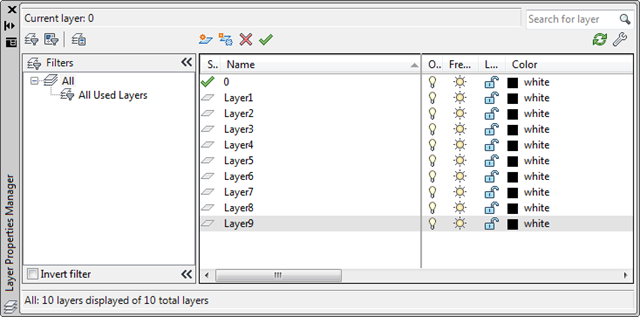
To see this code in action, let's start by creating a bunch of layers using the layer manager:
Now let's create a parent layer group using the CLG command:
Command: CLG
Layers available for group:
1 - 0
2 - Layer1
3 - Layer2
4 - Layer3
5 - Layer4
6 - Layer5
7 - Layer6
8 - Layer7
9 - Layer8
10 - Layer9
Enter number of layer to add: 2
Added "Layer1" to selected layers.
Enter number of layer to add: 3
Added "Layer2" to selected layers.
Enter number of layer to add: 4
Added "Layer3" to selected layers.
Enter number of layer to add:
"My Layer Group" group created containing 3 layers.
1 - My Layer Group (can be deleted)
2 - All Used Layers (cannot be deleted)
3 - Unreconciled New Layers (cannot be deleted)
4 - Viewport Overrides (cannot be deleted)
From here we can use the CNLG command to create our nested filter, selecting the newly-created parent:
Command: CNLG
Layers available for nested group:
1 - 0
2 - Layer1
3 - Layer2
4 - Layer3
5 - Layer4
6 - Layer5
7 - Layer6
8 - Layer7
9 - Layer8
10 - Layer9
Enter number of layer to add: 5
Added "Layer4" to selected layers.
Enter number of layer to add: 6
Added "Layer5" to selected layers.
Enter number of layer to add: 7
Added "Layer6" to selected layers.
Enter number of layer to add: 8
Added "Layer7" to selected layers.
Enter number of layer to add:
1 - My Layer Group
Enter number of parent filter: 1
"My Nested Layer Group" nested group added to parent "My Layer Group"
containing 4 layers.
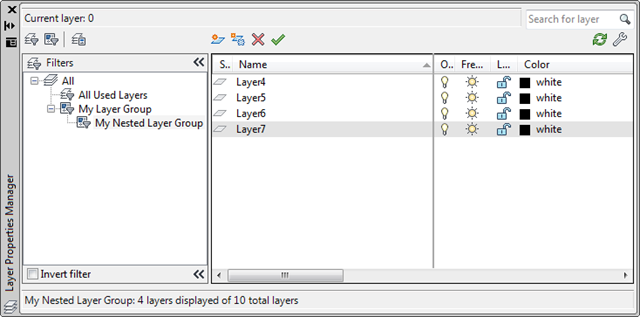
Now let's see the results in the layer manager. First the nested group with its four layers:
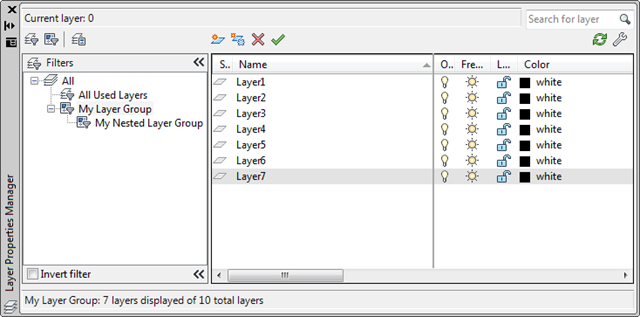
And now the parent group with the additional three layers (making seven, in total):


Leave a Reply to Georgel Cancel reply