Sweeping an AutoCAD solid using .NET

Back in this previous post we looked at some code to sweep an AutoCAD surface using .NET. As I mentioned in a later update, it's possible to also sweep an AutoCAD solid using .NET (since AutoCAD 2010: prior to that one had to use ObjectARX). I've just received a comment asking me to show how to do this, so I thought I'd cover that, today.

The code difference is tiny – we simply need to change the type of object we're creating and call a different method with the same arguments.

Where for a SweptSurface we would do this…

SweptSurface ss = new SweptSurface();

ss.CreateSweptSurface(sweepEnt, pathEnt, sob.ToSweepOptions());

… for a Solid3d, we simply need to do this:

Solid3d sol = new Solid3d();

sol.CreateSweptSolid(sweepEnt, pathEnt, sob.ToSweepOptions());

In the below code I've added an additional prompt to the SAP command to ask the user whether to create a solid or a surface and then abstracted the logic slightly to create either entity type, setting the resulting entity to a generic Entity pointer that we can then add to the modelspace and our transaction. These are really the only changes – the rest of the code is identical to that shown previously.

Here's the updated C# code:

using Autodesk.AutoCAD.ApplicationServices;

using Autodesk.AutoCAD.DatabaseServices;

using Autodesk.AutoCAD.EditorInput;

using Autodesk.AutoCAD.Runtime;

using Autodesk.AutoCAD.Geometry;


namespace SolidCreation

{

  public class Commands

  {

    [CommandMethod("SAP")]

    public void SweepAlongPath()

    {

      Document doc =

        Application.DocumentManager.MdiActiveDocument;

      Database db = doc.Database;

      Editor ed = doc.Editor;


      // Ask the user to select a region to extrude


      PromptEntityOptions peo1 =

        new PromptEntityOptions(

          "\nSelect profile or curve to sweep: "

        );


      peo1.SetRejectMessage(

        "\nEntity must be a region, curve or planar surface."

      );

      peo1.AddAllowedClass(

        typeof(Region), false);

      peo1.AddAllowedClass(

        typeof(Curve), false);

      peo1.AddAllowedClass(

        typeof(PlaneSurface), false);


      PromptEntityResult per =

        ed.GetEntity(peo1);


      if (per.Status != PromptStatus.OK)

        return;


      ObjectId regId = per.ObjectId;


      // Ask the user to select an extrusion path


      PromptEntityOptions peo2 =

        new PromptEntityOptions(

          "\nSelect path along which to sweep: "

        );


      peo2.SetRejectMessage(

        "\nEntity must be a curve."

      );

      peo2.AddAllowedClass(

        typeof(Curve), false);


      per = ed.GetEntity(peo2);


      if (per.Status != PromptStatus.OK)

        return;


      ObjectId splId = per.ObjectId;


      PromptKeywordOptions pko =

        new PromptKeywordOptions(

          "\nSweep a solid or a surface?"

        );

      pko.AllowNone = true;

      pko.Keywords.Add("SOlid");

      pko.Keywords.Add("SUrface");

      pko.Keywords.Default = "SOlid";


      PromptResult pkr =

        ed.GetKeywords(pko);


      bool createSolid = (pkr.StringResult == "SOlid");


      if (pkr.Status != PromptStatus.OK)

        return;


      // Now let's create our swept surface


      Transaction tr =

        db.TransactionManager.StartTransaction();

      using (tr)

      {

        try

        {

          Entity sweepEnt =

            tr.GetObject(regId, OpenMode.ForRead) as Entity;


          Curve pathEnt =

            tr.GetObject(splId, OpenMode.ForRead) as Curve;


          if (sweepEnt == null || pathEnt == null)

          {

            ed.WriteMessage(

              "\nProblem opening the selected entities."

            );

            return;

          }


          // We use a builder object to create

          // our SweepOptions


          SweepOptionsBuilder sob =

            new SweepOptionsBuilder();


          // Align the entity to sweep to the path


          sob.Align =

            SweepOptionsAlignOption.AlignSweepEntityToPath;


          // The base point is the start of the path


          sob.BasePoint = pathEnt.StartPoint;


          // The profile will rotate to follow the path


          sob.Bank = true;


          // Now generate the solid or surface...


          Entity ent;


          if (createSolid)

          {

            Solid3d sol = new Solid3d();


            sol.CreateSweptSolid(

              sweepEnt,

              pathEnt,

              sob.ToSweepOptions()

            );


            ent = sol;

          }

          else

          {

            SweptSurface ss = new SweptSurface();


            ss.CreateSweptSurface(

              sweepEnt,

              pathEnt,

              sob.ToSweepOptions()

            );


            ent = ss;

          }


          // ... and add it to the modelspace


          BlockTable bt =

            (BlockTable)tr.GetObject(

              db.BlockTableId,

              OpenMode.ForRead

            );


          BlockTableRecord ms =

            (BlockTableRecord)tr.GetObject(

              bt[BlockTableRecord.ModelSpace],

              OpenMode.ForWrite

            );


          ms.AppendEntity(ent);

          tr.AddNewlyCreatedDBObject(ent, true);


          tr.Commit();

        }

        catch

        { }

      }

    }

  }

}

Before we run the code, here are some helixes paths with circular profiles drawn planar to the plan view (as before, the sweep options take care of aligning the profile appropriately):
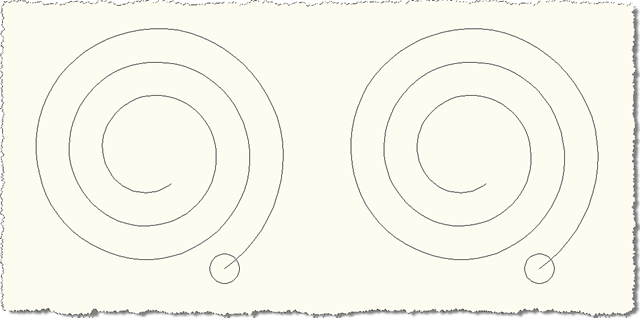
Helix paths and profiles - ready for sweeping

Now we can run the SAP command, choosing "SUrface" type for the profile & path on the left and "SOlid" for the profile & path on the right:
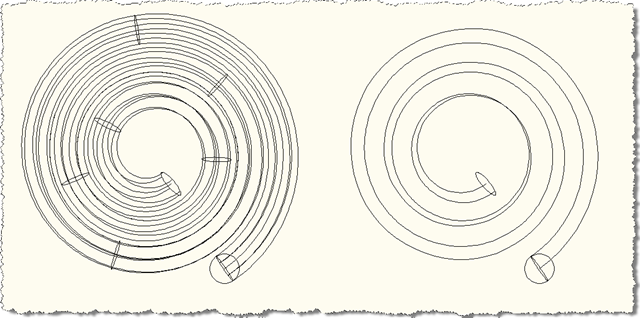
Swept surface and solid - plan

And now let's see the results in a 3D, conceptual view of the drawing:
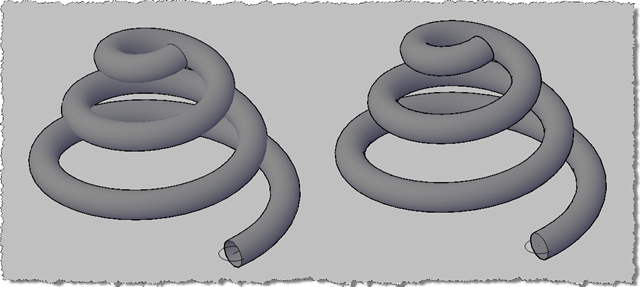
Swept surface and solid - 3D conceptual

If you look carefully at the exposed end of the helices you'll see that the one on the left (the surface) is open, which the one on the right (the solid) is closed.

11 responses to “Sweeping an AutoCAD solid using .NET”

  1. Hi Kean,

    Thanks for that sample. Creating AutoCAD entities is sometimes a bit of a task in itself, however, creation is only one side of the coin. The other, and usually more illusory is entity modification.

    I was wondering if you could show how to MODIFY the created surface/solid.

    One thing that strikes me as odd is the actual call 'CreateSweptSurface/Solid', which returns nothing, so therefore it seems to be a method which simply sets up the current instance internally.

    If you call the same method, with the same parameters, over and over, what is happening inside? Is a new object/internal data being recreated?

    I have used this technique to modify a swept entity (I have a test app which creates a swept entity from a path and profile, then lets the user change the shape of the path, a spline for instance, and then the swept entity reflects that change).

    Modification of entities is a bit abstract, as there is little definite way of modifying them, via grips or via creation methods etc.

    Cheers
    John.

  2. Hi John,

    It's not currently possible to programmatically edit a solid's hostory: you can recreate their state, but not edit their history.

    That said - and as shown in this previous post - it's very easy to enable them for user-editing: just set the RecordHistory flag to true before calling CreateSweptSolid and - in this case - you'll get additional grips to allow modification of the path and the profile used to create the solid).

    We know a solids history editing API is needed, and it's certainly on our list to get to.

    CreateSweptSurface/Solid do just affect the internal state of the object upon which they've been called. If you call it again and again on the same object, that object's state will indeed be recreated and replaced.

    Cheers,

    Kean

  3. Hi Kean,

    When I set sob.Bank = false and I sweep a 3dpolyline with a rectangle shape instead of a circle, the new 3dSolid gets tilted. I would like to keep the elevation of my 3dSolid the same of the 3dpolyline.

    Any suggestions? Thanks,

    Mat

  4. Hi Mat,

    Sorry - no suggestions off the top of my head.

    Please submit your question to the ADN team, if you're a member, or otherwise the AutoCAD .NET Discussion Group.

    Kean

  5. Douglas Rodrigues Avatar
    Douglas Rodrigues

    Como editar o path do Sweep,

    eu estava editando normalmente, porem quando fechei o autocad e abri novamente ele não oferece mais a opção de edição preciso alterar os vertices da tubulação feito em sweep.

    Oque devo fazer

  6. Douglas Rodrigues Avatar
    Douglas Rodrigues

    How to edit the path of the sweep,

    I was editing normally, however when I closed the autocad and open again it does not offer more accurate editing option to change the pipe vertices done sweep.

    What should I do

    1. Hi Douglas,

      Were you using the code in this post when it happened?

      Regards,

      Kean

      1. Douglas Rodrigues Avatar
        Douglas Rodrigues

        Hi Kean,

        I am using the sweep autocad, made a string of pipes where the path was a line 3dpoline, closing the autocad and safe and have no more access to edit the original path 3dpoline in properties box the histori show this off, are 19 000 meters of pipes have to check the crossing with each other so I have to constantly edit the path of the sweep

        Sorry English

        1. Kean Walmsley Avatar

          Hi Douglas,

          You need to find another mechanism to get support, if this is about standard AutoCAD functionality. I only have time to address issues in code I've posted.

          I suggest contacting your reseller or posting to the appropriate online discussion forum.

          Regards,

          Kean

  7. Hello Kean,
    I'm writing a code that should sweep solid entities using 3d polylines as sweeping paths. I used the code you provided here as a base. However, When I tried using this function to sweep a solid using a Circle entity as sweep entity and Polylines as sweep path, I got a GeneralModelingFailure error; either with a 2d or 3d Polyline. It works fine with Line and Spline entities as sweeping paths. The strange thing is that When I do a Sweep command on AutoCAD and select the Polyline as a path it works perfectly without any problem. Is there any explanation for why this can't be done programmatically although the AutoCAD command does it? Any suggestions for workaround?
    Thanks
    A. Taha

    1. Hi Amal,

      I'm unfortunately not able to provide support. Please post details of your problem to the AutoCAD .NET forum - someone there should be able to help.

      Best,

      Kean

Leave a Reply to Douglas Rodrigues Cancel reply

Your email address will not be published. Required fields are marked *