Handling COM calls rejected by AutoCAD from an external .NET application

We've had a few reports from people implementing external .NET applications to drive AutoCAD – as shown in this previous post – experiencing intermittent failures once AutoCAD 2010 Update 1 has been applied. Here's a typical error message:
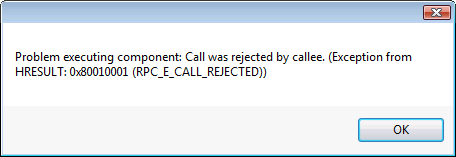
Exception after installing AutoCAD 2010 Update 1

It contains the text "Problem executing component: Call was rejected by callee. (Exception from HRESULT: 0x80010001 (RPC_E_CALL_REJECTED))" (to help people Googling this error message :-).

This "problem" was introduced as we addressed an issue with the way our WPF components in AutoCAD handle inbound messages, largely due to Microsoft's decision not to support nested message loops in WPF. If WPF is in the middle of performing some kind of layout processing operation (which leads to Dispatcher.DisableProcessing() being called) and there's an incoming COM call, then we were previously respecting it which could lead to a crash. Now we do the right thing and reject the COM call: effectively asking the caller to try again later.

The problem is that – while the VB6 runtime was very good at automatically retrying calls such as CreateObject() – WinForm applications are not. We need to implement an additional interface from our WinForm application to make sure it can handle failure (I could probably do with adding that one myself ;-).

As it's hopefully clear: while the problem is likely to be more visible in AutoCAD 2010 once Update 1 has been applied, this is ultimately about correctly inappropriate expectations on the side of the calling application and teaching it to do the right thing.

Here's the updated C# code from the previous post, with the changed lines in red, and here's the source project.

    1 using Autodesk.AutoCAD.Interop;

    2 using System.Windows.Forms;

    3 using System.Runtime.InteropServices;

    4 using System.Reflection;

    5 using System;

    6 using LoadableComponent;

    7 

    8 // For more information on IMessageFilter:

    9 // http://msdn.microsoft.com/en-us/library/ms693740(VS.85).aspx

   10 

   11 namespace DrivingAutoCAD

   12 {

   13   [ComImport,

   14    InterfaceType(ComInterfaceType.InterfaceIsIUnknown),

   15    Guid("00000016-0000-0000-C000-000000000046")]

   16   public interface IMessageFilter

   17   {

   18     [PreserveSig]

   19     int HandleInComingCall(

   20       int dwCallType, IntPtr hTaskCaller,

   21       int dwTickCount, IntPtr lpInterfaceInfo

   22     );

   23     [PreserveSig]

   24     int RetryRejectedCall(

   25       IntPtr hTaskCallee, int dwTickCount, int dwRejectType

   26     );

   27     [PreserveSig]

   28     int MessagePending(

   29       IntPtr hTaskCallee, int dwTickCount, int dwPendingType

   30     );

   31   }

   32 

   33   public partial class Form1 : Form, IMessageFilter

   34   {

   35     [DllImport("ole32.dll")]

   36     static extern int CoRegisterMessageFilter(

   37       IMessageFilter lpMessageFilter,

   38       out IMessageFilter lplpMessageFilter

   39     );

   40 

   41     public Form1()

   42     {

   43       InitializeComponent();

   44       IMessageFilter oldFilter;

   45       CoRegisterMessageFilter(this, out oldFilter);

   46     }

   47 

   48     private void button1_Click(object sender, EventArgs e)

   49     {

   50       const string progID = "AutoCAD.Application.18";

   51 

   52       AcadApplication acApp = null;

   53       try

   54       {

   55         acApp =

   56           (AcadApplication)Marshal.GetActiveObject(progID);

   57       }

   58       catch

   59       {

   60         try

   61         {

   62           Type acType =

   63             Type.GetTypeFromProgID(progID);

   64           acApp =

   65             (AcadApplication)Activator.CreateInstance(

   66               acType,

   67               true

   68             );

   69         }

   70         catch

   71         {

   72           MessageBox.Show(

   73             "Cannot create object of type \"" +

   74             progID + "\""

   75           );

   76         }

   77       }

   78       if (acApp != null)

   79       {

   80         try

   81         {

   82           // By the time this is reached AutoCAD is fully

   83           // functional and can be interacted with through code

   84 

   85           acApp.Visible = true;

   86 

   87           INumberAddition app =

   88             (INumberAddition)acApp.GetInterfaceObject(

   89               "LoadableComponent.Commands"

   90             );

   91 

   92           // Now let's call our method

   93 

   94           string res = app.AddNumbers(5, 6.3);

   95 

   96           acApp.ZoomAll();

   97 

   98           MessageBox.Show(

   99             this,

  100             "AddNumbers returned: " + res

  101           );

  102         }

  103         catch (Exception ex)

  104         {

  105           MessageBox.Show(

  106             this,

  107             "Problem executing component: " +

  108             ex.Message

  109           );

  110         }

  111       }

  112     }

  113     #region IMessageFilter Members

  114 

  115     int IMessageFilter.HandleInComingCall(

  116       int dwCallType, IntPtr hTaskCaller,

  117       int dwTickCount, IntPtr lpInterfaceInfo

  118     )

  119     {

  120       return 0; // SERVERCALL_ISHANDLED

  121     }

  122 

  123     int IMessageFilter.RetryRejectedCall(

  124       IntPtr hTaskCallee, int dwTickCount, int dwRejectType

  125     )

  126     {

  127       return 1000; // Retry in a second

  128     }

  129 

  130     int IMessageFilter.MessagePending(

  131       IntPtr hTaskCallee, int dwTickCount, int dwPendingType

  132     )

  133     {

  134       return 1; // PENDINGMSG_WAITNOPROCESS

  135     }

  136 

  137     #endregion

  138   }

  139 }

There's nothing really to see, in terms of modified behaviour, other than that you should no longer experience the crash.

One response to “Handling COM calls rejected by AutoCAD from an external .NET application”

  1. Can you explain what exactly is the workaround. I am only trying to start autocad with "AcadApp = New Autodesk.AutoCAD.Interop.AcadApplication" when i get this error.

    Can you tell me what exactly is the problem with running this. This was done in VB.

  2. Kean Walmsley Avatar

    The issue and workaround is explained as best I can in this post. I suggest following up on the appropriate online discussion group if you want more assistance.

    Kean

  3. Anatoly Knigin Avatar
    Anatoly Knigin

    Dear Kean,

    I have the same problem with Autocad 2010/11 initialization, but the difference is that I call CreateInstance from my C# module which I made as COM component (for calling it from C++ code). When I try to call CoRegisterMessageFilter from the component's implementation class constructor, I get error code CO_E_NOT_SUPPORTED, which means that my thread was initialized as COINIT_MULTITHREADED. Could you possibly give some advice, because this article is almost only piece of information about the problem that I've found. Thanks.

  4. Kean Walmsley Avatar

    Dear Anatoly,

    I'm far from being an expert on threading issues, but it sounds as though you need to change the threading model for your C# module to "STA" (Single Threaded Apartment), possibly using the [STAThread] attribute or some project settings.

    Cheers,

    Kean

  5. Anatoly Knigin Avatar
    Anatoly Knigin

    Dear Kean,

    Thank you for your help. I've made an example for testing almost the same as above - a simple form with a button starting AutoCAD instance. On Civil3D 2010 it works correctly, but when I try to start 2011 version this way, I get the following exception: Retrieving the COM class factory for component with CLSID {C92FB640-AD4D-498A-9979-A51A2540C977} failed due to the following error: 80080005 Server execution failed (Exception from HRESULT: 0x80080005 (CO_E_SERVER_EXEC_FAILURE)).

  6. Kean Walmsley Avatar

    Deat Anatoly,

    I suggest posting your test example via ADN to handle, if you're a member, or otherwise perhaps someone on the discussion groups can help.

    Regards,

    Kean

  7. Usamatahamouhamed Avatar
    Usamatahamouhamed

    This's another walkaround -a small part from an application I work on- (nicer code uglier results)

    The problem is sooner or later we will face much more complicated bugs see what will happen if we try to open or save files, draw objects or access the block editor or the layer maneger!!!

    // Interact with files and directories
    using System.IO;
    // Interact with registry
    using Microsoft.Win32;
    // Interact with Autocad [Avoid conflicts]
    using System.Runtime.InteropServices;
    using Autodesk.AutoCAD.Interop;
    using Autodesk.AutoCAD.Interop.Common;

    private void btnRun_Click(object sender, EventArgs e)
    {
    //Run Autocad
    AcadApplication acAppComObj = null;
    const string strProgId = "AutoCAD.Application.18";
    try //See if Autocad is already running
    {
    acAppComObj = (AcadApplication)Marshal.GetActiveObject(strProgId);
    }
    catch //If not see if it could be lunched
    {
    try
    {
    System.Windows.Forms.MessageBox.Show("I'm gonna to try to load Autocad.\r\n\r\nI'll pause for 15 seconds!");
    string acadLocation = Convert.ToString(Registry.GetValue(@"HKEY_LOCAL_MACHINE\SOFTWARE\Autodesk\AutoCAD\R18.1\ACAD-9001:409", "Location", ""));
    acadLocation += @"\acad.exe"; //This's for Autocad 2011 people
    System.Diagnostics.Process.Start(acadLocation);
    System.Threading.Thread.Sleep(15000); //Wait till Autocad is fully functional [This's a must]
    acAppComObj = (AcadApplication)Marshal.GetActiveObject(strProgId);
    }
    catch //Couldn't find acad.exe !
    {
    MessageBox.Show("Instance of 'AutoCAD.Application'" + " could not be created.");
    return; //Escape from this procedure
    }
    }
    acAppComObj.Visible = true; //Success!
    System.Windows.Forms.MessageBox.Show("Now running " + acAppComObj.Name + " version " + acAppComObj.Version);
    string filePath = System.Windows.Forms.Application.StartupPath.ToString() + @"\dwgTemplate.dwg";
    if (File.Exists(filePath))
    {
    //the following line generates an error
    //Autodesk.AutoCAD.ApplicationServices.Application.DocumentManager.Open(filePath);
    }
    else
    {
    MessageBox.Show("Couldn't find the specified drawing file!\r\n\r\nOperation failed");
    }

    AcadDocument acDocComObj;
    acDocComObj = acAppComObj.ActiveDocument;

    }

    now the question is can we do what we did in nice back old days with Autocad 2006 (can we fully automate Autocad 2011 ? - Is there a one nice & simple walkaround ?)

  8. If you stick to just using the COM interfaces (the Autodesk.AutoCAD.Interop namespace) from out-of-process clients, then you should be fine.

    If you want to call into .NET then I recommend creating an in-process .DLL which you demand-load and use to execute functionality implemented via commands.

    Kean

  9. Hi Kean,
    Once again, having your blog in my RSS feed saved the day (or probably more like a week). I actually have a big fat Zero lines of COM code in my 3 applications, but my installer used COM to open AutoCAD and create a new Workspace and Profile, which suddenly failed. Luckily my memory is still good enough (barely) to recall this post, which after a little massaging, solved the problem. Thanks again!

  10. Hi David,

    Glad it was helpful. 🙂

    Regards,

    Kean

  11. Hi!

    Here's what to do if you want to implement IMessageFilter in a console application (tested with AutoCAD Map 3D 2010):

    class Program
    {
    [DllImport("ole32.dll")]
    static extern int CoRegisterMessageFilter(
    IMessageFilter lpMessageFilter,
    out IMessageFilter lplpMessageFilter
    );

    class Filter : Form, IMessageFilter
    {
    IMessageFilter oldFilter;

    public Filter()
    {
    CoRegisterMessageFilter(this, out oldFilter);
    }

    public int HandleInComingCall(int dwCallType, IntPtr hTaskCaller, int dwTickCount, IntPtr lpInterfaceInfo)
    {
    return 0; // SERVERCALL_ISHANDLED
    }

    public int RetryRejectedCall(IntPtr hTaskCallee, int dwTickCount, int dwRejectType)
    {
    return 1000; // Retry in a second
    }

    public int MessagePending(IntPtr hTaskCallee, int dwTickCount, int dwPendingType)
    {
    return 1; // PENDINGMSG_WAITNOPROCESS
    }
    }

    [STAThread]
    static int Main(string[] args)
    {
    Filter f = new Filter();
    ...
    ...

    Regards,
    Pierre

  12. You'll have have to add a reference to System.Windows.Form add
    using System.Windows.Forms;
    into your source code.

    Pierre

  13. Hello Kean, is it possible to do the same application in VB.net

    Regards
    Amit

  14. Kean Walmsley Avatar

    I would expect it to be possible, although I haven't done so, myself.

    This post should at least help you get some of the way there:

    keanw.com/2009/07/converting-between-c-and-vbnet.html

    Kean

  15. Let's say I want to know when the retry occures and if that retry succeeded or ended up in the queue once again?

    My idea is is to display a form while the call is doing that retry loop to inform the user of the situation (and also asking him to resolve the issue if it's on his side).

    I succesfully applied this interface into my form to handle some async/sync issues in my application (stuff like running some commands with SendCommand() that wouldn't complete in time for the next interop call). However, sometimes what causes those RPC calls failure can be bad manipulation on the user side such as starting a selection box with the form running, leaving the selection box unfinished, then doing whatever with the form that implies interop actions. This would result in an infinit (unless theres some technical limit) loop of RPC call failures until the user goes into autocad, completes his selection box, then wait for the retry to occure again.

    So, that said, is there a way to listen to that RPC call retry to know if it passes so I can accordingly shut down my warning form?

    Thanks!

  16. I suggest posting your question in the AutoCAD .NET Discussion Group or to the ADN team (I won't be in a position to answer this anytime soon - I have too much else going on with the lead-up to AU).

    Kean

  17. Ezra Kevelson Avatar
    Ezra Kevelson

    Dear Kean,
    I'm am receiving a similar error, RPC_E_SERVERCALL_RETRYLATER, as described in this article while trying to run AutoCAD2012 from a C# class library (dll). The program worked fine with AutoCAD2007 for which it was originally written. The instance of AutoCAD is successfully created, however I receive the error when I try to open a drawing.
    I tried implementing the solution you provide for a windows form application, in my dll, with no success.

    I solved the problem by wrapping the line responsible for opening the document in a try-catch nested in a while loop as such:

    AcadDocument acadDoc;
    bool retry = true;
    while (retry)
    {
    try
    {
    retry = false;
    acadDoc = acadApp.Documents.Open(dwgPath, false, null);
    }
    catch (COMException e)
    {
    if (e.ErrorCode == RPC_E_SERVERCALL_RETRYLATER)
    {
    retry = true;
    }
    }
    }

    However, following such,on the next action I try to perform I receive the same error. So, I found I had to wrap each line of code which accesses a property of the acadDocument in a while-try-catch-loop.

    Needless to say, my solution is quite messy and I would prefer to use the message filter.
    Perhaps you can suggest something?

    I have used several of your posts to solve other problems when I originally wrote the program for AutoCAD2007, and thank you for that, however, this time I'm stumped.

  18. Kean Walmsley Avatar
    Kean Walmsley

    Dear Ezra,

    Yes - if I recall correctly this behaviour was introduced with our use of WPF (and the ribbon).

    I'd persist trying to get the messafe filter working, if I were you: having try-catch blocks around each call is going to be unwieldy and less performant.

    I'm not sure what's not working - have you tried the provided source project on its own?

    Regards,

    Kean

  19. Ezra Kevelson Avatar

    Hi Kean,
    Thanks for your quick reply. Ideally I'd like to persist in getting the message filter to work, but as I was pressed for a deadline and had other issues to deal with, I went ahead with the try-catch blocks. I did continue trying to implement the message filter and even called in some help from someone better versed in both AutoCAD and .NET than I. We came to the conclusion that the message filter is designed to work for windows applications with a user interface. My interface with AutoCAD is designed to work in the background. We also tried implementing the Message Filter on the windows application that starts the process, but its capabilities don't seem to trickle down to the dll I built for actually interfacing with AutoCAD. (We have a multi-module system to work with several cad tools so we can centralize and customize our plotting system, where the modules for interfacing with the cad tools are third in the hierarchy). Also, even if I did get it to work, I would still be stuck with our server implementation, where the process begins with a service. However, when I have time, I will continue to investigate (perhaps add a dummy form to the dll interface and maybe change it to a console application) and let you know how it goes.
    Thanks again, and sorry for taking so long to respond.

    1. Hi Ezra - I'm wondering if you resolved this issue as I am running into the same problem. Most of our AutoCAD out of process (COM) code are nicely organized in dlls. When our windows forms applications runs code in these dlls we are getting threading errors even though the Class calling the methods in the dlls implements IMessageFilter per this block post (like you said, it doesn't appear to trickle down to the dlls. Any thoughts are appreciated.

  20. Any chance of seeing this in VB.NET? I checked the MS links and all they provide is C# code. I dread having to rewrite my entire application - especially since I don't know C#... 🙂

  21. Kean Walmsley Avatar

    Sorry, paul, I don't have this in VB.NET (and wouldn't know where to start, especially given the lack of documentation from MS on the techniques used).

    Perhaps someone on the discussion groups will be able to help...

    Kean

  22. Hi Kean - as is typical, after I asked the question I worked out the answer. With some help from a code converter I came up with the code below. It makes for a nice band-aid, but I think I need to get on the C# train...

    <comimport(), interfacetype(cominterfacetype.interfaceisiunknown),="" guid("00000016-0000-0000-c000-000000000046")=""> _
    Public Interface IMessageFilter
    <preservesig()> _
    Function HandleInComingCall(ByVal dwCallType As Integer, ByVal hTaskCaller As IntPtr, ByVal dwTickCount As Integer, ByVal lpInterfaceInfo As IntPtr) As Integer
    <preservesig()> _
    Function RetryRejectedCall(ByVal hTaskCallee As IntPtr, ByVal dwTickCount As Integer, ByVal dwRejectType As Integer) As Integer
    <preservesig()> _
    Function MessagePending(ByVal hTaskCallee As IntPtr, ByVal dwTickCount As Integer, ByVal dwPendingType As Integer) As Integer

    End Interface

    Public Class Form1
    Inherits Form
    Implements IMessageFilter

    <dllimport("ole32.dll")> _
    Private Shared Function CoRegisterMessageFilter(ByVal lpMessageFilter As IMessageFilter, ByRef lplpMessageFilter As IMessageFilter) As Integer
    End Function

    Public Sub New()
    InitializeComponent()
    Dim oldFilter As IMessageFilter
    CoRegisterMessageFilter(Me, oldFilter)
    End Sub

    Private Sub Button1_Click(ByVal sender As System.Object, ByVal e As System.EventArgs) Handles Button1.Click
    StartAutoCAD()
    ProcessDwgs()
    End Sub

    Sub ProcessDwgs()
    For Each dwg In My.Settings.DwgList
    OpenDwg(dwg)
    RunScript("C:\Temp\Test.scr")
    CloseDwg(True)
    Next
    End Sub
    #Region "IMessageFilter Members"
    Private Function IMessageFilter_HandleInComingCall(ByVal dwCallType As Integer, ByVal hTaskCaller As IntPtr, ByVal dwTickCount As Integer, ByVal lpInterfaceInfo As IntPtr) As Integer Implements IMessageFilter.HandleInComingCall
    Return 0
    End Function

    Private Function IMessageFilter_RetryRejectedCall(ByVal hTaskCallee As IntPtr, ByVal dwTickCount As Integer, ByVal dwRejectType As Integer) As Integer Implements IMessageFilter.RetryRejectedCall
    Return 1000
    End Function

    Private Function IMessageFilter_MessagePending(ByVal hTaskCallee As IntPtr, ByVal dwTickCount As Integer, ByVal dwPendingType As Integer) As Integer Implements IMessageFilter.MessagePending
    Return 1
    End Function
    #End Region

  23. Thank you very much for this post and for this entre blog!
    Nice work indeed!)

  24. iurgi@semakprocesados.com Avatar
    iurgi@semakprocesados.com

    Hi
    I can't open drawings created with no original autodesk applications. I'm getting the same error.
    Any clue?
    Thanks

  25. Sorry - no idea why that's happening in your code. You might try posting a more complete description of the problem to the appropriate online discussion forum.

    Kean

  26. Thanks for your answer.
    I have added your code in my application, and it runs fine, but in some cases I'm getting an exception.
    The problem is that when I try to open a drawing that was not created with an official autodesk application, for example DraftSight, I'm getting this error:
    System.Runtime.InteropServices.COMException
    HelpLink=C:\Program Files\Autodesk\AutoCAD 2011\HELP\OLE_ERR.CHM#-2145386153
    Message=""
    Source=AutoCAD
    ErrorCode=-2145386153
    However, I'm able to open the the drawing directly through autocad.
    Thanks

  27. AutoCAD doesn't show a dialog when it's loaded manually, does it?

    Otherwise I have no idea why this would happen...

    Kean

  28. I'm using autocad 2011, and yes it was showing a dialog. I checked to do not show by default, but it was showing the dialog.
    Now it is displaying just a message in the command window.

  29. Hopefully that's enough for the code to now work properly...

    Kean

  30. I can open the file with autocad, but it is giving an exception when I try to open with the application I have created. That's the problem.

  31. I understand.

    My hope was that once you changed the setting in AutoCAD *not* to show the dialog, then the exception would disappear.

    If the problem is still there then I'd suggest starting a thread on the AutoCAD .NET Discussion Group (or asking ADN, if you're a member).

    Kean

  32. Mahmoud Abdelmoneam Avatar
    Mahmoud Abdelmoneam

    Hi Kean,

    I ran the LoadableComponent Successfully on my PC (AutoCAD 2014 x64) .

    Now I'm Trying to Run the LoadableComponent Application On another PC that doesn't have Visual Studio installed, After Doing a RegAsm and Everything.

    when I run it, it opens AutoCAD But doesn't continue and produces the following Exception:

    System.IO.FileNotFoundException: Problem in loading application

    Please Help as I have spent weeks trying to solve it but in vain.

    1. You might want to make sure the DLL hasn't been blocked in some way (this can happen when you email a file across - perhaps in a ZIP - or download it from an address considered unsafe).

      As it stands I'm afraid I don't have enough information to help: I suggest posting more details at the AutoCAD .NET Discussion Group.

      Kean

      1. Mahmoud Abdelmoneam Avatar
        Mahmoud Abdelmoneam

        Thank you for your Reply.
        Thank you Very Much for this Post and for this Blog. It's really helpful. I Like It.

      2. Mahmoud Abdelmoneam Avatar
        Mahmoud Abdelmoneam

        I did a Post at the AutoCAD .NET Discussion Group.

        forums.autodesk.com/

      3. Mahmoud Abdelmoneam Avatar
        Mahmoud Abdelmoneam

        Building the Application Inside AutoCAD Folder Solved it.

  33. Hi Kean,

    I have this problem running an app with VB.net 2010 and autocad 2014, this app was developunderf vb6 and autocad 2002 and i made little changes to make it work with autocad 2014 using VB.net 2010 but keeps this error i tried to figure out but still the error,

    Can you help me with this?

    this is the code:

    Dim dpuntos(0 To 11) As Double

    dpuntos(0) = 0 : dpuntos(1) = 0 : dpuntos(2) = 0
    dpuntos(3) = CType(txtTankD.Text, Double) : dpuntos(4) = 0 : dpuntos(5) = 0
    dpuntos(6) = CType(txtTankD.Text, Double) : dpuntos(7) = CType(txtOilLevel.Text, Double) : dpuntos(8) = 0
    dpuntos(9) = 0 : dpuntos(10) = CType(txtOilLevel.Text, Double) : dpuntos(11) = 0

    acuadro = adDibujo.ModelSpace.AddPolyline(dpuntos)
    acuadro.Closed = True

    and it crash on acuadro= adDibujo.modelspace.addpolyline(dpuntos)

    Thanks for your reply.

    1. Sorry, Carlos - I don't provide support or debugging services via this blog. I suggest posting your question to the AutoCAD .NET Discussion Group.

      Kean

  34. Kean, You saved me again with this post. YOU ROCK!

  35. Kean, would AutoCAD 2015/.Net 4.5 and the use of Async calls help avoid this issue (Call Rejected by Callee) or is it a completely separate thing? thanks, Clay

    1. I don't think async would help external callers avoid the issue: AutoCAD would still reject the COM call if it wasn't ready to handle it.

      Kean

  36. Jean-Sébastien Hould Avatar
    Jean-Sébastien Hould

    Great post Kean, it was really helpful. Kudos!

  37. Just wanted to thank you for posting this.

Leave a Reply to Mahmoud Abdelmoneam Cancel reply

Your email address will not be published. Required fields are marked *