I received this question by email from Chris Witt:
I know you can load specific linetypes with vb.net, but is there a way to load *all* line types from a specified lin file with vb.net without having to name each one?
This is an easy one, as the Database.LoadLineTypeFile() method supports wildcard characters in the linetype name.
Here's some C# code that does this:
using Autodesk.AutoCAD.ApplicationServices;
using Autodesk.AutoCAD.DatabaseServices;
using Autodesk.AutoCAD.EditorInput;
using Autodesk.AutoCAD.Runtime;
namespace LoadLinetypes
{
public class Commands
{
[CommandMethod("LL")]
public void LoadLinetypes()
{
Document doc =
Application.DocumentManager.MdiActiveDocument;
Database db = doc.Database;
Editor ed = doc.Editor;
const string filename = "acad.lin";
try
{
string path =
HostApplicationServices.Current.FindFile(
filename, db, FindFileHint.Default
);
db.LoadLineTypeFile("*", path);
}
catch (Autodesk.AutoCAD.Runtime.Exception ex)
{
if (ex.ErrorStatus == ErrorStatus.FilerError)
ed.WriteMessage(
"\nCould not find file \"{0}\".",
filename
);
else if (ex.ErrorStatus == ErrorStatus.DuplicateRecordName)
ed.WriteMessage(
"\nC
annot load already defined linetypes."
);
else
ed.WriteMessage(
"\nException: {0}", ex.Message
);
}
}
}
}
For a VB.NET version (as that was specified in the question), please use one of the conversion tools in this previous post.
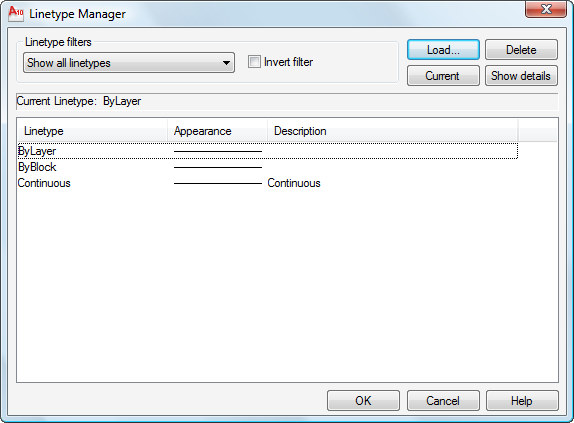
Now to see the LL command in action… Let's start by calling the LINETYPE command, to check the initial state of a blank drawing:
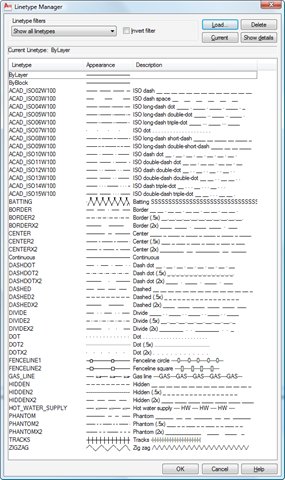
If we re-check the loaded linetypes once we've run the LL command we see a much longer list:
The code has been structured to catch exceptions, two of which might get hit quite easily: if the file has not been found (and we use HostApplicationServices.FindFile() to help get a full path to our file), then we'll get an "eFilerError". And if we run the LL command a second time we'll get an "eDuplicateRecordName" exception.


Leave a Reply to Kean Walmsley Cancel reply