I didn't realise when I created the last post (with code borrowed from Fenton) that this would become a multi-part series – otherwise I'd clearly have called the earlier post "Part 1". 🙂
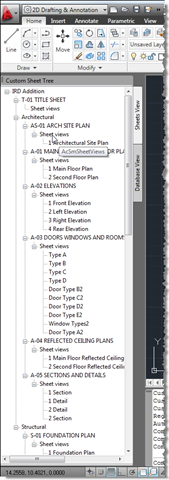
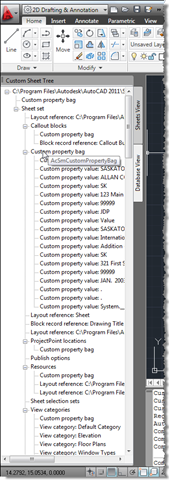
A comment from Harold Comerro requested information on getting more from the DST than was previously shown. Today's post extends the previous code to create two different slices of the data: a "Sheets View" and a "Database View", both hosted in the same palette set.
Here's the updated C# code:
using Autodesk.AutoCAD.ApplicationServices;
using Autodesk.AutoCAD.EditorInput;
using Autodesk.AutoCAD.Runtime;
using Autodesk.AutoCAD.Windows;
using acApp =
Autodesk.AutoCAD.ApplicationServices;
using ACSMCOMPONENTS18Lib;
using System.Windows.Forms;
using System;
namespace MyApplication
{
public class Commands
{
static PaletteSet ps = null;
static UserControl1 sheetsControl = null;
static UserControl1 dbControl = null;
[CommandMethod("SSTREE")]
public void PopulateCustomSheetTree()
{
// Check the state of the paletteset
if (ps == null)
{
// Then create it
ps = new PaletteSet("Custom Sheet Tree");
// Create and add our "sheets" view
sheetsControl = new UserControl1();
ps.Add("Sheets View", sheetsControl);
sheetsControl.treeView1.ShowNodeToolTips = true;
// Create and add our "database" view
dbControl = new UserControl1();
ps.Add("Database View", dbControl);
dbControl.treeView1.ShowNodeToolTips = true;
}
ps.Visible = true;
// Get the AutoCAD Editor
Editor ed =
acApp.Application.DocumentManager.MdiActiveDocument.Editor;
// Get the SheetSet Manager
AcSmSheetSetMgr mgr = new AcSmSheetSetMgr();
// Create a new SheetSet Database
AcSmDatabase db = new AcSmDatabase();
// Try and load a default DST file...
try
{
db =
mgr.OpenDatabase(
@"C:\Program Files\Autodesk\AutoCAD 2011\Sample\" +
@"Sheet Sets\Architectural\IRD Addition.dst",
true
);
}
catch (System.Exception ex)
{
ed.WriteMessage(ex.ToString());
return;
}
// Lock the db for processing
db.LockDb(db);
// Create our root item in the "database" tree view
TreeNode dbRoot = new TreeNode(db.GetFileName());
dbControl.treeView1.Nodes.Add(dbRoot);
// Process the items owned by the database
try
{
ProcessItems(db, false, dbRoot);
}
catch { }
// Create our root item in the "sheets" tree view
AcSmSheetSet ss = db.GetSheetSet();
TreeNode sheetsRoot = new TreeNode(ss.GetName());
sheetsControl.treeView1.Nodes.Add(sheetsRoot);
// Use the sheet enumerator to process the contents
try
{
ProcessEnumerator(ss.GetSheetEnumerator(), true, sheetsRoot);
}
catch { }
db.UnlockDb(db, true);
mgr.Close(db);
// Expand our trees
sheetsControl.treeView1.ExpandAll();
dbControl.treeView1.ExpandAll();
}
// A number of functions to take advantage of different
// AcSm enumerator interfaces
void ProcessEnumerator(
IAcSmEnumComponent iter, bool useEnum, TreeNode root
)
{
IAcSmComponent item = iter.Next();
while (item != null)
{
ProcessItem(item, useEnum, root);
item = iter.Next();
}
}
void ProcessEnumerator(
IAcSmEnumPersist iter, bool useEnum, TreeNode root
)
{
IAcSmPersist pers = iter.Next();
IAcSmComponent item = pers as IAcSmComponent;
while (pers != null)
{
if (item != null)
ProcessItem(item, useEnum, root);
pers = iter.Next();
item = pers as IAcSmComponent;
}
}
void ProcessEnumerator(
IAcSmEnumSheetSelSet iter, bool useEnum, TreeNode root
)
{
IAcSmSheetSelSet selset = iter.Next();
IAcSmComponent item = selset as IAcSmComponent;
while (selset != null)
{
if (item != null)
ProcessItem(item, useEnum, root);
selset = iter.Next();
item = selset as IAcSmComponent;
}
}
void ProcessEnumerator(
IAcSmEnumSheetView iter, bool useEnum, TreeNode root
)
{
IAcSmSheetView shv = iter.Next();
IAcSmComponent item = shv as IAcSmComponent;
while (shv != null)
{
if (item != null)
ProcessItem(item, useEnum, root);
shv = iter.Next();
item = shv as IAcSmComponent;
}
}
// A function to loop through and process a set of
// items via their ownership hierarchy
void ProcessItems(
IAcSmPersist pers, bool useEnum, TreeNode root
)
{
System.Array arr;
pers.GetDirectlyOwnedObjects(out arr);
if (arr != null)
{
foreach (object obj in arr)
{
IAcSmPersist item = obj as IAcSmPersist;
if (item != null)
ProcessItem(item, useEnum, root);
}
}
}
// Our main processing function which is called by
// all the others, sooner or later
void ProcessItem(
IAcSmPersist item, bool useEnum, TreeNode root
)
{
string type = item.GetTypeName();
switch (type)
{
case "AcSmDatabase":
{
AcSmDatabase db = (AcSmDatabase)item;
TreeNode tn = AddTreeNode(root, "Database", type);
if (useEnum)
{
IAcSmEnumPersist enumerator =
db.GetEnumerator();
ProcessEnumerator(enumerator, useEnum, tn);
}
else
{
ProcessItems(db, useEnum, tn);
}
}
break;
case "AcSmSheetSet":
{
AcSmSheetSet ss = (AcSmSheetSet)item;
TreeNode tn = AddTreeNode(root, "Sheet set", type);
if (useEnum)
{
IAcSmEnumComponent enumerator =
(IAcSmEnumComponent)ss.GetSheetEnumerator();
ProcessEnumerator(enumerator, useEnum, tn);
}
else
{
ProcessItems(ss, useEnum, tn);
}
}
break;
case "AcSmSheetSelSets":
{
AcSmSheetSelSets selsets = (AcSmSheetSelSets)item;
TreeNode tn =
AddTreeNode(root, "Sheet selection sets", type);
IAcSmEnumSheetSelSet enumerator =
selsets.GetEnumerator();
ProcessEnumerator(enumerator, useEnum, tn);
}
break;
case "AcSmSubset":
{
AcSmSubset subset = (AcSmSubset)item;
string subName = subset.GetName();
if (!String.IsNullOrEmpty(subName))
{
TreeNode tn = AddTreeNode(root, subName, type);
IAcSmEnumComponent enumerator =
(IAcSmEnumComponent)subset.GetSheetEnumerator();
ProcessEnumerator(enumerator, useEnum, tn);
}
}
break;
case "AcSmSheet":
{
AcSmSheet sh = (AcSmSheet)item;
string shName = sh.GetName();
if (!String.IsNullOrEmpty(shName))
{
TreeNode tn = AddTreeNode(root, shName, type);
if (useEnum)
{
AcSmSheetViews shvs = sh.GetSheetViews();
ProcessItem(shvs, useEnum, tn);
}
else
{
ProcessItems(sh, useEnum, tn);
}
}
}
break;
case "AcSmSheetViews":
{
AcSmSheetViews shvs = (AcSmSheetViews)item;
TreeNode tn = AddTreeNode(root, "Sheet views", type);
if (useEnum)
{
IAcSmEnumSheetView enumerator = shvs.GetEnumerator();
ProcessEnumerator(enumerator, useEnum, tn);
}
else
{
ProcessItems(shvs, useEnum, tn);
}
}
break;
case "AcSmSheetView":
{
AcSmSheetView sv = (AcSmSheetView)item;
string svName = sv.GetName();
if (!String.IsNullOrEmpty(svName))
AddTreeNode(root, svName, type);
}
break;
case "AcSmViewCategories":
{
AcSmViewCategories cats = (AcSmViewCategories)item;
TreeNode tn =
AddTreeNode(root, "View categories", type);
if (useEnum)
{
IAcSmEnumComponent enumerator =
(IAcSmEnumComponent)cats.GetEnumerator();
ProcessEnumerator(enumerator, useEnum, tn);
}
else
{
ProcessItems(cats, useEnum, tn);
}
}
break;
case "AcSmViewCategory":
{
AcSmViewCategory cat = (AcSmViewCategory)item;
AddTreeNode(
root,
"View category: " + cat.GetName(),
type
);
}
break;
case "AcSmCustomPropertyBag":
{
AcSmCustomPropertyBag bag =
(AcSmCustomPropertyBag)item;
TreeNode tn =
AddTreeNode(root, "Custom property bag", type);
if (useEnum)
{
IAcSmEnumComponent enumerator =
(IAcSmEnumComponent)bag.GetPropertyEnumerator();
ProcessEnumerator(enumerator, useEnum, tn);
}
else
{
ProcessItems(bag, useEnum, tn);
}
}
break;
case "AcSmCustomPropertyValue":
{
AcSmCustomPropertyValue pv =
(AcSmCustomPropertyValue)item;
AddTreeNode(
root,
"Custom property value: " + pv.GetValue().ToString(),
type
);
}
break;
case "AcSmCalloutBlocks":
{
AcSmCalloutBlocks blks = (AcSmCalloutBlocks)item;
TreeNode tn = AddTreeNode(root, "Callout blocks", type);
if (useEnum)
{
IAcSmEnumComponent enumerator =
(IAcSmEnumComponent)blks.GetEnumerator();
ProcessEnumerator(enumerator, useEnum, tn);
}
else
{
ProcessItems(blks, useEnum, tn);
}
}
break;
case "AcSmCalloutBlockReferences":
{
AcSmCalloutBlockReferences refs =
(AcSmCalloutBlockReferences)item;
TreeNode tn =
AddTreeNode(root, "Block references", type);
if (useEnum)
{
IAcSmEnumComponent enumerator =
(IAcSmEnumComponent)refs.GetEnumerator();
ProcessEnumerator(enumerator, useEnum, tn);
}
else
{
ProcessItems(refs, useEnum, tn);
}
}
break;
case "AcSmAcDbBlockRecordReference":
{
AcSmAcDbBlockRecordReference brr =
(AcSmAcDbBlockRecordReference)item;
AddTreeNode(
root,
"Block record reference: " + brr.GetName(),
type
);
}
break;
case "AcSmAcDbLayoutReference":
{
AcSmAcDbLayoutReference lr =
(AcSmAcDbLayoutReference)item;
AddTreeNode(
root,
"Layout reference: " + lr.GetName(),
type
);
}
break;
case "AcSmFileReference":
{
AcSmFileReference fr = (AcSmFileReference)item;
AddTreeNode(
root,
"Layout reference: " + fr.GetFileName(),
type
);
}
break;
case "AcSmAcDbViewReference":
{
AcSmAcDbViewReference vr = (AcSmAcDbViewReference)item;
AddTreeNode(
root,
"View reference: " + vr.GetName(),
type
);
}
break;
case "AcSmObjectReference":
{
AcSmObjectReference or =
(AcSmObjectReference)item;
AddTreeNode(
root,
"Object reference: " +
or.GetReferencedObject().GetTypeName(),
type
);
}
break;
case "AcSmProjectPointLocations":
{
AcSmProjectPointLocations ppls =
(AcSmProjectPointLocations)item;
TreeNode tn =
AddTreeNode(root, "ProjectPoint locations", type);
if (useEnum)
{
IAcSmEnumComponent enumerator =
(IAcSmEnumComponent)ppls.GetEnumerator();
ProcessEnumerator(enumerator, useEnum, tn);
}
else
{
ProcessItems(ppls, useEnum, tn);
}
}
break;
case "AcSmPublishOptions":
{
AcSmPublishOptions opts = (AcSmPublishOptions)item;
AddTreeNode(root, "Publish options", type);
}
break;
case "AcSmResources":
{
AcSmResources res = (AcSmResources)item;
TreeNode tn = AddTreeNode(root, "Resources", type);
if (useEnum)
{
IAcSmEnumComponent enumerator =
(IAcSmEnumComponent)res.GetEnumerator();
ProcessEnumerator(enumerator, useEnum, tn);
}
else
{
ProcessItems(res, useEnum, tn);
}
}
break;
default:
{
Document doc =
acApp.Application.DocumentManager.MdiActiveDocument;
Editor ed = doc.Editor;
ed.WriteMessage("\nMissed Type = " + type);
}
break;
}
}
private TreeNode AddTreeNode(
TreeNode root, string name, string tooltip
)
{
// Create a new node on the tree view with a tooltip
TreeNode node = new TreeNode(name);
node.ToolTipText = tooltip;
// Add it to what we have
root.Nodes.Add(node);
return node;
}
}
}
The code uses two different approaches for parsing the data: the first is via enumerators retrieved from the objects themselves (used by the "Sheets View") and the second works purely via ownership ("Database View"). Each item's tooltip shows the underlying COM class, to help understand the structure. I do agree with Tony that this approach – as you can see from the above code – does start to get unwieldy. With any luck I'll provide a more streamlined approach to this in a future post in this series.
Let's see what happens when we run the updated SSTREE command:
That's it for today. Now that Tony has clarified a mistaken assumption in my last post, I expect I'll take a look at implementing the UI via data-binding with WPF, when I get some time. This should also demonstrate the benefits of a more elegant approach to extracting and presenting the data.


Leave a Reply to Kean Walmsley Cancel reply