Last week we saw a series of simple posts about creating, placing and editing MText. Barry Ralphs asked about the ability to fire off editing commands to the in-place MText editor, which – interestingly – was a new feature in AutoCAD 2011, implemented primarily to enable the control of the MText IPE via AutoCAD's ribbon.
While I'm not yet covering Barry's specific question, here's the first of (hopefully) a series of posts which looks into the API now exposed for the MText IPE. There appear to be some quirks related to selection (and especially searching) of an MText's contents using the IPE, so I'm taking baby steps on this one.
[The material I'm using as a starting point is available along with the AutoCAD 2011 New APIs webcast, also linked to from the ADN webcast archive.]
To get the ball rolling, let's use the IPE to strip away all that nice formatting we added in last week's first post. Here's some C# code to do so:
using Autodesk.AutoCAD.ApplicationServices;
using Autodesk.AutoCAD.EditorInput;
using Autodesk.AutoCAD.DatabaseServices;
using Autodesk.AutoCAD.Runtime;
namespace MTextEditing
{
public class Commands
{
[CommandMethod("SMF")]
public void StripMTextFormatting()
{
Document doc =
Application.DocumentManager.MdiActiveDocument;
Database db = doc.Database;
Editor ed = doc.Editor;
// Specifically select an MText object
PromptEntityOptions peo =
new PromptEntityOptions(
"\nSelect MText to strip of formatting: "
);
peo.SetRejectMessage("\nObject must me MText.");
peo.AddAllowedClass(typeof(MText), false);
PromptEntityResult per = ed.GetEntity(peo);
if (per.Status != PromptStatus.OK)
return;
Transaction tr =
doc.TransactionManager.StartTransaction();
using (tr)
{
// We only need our MText open for read
DBObject obj =
tr.GetObject(per.ObjectId, OpenMode.ForRead, false);
MText mt = obj as MText;
if (mt == null)
return;
// Create a text editor object for the MText
TextEditor te = TextEditor.CreateTextEditor(mt);
if (te == null)
return;
// Simply select the entire contents and strip
// all formatting from the selection
te.SelectAll();
te.Selection.RemoveAllFormatting();
// Be sure to save the results from the editor
te.Close(TextEditor.ExitStatus.ExitSave);
tr.Commit();
}
}
}
}
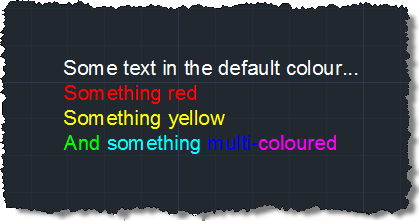
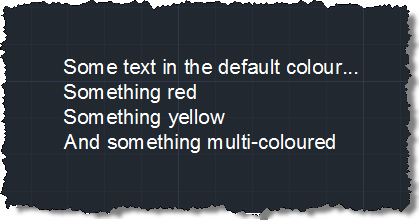
We can use our new SMF command to strip the formatting from a particular MText object:
Before…
After…


Leave a Reply to Ben Cancel reply