Changing the relative draw-order of AutoCAD objects based on their layer

Terry Dotson has – once again – generously offered an application to be an ADN Plugin of the Month. This little tool, called DrawOrderByLayer, allows you to modify the draw-order of objects in an AutoCAD drawing according to the layer they're on. I don't expect this to go live for another month or so (I still have plans for November's plugin), but I did want to post it in order to give people the chance to provide feedback.

Here's basically how it works…

You have layers containing geometry – in this case I've created circular solid hatches on layers named by their respective colours:
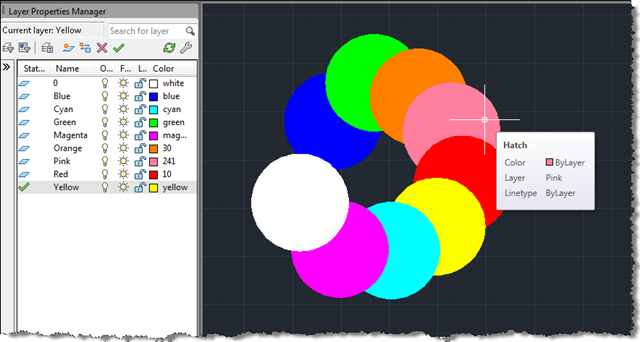
Hatches ready for ordering by layer Loading the DLL and launching the DOBYLAYS command shows a simple dialog:
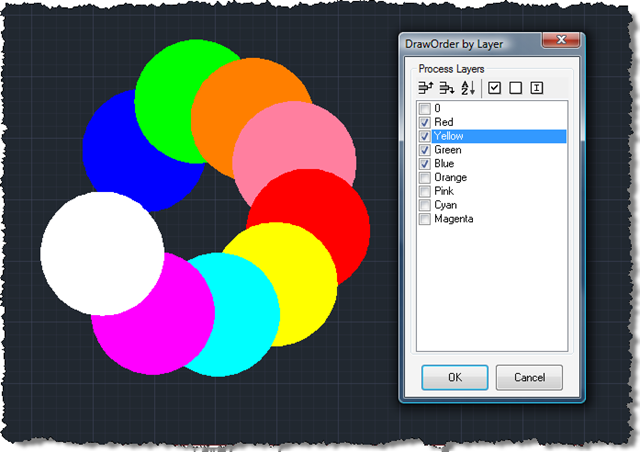
Our DrawOrderByLayer dialog Once you've ticked/checked the layers you care about and have moved them into an appropriate relative order, clicking OK selects the objects on each layer and uses the DrawOrderTable to bring them to the top. In our case we have asked for Red, Yellow, Green and Blue to be brought to the the top (Red being the topmost of them):

The ordered layers I've made a few cosmetic changes to Terry's code, but it's mostly his. There may well be further changes prior to the eventually posting – I'm wondering if it's worth streamlining the DrawOrderTable calls, for instance – but I (and, I'm sure, Terry, also) would appreciate any feedback people would like to provide, in the meantime.

Here's the main VB.NET file:

Imports Autodesk.AutoCAD.ApplicationServices

Imports Autodesk.AutoCAD.Runtime

Imports DrawOrderByLayer.DemandLoading


Public Class Commands


  Implements IExtensionApplication


  ' AutoCAD fires the Initialize Sub when the assembly is loaded,

  ' so we check to see if the command is registered by looking for

  ' the existance of the Registry keys.  If not found, we attempt

  ' to add them so the command will automatically load in future

  ' sessions.  This means it only needs to be NETLOADed once.


  Public Sub Initialize() Implements IExtensionApplication.Initialize

    RegistryUpdate.RegisterForDemandLoading()

  End Sub


  Public Sub Terminate() Implements IExtensionApplication.Terminate

    ' Only fires when AutoCAD is shutting down

  End Sub


  <CommandMethod("ADNPLUGINS", "REMOVEDO", CommandFlags.Modal)> _

  Public Shared Sub RemoveDrawOrderByLayer()

    RegistryUpdate.UnregisterForDemandLoading()

  End Sub


  ' Establish our command name to use to start the tool.  It

  ' dimensions an instance of the form and displays it with

  ' AutoCAD's ShowModalDialog.  Don't use Windows Form.Show!< /p>


  <CommandMethod("ADNPLUGINS", "DOBYLAY", CommandFlags.Modal)> _

  Public Shared Sub OrderByLayer()

    Using dlg As New OrderDialog()

      Application.ShowModalDialog(dlg)

    End Using

  End Sub


End Class

Here's the dialog implementation file:

Imports Autodesk.AutoCAD.ApplicationServices

Imports Autodesk.AutoCAD.DatabaseServices

Imports Autodesk.AutoCAD.EditorInput

Imports Autodesk.AutoCAD.Runtime


Public Class OrderDialog


  'Related System Variables

  '  DRAWORDERCTL: Controls the display order of overlapping objects.

  '    Improves editing speed in large drawings

  '  SORTENTS: Controls object sorting in support of draw order for

  '    several operations.


  Private Sub MainForm_Load( _

    ByVal sender As System.Object, ByVal e As System.EventArgs) _

    Handles MyBase.Load


    ' Populate layer list with layers (in order created)


    Dim db As Database = _

      Application.DocumentManager.MdiActiveDocument.Database


    Using tr As Transaction = _

      db.TransactionManager.StartTransaction

      Dim lt As LayerTable = _

        tr.GetObject(db.LayerTableId, OpenMode.ForRead)

      For Each id As ObjectId In lt

        Dim ltr As LayerTableRecord = _

          tr.GetObject(id, OpenMode.ForRead)

        If ltr.IsDependent = False Then

          LayLst.Items.Add(ltr.Name)

        End If

      Next

      tr.Commit() ' Cheaper to commit than abort

    End Using


  End Sub


  Private Sub Accept_Click( _

    ByVal sender As System.Object, ByVal e As System.EventArgs) _

    Handles Accept.Click


    If LayLst.CheckedItems.Count > 0 Then


      ' Build list of layers from those checked, then reverse it


      Dim revLst As New List(Of String)

      For Each TxtStr As String In LayLst.CheckedItems

        revLst.Add(TxtStr)

      Next

      revLst.Reverse()


      ' Get modelspace objects on each layer and pass to

      ' DrawOrderTable.MoveToTop()


      Dim doc As Document = _

        Application.DocumentManager.MdiActiveDocument

      Dim db As Database = doc.Database

      Dim ed As Editor = doc.Editor


      Using tr As Transaction = _

        db.TransactionManager.StartTransaction

        Dim bt As BlockTable = _

          tr.GetObject(db.BlockTableId, OpenMode.ForWrite)

        Dim btr As BlockTableRecord = _

          tr.GetObject( _

            bt(BlockTableRecord.ModelSpace), OpenMode.ForWrite)

        Dim dot As DrawOrderTable = _

          tr.GetObject(btr.DrawOrderTableId, OpenMode.ForWrite)

        Using pm As New ProgressMeter

          pm.Start("Processing: ")

          pm.SetLimit(LayLst.CheckedItems.Count)

          For Each lay As String In revLst

            Dim psr As PromptSelectionResult

            Dim tvs(0) As TypedValue

            tvs(0) = New TypedValue(DxfCode.LayerName, lay)

            Dim sf As New SelectionFilter(tvs)

            psr = ed.SelectAll(sf)

            If psr.Value IsNot Nothing Then

              dot.MoveToTop( _

                New ObjectIdCollection(psr.Value.GetObjectIds))

            End If

            pm.MeterProgress()

            System.Windows.Forms.Application.DoEvents()

          Next

          pm.Stop()

        End Using

        tr.Commit()

      End Using

      ed.Regen()

    End If

    Me.Close()

  End Sub


  Private Sub Cancel_Click( _

    ByVal sender As System.Object, ByVal e As System.EventArgs) _

    Handles Cancel.Click


    Me.Close()

  End Sub


  Private Sub LayInv_Click( _

    ByVal sender As System.Object, ByVal e As System.EventArgs) _

    Handles LayInv.Click


    For AI As Integer = 0 To LayLst.Items.Count - 1

      LayLst.SetItemChecked(AI, Not LayLst.GetItemChecked(AI))

    Next

  End Sub


  Private Sub LaySrt_Click( _

    ByVal sender As System.Object, ByVal e As System.EventArgs) _

    Handles LaySrt.Click


    LayLst.Sorted = True

    LayLst.Sorted = False

  End Sub


  Private Sub MovUpp_Click( _

    ByVal sender As System.Object, ByVal e As System.EventArgs) _

    Handles MovUpp.Click


    If LayLst.SelectedIndex > 0 Then

      Dim OldChk As Boolean = _

        LayLst.GetItemChecked(LayLst.SelectedIndex - 1)

      LayLst.Items.Insert( _

        LayLst.SelectedIndex + 1, _

        LayLst.Items(LayLst.SelectedIndex - 1))

      LayLst.Items.RemoveAt( _

        LayLst.SelectedIndex - 1)

      LayLst.SetItemChecked( _

        LayLst.SelectedIndex + 1, OldChk)

    End If

  End Sub


  Private Sub MovDnn_Click( _

    ByVal sender As System.Object, ByVal e As System.EventArgs) _

    Handles MovDnn.Click


    If LayLst.SelectedIndex < LayLst.Items.Count - 1 Then

      Dim OldChk As Boolean = _

        LayLst.GetItemChecked(LayLst.SelectedIndex + 1)

      LayLst.Items.Insert( _

        LayLst.SelectedIndex, LayLst.Items(LayLst.SelectedIndex + 1))

      LayLst.Items.RemoveAt( _

        LayLst.SelectedIndex + 1)

      LayLst.SetItemChecked( _

        LayLst.SelectedIndex - 1, OldChk)

    End If

  End Sub


  Private Sub SelAll_Click( _

    ByVal sender As System.Object, ByVal e As System.EventArgs) _

    Handles SelAll.Click


    For I As Int16 = 0 To LayLst.Items.Count - 1

      LayLst.SetItemChecked(I, True)

    Next

  End Sub


  Private Sub SelNon_Click( _

    ByVal sender As System.Object, ByVal e As System.EventArgs) _

    Handles SelNon.Click


    For I As Int16 = 0 To LayLst.Items.Count - 1

      LayLst.SetItemChecked(I, False)

    Next

  End Sub


End Class

And here's the project. Thanks for providing this sample, Terry!

31 responses to “Changing the relative draw-order of AutoCAD objects based on their layer”

  1. Awesome tool, I would love to see this get integrated with the layer dialog box and built-in to AutoCAD.

  2. Nice tool. I can see a few applications for it in our office.. (with a few modifications)..

    Thank you for this Terry and Kean 😉

  3. It would be nice if you could change the order by drag&drop instead of having to hit the up & down buttons a bunch of times. Is the draw order saved when the dwg is closed & reopened?

  4. hi kean,i found a problem in AutoCAD2008 plot library just like plotengine class etc,but i'm not sure about it.When i using BeginGenerateGraphics on a dwg file without any modify,it has a fast plot to file,but when the dwg was modified(for example double click the blockrefrence in the doc and edit),the scence has changed that it become very slow to plot.when using the ANTS performace tools,the result show that it's five times slower than that the scene with no changed dwg.Thanks for your attention.

  5. I think Chris has a good idea there, something similar to a layer style which we use in our office.

  6. I am Brazilian and I discovered the blog recently, the plugin looks great, but I can not use it! what is the problem?

  7. Hi Ricardo,

    What steps have you taken to get it working, and where/how did it fail?

    Regards,

    Kean

  8. Hi Kean,

    when I create the dll and load it in autocad 2011 me of an error message, I tried in various ways, but I can not, I doing some things very wrong.

  9. Hi Ricardo,

    What error message?

    Kean

  10. AVI: o log de ligações de assembly está desativado.
    Para ativar o log de falhas de assembly, defina o valor do Registro
    [HKLM\Software\Microsoft\Fusion!EnableLog] (DWORD) como 1.
    Observação: há alguma penalidade para o desempenho associada ao log de falha de
    ligação de assembly.
    Para desativar esse recurso, remova o valor do Registro
    [HKLM\Software\Microsoft\Fusion!EnableLog].

  11. That error message doesn't appear to have anything to do with the code in this post.

    Have you tried enabling fusion logging as per the information in this post? That might be why you're getting this message, although that's really just a guess - I haven't used it myself.

    Kean

  12. This is what i've needed for ages. But how do I get it to work? The "plugin of the month" is not the same plugin.

  13. Hi Sigurd,

    You can get the project from the link at the bottom of the post. If you load it into Visual Studio (or presumably Visual Basic Express) you should be able to build a DLL that can be NETLOADed into AutoCAD.

    Regards,

    Kean

  14. Thanks for the reply. So i downloaded the zip file & extracted it, & i downloaded a trial version of Visual Studio 2010. I then opened the DrawOrderByLayer.vbproj file. - Then i got stuck.
    Have I got very far to go or am I wasting my time?

    Thanks Kean
    Sigurd

  15. You're close: I tend to open the .sln rather than the .vbproj, but either should work. You may find the project needs some references to be found: if you right-click on the project in the Solution Explorer (on the right, usually) and select Properties, you can add a Reference Path via the References tab (this is in VS 2008, which I am using) to your AutoCAD installation (e.g. "c:\Program Files\Autodesk\AutoCAD 2011").

    Then hopefully you can Build Solution via the Build menu and you'll find a DLL you can NETLOAD in the bin\Debug or bin\Release sub-folder.

    Let me know how you get on,

    Kean

  16. I've run into a problem with the program..

    It works great so long as there is nothing on the selected layers outside of "modelspace". But it fails every time it runs into a layer that is in use in model & paper.

    Is there some way of getting around this? (IE: have it work in both spaces)

  17. I'm sure there is: it's true the current implementation focuses on modelspace-resident geometry, but we should also be able to support paperspace.

    I would start by filtering the geometry selection to do two passes to each later: one for modelspace and one (perhaps even more) for paperspace. You'd then open and use the DrawOrder Table for the appropriate space.

    If this goes further as a Plugin of the Month, I'll certainly make sure this gets addressed.

    Kean

  18. I've just received the below comment from Terry, the plugin's author:

    >>>
    Simply changing ...

    Dim tvs(0) As TypedValue
    tvs(0) = New TypedValue(DxfCode.LayerName, lay)

    ... to ...

    Dim tvs(0 to 1) As TypedValue
    tvs(0) = New TypedValue(DxfCode.LayerName, lay)
    tvs(1) = New TypedValue(DxfCode.LayoutName, "Model")

    ... appears to fix the problem (for modelspace only). Being a long time mapping user I can't see any justification for expanding it to layouts.
    In the *highly unlikely* case someone needs to change the draworder in paper space, they can do it manually.
    <<<

    Kean

  19. I got heeps of errors but I haven't had time to address/figure out what they mean. Thanks for your help, I think i'll try & track down our IT guy who works on the weekends to give me a hand when I get the chance

    Thanks again

  20. The errors are almost certainly about not having the right project references in place. if you add references to AdMgd.dll and AcDbMgd.dll I'd expect them all to disappear.

    Kean

  21. leigh.dragovich@gmail.com Avatar
    leigh.dragovich@gmail.com

    Hi,

    I am getting the following error.

    Command: netload
    Cannot load assembly. Error details: System.IO.FileLoadException: Could not
    load file or assembly 'file:///C:Transfield AutodeskAutoCAD Map 3D
    2012ADNPlugin-DrawOrderByLayer.dll' or one of its dependencies. Operation is
    not supported. (Exception from HRESULT: 0x80131515)
    File name: 'file:///C:Transfield AutodeskAutoCAD Map 3D
    2012ADNPlugin-DrawOrderByLayer.dll' ---> System.NotSupportedException: An
    attempt was made to load an assembly from a network location which would have
    caused the assembly to be sandboxed in previous versions of the .NET Framework.
    This release of the .NET Framework does not enable CAS policy by default, so
    this load may be dangerous. If this load is not intended to sandbox the
    assembly, please enable the loadFromRemoteSources switch. See
    go.microsoft.com/fwlink/?LinkId=155569 for more information.
    at System.Reflection.RuntimeAssembly._nLoad(AssemblyName fileName, String
    codeBase, Evidence assemblySecurity, RuntimeAssembly locationHint,
    StackCrawlMark& stackMark, Boolean throwOnFileNotFound, Boolean
    forIntrospection, Boolean suppressSecurityChecks)
    at System.Reflection.RuntimeAssembly.InternalLoadAssemblyName(AssemblyName
    assemblyRef, Evidence assemblySecurity, StackCrawlMark& stackMark, Boolean
    forIntrospection, Boolean suppressSecurityChecks)
    at System.Reflection.RuntimeAssembly.InternalLoadFrom(String assemblyFile,
    Evidence securityEvidence, Byte[] hashValue, AssemblyHashAlgorithm
    hashAlgorithm, Boolean forIntrospection, Boolean suppressSecurityChecks,
    StackCrawlMark& stackMark)
    at System.Reflection.Assembly.LoadFrom(String assemblyFile)
    at Autodesk.AutoCAD.Runtime.ExtensionLoader.Load(String fileName)
    at loadmgd()

  22. Try unblocking the ZIP as per these instructions:

    labs.blogs.com/its_alive_in_the_lab/2011/05/unblock-net.html

    Or you could use this approach:

    keanw.com/2011/07/loading-blocked-and-network-hosted-assemblies-with-net-4.html

    Regards,

    Kean

  23. Any reason to suspect that this is not compatible with Autocad MEP? After loading it (no errors), it returns 'command not found'.

  24. No reason that I can think of - I'm pretty sure someone else would have reported an incompatibility before now.

    It may be that NETLOAD isn't telling you that the module hasn't loaded properly: make sure you have the right DLL version for your AutoCAD MEP version.

    The best would be to install it from the Exchange Store (I'm pretty sure it's up there, probably provided by DotSoft).

    Kean

  25. how can i set the draw order of reference files.
    i want my existing files below my design.
    in microstation its update sequence, what is it in
    autocad??

  26. Hi Ken,

    This sounds like a product usage question (which isn't really my area of expertise). I would think you could adjust the relative draw-order of attached XRefs via the DRAWORDER command.

    I suggest posting your question on the online discussion groups - someone there will certainly be able to help you.

    Regards,

    Kean

  27. I had the same problem and then I solved
    it cut and paste acad.exe.config (under Programfiles/Autodesk /Autocad) file to your desktop and open it with visual studio
    and check version number in your *.dll project framework version end acad.exe.config file version mut be same and delete command signs (like ) beginin and end of the sturtup elemnet

    <startup uselegacyv2runtimeactivationpolicy="true">
    <supportedruntime version="v4.0"/>
    </startup>

  28. Hi, I've been using this plugin for making drawings during my studying
    (so, first of all, thanks for extremely useful tool!), but starting from
    autocad map 3d 2015 it doesn't work. Is it me, who is doing something
    wrong, or Draw Order By Layer plugin is not supported by autocad map 3d
    2015. Thanks.

    1. You should be able to get it from DotSoft - the original author of the tool:

      dotsoft.com/free... (DOBLAYER.ZIP)

      Kean

      1. Thank you, It works!

Leave a Reply to xiaolang Cancel reply

Your email address will not be published. Required fields are marked *