Creating an associative, lofted surface in AutoCAD using .NET

As mentioned a few posts ago, I'm working towards generating a set of surfaces from some polyline profiles, to programmatically create a space shuttle. Most of the surfaces are "lofted", so that seems a good place to start. Today we're going to implement a simple command that creates a lofted surface from three circular profiles. This is based on functionality added in AutoCAD 2011, so apologies to those using prior versions.

If anyone's interested in where the term "lofted" comes from, the ever-useful Wikipedia has some information for us:

The term lofting originally came from the shipbuilding industry where loftsmen worked on "barn loft" type structures to create the keel and bulkhead forms out of wood. This was then passed on to the aircraft then automotive industries who also required streamline [sic] shapes.

Here's the C# code implementing our CLS command (for CreateLoftedSurface, although I do admit to a wee bit of nostalgia from implementing a CLS command :-):

using Autodesk.AutoCAD.ApplicationServices;

using Autodesk.AutoCAD.Runtime;

using Autodesk.AutoCAD.DatabaseServices;

using Autodesk.AutoCAD.Geometry;


namespace SurfaceModelling

{

  public class Commands

  {

    [CommandMethod("CLS")]

    public void CreateLoftedSurface()

    {

      Database db =

        HostApplicationServices.WorkingDatabase;

      Transaction tr =

        db.TransactionManager.StartTransaction();

      using (tr)

      {

        BlockTable bt =

          (BlockTable)tr.GetObject(

            db.BlockTableId,

            OpenMode.ForRead

          );

        BlockTableRecord btr =

          (BlockTableRecord)tr.GetObject(

            bt[BlockTableRecord.ModelSpace],

            OpenMode.ForWrite

          );


        // Add our 3 circles to the database and created

        // corresponding loft profiles


        Circle c1 =

          new Circle(

            new Point3d(0, 0, 0), new Vector3d(0, 0, 1), 2

          );

        btr.AppendEntity(c1);

        tr.AddNewlyCreatedDBObject(c1, true);

        LoftProfile lp1 = new LoftProfile(c1);


        Circle c2 =

          new Circle(

            new Point3d(0, 0, 5), new Vector3d(0, 0, 1), 5

          );

        btr.AppendEntity(c2);

        tr.AddNewlyCreatedDBObject(c2, true);

        LoftProfile lp2 = new LoftProfile(c2);


        Circle c3 =

          new Circle(

            new Point3d(0, 0, 10), new Vector3d(0, 0, 1), 3

          );

        btr.AppendEntity(c3);

        tr.AddNewlyCreatedDBObject(c3, true);

        LoftProfile lp3 = new LoftProfile(c3);


        // Create an array of our loft profiles


        LoftProfile[] lps = new LoftProfile[3]{lp1, lp2, lp3};


        // Create our lofted surface


        Autodesk.AutoCAD.DatabaseServices.Surface.

          CreateLoftedSurface(

            lps, null, null, new LoftOptions(), true

          );


        tr.Commit();

      }

    }

  }

}

A few comments on this code:

  • There are two versions of the static CreateLoftedSurface() method
    • The one we have used takes an additional "associativity" flag and takes care of adding the new surface to the modelspace (and presumably the outermost transaction)
    • The other one returns a surface that requires manual adding t
      o a block table record and to a transaction and does not add any associativity
  • We are passing an empty LoftOptions() object
    • We could, of course, assign it to a variable and modified the options before making the call, should we so wish
    • Passing null is not an option, however: AutoCAD will crash

And let's see the results:
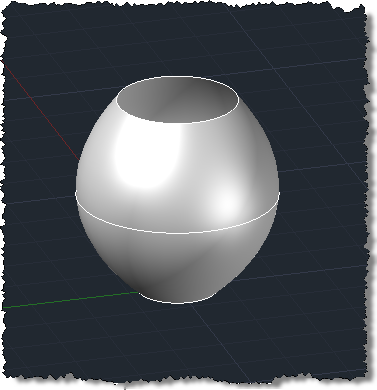
Our lofted surfaceAnd just to prove we have an associative surface,  we can stretch the middle circle to fatten it:
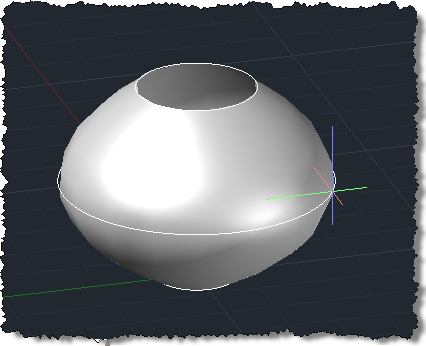
And yes, it's associativeIn the next post I'll put this into the "copy code to clipboard" solution, to place code on the clipboard to generate the lofted components of our space shuttle.

  1. Kean,
    I'm fairly new to VB.net, but have programed vba for years. I have used parts of your code above to create lofted surfaces (Thanks!). I now need to create a lofted surface and add it to a block. However, if I create a variable as a loftedsurface and try to createloftedsurface from that object, then I get an error at the variable: "Access of shared member....expression will not be evaluated."

    You mention above about assigning it to a variable, but I think I'm doing something wrong. Here is part of the code:
    Dim myDBObjects As New DBObjectCollection
    Dim lp1r1 As New LoftProfile(r1) 'this is a rectangle polyline
    Dim lp2c2 As New LoftProfile(c2) 'this is a circle
    Dim lps As LoftProfile() = New LoftProfile(1) {lp1r1, lp2c2}
    Dim clps1 As New LoftedSurface
    clps1.CreateLoftedSurface(lps, Nothing, Nothing, New LoftOptions(), True)
    myDBObjects.Add(clps1)
    AddEntities(HostApplicationServices.WorkingDatabase, myDBObjects, blkName)
    InsertBlock2(HostApplicationServices.WorkingDatabase, BlockTableRecord.ModelSpace, New Point3d(0, 0, 0), blkName, 1, 1, 1) 'this is a function to insert the block.

    However, since I get an error on the clps1.CreateLoftedSurface line, clps1 ends up having no value.

    Any help on this would be appreciated.

    Thanks,
    Ken

  2. Kean Walmsley Avatar

    Ken,

    The two versions of CreateLoftedSurface() are static ("Shared" in VB) members of the Autodesk.AutoCAD.DatabaseServices.Surface class. You can call them in exactly the same way as in my code, not using the clps1 directly.

    And you want the second version, which doesn't have the associativity flag and returns a LoftedSurface object.

    You would probably write something like this:

    Dim clps1 As LoftedSurface = _
    Autodesk.AutoCAD.DatabaseServices.Surface.CreateLoftedSurface(lps, Nothing, Nothing, New LoftOptions())

    You would then need to manually add clps1 to the BlockTableRecord of your choice (and to the transaction).

    I unfortunately don't have time to debug your code, so if this advice doesn't help, please post it to the AutoCAD .NET Discussion Group.

    Regards,

    Kean

  3. Kean,
    Thanks for the info. I've been playing with it and it exits the sub right after the line that you provided:
    Dim clps1 As LoftedSurface = _
    Autodesk.AutoCAD.DatabaseServices.Surface.CreateLoftedSurface(lps, Nothing, Nothing, New LoftOptions())

    Though, I don't get the warning anymore. So it looks like it should work.

    And it works fine (in creating the surface) if I use the other version of CLS:
    Autodesk.AutoCAD.DatabaseServices.Surface.CreateLoftedSurface(lps, Nothing, Nothing, New LoftOptions(), true)

    But then I don't get the object.

    I realize you don't have time to debug my code, so I will play with it some more and maybe bring it to the discussion group, as you mentioned.

    Thanks again for all your help.

    Ken

  4. Ok, I discovered the issue. It should be dimmed as a surface instead of a loftedsurface. Otherwise it gets a cast error:

    Unable to cast object of type 'Autodesk.AutoCAD.DatabaseServices.Surface' to type 'Autodesk.AutoCAD.DatabaseServices.LoftedSurface.

    This is what I got to work:
    Dim clps1 As Autodesk.AutoCAD.DatabaseServices.Surface = Autodesk.AutoCAD.DatabaseServices.Surface.CreateLoftedSurface(lps1, Nothing, Nothing, New LoftOptions())

    Thanks again,
    Ken

  5. I have problem in autocad 2009

    loftbuilder = New LoftOptionsBuilder(loft)
    loftbuilder.Ruled = True
    loftbuilder.NormalOption = LoftOptionsNormalOption.NoNormal
    loftbuilder.AlignDirection = True
    loftbuilder.Closed = True
    loftbuilder.Simplify = True
    lofted.SetDatabaseDefaults()
    lofted.Closed = False
    Try
    'loftbuilder.ToLoftOptions.CheckLoftCurves(crosssections, guid, Nothing, True)

    lofted.CreateLoftedSurface(crosssections, guides,path, loftbuilder.ToLoftOptions)
    'lofted.CreateLoftedSurface(Me.surf, Me.guides, Nothing, loft)
    btr.AppendEntity(lofted)
    tr.AddNewlyCreatedDBObject(lofted, True)

    always throws einvalid input, object refernce is not set to an instance of an object

    i tried everything put guides and path curves to nothing and result is same

    loft.CheckGuideCurves(guid, True)
    loft.CheckCrossSectionCurves(crosssections, True)
    loft.CheckPathCurve(path, True)

    this 3 lines of code passes ok

  6. Kean Walmsley Avatar

    Your comment doesn't appear to relate directly to code from this post, so please submit your question to the ADN team, if you're a member, or otherwise the AutoCAD .NET Discussion Group.

    Kean

Leave a Reply to Ken Washburn Cancel reply

Your email address will not be published. Required fields are marked *