Here's an idea I've been playing around with for some time: say you want to capture geometry as code for pasting back into your application, how do you do it? For instance, sometimes you might want to model geometry using AutoCAD and then capture it as code for later generation at runtime.
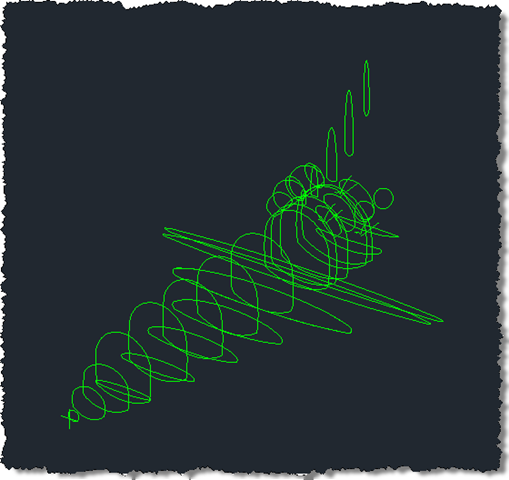
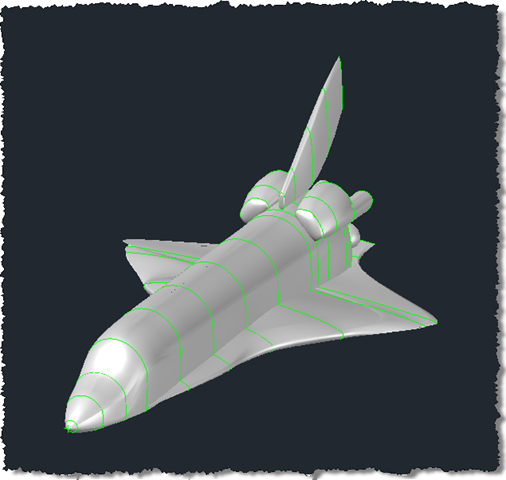
I have a specific example in mind, of course: I have some boundary loops that can be used to generate the outer shell of a space shuttle using the surfacing capabilities introduced in AutoCAD 2010. I'd really like to use code to store these loops and – in due course – generate the various surfaces using these loops to define the "lofts". It may even be that the loops don't have to be database-resident, but we'll see that when we come to the actual surface generation.
Here are the loops:
 To give you an idea of what I'm aiming for, here are the surfaces created by lofting them together:
Here's some simple C# code that places C# code you can later use to generate the selected polylines onto the clipboard, ready for pasting into a code project (whether the same or a different one):
using Autodesk.AutoCAD.ApplicationServices;
using Autodesk.AutoCAD.Runtime;
using Autodesk.AutoCAD.DatabaseServices;
using Autodesk.AutoCAD.EditorInput;
using Autodesk.AutoCAD.Geometry;
using System.Text;
using System;
namespace CopyCodeForEntities
{
public class Commands
{
// 0 - Counter
// 1 - Vertex count
// 2,3,4 - Normal - Vector3d(X,Y,Z)
const string header =
"Polyline pl{0} = new Polyline({1});\r\n" +
"pl{0}.Normal = new Vector3d({2},{3},{4});\r\n";
// 0 - Counter
// 1 - Index
// 2,3 - Point(X,Y)
// 4 - Bulge
// 5 - Start width
// 6 - End width
const string vert =
"pl{0}.AddVertexAt({1}, new Point2d({2}, {3})," +
"{4}, {5}, {6});\r\n";
// 0 - Counter
const string closed = "pl{0}.Closed = true;\r\n";
// 0 - Counter
// 1 - Elevation
const string elev = "pl{0}.Elevation = {1};\r\n";
// 0 - Counter
const string footer =
"btr.AppendEntity(pl{0});\r\n" +
"tr.AddNewlyCreatedDBObject(pl{0}, true);\r\n\r\n";
[CommandMethod("CC")]
public void CopyCode()
{
Editor ed =
Application.DocumentManager.MdiActiveDocument.Editor;
Database db =
HostApplicationServices.WorkingDatabase;
Transaction tr =
db.TransactionManager.StartTransaction();
using (tr)
{
// Build a filter list so that only
// polyline are selected
TypedValue[] filList = new TypedValue[1] {
new TypedValue((int)DxfCode.Start, "LWPOLYLINE")
};
SelectionFilter filter =
new SelectionFilter(filList);
PromptSelectionOptions opts =
new PromptSelectionOptions();
opts.MessageForAdding = "Select polylines: ";
PromptSelectionResult res =
ed.GetSelection(opts, filter);
// Do nothing if selection is unsuccessful
if (res.Status != PromptStatus.OK)
return;
SelectionSet selSet = res.Value;
ObjectId[
] ids = selSet.GetObjectIds();
StringBuilder sb = new StringBuilder();
for (int i=0; i < ids.Length; i++)
{
Polyline pl =
(Polyline)tr.GetObject(
ids[i],
OpenMode.ForRead
);
sb.AppendFormat(
header, i, pl.NumberOfVertices,
ZeroIfTiny(pl.Normal.X),
ZeroIfTiny(pl.Normal.Y),
ZeroIfTiny(pl.Normal.Z)
);
if (!NearZero(pl.Elevation))
{
sb.AppendFormat(elev, i, pl.Elevation);
}
for (int j = 0; j < pl.NumberOfVertices; j++)
{
Point2d pt = pl.GetPoint2dAt(j);
double bul = pl.GetBulgeAt(j),
sWid = pl.GetStartWidthAt(j),
eWid = pl.GetEndWidthAt(j);
sb.AppendFormat(vert, i, j, pt.X, pt.Y, bul, sWid, eWid);
}
if (pl.Closed)
{
sb.AppendFormat(closed, i);
}
sb.AppendFormat(
footer,
i
);
}
ed.WriteMessage(
"\nCopied C# code for {0} polylines to the clipboard.",
ids.Length
);
System.Windows.Forms.Clipboard.SetText(sb.ToString());
tr.Commit();
}
}
bool NearZero(double x)
{
return (Math.Abs(x) <= Tolerance.Global.EqualPoint);
}
double ZeroIfTiny(double x)
{
return (NearZero(x) ? 0.0 : x);
}
[CommandMethod("PP")]
public void CreatePolylines()
{
Editor ed =
Application.DocumentManager.MdiActiveDocument.Editor;
Database db =
HostApplicationServices.WorkingDatabase;
Transaction tr =
db.TransactionManager.StartTransaction();
using (tr)
{
BlockTable bt =
(BlockTable)tr.GetObject(
db.BlockTableId,
OpenMode.ForRead
);
BlockTableRecord btr =
(BlockTableRecord)tr.GetObject(
bt[BlockTableRecord.ModelSpace],
OpenMode.ForWrite
);
// Paste clipboard contents here
tr.Commit();
}
}
}
}
When we run the CC command and select the contents of the above drawing, we get code that creates a number of Polyline objects on the clipboard (which can then be pasted at the suggested place in the PP command's implementation). Here's one chosen at random:
Polyline pl36 = new Polyline(7);
pl36.Normal = new Vector3d(0,1,0);
pl36.Elevation = -2.4299;
pl36.AddVertexAt(0, new Point2d(8.02783179363428, -0.295849333699189),0.354906273868793,
0, 0);
pl36.AddVertexAt(1, new Point2d(7.45736328194178, -0.759462222753096),0.0609649900714751, 0, 0);
pl36.AddVertexAt(2, new Point2d(7.45188160777544, -1.53173175298703),0.146023464679161, 0, 0);
pl36.AddVertexAt(3, new Point2d(8.00466801537898, -1.71147878611281),0, 0, 0);
pl36.AddVertexAt(4, new Point2d(8.04787604781722, -1.71152639257886),0.146023464679161, 0, 0);
pl36.AddVertexAt(5, new Point2d(8.60105720218827, -1.53299791082467),0.0609649900714751, 0, 0);
pl36.AddVertexAt(6, new Point2d(8.59727730725114, -0.760718176224785),0.354906273868755, 0, 0);
pl36.Closed = true;
btr.AppendEntity(pl36);
tr.AddNewlyCreatedDBObject(pl36, true);
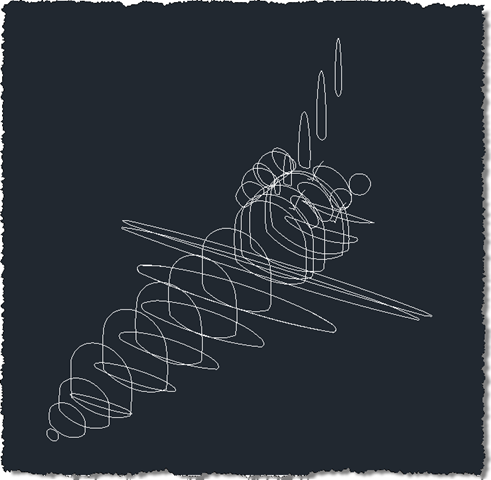
Clearly there are some objects needed by this code, such as btr and tr. The PP command sets these up appropriately. If the code gets pasted in and we use this command, we see our Polyline loop get recreated appropriately:
 There may be things that I'm missing, but this worked well with the geometry I needed to capture. We'll see later on whether we can then use that to programmatically generate surfaces.


Leave a Reply to John Holmes; ADN #3908 Cancel reply