A simple command to perform a matrix transformation on an AutoCAD entity using .NET

As promised in the last post and based on the overwhelming feedback in the one before that,  today we're starting a series on how to transform AutoCAD geometry.

Before developing a fancy modeless GUI to make this really easy, we need a base command that can do the hard work. What's needed from our basic command is the following:

  • Get a single entity from the pickfirst set (which will help us when calling the command from our modeless UI)
    • If there isn't one selected, ask the user for it
  • Get the property name to transform
    • Only for writeable Point3d and Vector3d properties
      • The list of valid properties will be populated in our GUI, so we shouldn't need much validation
    • If none is entered, we just transform the whole entity
  • Get the matrix contents as a comma-delimited string
    • We'll then decompose it into the 16 doubles required to define a Matrix3d
  • Transform the property (or the whole entity) by the provided matrix
    • We will use Reflection to get and set the Point3d/Vector3d property value

To understand some of the underlying concepts, let's talk a little about transformation matrices.

We need 4 x 4 matrices when working in 3D space to allow us to perform a full range of transformations: translation, rotation, scaling, mirroring and projection. We could achieve some of these using 3 x 3 matrices, but some of these – particular translation, but probably some of the others (I'm not 100% certain of the specifics) – need the additional cells.

We'll be looking into different transformation matrix types in more detail when we have a simple UI to play around with them, but for now let's focus on a simple scaling matrix.

2 0 0 0
0 2 0 0
0 0 2 0
0 0 0 1

When we apply this transformation to an entity, it is basically used to multiply the relevant properties (and basically scales them by a factor of 2).

Let's see what that means by applying this scaling transformation to the 3D point (5, 5, 0), which could be the centre point of a circle (for instance). We need to add a unit entry (1) to the point, to make it compatible with a 4 x 4 matrix.

2 0 0 0 5
0 2 0 0 * 5
0 0 2 0 0
0 0 0 1 1

Now if we follow the rules of matrix multiplication, we can see that our resultant point is calculated like this:

a b c d r a*r + b*s + c*t + d*u
e f g h * s = e*r + f*s + g*t + h*u
i j k l t i*r + j*s + k*t + l*u
n o p q u n*r + o*s + p*t + q*u

This page has a nice graphical representation of multiplying a matrix with a vector.

Which means for us, specifically:

2 0 0 0 5 10 + 0 + 0 + 0
0 2 0 0 * 5 = 0 + 10 + 0 + 0
0 0 2 0 0 0 + 0 + 0 + 0
0 0 0 1 1 0 + 0 + 0 + 1

And so our transformed point – which is the top three values of the resultant 4-cell matrix – is (10, 10, 0).

Now let's see the C# code to transform an entity by a user-specified matrix:

using Autodesk.AutoCAD.ApplicationServices;

using Autodesk.AutoCAD.EditorInput;

using Autodesk.AutoCAD.DatabaseServices;

using Autodesk.AutoCAD.Geometry;

using Autodesk.AutoCAD.Runtime;

using System.Reflection;


namespace Transformer

{

  public class Commands

  {

    [CommandMethod("TRANS", CommandFlags.UsePickSet)]

    static public void TransformEntity()

    {

      Document doc =

        Application.DocumentManager.MdiActiveDocument;

      Database db = doc.Database;

      Editor ed = doc.Editor;


      // Our selected entity (only one supported, for now)


      ObjectId id;


      // First query the pickfirst selection set


      PromptSelectionResult psr = ed.SelectImplied();

      if (psr.Status != PromptStatus.OK || psr.Value == null)

      {

        // If nothing selected, ask the user


        PromptEntityOptions peo =

          new PromptEntityOptions(

            "\nSelect entity to transform: "

          );

        PromptEntityResult per = ed.GetEntity(peo);

        if (per.Status != PromptStatus.OK)

          return;

        id = per.ObjectId;

      }

      else

      {

        // If the pickfirst set has one entry, take it


        SelectionSet ss = psr.Value;

        if (ss.Count != 1)

        {

          ed.WriteMessage(

            "\nThis command works on a single entity."

          );

          return;

        }

        ObjectId[] ids = ss.GetObjectIds();

        id = ids[0];

      }


      PromptResult pr = ed.GetString("\nEnter property name: ");

      if (pr.Status != PromptStatus.OK)

        return;


      string prop = pr.StringResult;


      // Now let's ask for the matrix string


      pr = ed.GetString("\nEnter matrix values: ");

      if (pr.Status != PromptStatus.OK)

        return;


      // Split the string into its individual cells


      string[] cells = pr.StringResult.Split(new char[] { ',' });

      if (cells.Length != 16)

      {

        ed.WriteMessage("\nMust contain 16 entries.");

        return;

      }


      try

      {

        // Convert the array of strings into one of doubles


        double[] data = new double[cells.Length];

        for (int i = 0; i < cells.Length; i++)

        {

          data[i] = double.Parse(cells[i]);

        }


        // Create a 3D matrix from our cell data


        Matrix3d mat = new Matrix3d(data);


        // Now we can transform the selected entity


        Transaction tr =

          doc.TransactionManager.StartTransaction();

        using (tr)

        {

          Entity ent =

            tr.GetObject(id, OpenMode.ForWrite)

            as Entity;

          if (ent != null)

          {

            bool transformed = false;


            // If the user specified a property to modify


            if (!string.IsNullOrEmpty(prop))

            {

              // Query the property's value


              object val =

                ent.GetType().InvokeMember(

                  prop, BindingFlags.GetProperty, null, ent, null

                );


              // We only know how to transform points and vectors


              if (val is Point3d)

              {

                // Cast and transform the point result


                Point3d pt = (Point3d)val,

                        res = pt.TransformBy(mat);


                // Set it back on the selected object


                ent.GetType().InvokeMember(

                  prop, BindingFlags.SetProperty, null,

                  ent, new object[] { res }

                );

                transformed = true;

              }

              else if (val is Vector3d)

              {

                // Cast and transform the vector result


                Vector3d vec = (Vector3d)val,

                        res = vec.TransformBy(mat);


                // Set it back on the selected object


                ent.GetType().InvokeMember(

                  prop, BindingFlags.SetProperty, null,

                  ent, new object[] { res }

                );

                transformed = true;

              }

            }


            // If we didn't transform a property,

            // do the whole object


            if (!transformed)

              ent.TransformBy(mat);

          }

          tr.Commit();

        }

      }

      catch (Autodesk.AutoCAD.Runtime.Exception ex)

      {

        ed.WriteMessage(

          "\nCould not transform entity: {0}", ex.Message

        );

      }

    }

  }

}

Now let's use the TRANS command to transform a couple of entities:
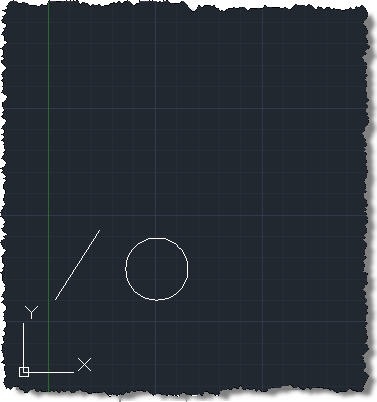
Our entities to transform

We'll use TRANS to apply the above scaling transformation matrix to the whole circle and then to the EndPoint of the line:

Command: TRANS

Select entity to transform: <selected the circle>

Enter property name:

Enter matrix values: 2,0,0,0,0,2,0,0,0,0,2,0,0,0,0,1

Command: TRANS

Select entity to transform: <selected the line>

Enter property name: EndPoint

Enter matrix values: 2,0,0,0,0,2,0,0,0,0,2,0,0,0,0,1

With these results:
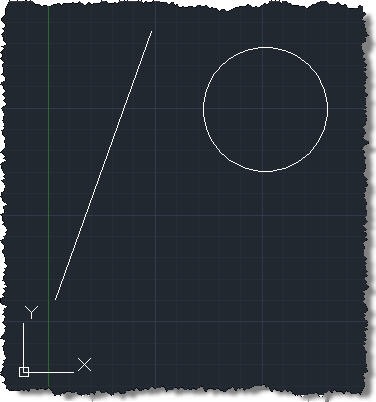
Our transformed entities

I understand this is quite a tricky topic, so I'd appreciate your feedback: does this initial explanation help, at all? Does the level of detail work for you?

In the coming posts we'll be looking at more complex transformation matrices – and using a GUI to play around with them – but hopefully this introductory post is a reasonably helpful start.

23 responses to “A simple command to perform a matrix transformation on an AutoCAD entity using .NET”

  1. Kean, the .NET Developer's Guide might help expand on what your article touches on. Check out:

    docs.autodesk.com/ACD/2011/ENU/filesMDG/WS1a9193826455f5ff2566ffd511ff6f8c7ca-3ed5.htm

    It also has samples to move, rotate, mirror, and scale objects using transformation with TransformBy.

  2. Thanks, Lee.

    The next post will actually present a UI to generate and apply matrices like the ones you've described.

    Cheers,

    Kean

  3. good! hope to see the next article.

  4. Ken,

    Nice article.

    Just to clarify, the use of a 4x4 matrix using homogeneous coodinates it's just for make the composition of (affine) transformation a matrix multiplication operation, by other hand, all transformation can be achieved using a 3x3 (or 2x2 in 2D)matrix, but the composition won't be, in all the cases, a matrix multiplication operation. You can also use quaternions to representate transformations, and there are very hot discussions about which way is better.

  5. Thank you, Gaston!

    I've used matrix calculations for many years without ever using the words homogeneous and affine (at least not in that context), so I avoided copying them from Wikipedia into this particular article. 😉

    But you're basically saying that having a 4x4 matrix allows the composition of transformations via multiplication? That's helpful for people to know (and it's certainly something that will be demonstrated practically in the next article).

    I do believe that translation (or displacement, in AutoCAD-speak) needs a 4x4 matrix - I'd be curious to know how that could be achieved using a 3x3 matrix.

    AutoCAD doesn't use quaternions (although I think some of our other products might), so I'm going to stick with matrices for the purposes of this series of articles.

    Regards,

    Kean

  6. Ken,

    You are right, translation can't be done by 3x3 matrix multiplication. it's just a vector adding operation.

  7. Hi Kean! I just love your posts regarding Autocad .Net!

    In the same time, I have a question: 😀

    I have a block which is formed from lots of lines, arcs and polylines and every line, arc and polyline is intersected by at least one leader (line with arrow).
    In the same time, every leader is connected to a text entity (which I want to modify).

    I want to modify the text based on the color of the lines, arcs, and polylines. And based of that, I want a way to get all the entities which intersect a specific entity. Is this possible?

  8. Hi Peter,

    This is a bit off-topic: in future, please post such questions to ADN or to the appropriate discussion group.

    What you want to achieve is altogether possible, given enough effort. You'll need to do some programmatic selection based on location (Editor.SelectCrossingWindow() should help) and then perform some intersections (Entity.IntersectWith()).

    Regards,

    Kean

    1. This is surely off-topic. But Just have a look on this 10 years older post.
      Please have a look on this blog.

      https://imrananees.blogspot...

  9. Ok. Sorry for the off-topic!

    P.S. Thank you for your answer! 🙂

  10. Dear kean, I am trying to use TransformBy method with different scales in X and Y direction. But i does not allow NonUniform Scaling ... Do you have any idea about it ?

    1. What object are you attempting it on? It would need to support non-uniform scaling, of course. This is from the docs:

      >>>
      Each entity class must implement this function, so restrictions on what types of transformations are supported are up to the implementer of the entity class. The AutoCAD built-in entity classes for entity types that existed before R13 (such as Circle, Line, Arc, 2dPolyline, etc.) require that the transformation matrix represent a uniformly scaling orthogonal transformation. Other AutoCAD built-in classes have no restrictions.
      <<<

      Kean

  11. VINOTH KUMAR RAVI Avatar
    VINOTH KUMAR RAVI

    Hi Kean,
    I need to get the transformation matrix dynamically as like (nentsel) command.How can i achieve this one?

    1. Hi Vinoth,

      If you use Editor.GetNestedEntity() then the PromptNestedEntityResult has a Transform property.

      Please post support questions to the discussion group, in future.

      Kean

      1. VINOTH KUMAR RAVI Avatar
        VINOTH KUMAR RAVI

        Kean,
        Sure, thanks for your reply. It will be very useful to us.

  12. Philip Montgomery Avatar
    Philip Montgomery

    Getting this when i try to run the C# code

    error: bad function: "TRANS"

    any ideas?

    im wanting to transform everything within a drawing by a 4x4 matrix

    Hope someone can help

    1. Have you tried applying a standard matrix transformation but using the static Matrix3d functions to create the transformation matrix?

      Kean

      1. Philip Montgomery Avatar
        Philip Montgomery

        Kean, thanks for the prompt reply

        Im using bog standard autoCAD 2016 and have access to Civil3d also.

        maybe im not in a position to complete the task but i dont know how to start applying a standard matrix transformation ?

        if it helps ive used excel to invert the 4x4 matrix that should revert the objects back into their original position, if i only knew how to apply it

        1. Basically you need to use TransformBy() on the objects, passing in a matrix that represents the transformation (which can be created from a number of different operations) you wish to apply.

          If you're not show how to get started, I suggest asking over on the AutoCAD .NET forum - someone there will be able to help.

          Kean

  13. > does this initial explanation help, at all? Does the level of detail work for you?

    I cannot see too many better ways to introduce the topic. rgds, Ben

  14. How can this Autocad VBA code be placed in the 4X4 matrix?
    Dispensing_Block.Move Dispensing_Block.InsertionPoint, Dispensing_Block_Coordinates
    Dispensing_Block.Rotate Dispensing_Block.Rotate, RadiansToRotate
    I’d like to see if there’s a benefit performance-wise in using the “TransformBy” command instead of “Move” and “Rotate”

  15. How can this Autocad VBA code be placed in the matrix?
    Dispensing_Block.Move Dispensing_Block.InsertionPoint, Dispensing_Block_Coordinates

    Dispensing_Block.Rotate Dispensing_Block.InsertionPoint, RadiansToRotate
    I’d like to see if there’s a benefit performance-wise in using the “TransformBy” method instead of “Move” and “Rotate”

    1. Hi Art,

      Please post your support questions to the appropriate Autodesk forum.

      Best,

      Kean

Leave a Reply to Gaston Nunez Cancel reply

Your email address will not be published. Required fields are marked *