December’s Plugin of the Month live on Autodesk Labs: QR Codes for AutoCAD

As promised and reported on, and then announced by Scott on his blog, the QR Codes application for AutoCAD is now live on Autodesk Labs as December's Plugin of the Month. You may have seen my original implementation, but it's come a long way thanks to the efforts of Augusto Gonรงalves, a member of DevTech based in Sรฃo Paulo.

While I had developed the original implementation to create and embed raster images using the Google Chart API, Augusto extended that implementation to create native hatches for QR Codes. And while my implementation focused on a command-line UI, Augusto implemented a dialog-based GUI to complement it. Both the command-line and dialog-based UIs can now be used to create either native (i.e. hatch) or online (i.e. raster image) QR Codes.

Download it and give it a try! And be sure to check out the accompanying source project, of course. ๐Ÿ™‚

Once loaded, you can use the QRGEN command (and it's command-line counterpart, โ€“QRGEN) to create a QR Code representing one of the following content types:

  • Calendar
  • Contact
  • Email
  • Geolocation
  • Phone
  • Text
  • Url

As we save the source data along with the hatch or raster image as XData, they can then be edited (even in later editing sessions) using QRED or โ€“QRED.

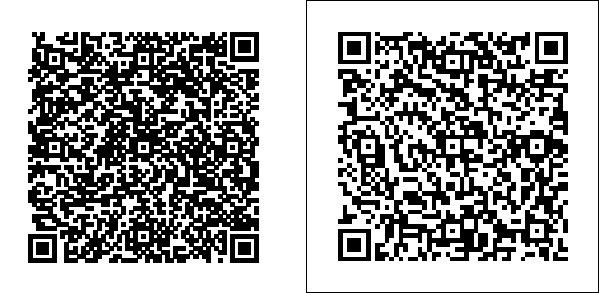
Here's an example of my contact information embedded in native (left) and online (right) QR Codes inside AutoCAD:

Native and online QR Codes in AutoCADNow if you try and scan the left-hand image, you'll probably fail: most QR Codes are black on a white background, while this is the opposite. That said, if you print them โ€“ or use a white background without a grid โ€“ then they should both work well:

The printed QR Codes

You'll notice the patterns are different: it's like the Google Chart implementation uses a different error correction level (as described here and here), which would go some way to explaining that.

I'm really impressed with how Augusto as managed to make a complex QR Code out of a single solid-filled hatch: I had always imagined having to create lots of solids to do this, but apparently it wasn't needed. Neat stuff.

As ever, please let us know what you think by posting a comment or dropping us an email.

One response to “December’s Plugin of the Month live on Autodesk Labs: QR Codes for AutoCAD”

  1. Great work! Thanks to you both. Works perfectly; as you said, the idea to create a hatch object is great, but how is it done? The answer is in the code, for sure... I suggested on my CAD site more than one year ago the use of 2D codes in AutoCAD drawings, but at the time, I created them by hand! (well by Google...)

    1. Dear Patrick,

      I was searching for the QR Codes for AutoCAD in native entities, I found it here. But DLL and the source code has been moved from the ADN site. I hope you must be having the back up of the same.
      I request you your kindness please send me this thru email at my email address, zak8279025@yahoo.com
      Thanks in advance.
      Zaki Kaz
      India

  2. Hi Patrick,

    OK, I've just looked mores closely at the code, to understand it better myself. ๐Ÿ™‚

    If you look at the AcadHatchQREncoder.cs file, you'll see where we call through the open source QR Codes library to encode the data as a 2D (square) matrix of Boolean flags indicating whether each square is set or not.

    We then iterate through that array, creating loops for all the squares that are set. Which means that each square - even if adjacent to others that are "on" - is a separate island in the hatch. So I suspect there are opportunities to optimise the resultant hatch by merging islands (probably during creation). Do let us know if you come up with a more optimal algorithm that you'd like to share. ๐Ÿ˜‰

    Cheers,

    Kean

  3. It's look'in good Kean, thx.
    The idea to create it all from one large hatch is a great idea, but can it be created inside an anonymous block?
    When selecting this large of a hatch, it can be slow while all the grips generate. Plus, you don't want someone to accidentally grip edit the hatch....

  4. Hi all,

    I comment from the "Agreement" that comes before the download:
    "2.1 Grant of License-Testing and Evaluation. ... Without limiting the foregoing, Tester may not use the Pre-Release Products for competitive analysis, or commercial, professional, or other for-profit purposes."

    That seems to mean, that I may not use the Plug-In for any commercial purposes, not using it just normal for QR-Coding my draftings in my company nor reusing the code to create some commercial work off of it. Is that true? In that case it would be completely useless. Why is it then released??!!!?? Or why does Autodesk try sooo hard (again and again) to really upset it's customers? We all bought Autocad for commercial reasons and not for fun!!! Therefore we don't need Plug-Ins that we can not use commercially!!!

    Maybe I misunderstand it? Or is there a commercial version that I can buy?

    Regards, Stephan

  5. Interesting suggestion, Barry - we'll certainly bear it in mind for the next release.

    Kean

  6. Hi Stephan,

    I believe we're using the standard Autodesk Labs EULA for our Plugins of the Month. I'll pass you comments on to Scott Sheppard, to see what he has to say about the terms of usage.

    My understanding is that this is about limiting liability related to the use of plugins that have not put through the formal QA process our company uses for officially released software. The same is probably true of the source code, but clearly the terms have been crafted primarily for compiled modules: it's absolutely our expectation that you extend the source code for use commercially, providing you undersand that it's your responsibility to ensure it works well for your (or your customers') purposes.

    As for Autodesk "trying so hard to upset its customers", I'm afraid I find that comment quite offensive. Autodesk Labs is about connecting with customers, learning about and meeting their needs. I think the breadth and depth of the technology available on the site speaks for itself. And I might also add that my team and I spend a great deal of effort (professionally and personally) in efforts to please (even to delight) our customers.

    Regards,

    Kean

  7. Thanks, Kean, for the understanding and fair words.

    I am sorry for the obviously offensive line. I was a little upset when I wrote the comment and for sure it is an overstatement. I had even stronger words in the first draft, wich I deleted out before posting.
    Please, be assured that I was not referring to you or your team. I really like your blog. I was referring to Autodesk as a big company as a whole in general and for sure I did not want to offend anybody personally.

    Kind regards,
    Stephan

  8. Hi Kean,

    Thanks for this article which inspired me again. I was trying to find a topic to demonstrate a simple dev on the software i work on and QR code is a great idea (not very usefull for the user in my case but easy to show how to implement it). I used the Google Chart implementation with the Docomo format for Contact information.
    here is the video : prodeos.fr/2010/12/13/eng-tech-integrate-qr-code-tag-in-user-form-in-aras-innovator/

    Best Regards,

    Yoann

  9. Constantin Gherasim Avatar
    Constantin Gherasim

    Hi Kean,

    Nice tool. I would work a little bit on my side to polish the GUI (I'm kind of picky about it ๐Ÿ™‚ and to translate the application in French.

    One little warning though for potential users, don't try to separate the hatches (not even out of curiosity) because this will generate a FATAL ERROR message.

    Best Regards,

    Constantin

  10. A Facebook User Avatar

    Late question here regarding this cool tool. I am a definite novice at CAD programming, but I am wondering if the text data, url or whatever can be stored in a block as an attribute. Is it possible to either create a custom property to create the data, or to directly change the XData without the QRED command?

    Thanks for the tool!

    Keith

  11. With some more work the encoded data could certainly be exposed via the Properties Window and cause the QR Code to be regenerated once edited, but that was beyind the scope of this initial implementation. The source code is all there for someone to take further, of course... ๐Ÿ™‚

    Kean

  12. Hello thank you for this. I clicked on the labs link but I couldn't get to the labs website nor could i get to the code for the plug in of the month. Is it possible to access it. i would very much like to see and change the source code? chrs, Ben

  13. Hello Kean
    In the code AcadHatchQREncoder.cs there is an error at the end of the function, you mirror the HATCH on a vertical line instead of horizontal.

    // Mirror the hatch as the original code use Windows
    // coordinates (from upper left corner)

    double halfSize = (h.GeometricExtents.MaxPoint.X -
    h.GeometricExtents.MinPoint.X)/2;
    h.TransformBy(
    Matrix3d.Mirroring(
    new Line3d(
    new Point3d(halfSize, 0, 0),
    new Point3d(halfSize, halfSize, 0)
    )
    )
    );

Leave a Reply to Barry Ralphs Cancel reply

Your email address will not be published. Required fields are marked *