Jigging an AutoCAD polyline with arc segments using .NET

I was just easing back into post-AU work – dealing with my email backlog and thinking about possible blog posts for the week – when I received a very welcome email from Philippe Leefsma, a member of the DevTech team based in Prague. Philippe had a bit of time to spare during our annual DevDays tour and decided to polish up a sample he'd been working on for posting. It extends a post of mine from four years ago (I can't believe it's been that long, but anyway), which shows how to jig a polyline with keywords. Philippe adjusted the code to modify the bulge factor of the current arc segment dynamically based on the cursor position – very much as the standard PLINE command does, in fact.

Here's the C# code, with a few minor – mostly formatting – modifications from my side:

using Autodesk.AutoCAD.ApplicationServices;

using Autodesk.AutoCAD.DatabaseServices;

using Autodesk.AutoCAD.EditorInput;

using Autodesk.AutoCAD.Geometry;

using Autodesk.AutoCAD.Runtime;

using System;


namespace PolylineJig

{

  class JigUtils

  {

    // Custom ArcTangent method, as the Math.Atan

    // doesn't handle specific cases


    public static double Atan(double y, double x)

    {

      if (x > 0)

        return Math.Atan(y / x);

      else if (x < 0)

        return Math.Atan(y / x) - Math.PI;

      else  // x == 0

      {

        if (y > 0)

          return Math.PI;

        else if (y < 0)

          return -Math.PI;

        else // if (y == 0) theta is undefined

          return 0.0;

      }

    }


    // Computes Angle between current direction

    // (vector from last vertex to current vertex)

    // and the last pline segment


    public static double ComputeAngle(

      Point3d startPoint, Point3d endPoint,

      Vector3d xdir, Matrix3d ucs

    )

    {

      Vector3d v =

        new Vector3d(

          (endPoint.X - startPoint.X) / 2,

          (endPoint.Y - startPoint.Y) / 2,

          (endPoint.Z - startPoint.Z) / 2

        );


      double cos = v.DotProduct(xdir);

      double sin =

        v.DotProduct(

          Vector3d.ZAxis.TransformBy(ucs).CrossProduct(xdir)

        );


      return Atan(sin, cos);

    }

  }


  public class BulgePolyJig : EntityJig

  {

    Point3d _tempPoint;

    Plane _plane;

    bool _isArcSeg = false;

    bool _isUndoing = false;

    Matrix3d _ucs;


    public BulgePolyJig(Matrix3d ucs) : base(new Polyline())

    {

      _ucs = ucs;

      Vector3d normal = Vector3d.ZAxis.TransformBy(ucs);

      _plane = new Plane(Point3d.Origin, normal);

      Polyline pline = Entity as Polyline;

      pline.SetDatabaseDefaults();

      pline.Normal = normal;

      AddDummyVertex();

    }


    protected override SamplerStatus Sampler(JigPrompts prompts)

    {

      JigPromptPointOptions jigOpts = new JigPromptPointOptions();


      jigOpts.UserInputControls =

        (UserInputControls.Accept3dCoordinates |

        UserInputControls.NullResponseAccepted |

        UserInputControls.NoNegativeResponseAccepted);


      _isUndoing = false;


      Polyline pline = Entity as Polyline;


      if (pline.NumberOfVertices == 1)

      {

        // For the first vertex, just ask for the point


        jigOpts.Message = "\nSpecify start point: ";

      }

      else if (pline.NumberOfVertices > 1)

      {

        string msgAndKwds =

          (_isArcSeg ?

            "\nSpecify endpoint of arc or [Line/Undo]: " :

            "\nSpecify next point or [Arc/Undo]: "

          );


        string kwds = (_isArcSeg ? "Line Undo" : "Arc Undo");


        jigOpts.SetMessageAndKeywords(msgAndKwds, kwds);

      }

      else

        return SamplerStatus.Cancel; // Should never happen


      // Get the point itself


      PromptPointResult res = prompts.AcquirePoint(jigOpts);


      if (res.Status == PromptStatus.Keyword)

      {

        if (res.StringResult.ToUpper() == "ARC")

          _isArcSeg = true;

        else if (res.StringResult.ToUpper() == "LINE")

          _isArcSeg = false;

        else if (res.StringResult.ToUpper() == "UNDO")

          _isUndoing = true;


        return SamplerStatus.OK;

      }

      else if (res.Status == PromptStatus.OK)

      {

        // Check if it has changed or not (reduces flicker)


        if (_tempPoint == res.Value)

          return SamplerStatus.NoChange;

        else

        {

          _tempPoint = res.Value;

          return SamplerStatus.OK;

        }

      }


      return SamplerStatus.Cancel;

    }


    protected override bool Update()

    {

      // Update the dummy vertex to be our 3D point

      // projected onto our plane


      Polyline pl = Entity as Polyline;


      if (_isArcSeg)

      {

        Point3d lastVertex =

          pl.GetPoint3dAt(pl.NumberOfVertices - 2);


        Vector3d refDir;


        if (pl.NumberOfVertices < 3)

          refDir = new Vector3d(1.0, 1.0, 0.0);

        else

        {

          // Check bulge to see if last segment was an arc or a line


          if (pl.GetBulgeAt(pl.NumberOfVertices - 3) != 0)

          {

            CircularArc3d arcSegment =

              pl.GetArcSegmentAt(pl.NumberOfVertices - 3);


            Line3d tangent = arcSegment.GetTangent(lastVertex);


            // Reference direction is the invert of the arc tangent

            // at last vertex


            refDir = tangent.Direction.MultiplyBy(-1.0);

          }

          else

          {

            Point3d pt =

              pl.GetPoint3dAt(pl.NumberOfVertices - 3);


            refDir =

              new Vector3d(

                lastVertex.X - pt.X,

                lastVertex.Y - pt.Y,

                lastVertex.Z - pt.Z

              );

          }

        }


        double angle =

          JigUtils.ComputeAngle(

            lastVertex, _tempPoint, refDir, _ucs

          );


        // Bulge is defined as tan of one fourth of included angle

        // Need to double the angle since it represents the included

        // angle of the arc

        // So formula is: bulge = Tan(angle * 2 * 0.25)


        double bulge = Math.Tan(angle * 0.5);


        pl.SetBulgeAt(pl.NumberOfVertices - 2, bulge);

      }

      else

      {

        // Line mode. Need to remove last bulge if there was one


        if (pl.NumberOfVertices > 1)

          pl.SetBulgeAt(pl.NumberOfVertices - 2, 0);

      }


      pl.SetPointAt(

        pl.NumberOfVertices - 1, _tempPoint.Convert2d(_plane)

      );


      return true;

    }


    public bool IsUndoing

    {

      get

      {

        return _isUndoing;

      }

    }


    public void AddDummyVertex()

    {

      // Create a new dummy vertex... can have any initial value


      Polyline pline = Entity as Polyline;

      pline.AddVertexAt(

        pline.NumberOfVertices, new Point2d(0, 0), 0, 0, 0

      );

    }


    public void RemoveLastVertex()

    {

      Polyline pline = Entity as Polyline;


      // Let's first remove our dummy vertex   


      if (pline.NumberOfVertices > 0)

        pline.RemoveVertexAt(pline.NumberOfVertices - 1);


      // And then check the type of the last segment


      if (pline.NumberOfVertices >= 2)

      {

        double blg = pline.GetBulgeAt(pline.NumberOfVertices - 2);

        _isArcSeg = (blg != 0);

      }

    }


    public void Append()

    {

      Database db = HostApplicationServices.WorkingDatabase;


      Transaction tr =

        db.TransactionManager.StartTransaction();

      using (tr)

      {

        BlockTable bt =

          tr.GetObject(

            db.BlockTableId, OpenMode.ForRead

          ) as BlockTable;

        BlockTableRecord btr =

          tr.GetObject(

            bt[BlockTableRecord.ModelSpace], OpenMode.ForWrite

          ) as BlockTableRecord;


        btr.AppendEntity(this.Entity);

        tr.AddNewlyCreatedDBObject(this.Entity, true);

        tr.Commit();

      }

    }


    [CommandMethod("BPJIG")]

    public static void RunBulgePolyJig()

    {

      Document doc = Application.DocumentManager.MdiActiveDocument;

      Database db = doc.Database;

      Editor ed = doc.Editor;


      BulgePolyJig jig =

        new BulgePolyJig(ed.CurrentUserCoordinateSystem);


      while (true)

      {

        PromptResult res = ed.Drag(jig);


        switch (res.Status)

        {

          // New point was added, keep going


          case PromptStatus.OK:

            jig.AddDummyVertex();

            break;


          // Keyword was entered


          case PromptStatus.Keyword:

            if (jig.IsUndoing)

              jig.RemoveLastVertex();

            break;


          // If the jig completed successfully, add the polyline


          case PromptStatus.None:

            jig.RemoveLastVertex();

            jig.Append();

            return;


          // User cancelled the command, get out of here

          // and don't forget to dispose the jigged entity


          default:

            jig.Entity.Dispose();

            return;

        }

      }

    }

  }

}

Here's the BPJIG command in action, jigging a polyline with arc segments:
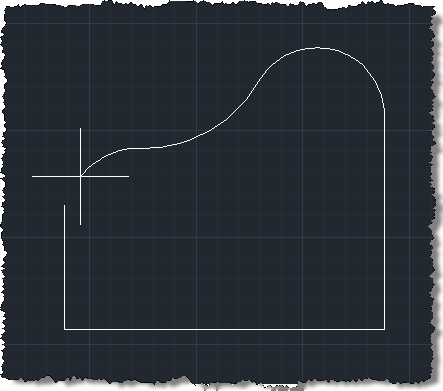
Jigging a polyline with arc segments

Now it must be noted that this implementation is some way from re-implementing the full PLINE command – for those of you who like to re-invent the wheel 😉 - but it should provide some idea of how to allow users to input bulge factors for polyline segments that are being jigged by your custom commands.

Thanks, Philippe! 🙂

Update

It was pointed out in a comment (thanks, Igor 🙂 that the above code doesn't work for all UCS settings (especially when there's a custom origin defined). I've done my best to address this in the below code: if it doesn't work for your specific situation, please do let me know.

(I've included the code in its entirety, but the only changes were to the BulgePolyJig() constructor, in case you want to integrate with existing code.)

using Autodesk.AutoCAD.ApplicationServices;

using Autodesk.AutoCAD.DatabaseServices;

using Autodesk.AutoCAD.EditorInput;

using Autodesk.AutoCAD.Geometry;

using Autodesk.AutoCAD.Runtime;

using System;


namespace PolylineJig

{

  class JigUtils

  {

    // Custom ArcTangent method, as the Math.Atan

    // doesn't handle specific cases


    public static double Atan(double y, double x)

    {

      if (x > 0)

        return Math.Atan(y / x);

      else if (x < 0)

        return Math.Atan(y / x) - Math.PI;

      else  // x == 0

      {

        if (y > 0)

          return Math.PI;

        else if (y < 0)

          return -Math.PI;

        else // if (y == 0) theta is undefined

          return 0.0;

      }

    }


    // Computes Angle between current direction

    // (vector from last vertex to current vertex)

    // and the last pline segment


    public static double ComputeAngle(

      Point3d startPoint, Point3d endPoint,

      Vector3d xdir, Matrix3d ucs

    )

    {

      Vector3d v =

        new Vector3d(

          (endPoint.X - startPoint.X) / 2,

          (endPoint.Y - startPoint.Y) / 2,

          (endPoint.Z - startPoint.Z) / 2

        );


      double cos = v.DotProduct(xdir);

      double sin =

        v.DotProduct(

          Vector3d.ZAxis.TransformBy(ucs).CrossProduct(xdir)

        );


      return Atan(sin, cos);

    }

  }


  public class BulgePolyJig : EntityJig

  {

    Point3d _tempPoint;

    Plane _plane;

    bool _isArcSeg = false;

    bool _isUndoing = false;

    Matrix3d _ucs;


    public BulgePolyJig(Matrix3d ucs) : base(new Polyline())

    {

      _ucs = ucs;


      // Get the coordinate system for the UCS passed in, and

      // create a plane with the same normal (but we won't use

      // the same origin)


      CoordinateSystem3d cs = ucs.CoordinateSystem3d;

      Vector3d normal = cs.Zaxis;

      _plane = new Plane(Point3d.Origin, normal);


      // Access our polyline and set its normal


      Polyline pline = Entity as Polyline;

      pline.SetDatabaseDefaults();

      pline.Normal = normal;


      // Check the distance from the plane to the coordinate

      // system's origin (wwe could use Plane.DistanceTo(), but

      // then we also need the vector to determine whether it is

      // co-directional with the normal)


      Point3d closest = cs.Origin.Project(_plane, normal);

      Vector3d disp = closest - cs.Origin;


      // Set the elevation based on the direction of the vector


      pline.Elevation =

        disp.IsCodirectionalTo(normal) ? -disp.Length : disp.Length;


      AddDummyVertex();

    }


    protected override SamplerStatus Sampler(JigPrompts prompts)

    {

      JigPromptPointOptions jigOpts = new JigPromptPointOptions();


      jigOpts.UserInputControls =

        (UserInputControls.Accept3dCoordinates |

         UserInputControls.NullResponseAccepted |

         UserInputControls.NoNegativeResponseAccepted |

         UserInputControls.GovernedByOrthoMode);


      _isUndoing = false;


      Polyline pline = Entity as Polyline;


      if (pline.NumberOfVertices == 1)

      {

        // For the first vertex, just ask for the point


        jigOpts.Message = "\nSpecify start point: ";

      }

      else if (pline.NumberOfVertices > 1)

      {

        string msgAndKwds =

          (_isArcSeg ?

            "\nSpecify endpoint of arc or [Line/Undo]: " :

            "\nSpecify next point or [Arc/Undo]: "

          );


        string kwds = (_isArcSeg ? "Line Undo" : "Arc Undo");


        jigOpts.SetMessageAndKeywords(msgAndKwds, kwds);

      }

      else

        return SamplerStatus.Cancel; // Should never happen


      // Get the point itself


      PromptPointResult res = prompts.AcquirePoint(jigOpts);


      if (res.Status == PromptStatus.Keyword)

      {

        if (res.StringResult.ToUpper() == "ARC")

          _isArcSeg = true;

        else if (res.StringResult.ToUpper() == "LINE")

          _isArcSeg = false;

        else if (res.StringResult.ToUpper() == "UNDO")

          _isUndoing = true;


        return SamplerStatus.OK;

      }

      else if (res.Status == PromptStatus.OK)

      {

        // Check if it has changed or not (reduces flicker)


        if (_tempPoint == res.Value)

          return SamplerStatus.NoChange;

        else

        {

          _tempPoint = res.Value;

          return SamplerStatus.OK;

        }

      }


      return SamplerStatus.Cancel;

    }


    protected override bool Update()

    {

      // Update the dummy vertex to be our 3D point

      // projected onto our plane


      Polyline pl = Entity as Polyline;


      if (_isArcSeg)

      {

        Point3d lastVertex =

          pl.GetPoint3dAt(pl.NumberOfVertices - 2);


        Vector3d refDir;


        if (pl.NumberOfVertices < 3)

          refDir = new Vector3d(1.0, 1.0, 0.0);

        else

        {

          // Check bulge to see if last segment was an arc or a line


          if (pl.GetBulgeAt(pl.NumberOfVertices - 3) != 0)

          {

            CircularArc3d arcSegment =

              pl.GetArcSegmentAt(pl.NumberOfVertices - 3);


            Line3d tangent = arcSegment.GetTangent(lastVertex);


            // Reference direction is the invert of the arc tangent

            // at last vertex


            refDir = tangent.Direction.MultiplyBy(-1.0);

          }

          else

          {

            Point3d pt =

              pl.GetPoint3dAt(pl.NumberOfVertices - 3);


            refDir =

              new Vector3d(

                lastVertex.X - pt.X,

                lastVertex.Y - pt.Y,

                lastVertex.Z - pt.Z

              );

          }

        }


        double angle =

          JigUtils.ComputeAngle(

            lastVertex, _tempPoint, refDir, _ucs

          );


        // Bulge is defined as tan of one fourth of included angle

        // Need to double the angle since it represents the included

        // angle of the arc

        // So formula is: bulge = Tan(angle * 2 * 0.25)


        double bulge = Math.Tan(angle * 0.5);


        pl.SetBulgeAt(pl.NumberOfVertices - 2, bulge);

      }

      else

      {

        // Line mode. Need to remove last bulge if there was one


        if (pl.NumberOfVertices > 1)

          pl.SetBulgeAt(pl.NumberOfVertices - 2, 0);

      }


      pl.SetPointAt(

        pl.NumberOfVertices - 1, _tempPoint.Convert2d(_plane)

      );


      return true;

    }


    public bool IsUndoing

    {

      get

      {

        return _isUndoing;

      }

    }


    public void AddDummyVertex()

    {

      // Create a new dummy vertex... can have any initial value


      Polyline pline = Entity as Polyline;

      pline.AddVertexAt(

        pline.NumberOfVertices, new Point2d(0, 0), 0, 0, 0

      );

    }


    public void RemoveLastVertex()

    {

      Polyline pline = Entity as Polyline;


      // Let's first remove our dummy vertex   


      if (pline.NumberOfVertices > 0)

        pline.RemoveVertexAt(pline.NumberOfVertices - 1);


      // And then check the type of the last segment


      if (pline.NumberOfVertices >= 2)

      {

        double blg = pline.GetBulgeAt(pline.NumberOfVertices - 2);

        _isArcSeg = (blg != 0);

      }

    }


    public void Append()

    {

      Database db = HostApplicationServices.WorkingDatabase;


      Transaction tr =

        db.TransactionManager.StartTransaction();

      using (tr)

      {

        BlockTable bt =

          tr.GetObject(

            db.BlockTableId, OpenMode.ForRead

          ) as BlockTable;

        BlockTableRecord btr =

          tr.GetObject(

            bt[BlockTableRecord.ModelSpace], OpenMode.ForWrite

          ) as BlockTableRecord;


        btr.AppendEntity(this.Entity);

        tr.AddNewlyCreatedDBObject(this.Entity, true);

        tr.Commit();

      }

    }


    [CommandMethod("BPJIG")]

    public static void RunBulgePolyJig()

    {

      Document doc = Application.DocumentManager.MdiActiveDocument;

      Database db = doc.Database;

      Editor ed = doc.Editor;


      BulgePolyJig jig =

        new BulgePolyJig(ed.CurrentUserCoordinateSystem);


      while (true)

      {

        PromptResult res = ed.Drag(jig);


        switch (res.Status)

        {

          // New point was added, keep going


          case PromptStatus.OK:

            jig.AddDummyVertex();

            break;


          // Keyword was entered


          case PromptStatus.Keyword:

            if (jig.IsUndoing)

              jig.RemoveLastVertex();

            break;


          // If the jig completed successfully, add the polyline


          case PromptStatus.None:

            jig.RemoveLastVertex();

            jig.Append();

            return;


          // User cancelled the command, get out of here

          // and don't forget to dispose the jigged entity


          default:

            jig.Entity.Dispose();

            return;

        }

      }

    }

  }

}


2 responses to “Jigging an AutoCAD polyline with arc segments using .NET”

  1. Hi Kean,

    I was evaluating this code and I face with some limitation.
    Before calling "BPJIG" command I have created a new WCS with those parameters:
    WCS:
    origin: {100, 200, 0}
    Xaxis: {0, -1, 0}
    Yaxis: {0, 0, 1}
    Zaxis: {-1, 0, 0}

    When I use this code, the polyline is not drawn correctly.
    Do you know how this code can be improved in order to work on any WCS.

    Thanks,

    Igor

  2. Hi Igor,

    I used 3DORBIT to rotate the view to an arbitrary position/rotation and used UCS VIEW to set the UCS to that view.

    The BPJIG command worked perfectly in that UCS, as far as I could tell.

    Please provide more information on what's not working.

    Thanks & regards,

    Kean

  3. Hi Kean,

    in the text below I use some keywords
    (Command:) -> means that I use a keyboard to run an Autocad command

    Here are the steps I used:
    (1) Open a new blank document
    (2) (Command:) netload
    (3) load a NET assembly
    (4) Draw a 3D box with start point (0,0,0) and end point (100,200,300) this is only for better visualization under 3D
    (Command:) box ..... (enter start and end point coordinates)
    (5) Create a new UCS using a three point command: Origin (100,200,0) ; Point on X-axis (100,0,0) Point on Y-axis (100,200,300). Those coordinates are in WCS
    (Command:) UCS
    (Command:) Specify origin of UCS or [Face/NAmed/OBject/Previous/View/World/X/Y/Z/ZAxis] <world>: 100,200,0
    (Command:) Specify point on X-axis or <accept>: 0,-200,0
    (Command:) Specify point on the XY plane or <accept>: 0,0,300
    Here we have created a new UCS and we can use the Orbit to adjust the view.
    (6) run "BPJIG" command and using a free mouse pointer pick several points (do not use OSnap). Important: UCS created under step-5 has to be active.
    (7) use orbit to see that the polyline is not drawn in XY-plane of the active UCS (which we have created under step 5).

    As I can see under this line in your code:
    pl.SetPointAt(pl.NumberOfVertices - 1, _tempPoint.Convert2d(_plane));
    the origin distance between WCS and UCS is not taken into consideration and because that the polyline is not in proper Plane.

    I hope I managed to explain you the procedure how to replicate my example.
    I would like to here your opinion about this issue.

    Thanks,
    Igor

  4. Hi Igor,

    I *think* I've addressed this with the above update. Please let me know, if not.

    Regards,

    Kean

  5. Kean,

    The new updated code is working.

    According to me the ARX-library is not working well for Polylines. When you set the "Normal" to the Polyline then the "Polyline.Ecs" is calculated and here the UCS.Origin should be included in "Polyline.Ecs". This should be the right way for this issue and there is no need for setting the "Elevation".

    If you have some free time than make a talk to the ARX development team and see why when we set the "Polyline.Normal" the "UCS.Origin" is not included in "Polyline.Ecs".

    Thanks for the update, a nice solution.

    Igor

  6. well this is weird, if i take your code directly and run it, it works like it should, if i convert it to VB.net (manually or using a converter) then the first segment is skipped, basically you have to click two times to start the line.

  7. likely a sign that i need to stop with vb...

  8. no its a sign that i need to pay more attention... my mistake.

  9. Hi Kean,

    thanks for the great codesample.
    Unfortunately it doesn't work for me with active osnap.

    When I start drawing a polylinejig and reach an area of osnap (for example want to pick a lineend of an existing line with osnap to add this point to the polylinejig) then the jig line became invisible. The jig line is invisible untill I add a new vertex without osnap.

    Can you reproduce this error?

    Regards,
    Frank

  10. Hi Frank,

    It works well for me when osnapping to existing geometry, as you've described. I test on AutoCAD 2013 x64.

    Perhaps there's a specific case that I'm missing to reproduce the problem?

    Regards,

    Kean

  11. Hi Kean,

    I am sorry for my comment above. I found the error in my code. There was a sub transaction in my PointMonitor event which was not commited in some cases.

    Regards,
    Frank

  12. Hi Frank,

    I'm just glad to hear it's working for you.

    Thanks for letting me know,

    Kean

  13. i used your code and try to implement the close command.
    It work fine, only i need to exit after the close command
    Can you help me with this?
    Here is a piece of code i have changed:
    Public Shared Sub RunBulgePolyJig()

    Dim doc As Document = Application.DocumentManager.MdiActiveDocument
    Dim db As Database = doc.Database
    Dim ed As Editor = doc.Editor
    Dim jig As New BulgePolyJig(ed.CurrentUserCoordinateSystem)

    While True

    Dim res As PromptResult = ed.Drag(jig)
    Select Case res.Status
    ' New point was added, keep going

    Case PromptStatus.OK

    jig.AddDummyVertex()

    Exit Select
    ' Keyword was entered

    Case PromptStatus.Keyword

    If jig.IsUndoing Then
    jig.RemoveLastVertex()
    End If

    If jig.IsClose Then
    jig.CloseVertex()
    End If

    Exit Select
    ' If the jig completed successfully, add the polyline

    Case PromptStatus.None

    jig.RemoveLastVertex()
    jig.Append()

    Return
    Case Else

    ' User cancelled the command, get out of here
    ' and don't forget to dispose the jigged entity

    jig.Entity.Dispose()

    Return

    End Select

    End While

    End Sub
    Public Sub CloseVertex()

    Dim pline As Polyline = TryCast(Entity, Polyline)
    pline.Closed = True

    End Sub

    1. Please post your code to the AutoCAD .NET Discussion Group. I'm travelling and I really don't have time to add custom features to this, right now.

      Kean

  14. Hi Kean, the jig doesn't appear to work properly when ortho mode is on? If a draw a horizontal line, then try to go vertically it displays a angled line... vertical cannot be reached. and vice-versa.

    1. Hi matinau,

      If you debug into the code you should be able to see what's happening: the fact the previous segment - a linear segment, therefore with no bulge - is orthogonal, you get a flat reference vector that we use to calculate the bulge for the current segment. (It works fine if you start with an arc segment, by the way.)

      It should be straightforward to modify the code to assign an arbitrary bulge when none can be calculated. It just depends on what logic you want to use (I haven't gone out of my way to have this work exactly like the polyline command, as you can tell).

      Regards,

      Kean

  15. I know this is an older post, but for my own reasons, I have made an updated version of this. It should be noted that I found that drawing plines with software rendering instead of hardware causes quite a bit of flickering, so part of this fixes that, but as a side benefit, the pline displays exactly as it will be drawn, even when there is a width to the pline. The built0in pline command will have gaps in the corners as the pline is drawn until the pline command is finished.

    It should be noted this code is only tested under .net 8.0 for AutoCAD 2025 and newer.

    using Autodesk.AutoCAD.ApplicationServices;
    using Autodesk.AutoCAD.DatabaseServices;
    using Autodesk.AutoCAD.EditorInput;
    using Autodesk.AutoCAD.Geometry;
    using Autodesk.AutoCAD.Runtime;
    using Autodesk.AutoCAD.GraphicsInterface;
    using Application = Autodesk.AutoCAD.ApplicationServices.Application;

    namespace PolylineJig
    {
    static class JigUtils
    {
    public static double Atan(double y, double x)
    {
    if (x > 0)
    {
    return Math.Atan(y / x);
    }
    else if (x < 0)
    {
    return Math.Atan(y / x) + Math.PI;
    }
    else // x == 0
    {
    return y > 0 ? Math.PI / 2 : y < 0 ? -Math.PI / 2 : 0.0;
    }
    }

    public static double ComputeAngle(Point3d startPoint, Point3d endPoint, Vector3d xdir, Matrix3d ucs)
    {
    Vector3d v = new(
    (endPoint.X - startPoint.X) / 2,
    (endPoint.Y - startPoint.Y) / 2,
    (endPoint.Z - startPoint.Z) / 2
    );

    double cos = v.DotProduct(xdir);
    double sin = v.DotProduct(Vector3d.ZAxis.TransformBy(ucs).CrossProduct(xdir));

    return Atan(sin, cos);
    }
    }

    public class BulgePolyJig : EntityJig
    {
    private Point3d _tempPoint;
    private readonly Plane _plane;
    private bool _isArcSeg = false;
    private bool _isUndoing = false;
    private readonly Matrix3d _ucs;
    private readonly Autodesk.AutoCAD.DatabaseServices.Polyline _pline;
    private readonly TransientManager _transientManager;
    private Drawable? _transientDrawable = null;
    private bool _isClosed = false;
    private double _startWidth;
    private double _endWidth;
    private double _halfWidth = 0.0;

    public BulgePolyJig(Matrix3d ucs) : base(new Autodesk.AutoCAD.DatabaseServices.Polyline())
    {
    _ucs = ucs;
    CoordinateSystem3d cs = ucs.CoordinateSystem3d;
    Vector3d normal = cs.Zaxis;
    _plane = new Plane(Point3d.Origin, normal);

    _pline = (Autodesk.AutoCAD.DatabaseServices.Polyline)Entity;
    _pline?.SetDatabaseDefaults();
    _pline!.Normal = normal;
    _pline.Visible = false;

    Point3d closest = cs.Origin.Project(_plane, normal);
    Vector3d disp = closest - cs.Origin;
    _pline.Elevation = disp.IsCodirectionalTo(normal) ? -disp.Length : disp.Length;

    // Set initial width values from the PLINEWID system variable
    double plinewid = Application.GetSystemVariable("PLINEWID") is double width ? width : 0.0;
    _startWidth = _endWidth = plinewid;

    AddDummyVertex();

    _transientManager = TransientManager.CurrentTransientManager;
    }

    protected override SamplerStatus Sampler(JigPrompts prompts)
    {
    JigPromptPointOptions jigOpts = new()
    {
    UserInputControls = UserInputControls.Accept3dCoordinates |
    UserInputControls.NullResponseAccepted |
    UserInputControls.NoNegativeResponseAccepted |
    UserInputControls.GovernedByOrthoMode
    };

    _isUndoing = false;

    switch (_pline.NumberOfVertices)
    {
    case 1:
    jigOpts.Message = "\nSpecify start point: ";
    break;
    case 2:
    {
    string msgAndKwds = _isArcSeg
    ? "\nSpecify endpoint of arc or [Line/Undo/Width/Halfwidth]: "
    : "\nSpecify next point or [Arc/Undo/Width/Halfwidth]: ";
    string kwds = _isArcSeg ? "Line Undo Width Halfwidth" : "Arc Undo Width Halfwidth";
    jigOpts.SetMessageAndKeywords(msgAndKwds, kwds);
    break;
    }
    case >= 3 when !_isClosed:
    {
    string msgAndKwds = _isArcSeg
    ? "\nSpecify endpoint of arc or [Close/Line/Undo/Width/Halfwidth]: "
    : "\nSpecify next point or [Close/Arc/Undo/Width/Halfwidth]: ";
    string kwds = _isArcSeg ? "Close Line Undo Width Halfwidth" : "Close Arc Undo Width Halfwidth";
    jigOpts.SetMessageAndKeywords(msgAndKwds, kwds);
    break;
    }
    case >= 3 when _isClosed:
    {
    string msgAndKwds = _isArcSeg
    ? "\nSpecify endpoint of arc or [Open/Line/Undo/Width/Halfwidth]: "
    : "\nSpecify next point or [Open/Arc/Undo/Width/Halfwidth]: ";
    string kwds = _isArcSeg ? "Open Line Undo Width Halfwidth" : "Open Arc Undo Width Halfwidth";
    jigOpts.SetMessageAndKeywords(msgAndKwds, kwds);
    break;
    }
    default:
    return SamplerStatus.Cancel; // Should never happen
    }

    PromptPointResult res = prompts.AcquirePoint(jigOpts);
    if (res.Status == PromptStatus.Keyword)
    {
    if (res.StringResult.Equals("ARC", StringComparison.OrdinalIgnoreCase))
    {
    _isArcSeg = true;
    }
    else if (res.StringResult.Equals("LINE", StringComparison.OrdinalIgnoreCase))
    {
    _isArcSeg = false;
    }
    else if (res.StringResult.Equals("UNDO", StringComparison.OrdinalIgnoreCase))
    {
    _isUndoing = true;
    }
    else if (res.StringResult.Equals("CLOSE", StringComparison.OrdinalIgnoreCase))
    {
    _isClosed = true;
    _pline.Closed = true;
    DrawTransient();
    return SamplerStatus.Cancel;
    }
    else if (res.StringResult.Equals("OPEN", StringComparison.OrdinalIgnoreCase))
    {
    _isClosed = false;
    _pline.Closed = false;
    DrawTransient();
    return SamplerStatus.Cancel;
    }
    else if (res.StringResult.Equals("WIDTH", StringComparison.OrdinalIgnoreCase))
    {
    PromptDoubleOptions widthOpts = new("\nEnter width: ")
    {
    DefaultValue = _startWidth,
    AllowNegative = false
    };
    PromptDoubleResult widthRes = Application.DocumentManager.MdiActiveDocument.Editor.GetDouble(widthOpts);
    if (widthRes.Status == PromptStatus.OK)
    {
    _startWidth = _endWidth = widthRes.Value;
    Application.SetSystemVariable("PLINEWID", _startWidth);
    ApplyWidthToCurrentSegment();
    }
    return SamplerStatus.OK;
    }
    else if (res.StringResult.Equals("HALFWIDTH", StringComparison.OrdinalIgnoreCase))
    {
    PromptDoubleOptions halfWidthOpts = new("\nEnter half-width: ")
    {
    DefaultValue = _halfWidth,
    AllowNegative = false
    };
    PromptDoubleResult halfWidthRes = Application.DocumentManager.MdiActiveDocument.Editor.GetDouble(halfWidthOpts);
    if (halfWidthRes.Status == PromptStatus.OK)
    {
    _halfWidth = halfWidthRes.Value;
    _startWidth = _endWidth = _halfWidth * 2;
    Application.SetSystemVariable("PLINEWID", _startWidth);
    ApplyWidthToCurrentSegment();
    }
    return SamplerStatus.OK;
    }

    return SamplerStatus.OK;
    }
    else if (res.Status == PromptStatus.OK)
    {
    if (_tempPoint == res.Value)
    {
    return SamplerStatus.NoChange;
    }

    _tempPoint = res.Value;
    return SamplerStatus.OK;
    }
    return SamplerStatus.Cancel;
    }

    private void ApplyWidthToCurrentSegment()
    {
    if (_pline.NumberOfVertices > 0)
    {
    _pline.SetStartWidthAt(_pline.NumberOfVertices - 1, _startWidth);
    _pline.SetEndWidthAt(_pline.NumberOfVertices - 1, _endWidth);
    }
    DrawTransient();
    }

    protected override bool Update()
    {
    if (_isArcSeg)
    {
    Point3d lastVertex = _pline.GetPoint3dAt(_pline.NumberOfVertices - 2);
    Vector3d refDir = _pline.NumberOfVertices < 3
    ? new Vector3d(1.0, 1.0, 0.0)
    : GetReferenceDirection(_pline, lastVertex);

    double angle = JigUtils.ComputeAngle(lastVertex, _tempPoint, refDir, _ucs);
    double bulge = Math.Tan(angle * 0.5);
    _pline.SetBulgeAt(_pline.NumberOfVertices - 2, bulge);
    }
    else
    {
    if (_pline.NumberOfVertices > 1)
    {
    _pline.SetBulgeAt(_pline.NumberOfVertices - 2, 0);
    }
    }

    _pline.SetPointAt(_pline.NumberOfVertices - 1, _tempPoint.Convert2d(_plane));
    if (_pline.NumberOfVertices > 1)
    {
    _pline.SetStartWidthAt(_pline.NumberOfVertices - 2, _startWidth);
    _pline.SetEndWidthAt(_pline.NumberOfVertices - 2, _endWidth);
    }
    DrawTransient();
    return true;
    }

    private static Vector3d GetReferenceDirection(Autodesk.AutoCAD.DatabaseServices.Polyline pl, Point3d lastVertex)
    {
    if (pl.GetBulgeAt(pl.NumberOfVertices - 3) != 0)
    {
    CircularArc3d arcSegment = pl.GetArcSegmentAt(pl.NumberOfVertices - 3);
    Line3d tangent = arcSegment.GetTangent(lastVertex);
    return tangent.Direction.MultiplyBy(-1.0);
    }
    else
    {
    Point3d pt = pl.GetPoint3dAt(pl.NumberOfVertices - 3);
    return new Vector3d(lastVertex.X - pt.X, lastVertex.Y - pt.Y, lastVertex.Z - pt.Z);
    }
    }

    private void DrawTransient()
    {
    if (_transientDrawable != null)
    {
    _transientManager.EraseTransient(_transientDrawable, []);
    _transientDrawable = null;
    }

    var transientGraphics = new Autodesk.AutoCAD.DatabaseServices.Polyline();
    transientGraphics.SetDatabaseDefaults();
    transientGraphics.Normal = _pline.Normal;
    for (int i = 0; i < _pline.NumberOfVertices; i++)
    {
    transientGraphics.AddVertexAt(i, _pline.GetPoint2dAt(i), _pline.GetBulgeAt(i), _pline.GetStartWidthAt(i), _pline.GetEndWidthAt(i));
    }
    if (_isClosed)
    {
    transientGraphics.Closed = true;
    }

    _transientDrawable = transientGraphics;
    _transientManager.AddTransient(transientGraphics, TransientDrawingMode.Main, 128, []);
    }

    public bool IsUndoing => _isUndoing;

    public void AddDummyVertex()
    {
    _pline?.AddVertexAt(_pline.NumberOfVertices, new Point2d(0, 0), 0, _startWidth, _endWidth);
    }

    public void RemoveLastVertex()
    {
    if (_pline.NumberOfVertices > 0)
    {
    _pline.RemoveVertexAt(_pline.NumberOfVertices - 1);
    }

    if (_pline.NumberOfVertices >= 2)
    {
    _isArcSeg = _pline.GetBulgeAt(_pline.NumberOfVertices - 2) != 0;
    }
    }

    public void Append()
    {
    if (_transientDrawable != null)
    {
    _transientManager.EraseTransient(_transientDrawable, []);
    _transientDrawable = null;
    }
    _pline.Visible = true;

    Database db = HostApplicationServices.WorkingDatabase;
    using Transaction tr = db.TransactionManager.StartTransaction();
    BlockTable? bt = tr.GetObject(db.BlockTableId, OpenMode.ForRead) as BlockTable;
    BlockTableRecord? btr = tr.GetObject(bt![BlockTableRecord.ModelSpace], OpenMode.ForWrite) as BlockTableRecord;

    btr?.AppendEntity(_pline);
    tr.AddNewlyCreatedDBObject(_pline, true);
    tr.Commit();
    }

    public void FinalizeJig()
    {
    if (_transientDrawable != null)
    {
    _transientManager.EraseTransient(_transientDrawable, []);
    _transientDrawable = null;
    }
    _pline.Visible = true;
    }

    [CommandMethod("BPJIG")]
    public static void RunBulgePolyJig()
    {
    Document doc = Autodesk.AutoCAD.ApplicationServices.Application.DocumentManager.MdiActiveDocument;
    Editor ed = doc.Editor;

    BulgePolyJig jig = new(ed.CurrentUserCoordinateSystem);

    while (true)
    {
    PromptResult res = ed.Drag(jig);

    switch (res.Status)
    {
    case PromptStatus.OK:
    jig.AddDummyVertex();
    break;

    case PromptStatus.Keyword:
    if (jig.IsUndoing)
    {
    jig.RemoveLastVertex();
    }

    break;

    case PromptStatus.None:
    jig.RemoveLastVertex();
    jig.Append();
    return;

    case PromptStatus.Cancel:
    jig.FinalizeJig();
    jig.Append();
    return;

    default:
    jig.Entity.Dispose();
    return;
    }
    }
    }
    }
    }

    1. Kean Walmsley Avatar

      Thanks for sharing this, Chris!

      Kean

Leave a Reply to Kean Walmsley Cancel reply

Your email address will not be published. Required fields are marked *