I was hoping to post during the week from Las Vegas, but it didn't end up happening. My time just bled away between the various classes I recorded/ presented/co-paneled and the time spent catching up with old friends and making new ones – mainly from among the various people who took the chance to provide greatly appreciated feedback regarding this blog.
All in all it was a great week – as it always is – but it wasn't all smooth sailing: my AU Virtual session on our Plugins of the Month – which I'd struggled to get into Vegas to record – was among many that were plagued by technical problems. I have a sneaking suspicion that my sessions didn't end up having anyone successfully connect to for the full duration – whether you were able to or not, I'd appreciate hearing your comments on the experience. And please accept my sincere apologies for any inconvenience: while outside my control, I do feel very bad for anyone who wasted time on this. I have no doubt that next year will be much better, but in the meantime I'm going to look into the "on demand" experience and see whether it's worth me posting a repeat session recorded using Camtasia.
The physical classes all went much better, thankfully. I haven't seen the feedback, as yet, but I certain got the impression that many of the people in the room for both my classes ("CP322-2 - Integrate F# into Your C# or VB.NET Application for an 8x Performance Boost" and "AC427-4 - Point Clouds on a Shoestring") seemed to find them valuable. And big thanks to our friends at Eye-Fi for providing two Connect X2 and two Pro X2 cards as competition prizes.
One of the highlights of the event for me was seeing and getting to play around with the upcoming version of Photo Scene Editor (codenamed Caipi). The development team has integrated some incredible meshing technology which is going to be revolutionary: many people in the industry have been struggling to get this kind of capability via convoluted routes, and this will make it really easy.
As an example, here's another "capture" of my head, this time taken from just 15 images. I used this example in my class to demonstrate some of the inherent issues with capturing shiny/reflective surfaces ;-), but I know the results would have been better if we'd added a few overhead shots.
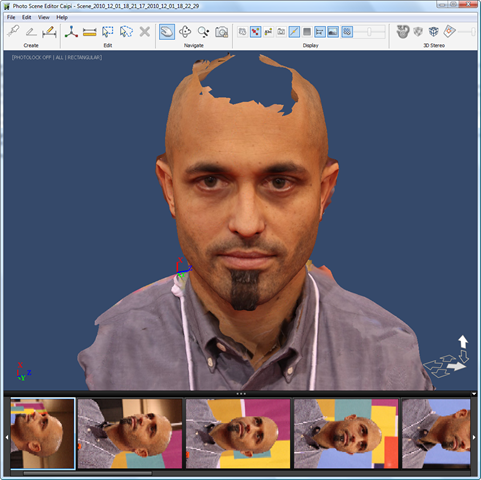
It should be noted that this is not a visualization created using splats: this is a properly textured mesh! Turning off the textures displays the underlying mesh:
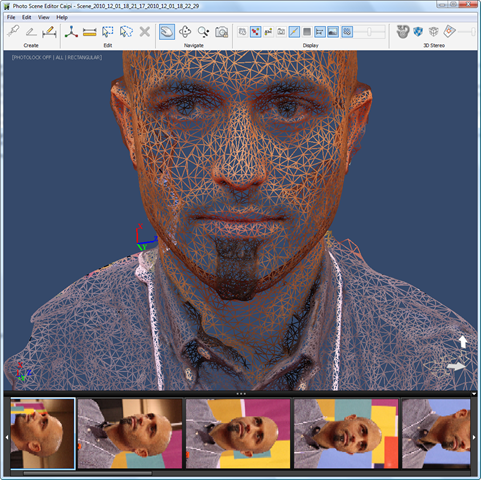
You'll be able to export the mesh as OBJ, DWG, DWF, FBX and a number of other formats.
Once you have a mesh, the sky's the limit: while I was in the AU exhibit hall members of the Labs team were working to make a mesh watertight so it could be 3D-printed. Fantastic stuff.
This version of Photo Scene Editor is likely to be posted in a few months: I'll certainly report back when it's available.


Leave a Reply