Finally working with Visual Studio 2010

Despite having worked for some time with a number of language features previewed for VS2008 and properly released in VS2010 (F# being a prime example), I've finally gotten around to installing VS2010 as my main .NET code development environment.

To make sure I could get code across properly into my blog, I was able to get my favourite source code copying tool, CopySourceAsHTML, working in Visual Studio 2010.

And thanks to tips from Ewen Wallace and Scott McFarlane, I upgraded my use of RockScroll to switch across to AllMargins (which includes the particularly handy OverviewMargin tool, as seen at the right of the below VS2010 screenshot).
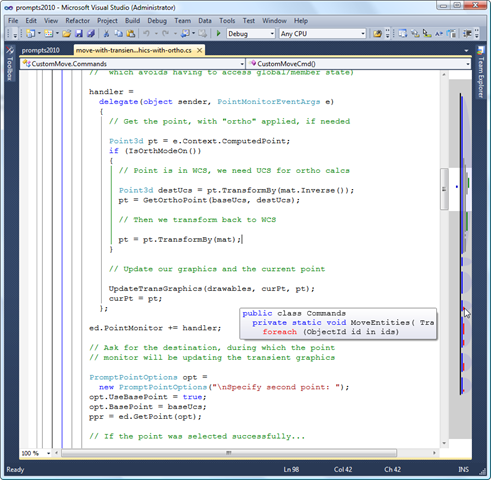
AllMargins in VS2010

Owen Wengerd has recommended installing Daffodil, which enables VS2010 to multi-target VS versions prior to 2008. VS2010 can use VS2008 to build apps for AutoCAD 2010 & 2011, as long as you have VS2008 installed, but Daffodil apparently allows you to build C++ applications using prior versions of Visual Studio, and therefore build ObjectARX applications for prior versions of AutoCAD. I very rarely have to do any C++ coding, these days – especially not for older AutoCAD versions – but I'll file that one away until it's needed (thanks, Owen! :-).

11 responses to “Finally working with Visual Studio 2010”

  1. Hi Kean,

    Great, thank you very much for that! The 2010 version of CopySourceAsHTML will be of great use to me too in the very near future 🙂

    Best regards from Jeddah,

    Jeremy

  2. Terry W. Dotson Avatar

    Still waiting for EnC (Edit & Continue) support in 64bit. From what I understand you can set VS2010 to x86 to enable EnC but a lot of good that does when you're running inside a 64bit ACAD.

    Anyone know if it's possible to EnC in VS2010 and 64bit AutoCAD?

  3. This one came up recently. I wasn't aware of the issue (as I a) don't use Edit & Continue and b) am currently on Vista 32-bit), but did enough research to work out that it'll be like that until the successor to VS2010.

    The other option would be to code/debug against a 32-bit AutoCAD build, which won't install onto x64 (unless you manage to get a vertical that doesn't yet have a native port, which I believe they now all do).

    Kean

  4. Just curious Kean, why did you decide to upgrade now?
    What are the determining factors in your upgrade decision?

  5. Hi Mark,

    A few factors:

    * I installed a second internal hard-drive in my Vista machine, which meant I finally had enough disk space for it.
    * I'm keen to fool around with the Async CTP, which is only available for VS2010/.NET 4.
    * Cost was not a factor: I have a VS subscription, so had the install just sitting there, already.
    * Something additional you'll see in tomorrow's post. 🙂

    Cheers,

    Kean

  6. Paavo Rantanen Avatar

    The edit and continue issue is truly a bit annoying... I also experienced other debugging issues when 1st moving to VS 2010 - they went away after installing SP1. Therefore, I'd like to point out something I read concerning the Async CTP, this is from Microsoft.com:

    "Please be aware that installing Visual Studio 2010 SP1 Beta will break the Visual Studio Async CTP. We are looking at options for an updated release that will make the Visual Studio Async CTP compatible with Visual Studio 2010 SP1. In the meanwhile if you need to work with the CTP you should use Visual Studio 2010 RTM."

    The currently published service pack is no longer a beta, but the MS recommendation above hasn't been removed.
    BR
    /Paavo

  7. Thanks, Paavo - interesting (and a little scary).

    I installed SP1 on Friday and the Async CTP yesterday, without noticing the warning you've mentioned. Hopefully they updated one or the other, in the meantime, to make them work together.

    Nothing seems to be broken - as yet - but then I haven't started trying any Async-specific code, either (and the "break" could well be more subtle but just as painful).

    Cheers,

    Kean

  8. Great post, I now have 3 new tools that I will put to good use!

  9. Scott McFarlane Avatar
    Scott McFarlane

    I also like ReSharper (1 I know it's not free, but it pays for itself every day I use it.

  10. I like the description on their website:

    "Instant fixes to eliminate errors and code smells."

    It certainly makes me wonder how smelly my code is. 🙂

    Kean

  11. Just to mention that a VS2010 SP1-compatible update to the Async CTP is now available via:

    msdn.microsoft.com/en-us/vstudio/async

    Kean

Leave a Reply

Your email address will not be published. Required fields are marked *