Generating a mesh for a 3D solid using AutoCAD’s Brep API from .NET

Thanks for Balaji Ramamoorthy – who recently joined our team in India – and Adam Nagy for helping generate the code for this post.

There are lots of reasons people might want to tessellate a 3D solid in AutoCAD to generate a mesh. The code in today's post uses the Boundary Representation (Brep) API in AutoCAD to do just that, generating a set of 3D faces.

A few points about the implementation:

  • I've only made a small number of settings to control the mesh generation: more are available for you to experiment with.
  • It should be simple enough to generate a SubDMesh, rather than a set of faces, but that's left as an exercise for the reader.
  • I only tested with a very simple solid (a sphere). The settings may need tweaking depending on the complexity of the solid you're meshing.

Here's the C# code:

using Autodesk.AutoCAD.ApplicationServices;

using Autodesk.AutoCAD.BoundaryRepresentation;

using Autodesk.AutoCAD.DatabaseServices;

using Autodesk.AutoCAD.EditorInput;

using Autodesk.AutoCAD.Geometry;

using Autodesk.AutoCAD.Runtime;

using AcDb = Autodesk.AutoCAD.DatabaseServices;


namespace MeshSolid

{

  public class MeshCreator

  {

    // Mesh a selected solid


    [CommandMethod("SOLMESH")]

    static public void MeshFromSolid()

    {

      Document doc =

        Application.DocumentManager.MdiActiveDocument;

      Database db = doc.Database;

      Editor ed = doc.Editor;


      // Ask the user to select a solid


      PromptEntityOptions peo =

        new PromptEntityOptions("Select a 3D solid");

      peo.SetRejectMessage("\nA 3D solid must be selected.");

      peo.AddAllowedClass(typeof(Solid3d), true);

      PromptEntityResult per = ed.GetEntity(peo);


      if (per.Status != PromptStatus.OK)

        return;


      Transaction tr =

        db.TransactionManager.StartTransaction();

      using (tr)

      {

        BlockTable bt =

          (BlockTable)tr.GetObject(

            db.BlockTableId,

            OpenMode.ForRead,

            false

          );

        BlockTableRecord btr =

          (BlockTableRecord)tr.GetObject(

            bt[BlockTableRecord.ModelSpace],

            OpenMode.ForWrite,

            false

          );


        Solid3d sol =

          tr.GetObject(

            per.ObjectId,

            OpenMode.ForRead

          ) as Solid3d;


        // Calculate the approximate size of our solid


        double length =

          sol.GeometricExtents.MinPoint.GetVectorTo(

            sol.GeometricExtents.MaxPoint

          ).Length;


        try

        {

          using (Brep brp = new Brep(sol))

          {

            // Create and set our mesh control object


            using (Mesh2dControl mc = new Mesh2dControl())

            {

              // These settings seem extreme, but only result

              // in ~500 faces for a sphere (during my testing,

              // anyway). Other control settings are available


              mc.MaxNodeSpacing = length / 10000;

              mc.MaxSubdivisions = 100000000;


              // Create a mesh filter object


              using (Mesh2dFilter mf = new Mesh2dFilter())

              {

                // Use it to map our control settings to the Brep


                mf.Insert(brp, mc);


                // Generate a mesh using the filter


                using (Mesh2d m = new Mesh2d(mf))

                {

                  // Extract individual faces from the mesh data


                  foreach (Element2d e in m.Element2ds)

                  {

                    Point3dCollection pts = new Point3dCollection();

                    foreach (Node n in e.Nodes)

                    {

                      pts.Add(n.Point);

                      n.Dispose();

                    }

                    e.Dispose();


                    // A face could be a triangle or a quadrilateral

                    // (the Booleans indicate the edge visibility)


                    AcDb.Face face = null;

                    if (pts.Count == 3)

                      face =

                        new AcDb.Face(

                          pts[0], pts[1], pts[2],

                          true, true, true, true

                        );

                    else if (pts.Count == 4)

                      face =

                        new AcDb.Face(

                          pts[0], pts[1], pts[2], pts[3],

                          true, true, true, true

                        );


                    // If we have a valid face, add it to the

                    // database and the transaction


                    if (face != null)

                    {

                      // Make each face yellow for visibility


                      face.ColorIndex = 2;


                      btr.AppendEntity(face);

                      tr.AddNewlyCreatedDBObject(face, true);

                    }

                  }

                }

              }

            }

          }

          tr.Commit();

        }

        catch (System.Exception ex)

        {

          ed.WriteMessage("Exception: {0}", ex.Message);

        }

      }

    }

  }

}


Here's what happens when we run the SOLMESH command, selecting a simple sphere (which I later moved to the side, for comparison):
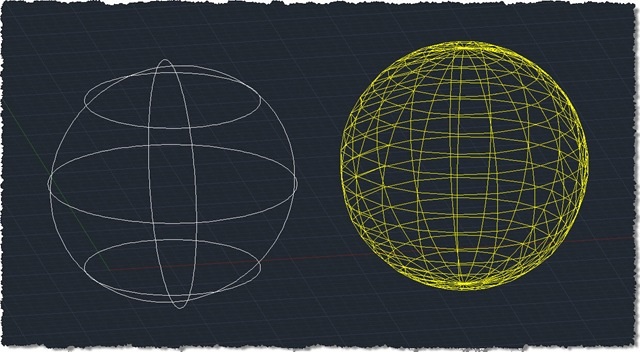
Meshed version of a sphere

And now with the realistic visual style set, just to show we have opacity:
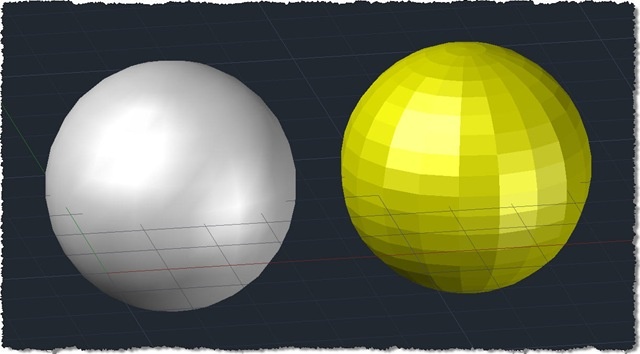
And now in the realistic visual style

Update:

As mentioned in the comments, the code was randomly crashing on larger models. Viru Aithal and Balaji Ramamoorthy tracked down the problem, which is due to a common issue with AutoCAD objects: the enumerators for Mesh2dElement2dCollection and Element2dNodeCollection both return newly-created objects (a Node and an Element2d, respectively) which need to be disposed of before the .NET Finalizer (which works on a background thread) attempts to do so for you. Two lines (with calls to n.Dispose() and e.Dispose()) have been added to the above code to address this issue.

22 responses to “Generating a mesh for a 3D solid using AutoCAD’s Brep API from .NET”

  1. Christian Stelzl Avatar
    Christian Stelzl

    Hi Kean,

    I tested your code and it works fine. But then, for more complex solids and only once in a while, the mesh generation fails throwing unmanaged exceptions, even with solids that have worked fine just before. Is this a known issue?

    Regards, Christian

  2. Hi Christian,

    I've seen one such report of instability with complex solids + certain settings, but I'm not sure that qualifies this as a known issue.

    I do suggest playing with the settings a little (particular the MaxSubDivisions property), although I don't like the fact a (presumably) untrappable exception is thrown when the going gets tough. That sounds like something we need to reproduce and submit to Engineering (are you an ADN member, by any chance?).

    Regards,

    Kean

  3. Christian Stelzl Avatar
    Christian Stelzl

    Hi Kean,

    thanks. I posted it in the ADN with sample solid.

    Regards, Christian

  4. Hi Christian,

    Great - Balaji and Viru have tracked it down, and I've integrated their fix into the above code.

    Thanks for sending the issue in!

    Kean

  5. Hey Kean,

    Is there a way to get this to read a pre-existing subd mesh surface instead of a solid?

  6. Kean Walmsley Avatar

    Hi Steve,

    You mean just open a SubDMesh object and create faces from it? You could, but you wouldn't use the Brep API.

    As it's already a mesh, you should be able to access its face data more directly (although I haven't tried it, admittedly).

    Regards,

    Kean

  7. I am having a hard time finding any code that can read points from an existing face/region/mesh. Everything I find is for drawing from existing data. I need to create data from existing drawings. I guess that is what I get for going against the flow. 😀

    Anyway I will keep looking. Maybe someone has something...

  8. Kean Walmsley Avatar

    I don't know if it's exactly what you want, but this post may be of some use.

    Kean

  9. I have seen that before and tried to use the "surface" section to find what I was looking for but I couldnt get it to function after chopping it up.

    What I need is the x,y,z coordinated of the vertices of a 3d mesh. I have code that draws the mesh from numbers stored in the database. But apparently the code to put those numbers in the DB to start with is a very different animal.

  10. Akaple Aka Kapes Avatar
    Akaple Aka Kapes

    Hi Kean I got this to work to pull the coordinates from the SubDMesh objects by drilling into the vertices. Going to try and reverse the roles to re-draw them back out. If you know of any methods to help with that would be appreciated. Have a great day.

  11. After using the code you have supplied, as is, it generated a 781,000+ face mesh. That might be a bit too much for our purposes. But it did work so, Kudos!

  12. When I using the code, I running into an problem:
    about using Autodesk.AutoCAD.BoundaryRepresentation;
    The name space does not exist in Autodesk.AutoCAD. I am using Autodesk 2012 64bit English.

  13. You'll need to add a project reference to acdbmgdbrep.dll (best used from the inc folder of the ObjectARX SDK for AutoCAD 2012).

    Kean

  14. Hello, I am testing the given code but for some reason when I reach this point:

    foreach (Element2d e in m.Element2ds)

    I get the following exception:
    " Common Language Runtime detected an invalid program"

    I am basically trying to read a dwg file using the RealDwg SDK, I am able to read almost all entities except the Solid3D (I need tessellated data).

    Also, just to comment, having Autodesk.AutoCAD.DatabaseServices and Autodesk.AutoCAD.BoundaryRepresentation namespace I have to specify which "Face" I am using as both namespace have the same class.

    1. I haven't tested the code with RealDWG... I don't recall hitting this problem inside AutoCAD.

      Yes - the above code already uses AcDb.Face to work with db-resident faces. You'd use a comparable approach if needing to work with Brep faces.

      Kean

  15. 黃瀞瑩 Avatar
    黃瀞瑩

    Hello,
    I use this code to get solid mesh in the civil 3D, but I get the problem:
    When I generating the mesh for solid of circle pipe, the result will be a square pipe...
    How can I get the more similar mesh?

    Ps. I try to change the condition of mesh control, but it still export to a square pipe...

    Regards, Jing

    1. Kean Walmsley Avatar

      Hello,

      I haven't tested this code with Civil 3D (and in addition to that, I don't provide support): I suggest posting your question to the relevant online forum.

      Best,

      Kean

  16. Hi Kean,
    Is there any way to go the other way around? Such as creating 3d solids from polyface mesh programmatically.

    Thanks,
    Al

    1. Hi Al,

      There may be, but it's a *lot* more complicated as you're having to add information (rather than reduce it).

      Best,

      Kean

      1. Hi Kean,
        Is there any way you can point me in the right direction as far as what I need to research to get this started. Any help would be greatly appreciated.

        Thanks,
        Al

        1. My best suggestion would be to search on "feature recognition mesh to solid" (or perhaps feature detection). I have very little idea of what the state of the art is, but this should get you started.

          Kean

          1. Kean,
            I really appreciate the info. I will see what I can come up with from that.

            Thanks Again,
            Al

Leave a Reply to 黃瀞瑩 Cancel reply

Your email address will not be published. Required fields are marked *