Companion apps now available in AutoCAD 2012

Today is a holiday, here in Switzerland, and I suffered a PC failure late last week, so I'm writing this without access to my usual system resources (AutoCAD 2012 and Visual Studio 2010, for instance). Despite these minor complications, I did want to let you know about this very important announcement.

The introduction of the companion apps via the Autodesk Exchange Apps tab inside AutoCAD 2012 - a mechanism introducing AutoCAD's extensive customer base to the value of applications from AutoCAD developers - could well turn out to be a watershed moment in the history of AutoCAD, comparable to the introduction of AutoLISP. At least that's my sincere hope... time will tell. 🙂

Here's a screenshot from Autodesk Exchange:
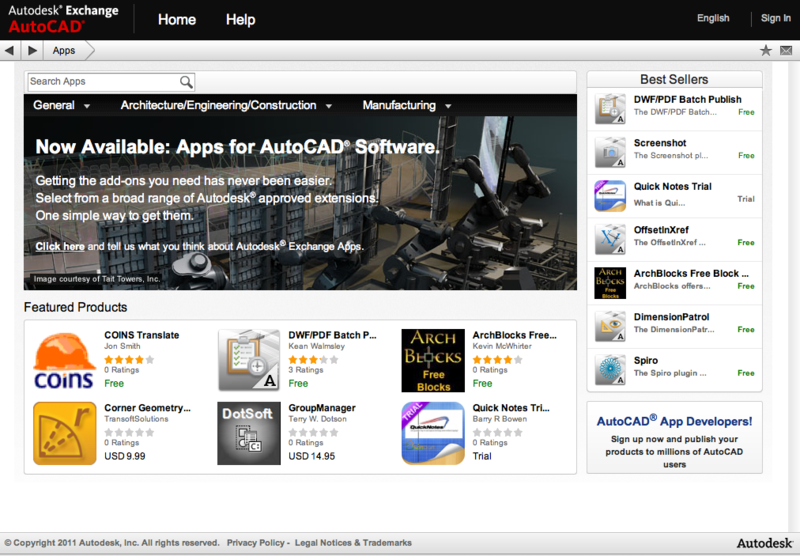
Companion apps for AutoCAD 2012

The ADN and AutoCAD Engineering teams have been working really hard on this feature, over the last year or so. The Autoloader mechanism introduced into AutoCAD 2012 was a core piece of the infrastructure needed to make this work, for instance. I was also asked to package up a number of our Plugins of the Month, helping populate the store early on and providing a number of implementation/packaging examples.

Be sure to check it out and - if you haven't already - consider posting your plugins via this mechanism. This could well prove to be a game-changer for AutoCAD users and developers alike.

9 responses to “Companion apps now available in AutoCAD 2012”

  1. Kean, this feature seems like it has potential.
    A listing of Acad add-ons is not new, of course, but it seems the installation process has been integrated, similar to my Droid.
    With Acad, the process has traditionally been to put the downloaded files in a support path of our choosing, then set up the loading through menus, acaddoc.lsp, or other "load on demad" mechanisms.
    For a new tool to really work, it needs to play well with CAD Managers, who generally like to control what is installed and how its organized. Does this app store feature allow that? Or does it control things via a compiled settings file that you must deal with or you don't get the app?
    thx

  2. This capability was certainly inspired/influenced by advances made in application management on consumer-oriented (particularly mobile) platforms.

    Control by CAD Managers is definitely on our radar, but isn't in this initial release.

    Kean

  3. How is going to evolve the localization of these apps? This is for example a big mess on the Android market, what are the plans for AutoCAD Exchange Apps? The idea "I see only the apps of my language" is a so bad idea in our interconnected world. My proposal (probably too late but I have not been asked), is a language filter drop down list, let's keep it simple...

  4. Kean Walmsley Avatar

    This is not part of the initial release (and is probably therefore yet to be decided, which is the good news :-).

    Kean

  5. checked into it, the app gets put in a profile folder, and can be moved later if needed. It seems there is no extra control over the apps imposed by the store management system of add ons, so they play nicely it seems.

  6. Hi Kean,

    I hadn't tried to look at the Apps store you mention until just now, and whatever URL I try I always end up redirected to exchange.autodesk.com/autocad - Whether I'm logged in or not I can never seem to get to the app store itself. (I've tried Google Chrome 12, Internet Exploder 8, and even my Android device but to no avail!) 🙁

    Any ideas?

    Thanks,

    Alex.

    PS. Out of curiosity I tried the https:// version of the same URL you list above (figuring that as you can purchase some of these Apps it would need to be secured) and, after ignoring the "Certificate not valid" warnings, I simply get a "Service Unavailable" message?

  7. Kean Walmsley Avatar

    Hi Alex,

    I expect we've disabled the out-of-product experience (which does make some sense): the appropriate way to access the store is from within AutoCAD 2012. The whole experience is pretty tightly integrated with the product.

    I included the link in my post as it happened to work - which surprised me, at the time - and so it's less of a surprise that it's no longer working.

    Regards,

    Kean

  8. I recently loaded the clipboard manager app and since then some of my toolbars aren't loading, has anyone else had this problem?

  9. I haven't seen this, myself (and haven't seen any reports of the problem).

    What happens if you make the toolbars visible again using the TOOLBAR command?

    Kean

Leave a Reply to Patrick EMIN Cancel reply

Your email address will not be published. Required fields are marked *