Installation
-
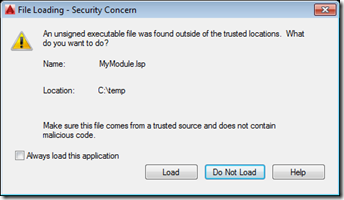
Yesterday we introduced the need to sign program modules for AutoCAD 2016. Today we're going to see how AutoCAD behaves when loading signed and unsigned modules, as well as what the innards of a signed LISP module look like. Here's a simple piece of AutoLISP code that I've placed in a file called c:/temp/MyModule.lsp: (defun c:test() (princ "\nThis is a test command.") (princ) ) Here's what AutoCAD displays when we try to load this module: We can use AcSignApply.exe to sign this module with our digital certificate, as we discussed yesterday: Here are the contents of the file…
-
Following on from our look at the Core Console, Dynamic .NET and .NET migration for AutoCAD 2013, today we're going to look briefly at the remaining API features in the AutoCAD 2013 release. Model Documentation The model documentation feature was introduced in AutoCAD 2012 – simplifying creation of 2D sections and details of 3D drawing content – and this initial API provides (primarily read-only) access to this information. It comprises the following classes SectionSymbol SectionViewstyle ViewBorder ViewRepBlockReference DetailViewStyle DetailSymbol The writeable aspects of the API are mostly related to the "style" objects – these can be created and edited programmatically,…
-

As a follow-up to their session on the Autoloader, AutoCAD 2012's simplified deployment mechanism, Stephen and Fenton have recorded another DevCast focused on creating an installer to deploy apps via the Autoloader. These two DevCasts are likely to be of relevance to anyone wishing to deploy their plugin via the "Apps" tab in Autodesk Exchange. There's also a new Developer Center focused on this very task, providing the guidelines and requirements for publishing apps along with a couple of helpful DevTV sessions to get you started.
-
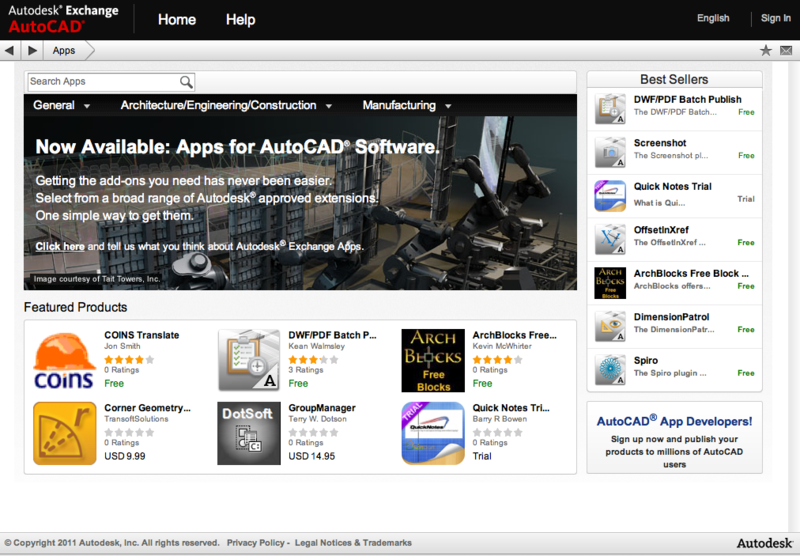
Today is a holiday, here in Switzerland, and I suffered a PC failure late last week, so I'm writing this without access to my usual system resources (AutoCAD 2012 and Visual Studio 2010, for instance). Despite these minor complications, I did want to let you know about this very important announcement. The introduction of the companion apps via the Autodesk Exchange Apps tab inside AutoCAD 2012 - a mechanism introducing AutoCAD's extensive customer base to the value of applications from AutoCAD developers - could well turn out to be a watershed moment in the history of AutoCAD, comparable to the…
-

They've been at it again. Stephen and Fenton have recorded another informative DevCast, this time on the new simplified application loading mechanism in AutoCAD 2012, the Autoloader. I'll be following up with my own experience of using Autoloader, in due course, but this should be a great "getting started" resource.
-
As mentioned in the last post, I decided to update the RegDL tool – which can be used to create demand-loading entries for an AutoCAD .NET module from, for instance, an installer – to support optional logging to a file. If you now run RegDL.exe with the /log command-line switch, then the application will now create a text file, reglog.txt, in the executable's folder with the high-level results of the registration (with hopefully some useful detail in case of failure). Here are the main, updated files, Program.cs: using System.Reflection; using System.IO; using System; using DemandLoading; namespace RegDL { …
-
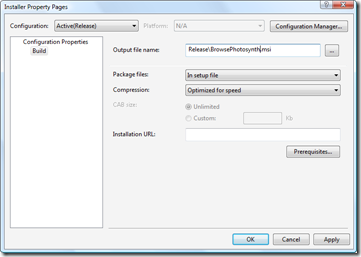
In the first part in this series, we looked at getting our basic installer to install files and in the second part we focused on checking and modifying the Registry. In this part we're going to finish up our installer by tweaking the user interface. Let's get started with some fundamentals: the name of the MSI file itself. This can be modified via the Installer project's property page (which I pulled up by right-clicking the project in the Solution Explorer and selecting "Properties"): A pretty simple one, but one that's worth making, nonetheless. Let's go ahead and spruce up our…
-
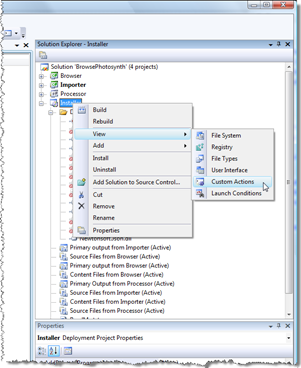
In the last post we created a basic installer to deploy our product files and source into a user-specified location. In this post we'll look at the Registry-related activities that need to happen from our installer. One of the files we added to the install project was the RegDL executable. We're going to add some custom actions which use this executable to create/remove our demand-loading Registry entries on install/uninstall. The advantage of this approach is that we don't need to duplicate information in an installation script that's already stored in our .NET assemblies: RegDL queries an assembly programmatically for its…
-
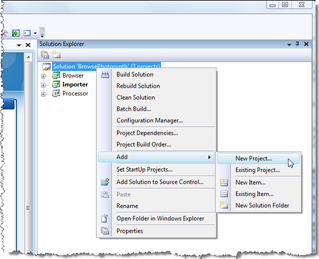
It's been a long time since I've dabbled with software deployment technology, which is absolutely fine by me (in my experience installation issues are some of the gnarliest to deal with, so – presumably like the majority of developers, with apologies to Install specialists – I prefer not having to care about them, myself). But last week I had to put together a few installers - as an internal test - for some of our Plugins of the Month, and ended up deciding the process was worth documenting, especially where it relates to the RegDL component I created and published…
-
This week I'm going to posting a few topics related to F#, as it feels as though I've been neglecting it, of late. And as this technology is going to hit the mainstream very soon – when Visual Studio 2010 ships – it seems all the more important to keep one's F# skills honed. We're going to start the week with an F# equivalent to the code shown in this previous post, where we go through and reflect on the commands exposed by an assembly in order to create corresponding demand-loading Registry keys automatically. We've shipped VB.NET and C# versions…