Delete “all but current” Annotation Scales on AutoCAD objects using .NET

I stumbled across this wishlist request on the forums, the other day, and thought it worth covering in a blog post.

It's an interesting little piece of code – nothing very startling, but obviously whenever removing data you have to be a bit careful: in fact I would probably add an "are you sure?" question prior to actually removing the various annotation scales, even if the operation participates in the undo mechanism and can therefore be rolled back easily by the user.

Here's the C# code for the AIOBJECTSCALEREMOVEOTHERS command (yes, I would normally use a slightly more succinct name, myself, such as DABC for "Delete All But Current", but I decided to make this one more consistent with the AIOBJECTSCALEREMOVE command).

using Autodesk.AutoCAD.ApplicationServices;

using Autodesk.AutoCAD.DatabaseServices;

using Autodesk.AutoCAD.EditorInput;

using Autodesk.AutoCAD.Runtime;


namespace AnnotationScaling

{

  public class Commands

  {

    [CommandMethod(

      "AIOBJECTSCALEREMOVEOTHERS",

      (CommandFlags.Modal | CommandFlags.UsePickSet)

     )]

    static public void RemoveAllButCurrentScale()

    {

      Document doc =

        Application.DocumentManager.MdiActiveDocument;

      Database db = doc.Database;

      Editor ed = doc.Editor;


      // Get the manager object and the list of scales


      ObjectContextManager ocm = db.ObjectContextManager;

      ObjectContextCollection occ =

        ocm.GetContextCollection("ACDB_ANNOTATIONSCALES");


      // Prompt the user for objects to process (or get them

      // from the pickfirst set)


      PromptSelectionOptions pso = new PromptSelectionOptions();

      pso.MessageForAdding = "\nSelect annotative objects";

      PromptSelectionResult psr = ed.GetSelection(pso);

      if (psr.Status != PromptStatus.OK)

        return;


      // Maintain counters of objects modified and scales removed


      int objCount = 0, scaCount = 0;


      // Use a flag to check when we first modify an object


      bool scalesRemovedForObject = false;


      Transaction tr =

        doc.TransactionManager.StartTransaction();

      using (tr)

      {

        // If we can't find the current annotation scale in our

        // dictionary, we have a problem


        if (!occ.HasContext(db.Cannoscale.Name))

        {

          ed.WriteMessage(

            "\nCannot find current annotation scale."

          );

          return;

        }


        // Get the ObjectContext associated with the current

        // annotation scale


        ObjectContext curCtxt =

          occ.GetContext(db.Cannoscale.Name);


        // Check each selected object


        foreach (SelectedObject so in psr.Value)

        {

          // Open it for read


          ObjectId id = so.ObjectId;

          DBObject obj = tr.GetObject(id, OpenMode.ForRead);


          // Check it's annotative and has the current scale


          if (obj.Annotative == AnnotativeStates.True &&

              obj.HasContext(curCtxt)

            )

          {

            // Now we get it for write


            obj.UpgradeOpen();


            // Loop through the various annotation scales in

            // the drawing


            foreach (ObjectContext oc in occ)

            {

              // If it's on the object but not current

              // (for some reason we have to check the name

              // rather than oc == curCtxt)


              if (obj.HasContext(oc) &&

                  oc.Name != db.Cannoscale.Name

                )

              {

                // Remove it and increment our counter/set our

                // flag


                obj.RemoveContext(oc);

                scaCount++;

                scalesRemovedForObject = true;

              }

            }


            // Increment our counter for objects once per pass

            // and then reset the flag


            if (scalesRemovedForObject)

            {

              objCount++;

              scalesRemovedForObject = false;

            }

          }

        }

        tr.Commit();


        // Report the results


        ed.WriteMessage(

          "\n{0} scales removed from {1} objects.",

          scaCount, objCount

        );

      }

    }

  }

}

For fun, I went ahead and manually added the command via the CUI editor, and added it to the corresponding ribbon panel:
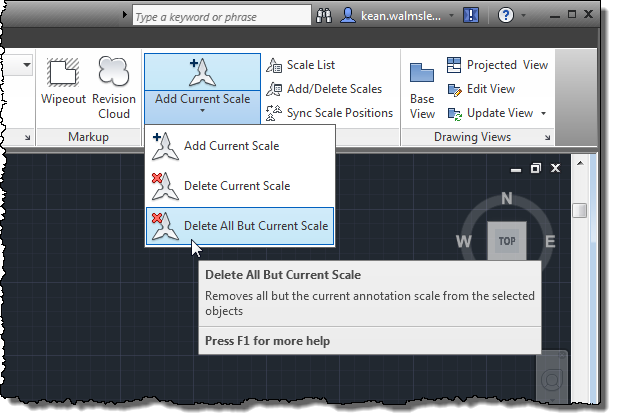
Our new command on the ribbon

If we then launch this command and select some annotative objects, we see that the command reports removing superfluous scales from the selected objects:

Command: AIOBJECTSCALEREMOVEOTHERS

Select annotative objects: Specify opposite corner: 4 found

Select annotative objects:

12 scales removed from 4 objects.

It should be noted that – while it's unlikely a command this long is going to be entered at the command-line – this command does make use of the implied (aka pickfirst) selection set, should you prefer to prefer working in the noun-verb style. The ribbon item clears the pickfirst selection when launching the command, but it does work if launched via the command-line, in case.

2 responses to “Delete “all but current” Annotation Scales on AutoCAD objects using .NET”

  1. How do I get this to run in Civil 3D?? Thanks

  2. You will need to install Visual Studio (or Visual C# Express) and then build a class library (a DLL) including this code, by following the steps in this post:

    keanw.com/2006/07/getting_started.html

    Then you should be able to NETLOAD the DLL into AutoCAD and execute the AIOBJECTSCALEREMOVEOTHERS command.

    Kean

  3. any way to just get the compiled files?

  4. Unfortunately I can't just send you compiled product functionality. Working for a publicly-traded company there are acounting rules around revenue recognition that mean I can't just send you something pre-built.

    Perhaps another reader of the blog or someone on the discussion groups would be kind enough to build the code into an app for you, but I'm unfortunately not at liberty to do so.

    Kean

  5. TypePad HTML Email
    Thanks Kean &#8211 I posted a query on the Autodesk forum and someone kindly did the Visual Studio stuff for me as I didn&#8217t have a clue where to start. Thanks for the link explaining how to create the DLL &#8211 I&#8217ll be taking a look at it so I know for the next time&#8230!!!!  
    Regards NeilP Before printing this think about the environment ******************************The information contained in this e-mail is confidential and intended for the addressee only. If you have received this message in error or there are any problems, please notify the originator immediately. The unauthorised use, disclosure, copying or alteration of this message is prohibited.As internet communications are capable of data corruption, I & H Brown Ltd do not accept liability or responsibility for any changes made to e-mails by a third party or for any viruses passed on.******************************
     

  6. How do you add the button in the ribbon panel?

  7. Kean Walmsley Avatar
    Kean Walmsley

    I did so via the CUI editor. The online help should explain the process in more detail, in case that's your question.

    Kean

  8. Kean,

    The code seems very useful. But I have a feeling majority of folks out there would not have a clue how to start.

    So this is, as more instructions are needed, for a very select group.

    I hope one day I will understand.

    Thanks

  9. Andre,

    Do you need instructions on how to build this into a working app or on what the code is doing?

    There are other posts dealing with the former - the latter is harder: the code is already pretty well commented.

    Kean

  10. Thanks Kean,

    I can understand what the code does..
    Compiling and making it work in CAD is my issue.

    Thanks

  11. It does... thanks.. I will give it a try..
    Thanks.

  12. Thanks a million Kean,

    I finally got it to work on 2014. Used VS 2012.
    I first looked into this post and others looking for a solution to a duplicate scale of 1:1 problem. This command doesn't get rid of problem but will be of very good use to my folks.

    Obrigado

  13. Just stumbled on this and quickly added it to AutoCAD 2021-2024.
    It works exactly as I was hoping.
    I am amazed this hasn't been added to core functionality yet as it is extremely useful.
    A dozen years late, but thanks!
    Kudos

    1. Good to know!

      Kean

Leave a Reply to Ray Foren Cancel reply

Your email address will not be published. Required fields are marked *