A big thanks to Ishwar Nagwani – an old friend, colleague and member of Autodesk Consulting working in our Bangalore office – for kindly providing this code.
Ishwar tells me that he has come across many developers struggling to identify holes in 3D solid using its boundary representation (Brep). The code he has provided works on the basis that a hole's normal is typically facing inwards and will therefore intersect the hole's axis of symmetry, providing we extend the line representing the normal by the hole's radius and the line representing the axis of symmetry by the cylinder's height (just to make sure).
Here is the C# code:
using Autodesk.AutoCAD.ApplicationServices;
using Autodesk.AutoCAD.BoundaryRepresentation;
using AcBr = Autodesk.AutoCAD.BoundaryRepresentation;
using Autodesk.AutoCAD.Colors;
using Autodesk.AutoCAD.DatabaseServices;
using Autodesk.AutoCAD.EditorInput;
using Autodesk.AutoCAD.Geometry;
using AcGe = Autodesk.AutoCAD.Geometry;
using Autodesk.AutoCAD.Runtime;
using System.Collections.Generic;
using System;
// Not mandatory, but improves loading performance
[assembly: CommandClass(typeof(HoleFeature.MyCommands))]
namespace HoleFeature
{
public class MyCommands
{
[CommandMethod("GETHOLES")]
public void GetHoles()
{
Document doc =
Application.DocumentManager.MdiActiveDocument;
Database db = doc.Database;
Editor ed = doc.Editor;
PromptEntityOptions peo =
new PromptEntityOptions("\nSelect a 3D solid: ");
peo.SetRejectMessage("\nMust be a 3D solid.");
peo.AddAllowedClass(typeof(Solid3d), true);
PromptEntityResult per = ed.GetEntity(peo);
if (per.Status != PromptStatus.OK)
return;
Transaction tr = db.TransactionManager.StartTransaction();
using (tr)
{
Solid3d solid =
tr.GetObject(per.ObjectId, OpenMode.ForWrite) as Solid3d;
ObjectId[] ids = new ObjectId[] { solid.ObjectId };
FullSubentityPath path =
new FullSubentityPath(
ids,
new SubentityId(SubentityType.Null, IntPtr.Zero)
);
// For storing SubentityIds of cylinderical faces
List<SubentityId> subentIds = new List<SubentityId>();
using (Brep brep = new Brep(path))
{
foreach (AcBr.Face face in brep.Faces)
{
AcGe.Surface surf = face.Surface;
ExternalBoundedSurface ebSurf =
surf as ExternalBoundedSurface;
// We are only looking only cylinders
if (ebSurf != null && ebSurf.IsCylinder)
{
Cylinder cyl = ebSurf.BaseSurface as Cylinder;
// And fully closed cylinders
if (cyl != null && cyl.IsClosed())
{
// Get normal and point on surface
Vector3d normal = new Vector3d();
Point3d pt = new Point3d();
GetNormalAndPoint(surf, ref normal, ref pt);
if (IsHole(face, normal, pt, cyl))
{
subentIds.Add(face.SubentityPath.SubentId);
}
}
}
}
}
// Assign red color to hole features
if (subentIds.Count > 0)
{
short colorIdx = 1;
AssignColor(solid, subentIds, colorIdx);
}
tr.Commit();
}
}
// Get normal and point at mid U and V parameters
void GetNormalAndPoint(
AcGe.Surface surf, ref Vector3d normal, ref Point3d pt
)
{
Interval[] box = surf.GetEnvelope();
double p1 = box[0].LowerBound + box[0].Length / 2.0;
double p2 = box[1].LowerBound + box[1].Length / 2.0;
Point2d ptParams = new Point2d(p1, p2);
PointOnSurface pos = new PointOnSurface(surf, ptParams);
normal = pos.GetNormal(ptParams);
pt = pos.GetPoint(ptParams);
}
// A cylinder is a hole if the normal points inwards
// and the normal after extending by radius intersects
// with axis of symmetry, the axis of symmetry is also
// extended by height of cylinder
Boolean IsHole(
AcBr.Face face, Vector3d normal, Point3d pt, Cylinder cyl
)
{
if (!face.IsOrientToSurface)
{
// Correct the normal and save back
normal = normal.Negate();
}
// Calculate another point on normal by extending the normal
// by radius of cylinder
Point3d opt = new Point3d(
pt.X + normal.X * cyl.Radius,
pt.Y + normal.Y * cyl.Radius,
pt.Z + normal.Z * cyl.Radius
);
// Get the cylinder's axis
Vector3d v1 = cyl.AxisOfSymmetry;
double dist = cyl.Height.Length;
// Calculate another point on axis by extending v1 by dist
Point3d pt2 = new Point3d(
cyl.Origin.X + v1.X * dist,
cyl.Origin.Y + v1.Y * dist,
cyl.Origin.Z + v1.Z * dist
);
// Create line segment representing the cylinder's normal
LineSegment3d ls1 = new LineSegment3d(pt, opt);
// Create line segment representing the cylinder's axis
LineSegment3d ls2 = new LineSegment3d(cyl.Origin, pt2);
// Get intersection of normal and cylinder axis
Point3d[] intpt;
intpt = ls1.IntersectWith(ls2);
return (intpt != null);
}
// Assign color to cylinderical surfaces which are holes
void AssignColor(
Solid3d solid, List<SubentityId> subentIds, short idx
)
{
foreach (SubentityId subentId in subentIds)
{
Color col = Color.FromColorIndex(ColorMethod.ByColor, idx);
solid.SetSubentityColor(subentId, col);
}
}
}
}
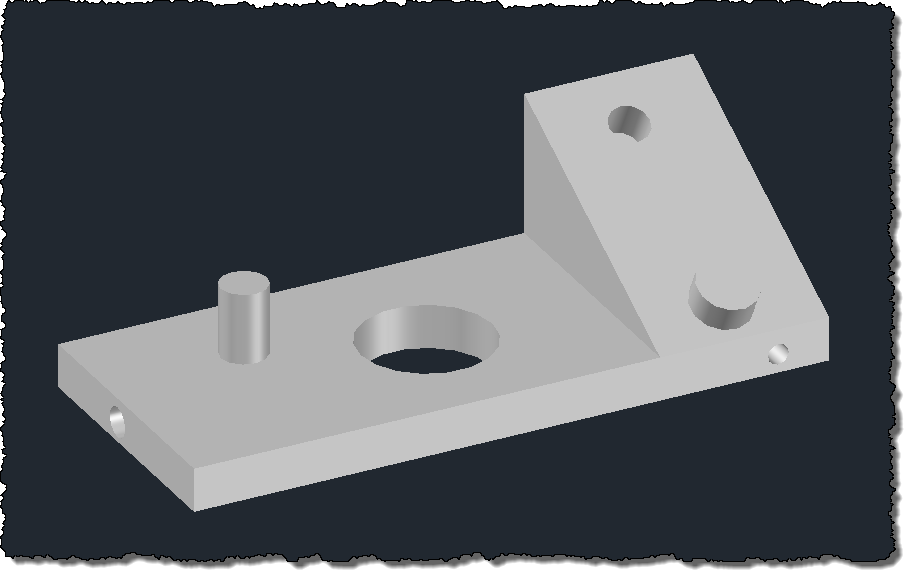
Here's a 3D solid for which we would like to identify holes:
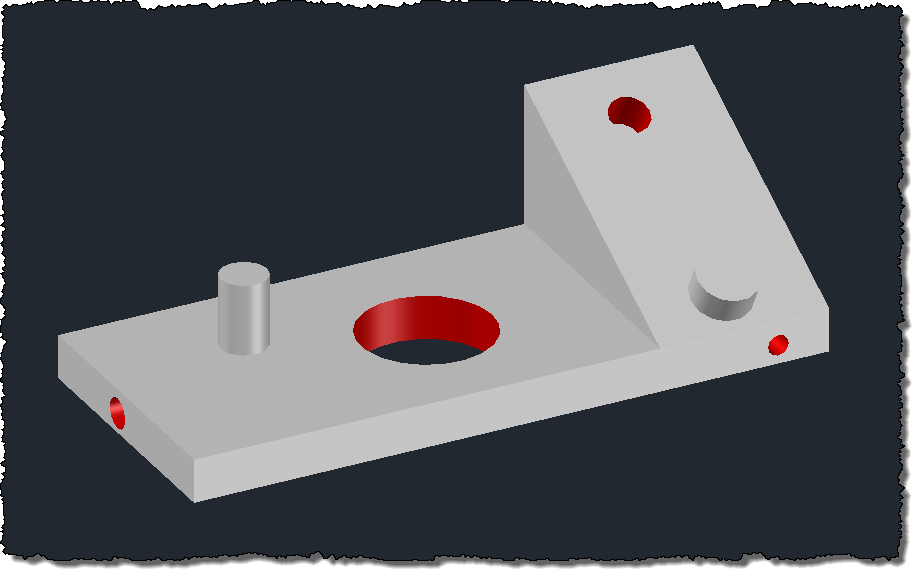
When we run the GETHOLES command and select our solid, its cylindrical holes are turned red:
Thanks again, Ishwar! 🙂
Update:
See this post for an updated version of the above code (as well as a description of why the changes are needed).


Leave a Reply to Ted Cancel reply